Where to start
| I am a… | Start here |
|---|---|
| Cluster Administrator | Installation then Quickstart |
| Tenant Owner | Quickstart - Tenant Owners section |
This is the multi-page printable view of this section. Click here to print.
| I am a… | Start here |
|---|---|
| Cluster Administrator | Installation then Quickstart |
| Tenant Owner | Quickstart - Tenant Owners section |
Advisory GHSA-qjjm-7j9w-pw72 - High - Users can create cluster scoped resources anywhere in the cluster if they are allowed to create TenantResources. To immediately mitigate this, make sure to use Impersonation for TenantResources.
Advisory GHSA-2ww6-hf35-mfjm - Moderate - Users may hijack namespaces via namespaces/status privileges. These privileges must have been explicitly granted by Platform Administrators through RBAC rules to be affected. Requests for the namespaces/status subresource are now sent to the Capsule admission webhook as well.
(Enterprise): Projectcapsule is now providing their releases on an immutable OCI registry, which allows users to verify the integrity of the images and provides a more secure way to distribute the images. Which is not possible on GHCR due to the fact that GHCR does not support immutability of images.
GlobalCustomQuotas and CustomQuotas. Read More.RequiredMetadata for Namespaces created in a Tenant Read More.ServiceAccounts in Tenants Read More.TenantOwner Read More.TenantOwner Read More.data field for Tenants Read More.projectcapsule.dev/tenant which is added for all namespaced resources belonging to a Tenant Read More.projectcapsule.dev/managed-by=controller can only be created, updated or deleted by the Capsule controller and administrators, and are rejected for all other operations. This prevents deletion of managed resources by users, which are not identified as capsule users (current behavior).events.k8s.io/v1 from legacy core/v1.ResourcePool resource quota calculation when multiple ResourcePoolClaims are present in a namespace but not everything is used. For details, see ResourcePools bound behavior.matchConditions for admission webhooks that intercept all namespaced items, to avoid processing subresource requests and Events, improving performance and reducing log noise.Namespaces are considered active until all unmanaged namespaced resources are deleted. Read MorePersistentVolumeClaims support now providing .spec.selector. When .spec.selector is provided we always aggregate a custom matchExpressions for the PersistentVolumeClaims to ensure that only the PersistentVolumeClaims created in the Tenant can mount PersistentVolumes provisioned from/for the same Tenant Read MoreWe have added new documentation for a better experience. See the following topics:
Newly added documentation to integrate Capsule with other applications:
In the upcoming releases we are planning to work on the following features:
transformers for Global/TenantResources.healthChecks for Global/TenantResources.Global/TenantResources.Capsule is a Kubernetes Operator that turns a single cluster into a shared, multi-tenant platform. Teams get their own isolated space: a Tenant. Within their Tenant they own namespaces, resource budgets, and policies. Cluster administrators maintain full control, while teams work autonomously without stepping on each other.
No custom Kubernetes distribution. No extra tooling your users need to learn. Just plain Kubernetes, made shareable.
Kubernetes namespaces provide a basic level of isolation, but they have no hierarchy. As soon as multiple teams or customers need to share a cluster, you face hard choices:
Capsule introduces the Tenant: a lightweight, cluster-scoped resource that groups one or more Kubernetes namespaces under a shared set of boundaries.
Everything defined on a Tenant is automatically inherited by all its namespaces:
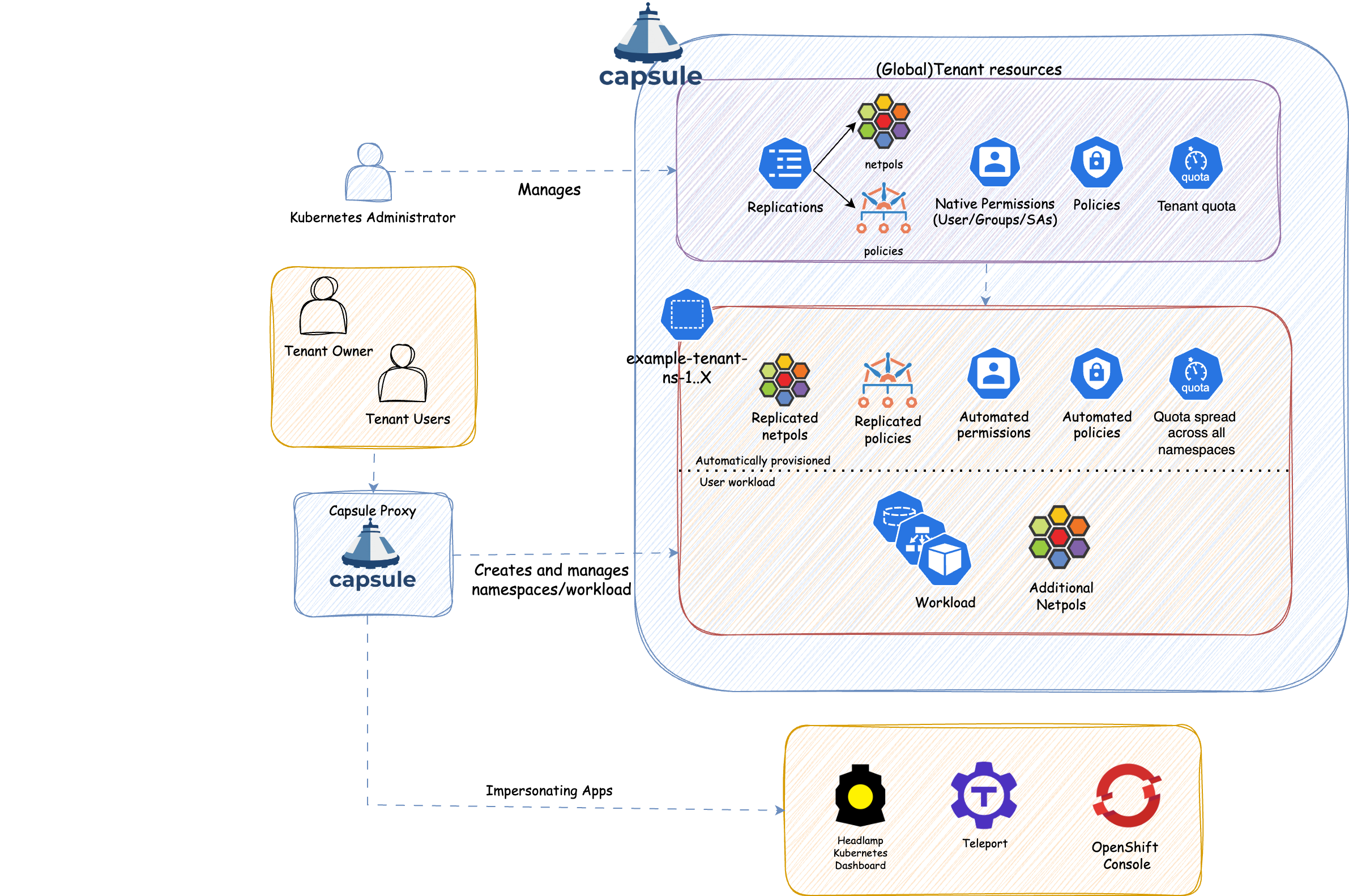
| Role | Responsibility |
|---|---|
| Cluster Admin | Installs Capsule, creates Tenants, sets resource budgets and policies. Never a bottleneck for day-to-day namespace work. |
| Tenant Owner | Creates and manages namespaces within their Tenant. Assigns access to team members. No cluster-level permissions needed. |
| Tenant User | Deploys workloads inside tenant namespaces, within the limits the owner has set. |
This shift-left model means Tenant Owners handle day-to-day namespace operations themselves, freeing cluster admins from repetitive provisioning work.
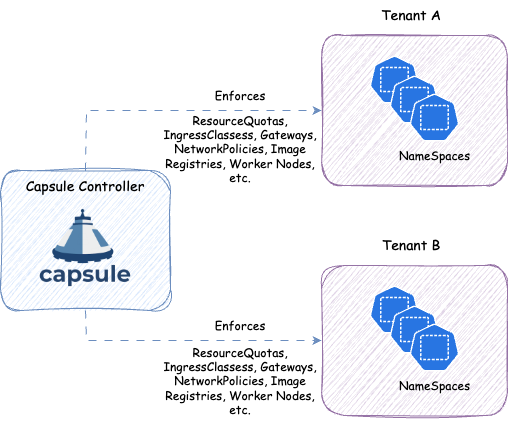
kubectl get namespaces and see only their own, without granting cluster-wide LIST permissions. Also works for other cluster-wide requests, like kubectl get pods -A, or listing Persistent Volumes that are used by a Persistent Volume Claim inside the tenant.The Capsule controller is a Kubernetes operator that continuously watches Tenant resources and reconciles the desired state across all namespaces that belong to a tenant. When a Tenant is created or updated, the controller automatically propagates the configured policies to every namespace in that tenant.
When a Tenant Owner creates a new namespace, the controller detects it and immediately applies all inherited policies. This means tenants are always in a consistent, compliant state, even as they grow.
This guide gets you from zero to a working multi-tenant cluster in minutes. You will install Capsule, create a Tenant as a cluster administrator, and then immediately switch to the tenant owner’s perspective to see what Capsule actually does.
Start a local Kubernetes cluster with KinD:
# kind.yaml
apiVersion: kind.x-k8s.io/v1alpha4
kind: Cluster
nodes:
  - role: control-plane
  - role: worker
    extraPortMappings:
      - hostPort: 9001
        containerPort: 9001
kind create cluster --name capsule --config kind.yaml --wait=120s
The extra port mapping is for the Capsule Proxy, which lets tenant users issue kubectl get namespaces and see only their own. Install Capsule with the Proxy included:
helm upgrade --install capsule oci://ghcr.io/projectcapsule/charts/capsule --debug --create-namespace -n capsule-system --version 0.13.10 \
		--set 'proxy.enabled=true' \
		--set 'proxy.certManager.generateCertificates=false' \
		--set 'proxy.options.additionalSANs={localhost}' \
		--set 'proxy.options.generateCertificates=true' \
		--set "proxy.options.leaderElection=true" \
		--set "proxy.options.roleBindingReflector=true" \
		--set "proxy.service.type=NodePort" \
		--set "proxy.kind=DaemonSet" \
		--set "proxy.daemonset.hostNetwork=true" \
		--set "proxy.serviceMonitor.enabled=false" \
		--set "proxy.options.extraArgs={--feature-gates=ProxyClusterScoped=true}"  \
		--set 'crds.install=true' \
		--set 'certManager.generateCertificates=false' \
		--set 'tls.enableController=true' \
		--set 'tls.create=true'
Verify everything is running:
kubectl get pods -n capsule-system

NAME                                          READY   STATUS      RESTARTS      AGE
capsule-controller-manager-7584dc9546-l6tgl   1/1     Running     1 (21s ago)   29s
capsule-crds-vfq9k                            0/1     Completed   0             41s
capsule-post-install-2lm99                    0/1     Completed   0             28s
capsule-proxy-fjl5s                           0/1     Running     0             29s
capsule-proxy-certgen-5x7d6                   0/1     Completed   0             29s
For more installation options see the installation guide.
A Tenant groups one or more namespaces under a shared set of policies and limits. The cluster administrator creates and owns tenants. Users assigned as TenantOwner manage namespaces within them, without needing cluster-admin rights.
Apply the following Tenant as cluster admin:
apiVersion: capsule.clastix.io/v1beta2
kind: Tenant
metadata:
  name: solar
spec:
  owners:
  - name: alice
    kind: User
  namespaceOptions:
    quota: 2
  forceTenantPrefix: true
  rules:
    - enforce:
        action: allow
        metadata:
          - apiGroups:
              - "v1"
            kinds:
              - "Namespace"
            labels:
              environment:
                required: true
                default: "dev"
                values:
                  - exact:
                      - dev
                      - test
                      - prod
    - namespaceSelector:
        matchLabels:
          environment: prod
      enforce:
        action: allow
        workloads:
          qosClasses:
            - Guaranteed
    - namespaceSelector:
        matchExpressions:
        - key: environment
          operator: NotIn
          values:
          - prod
      enforce:
        action: allow
        workloads:
          qosClasses:
            - BestEffort
            - Burstable
            - Guaranteed
What this configures:
owners: alice is the Tenant Owner and can create namespaces inside this tenant.namespaceOptions.quota: 2: alice can create at most 2 namespaces. Read moreforceTenantPrefix: true: every namespace must start with solar-. Read morerules: the environment label is required on every namespace, with dev as the default. Capsule enforces this at admission time. Read moreQoS rules: production namespaces (labeled environment=prod) only accept Guaranteed pods. Development and test namespaces accept any QoS class. Read moreCapsule only acts on requests from subjects it recognises as Capsule Users. The recommended way to register a user is to create a TenantOwner resource. The label projectcapsule.dev/tenant: "solar" binds it to the tenant automatically via aggregation:
apiVersion: capsule.clastix.io/v1beta2
kind: TenantOwner
metadata:
  name: alice
  labels:
    projectcapsule.dev/tenant: "solar"
spec:
  kind: User
  name: "alice"
Capsule matches users by the groups they carry on every request. Creating a TenantOwner registers the subject automatically - no manual configuration needed. You can verify who is recognised at any time:
kubectl get capsuleconfiguration default -o jsonpath='{.status.users}' | jq
For the quickstart we use impersonation (--as-group projectcapsule.dev) which bypasses the need for a real certificate or token. In production, authentication depends on your cluster setup (X.509 certificates, OIDC tokens, etc.), use the Gangplank workflow to issue real kubeconfigs.
Verify the Tenant is active and alice is listed as an owner:
kubectl get tnt solar

NAME    STATE    NAMESPACE QUOTA   NAMESPACE COUNT   NODE SELECTOR   READY   STATUS       AGE
solar   Active   2                 0                                 True    reconciled   10s
kubectl get tenant solar -o jsonpath='{.status.owners}' | jq
Now switch to alice’s perspective. Use impersonation to simulate her identity:
# All following commands run as alice
alias kubectl-alice='kubectl --as alice --as-group projectcapsule.dev'
Try creating a namespace without the required prefix:
kubectl-alice create namespace development
Error from server (Forbidden): admission webhook "namespaces.mutating.projectcapsule.dev" denied the request: The Namespace name must start with 'solar-' when ForceTenantPrefix is enabled in the Tenant.
Capsule immediately enforces the naming rule. Try with the correct prefix:
kubectl-alice create namespace solar-development -o yaml
The namespace is created and Capsule automatically applies the default label environment=dev:
apiVersion: v1
kind: Namespace
metadata:
  labels:
    capsule.clastix.io/tenant: solar
    environment: dev
    kubernetes.io/metadata.name: solar-development
  name: solar-development
The environment label can only be set to dev, test, or prod. Try to label the namespace with a value that is not allowed:
kubectl-alice label namespace solar-development environment=staging --overwrite
Error from server (Forbidden): admission webhook "namespaces.validating.projectcapsule.dev" denied the request: metadata label "staging" at metadata.labels["environment"] is not allowed by namespace rule: value did not match any allowed rule. Allowed metadata values: exact: dev, test, prod
Allowed values work fine:
kubectl-alice label namespace solar-development environment=test --overwrite
Create a second namespace, this time explicitly as production:
kubectl-alice apply -f - <<EOF
apiVersion: v1
kind: Namespace
metadata:
  name: solar-production
  labels:
    environment: prod
EOF
Attempting a third is denied:
kubectl-alice create namespace solar-staging

Error from server (Forbidden): admission webhook "namespaces.validating.projectcapsule.dev" denied the request: Cannot exceed Namespace quota: please, reach out to the system administrators
Without the Proxy, kubectl get namespaces -A returns Forbidden for non-admin users. Point alice’s kubeconfig to the Capsule Proxy to get a filtered view:
curl -s https://raw.githubusercontent.com/projectcapsule/capsule/main/hack/create-user.sh | bash -s -- alice solar projectcapsule.dev
KUBECONFIG=alice-solar.kubeconfig kubectl config set clusters.kind-capsule.certificate-authority-data $(kubectl -n capsule-system get secret capsule-proxy -o jsonpath='{.data.ca}')
KUBECONFIG=alice-solar.kubeconfig kubectl config set clusters.kind-capsule.server https://localhost:9001
export KUBECONFIG=alice-solar.kubeconfig
Now list namespaces; alice sees only hers:
kubectl get ns -A

NAME                STATUS   AGE
solar-development   Active   5m
solar-production    Active   2m
In production, automate kubeconfig distribution with Gangplank.
Want to see more of what Capsule can do? The Going Further guide builds directly on this quickstart and covers Pod Security Standards enforcement, service type restrictions, permission bindings per environment, and automatic LimitRange distribution with GlobalTenantResource. None of it is required for a working setup, but it shows the full power of the platform.
You have seen the core of Capsule: a cluster administrator defines constraints, and tenant owners work freely within them without cluster-admin rights.
| Topic | Link |
|---|---|
| Installation guide | Installation |
| Tenant Owner Guide | Tenant Owner Guide |
| Rules | Rules |
| Tenant resource replication | TenantResources |
| Cross-tenant replication | GlobalTenantResources |
| Resource Pools | Resource Pools |
| Custom Quotas | Custom Quotas |
| Capsule Proxy | Capsule Proxy |
| Day-2 Operations | Day-2 Operations |
The examples below extend the solar Tenant from the quickstart. Apply each section on top of the existing Tenant with kubectl apply.
Kubernetes Pod Security Standards (PSS) control what security contexts are allowed in a namespace. Capsule can enforce a PSS level per environment and even manage a label so users cannot override it.
Add the following rules to the solar Tenant:
apiVersion: capsule.clastix.io/v1beta2
kind: Tenant
metadata:
  name: solar
spec:
  owners:
  - name: alice
    kind: User
  namespaceOptions:
    quota: 2
  forceTenantPrefix: true
  rules:
    - enforce:
        action: allow
        metadata:
          - apiGroups:
              - "v1"
            kinds:
              - "Namespace"
            labels:
              environment:
                required: true
                default: "dev"
                values:
                  - exact:
                      - dev
                      - test
                      - prod

    # dev and test: allow restricted or baseline, default to restricted
    - namespaceSelector:
        matchExpressions:
        - key: environment
          operator: NotIn
          values:
          - prod
      enforce:
        action: allow
        workloads:
          qosClasses:
            - BestEffort
            - Burstable
            - Guaranteed
        metadata:
          - apiGroups:
              - "v1"
            kinds:
              - "Namespace"
            labels:
              pod-security.kubernetes.io/enforce:
                required: true
                default: "restricted"
                values:
                  - exact:
                      - restricted
                      - baseline

    # prod: lock pod-security to restricted, users cannot change it
    - namespaceSelector:
        matchLabels:
          environment: prod
      enforce:
        action: allow
        workloads:
          qosClasses:
            - Guaranteed
        metadata:
          - apiGroups:
              - "v1"
            kinds:
              - "Namespace"
            labels:
              pod-security.kubernetes.io/enforce:
                required: true
                managed: "restricted"
The key difference between values and managed:
values defines what a user is allowed to set.managed means Capsule owns the value. It is applied automatically and any attempt to change it is silently corrected by the webhook.Create a production namespace and try to set a permissive PSS level:
kubectl-alice apply -f - <<EOF
apiVersion: v1
kind: Namespace
metadata:
  name: solar-production
  labels:
    environment: prod
    pod-security.kubernetes.io/enforce: privileged
EOF
The namespace is created, but inspect it:
kubectl get namespace solar-production --show-labels
NAME               STATUS   LABELS
solar-production   Active   environment=prod   pod-security.kubernetes.io/enforce=restricted   ...
Capsule silently corrected privileged to restricted because the label is managed. No error, no friction - the policy is simply enforced.
Now try to change it after creation:
kubectl-alice label namespace solar-production pod-security.kubernetes.io/enforce=baseline --overwrite
Error from server (Forbidden): admission webhook "namespaces.validating.projectcapsule.dev" denied the request: metadata label "baseline" at metadata.labels["pod-security.kubernetes.io/enforce"] is not allowed by namespace rule: value did not match any allowed rule.
In a development namespace the user has more freedom. Create one and change the PSS to baseline:
kubectl-alice create namespace solar-development
kubectl-alice label namespace solar-development pod-security.kubernetes.io/enforce=baseline --overwrite
This succeeds because the dev rule lists both restricted and baseline as allowed values.
Prevent tenants from creating NodePort or LoadBalancer services, and optionally restrict ExternalName hostnames to a pattern:
apiVersion: capsule.clastix.io/v1beta2
kind: Tenant
metadata:
  name: solar
spec:
  rules:
  - enforce:
      action: allow
      services:
        types:
          - ClusterIP
          - ExternalName
        externalNames:
          hostnames:
            - exp: ".*\\.solar\\.svc\\.company\\.com"
Any attempt to create a NodePort or LoadBalancer service is denied at admission. ExternalName services are allowed only if their hostname matches the pattern - in this case any subdomain of solar.svc.company.com.
Automatically distribute RoleBindings across Tenant namespaces based on namespace metadata. This example gives an operators group edit access in dev and test namespaces, and only view access in production:
apiVersion: capsule.clastix.io/v1beta2
kind: Tenant
metadata:
  name: solar
spec:
  rules:
    - namespaceSelector:
        matchExpressions:
        - key: environment
          operator: NotIn
          values:
          - prod
      permissions:
        bindings:
          - clusterRoleName: 'edit'
            subjects:
              - kind: Group
                name: "solar:operators"

    - namespaceSelector:
        matchLabels:
          environment: prod
      permissions:
        bindings:
          - clusterRoleName: 'view'
            subjects:
              - kind: Group
                name: "solar:operators"
Capsule creates and maintains the RoleBindings automatically. When alice creates a new namespace with environment=dev, the edit binding is added without any manual step.
GlobalTenantResource lets a cluster administrator push resources into every namespace of selected Tenants automatically. A common use case is distributing LimitRange objects to cap resource consumption per container.
The following example enforces different LimitRange defaults per environment:
apiVersion: capsule.clastix.io/v1beta2
kind: GlobalTenantResource
metadata:
  name: limitranges
spec:
  resyncPeriod: 60s
  resources:
    # bronze: no defaults, containers must declare their own
    - namespaceSelector:
        matchLabels:
          environment: dev
      rawItems:
        - apiVersion: v1
          kind: LimitRange
          metadata:
            name: service-level-bronze
          spec:
            limits:
              - type: Container

    # silver: default memory limits for test
    - namespaceSelector:
        matchLabels:
          environment: test
      rawItems:
        - apiVersion: v1
          kind: LimitRange
          metadata:
            name: service-level-silver
          spec:
            limits:
              - default:
                  memory: "256Mi"
                defaultRequest:
                  cpu: 128m
                  memory: "256Mi"
                type: Container

    # gold: enforced defaults for production
    - namespaceSelector:
        matchLabels:
          environment: prod
      rawItems:
        - apiVersion: v1
          kind: LimitRange
          metadata:
            name: service-level-gold
          spec:
            limits:
              - default:
                  cpu: 128m
                  memory: "256Mi"
                defaultRequest:
                  cpu: 128m
                  memory: "256Mi"
                type: Container
Apply this and Capsule will immediately create the appropriate LimitRange in every matching namespace. New namespaces pick it up within the resyncPeriod. Verify:
kubectl get limitrange -n solar-production
NAME                 CREATED AT
service-level-gold   2026-07-24T10:00:00Z
Capsule also provides two dedicated quota mechanisms worth knowing about:
ResourcePoolClaim objects. Useful when you want a shared budget across multiple tenants or namespaces, with claims that stack automatically. See Resource Pools.ResourceQuota and Resource Pools, allowing fine-grained per-tenant quota management with custom rules on all types of resources. See Custom Quotas.Both are managed by cluster administrators and are independent of the Tenant rules shown on this page.
| Topic | Link |
|---|---|
| Installation guide | Installation |
| Tenant Owner Guide | Tenant Owner Guide |
| Rules | Rules |
| Tenant resource replication | TenantResources |
| Cross-tenant replication | GlobalTenantResources |
| Resource Pools | Resource Pools |
| Custom Quotas | Custom Quotas |
| Capsule Proxy | Capsule Proxy |
| Day-2 Operations | Day-2 Operations |
We officially only support the installation of Capsule using the Helm chart. The chart itself handles the installation/upgrade of the required CustomResourceDefinitions. The following Artifact Hub repositories are official:
Perform the following steps to install the Capsule operator:
Add repository:
helm repo add projectcapsule https://projectcapsule.github.io/charts
Install Capsule:
helm install capsule projectcapsule/capsule --version 0.13.10 -n capsule-system --create-namespace
or (OCI)
helm install capsule oci://ghcr.io/projectcapsule/charts/capsule --version 0.13.10 -n capsule-system --create-namespace
Show the status:
helm status capsule -n capsule-system
Upgrade the Chart
helm upgrade capsule projectcapsule/capsule -n capsule-system
or (OCI)
helm upgrade capsule oci://ghcr.io/projectcapsule/charts/capsule --version 0.13.10
Uninstall the Chart
helm uninstall capsule -n capsule-system
Here are some key considerations to keep in mind when installing Capsule. Also check out the Best Practices for more information.
For large clusters you might need to consider adjusting values for the Capsule controller.
In order to handle a large number of tenants and resources, you may need to increase the QPS and Burst values for the Capsule controller. This avoids the controller being throttled by the Kubernetes API server (Client Rate limited). You can set the following values in the Helm chart:
manager:
  options:
    clientConnectionQPS: 400
    clientConnectionBurst: 200
Define the number of workers for the Capsule controller, which translates into the number of concurrent reconciles:
manager:
  options:
    workers: 4
The more resources you have in your cluster, the longer it will take for the Capsule controller to sync its cache. You can adjust the cache sync period to a higher value to reduce the load on the API server:
manager:
  options:
    cacheSyncTimeout: "10m"
In high pressure environments leader election may fail due to the default timeout values. You can adjust the leader election timeout values to avoid this issue:
E0707 08:38:18.319041       1 leaderelection.go:452] "Error retrieving lease lock"
  err="Get \"https://10.96.0.1:443/apis/coordination.k8s.io/v1/namespaces/capsule-
  system/leases/42c733ea.clastix.capsule.io?timeout=5s\": net/http: request canceled
  (Client.Timeout exceeded while awaiting headers)" lock="capsule-
  system/42c733ea.clastix.capsule.io"
  I0707 08:38:18.442700       1 leaderelection.go:299] "Failed to renew lease"
Tune leader election with manager.options.leaderElection.leaseDuration, manager.options.leaderElection.renewDeadline, and manager.options.leaderElection.retryPeriod. Increasing these values makes Capsule more tolerant of slow or overloaded Kubernetes API servers; for example, raising renewDeadline also raises the leader-election client request timeout because controller-runtime uses roughly half of that value. The tradeoff is slower failover: if the active controller really dies, standby replicas will wait longer before taking leadership. Keep the ordering valid: leaseDuration should be greater than renewDeadline, and renewDeadline should be greater than retryPeriod.
manager:
  options:
    leaderElection:
      leaseDuration: "60s"
      renewDeadline: "40s"
      retryPeriod: "5s"
Worst-case leader failover is slower, around 60s, if the active pod really dies. Keep manager.options.leaderElection.leaseDuration > manager.options.leaderElection.renewDeadline > manager.options.leaderElection.retryPeriod.
With APF enabled, the Capsule controller will be subject to the APF configuration of the cluster. If you are running a large cluster with many tenants, you may need to adjust the APF configuration to ensure that the Capsule controller has sufficient resources to operate effectively. For more information on APF, see Kubernetes API Priority and Fairness.
We provide a built-in APF configuration for the Capsule controller, which provides API priority for all resources managed by Capsule. This configuration is applied automatically when you install Capsule. To enable the built-in APF configuration, set the following value in the Helm chart:
# Manager Options
manager:
  apiPriorityAndFairness:
    # -- Change to `true` if you want to insulate the API calls made by Capsule admission controller activities.
    # This will help ensure Capsule stability in busy clusters.
    # Ref: https://kubernetes.io/docs/concepts/cluster-administration/flow-control/
    enabled: true

    # -- Only the first matching FlowSchema for a given request matters. If multiple FlowSchemas match a single inbound request, it will be assigned based on the one with the highest matchingPrecedence.
    # Ref: https://kubernetes.io/docs/concepts/cluster-administration/flow-control/#flowschema
    matchingPrecedence: 900

    # -- Priority level configuration.
    # The block is directly forwarded into the priorityLevelConfiguration, so you can use whatever specification you want.
    # ref: https://kubernetes.io/docs/concepts/cluster-administration/flow-control/#prioritylevelconfiguration
    priorityLevelConfigurationSpec:
      type: Limited
      limited:
          nominalConcurrencyShares: 100
          limitResponse:
            type: Queue
            queuing:
              queues: 64
              handSize: 6
              queueLengthLimit: 100
0.13.0 of capsule before enabling strict mode. As it requires fields which are newly added with version 0.13.0.By default, the Capsule controller runs with the ClusterRole cluster-admin, which provides full access to the cluster. This is because the controller itself must grant RoleBindings on a per-namespace basis that by default reference the ClusterRole admin, which needs to at least match the permissions of the controller itself. However, for production environments we recommend configuring stricter RBAC permissions for the Capsule controller. You can enable the minimal required permissions by setting the following value in the Helm chart:
manager:
  rbac:
    strict: true
This grants the controller the minimal permissions required for its own operation. However, that alone is not sufficient for it to function properly. The ClusterRole for the controller allows aggregating further permissions to it via the following labels:
projectcapsule.dev/aggregate-to-controller: "true"projectcapsule.dev/aggregate-to-controller-instance: {{ .Release.Name }}In other words, you must aggregate all ClusterRoles that are assigned to Tenant owners or used for additional RoleBindings. This applies only to ClusterRoles that are not managed by Capsule (see Configuration). By default, the only such ClusterRole granted to owners is admin (not managed by Capsule).
kubectl label clusterrole admin projectcapsule.dev/aggregate-to-controller=true
Verify that the label has been applied:
kind: ClusterRole
apiVersion: rbac.authorization.k8s.io/v1
metadata:
  name: admin
  labels:
    projectcapsule.dev/aggregate-to-controller: "true"
rules:
...
Alternatively you can directly grant more permissions via Helm values:
manager:
  rbac:
    strict: true
    clusterRole:
      extraResources:
        - apiGroups: ["storage.k8s.io"]
          resources: ["storageclasses"]
          verbs: ["get", "list", "watch", "update", "patch"]
If you are missing permissions you will see an error status for the respective tenants reflecting
kubectl get tnt
NAME    STATE    NAMESPACE QUOTA   NAMESPACE COUNT   NODE SELECTOR   READY   STATUS                                                                                                                                                                                                                                                                                                                                          AGE
green   Active                     2                                 False   cannot sync rolebindings items: rolebindings.rbac.authorization.k8s.io "capsule:managed:658936e7f2a30e35" is forbidden: user "system:serviceaccount:capsule-system:capsule" (groups=["system:serviceaccounts" "system:serviceaccounts:capsule-system" "system:authenticated"]) is attempting to grant RBAC permissions not currently held:...   5s
Alternatively, you can enable only the minimal required permissions by setting the following value in the Helm chart:
manager:
  rbac:
    minimal: true
Before you enable this option, you must implement the required permissions for your use case. Depending on which features you are using, you may need to take manual action, for example:
TenantResources to use impersonationGlobalTenantResources to use impersonationWhile Capsule provides a robust framework for managing multi-tenancy in Kubernetes, it does not include built-in admission policies for enforcing specific security or operational standards for all possible aspects of a Kubernetes cluster. We provide additional policy recommendations here.
By default, Capsule delegates its certificate management to cert-manager. This is the recommended way to manage the TLS certificates for Capsule. However, you can also use Capsule’s built-in TLS reconciler to manage the certificates. This is not recommended for production environments. To enable the TLS reconciler, use the following values:
certManager:
  generateCertificates: false
tls:
  enableController: true
  create: true
Capsule makes use of webhooks for admission control. Ensure that your cluster supports webhooks and that they are properly configured. The webhooks are automatically created by Capsule during installation. However, some of these webhooks will cause problems when Capsule is not running (this is especially problematic in single-node clusters). Here are the webhooks you need to watch out for.
Generally, we recommend using matchConditions for all webhooks to avoid problems when Capsule is not running. You should exclude your system-critical components from the Capsule webhooks. For namespaced resources (pods, services, etc.) the webhooks select only namespaces that are part of a Capsule Tenant. If your system-critical components are not part of a Capsule Tenant, they will not be affected by the webhooks. However, if you have system-critical components that are part of a Capsule Tenant, you should exclude them from the Capsule webhooks by using matchConditions as well, or add more specific namespaceSelectors/objectSelectors to exclude them. This can also improve performance.
The Webhooks below are the most important ones to consider.
There is a webhook which catches interactions with the Node resource. This webhook is mainly relevant when you make use of Node metadata. In most other cases, it will only cause problems. By default, the webhook is disabled, but you can enable it by setting the following value:
webhooks:
  hooks:
    nodes:
      enabled: true
Or you could at least consider to set the failure policy to Ignore, if you don’t want to disrupt critical nodes:
webhooks:
  hooks:
    nodes:
      failurePolicy: Ignore
If you still want to use the feature, you could exclude the kube-system namespace (or any other namespace you want to exclude) from the webhook by setting the following value:
webhooks:
  hooks:
    nodes:
      matchConditions:
      - name: 'exclude-kubelet-requests'
        expression: '!("system:nodes" in request.userInfo.groups)'
      - name: 'exclude-kube-system'
        expression: '!("system:serviceaccounts:kube-system" in request.userInfo.groups)'
Namespaces are the most important resource in Capsule. The Namespace webhook is responsible for enforcing the Capsule Tenant boundaries. It is enabled by default and should not be disabled. However, you may change the matchConditions to exclude certain namespaces from the Capsule Tenant boundaries. For example, you can exclude the kube-system namespace by setting the following value:
webhooks:
  hooks:
    namespaces:
      matchConditions:
      - name: 'exclude-kube-system'
        expression: '!("system:serviceaccounts:kube-system" in request.userInfo.groups)'
By default resources with the following values are protected by a webhook to be changed by [Capsule Users]:
webhooks:
  hooks:
    managed:
      objectSelector:
        matchExpressions:
          - key: "projectcapsule.dev/created-by"
            operator: In
            values:
            - "controller"
            - "resources"
          - key: "projectcapsule.dev/managed-by"
            operator: In
            values:
            - "controller"
There are no specific requirements for using Capsule with GitOps tools like ArgoCD or FluxCD. You can manage Capsule resources as you would with any other Kubernetes resource.
Visit the ArgoCD Integration for more options to integrate Capsule with ArgoCD.
Manifests to get you started with ArgoCD. For ArgoCD you might need to skip the validation of the CapsuleConfiguration resources, otherwise there might be errors on the first install:
Validate=false option is required for the CapsuleConfiguration resource, because ArgoCD tries to validate the resource before the Capsule CRDs are installed via our CRD Lifecycle hook. Upstream Issue. This has mainly been observed in ArgoCD Applications using Service-Side Diff/Apply.manager:
options:
annotations:
argocd.argoproj.io/sync-options: "Validate=false,SkipDryRunOnMissingResource=true"
---
apiVersion: argoproj.io/v1alpha1
kind: Application
metadata:
name: capsule
namespace: argocd
finalizers:
- resources-finalizer.argocd.argoproj.io
spec:
project: system
source:
repoURL: ghcr.io/projectcapsule/charts
targetRevision: 0.13.10
chart: capsule
helm:
valuesObject:
crds:
install: true
manager:
  options:
    annotations:
      argocd.argoproj.io/sync-options: "Validate=false,SkipDryRunOnMissingResource=true"
capsuleConfiguration: default
ignoreUserGroups:
- oidc:administators
users:
- kind: Group
name: oidc:kubernetes-users
- kind: Group
name: system:serviceaccounts:tenants-system
monitoring:
dashboards:
enabled: true
serviceMonitor:
enabled: true
annotations:
argocd.argoproj.io/sync-options: SkipDryRunOnMissingResource=true
destination:
server: https://kubernetes.default.svc
namespace: capsule-system
syncPolicy:
automated:
prune: true
selfHeal: true
syncOptions:
- ServerSideApply=true
- CreateNamespace=true
- PrunePropagationPolicy=foreground
- PruneLast=true
- RespectIgnoreDifferences=true
retry:
limit: 5
backoff:
duration: 5s
factor: 2
maxDuration: 3m
---
apiVersion: v1
kind: Secret
metadata:
name: capsule-repo
namespace: argocd
labels:
argocd.argoproj.io/secret-type: repository
stringData:
url: ghcr.io/projectcapsule/charts
name: capsule
project: system
type: helm
enableOCI: "true"
apiVersion: helm.toolkit.fluxcd.io/v2
kind: HelmRelease
metadata:
  name: capsule
  namespace: flux-system
spec:
  serviceAccountName: kustomize-controller
  targetNamespace: "capsule-system"
  interval: 10m
  releaseName: "capsule"
  chart:
    spec:
      chart: capsule
      version: "0.13.10"
      sourceRef:
        kind: HelmRepository
        name: capsule
      interval: 24h
  install:
    createNamespace: true
  upgrade:
    remediation:
      remediateLastFailure: true
  driftDetection:
    mode: enabled
  values:
    crds:
      install: true
    manager:
      options:
        capsuleConfiguration: default
        ignoreUserGroups:
          - oidc:administators
        users:
          - kind: Group
            name: oidc:kubernetes-users
          - kind: Group
            name: system:serviceaccounts:tenants-system
    monitoring:
      dashboards:
        enabled: true
      serviceMonitor:
        enabled: true
---
apiVersion: source.toolkit.fluxcd.io/v1
kind: HelmRepository
metadata:
  name: capsule
  namespace: flux-system
spec:
  type: "oci"
  interval: 12h0m0s
  url: oci://ghcr.io/projectcapsule/charts
To verify artifacts you need to have cosign installed. This guide assumes you are using v2.x of cosign. All of the signatures are created using keyless signing. You can set the environment variable COSIGN_REPOSITORY to point to this repository. For example:
# Docker Image
export COSIGN_REPOSITORY=ghcr.io/projectcapsule/capsule

# Helm Chart
export COSIGN_REPOSITORY=ghcr.io/projectcapsule/charts/capsule
To verify the signature of the docker image, run the following command.
COSIGN_REPOSITORY=ghcr.io/projectcapsule/charts/capsule cosign verify ghcr.io/projectcapsule/capsule:<release_tag> \
  --certificate-identity-regexp="https://github.com/projectcapsule/capsule/.github/workflows/docker-publish.yml@refs/tags/*" \
  --certificate-oidc-issuer="https://token.actions.githubusercontent.com" | jq
To verify the signature of the helm image, run the following command.
COSIGN_REPOSITORY=ghcr.io/projectcapsule/charts/capsule cosign verify ghcr.io/projectcapsule/charts/capsule:<release_tag> \
  --certificate-identity-regexp="https://github.com/projectcapsule/capsule/.github/workflows/helm-publish.yml@refs/tags/*" \
  --certificate-oidc-issuer="https://token.actions.githubusercontent.com" | jq
Capsule creates and attests to the provenance of its builds using the SLSA standard and meets the SLSA Level 3 specification. The attested provenance may be verified using the cosign tool.
Verify the provenance of the docker image.
cosign verify-attestation --type slsaprovenance \
  --certificate-identity-regexp="https://github.com/slsa-framework/slsa-github-generator/.github/workflows/generator_container_slsa3.yml@refs/tags/*" \
  --certificate-oidc-issuer="https://token.actions.githubusercontent.com" \
  ghcr.io/projectcapsule/capsule:0.13.10 | jq .payload -r | base64 --decode | jq
cosign verify-attestation --type slsaprovenance \
  --certificate-identity-regexp="https://github.com/slsa-framework/slsa-github-generator/.github/workflows/generator_container_slsa3.yml@refs/tags/*" \
  --certificate-oidc-issuer="https://token.actions.githubusercontent.com" \
  ghcr.io/projectcapsule/charts/capsule:0.13.10 | jq .payload -r | base64 --decode | jq
An SBOM (Software Bill of Materials) in CycloneDX JSON format is published for each release, including pre-releases. You can set the environment variable COSIGN_REPOSITORY to point to this repository. For example:
# Docker Image
export COSIGN_REPOSITORY=ghcr.io/projectcapsule/capsule

# Helm Chart
export COSIGN_REPOSITORY=ghcr.io/projectcapsule/charts/capsule
To inspect the SBOM of the docker image, run the following command.
COSIGN_REPOSITORY=ghcr.io/projectcapsule/capsule cosign download sbom ghcr.io/projectcapsule/capsule:0.13.10
To inspect the SBOM of the helm image, run the following command.
COSIGN_REPOSITORY=ghcr.io/projectcapsule/charts/capsule cosign download sbom ghcr.io/projectcapsule/charts/capsule:0.13.10
The Kubernetes compatibility is announced for each Release. Generally we are up to date with the latest upstream Kubernetes Version. Note that the Capsule project offers support only for the latest minor version of Kubernetes. Backwards compatibility with older versions of Kubernetes and OpenShift is offered by vendors.
The configuration for the capsule controller is done via its dedicated configuration Custom Resource. You can explain the configuration options and how to use them:
The configuration for Capsule is done via its dedicated configuration Custom Resource. You can explain the configuration options and how to use them:
kubectl explain capsuleConfiguration.spec
administratorsThese entities are automatically owners for all existing tenants. Meaning they can add namespaces to any tenant. However they must be specific by using the capsule label for interacting with namespaces. Because if that label is not defined, it’s assumed that namespace interaction was not targeted towards a tenant and will therefore be ignored by capsule. May also be handy in GitOps scenarios where certain service accounts need to be able to manage namespaces for all tenants.
manager:
  options:
    administrators:
      - kind: User
        name: admin-user
usersThese entities are automatically owners for all existing tenants. Meaning they can add namespaces to any tenant. However they must be specific by using the capsule label for interacting with namespaces. Because if that label is not defined, it’s assumed that namespace interaction was not targeted towards a tenant and will therefore be ignored by capsule. May also be handy in GitOps scenarios where certain service accounts need to be able to manage namespaces for all tenants.
manager:
  options:
    users:
      - kind: User
        name: owner-user
      - kind: Group
        name: projectcapsule.dev
ignoreUserWithGroupsDefine groups which when found in the request of a user will be ignored by the Capsule. This might be useful if you have one group where all the users are in, but you want to separate administrators from normal users with additional groups.
manager:
  options:
    ignoreUserWithGroups:
      - company:org:administrators
enableTLSReconcilerToggles the TLS reconciler, the controller that is able to generate CA and certificates for the webhooks when not using an already provided CA and certificate, or when these are managed externally with Vault, or cert-manager.
tls:
  enableController: true
forceTenantPrefixEnforces the Tenant owner, during Namespace creation, to name it using the selected Tenant name as prefix, separated by a dash. This is useful to avoid Namespace name collision in a public CaaS environment.
manager:
  options:
    forceTenantPrefix: true
nodeMetadataAllows to set the forbidden metadata for the worker nodes that could be patched by a Tenant. This applies only if the Tenant has an active NodeSelector, and the Owner have right to patch their nodes.
manager:
  options:
    nodeMetadata:
      forbiddenLabels:
        denied:
          - "node-role.kubernetes.io/*"
        deniedRegex: ""
      forbiddenAnnotations:
        denied:
          - "node.alpha.kubernetes.io/*"
        deniedRegex: ""
overridesAllows to set different name rather than the canonical one for the Capsule configuration objects, such as webhook secret or configurations.
protectedNamespaceRegexDisallow creation of namespaces, whose name matches this regexp
manager:
  options:
    protectedNamespaceRegex: "^(kube|default|capsule|admin|system|com|org|local|localhost|io)$"
allowServiceAccountPromotionServiceAccounts within tenant namespaces can be promoted to owners of the given tenant this can be achieved by labeling the serviceaccount and then they are considered owners. This can only be done by other owners of the tenant. However ServiceAccounts which have been promoted to owner can not promote further serviceAccounts.
manager:
  options:
    allowServiceAccountPromotion: true
cacheInvalidationThe reconcile periode caches are invalidated. Invalidation is already attempted when resources change, however in certain scenarios it might be necessary to do out of order cache invalidations to ensure proper garbage collection of resources.
manager:
  options:
    cacheInvalidation: 0h30m0s
rbacDefine configurations for the RBAC which is being managed and applied by Capsule.
manager:
  options:
    rbac:
      # -- The ClusterRoles applied for Administrators
      administrationClusterRoles:
        - capsule-namespace-deleter

      # -- The ClusterRoles applied for ServiceAccounts which had owner Promotion
      promotionClusterRoles:
        - capsule-namespace-provisioner
        - capsule-namespace-deleter

      # -- Name for the ClusterRole required to grant Namespace Deletion permissions.
      deleter: capsule-namespace-deleter

      # -- Name for the ClusterRole required to grant Namespace Provision permissions.
      provisioner: capsule-namespace-provisioner
impersonationFor Replications by default the controller ServiceAccount is used to perform the operations. However it is possible to define a dedicated ServiceAccount to be used for that purpose. Within this configuration you can define properties such as the endpoint of the kube-apiserver and if service account promotion should be allowed for this client. Also declare default service account to be used for replication operations. By default the https://kubernetes.default.svc endpoint is used.
manager:
  options:
    impersonation:
      # Kubernetes API Endpoint to use for the operations
      endpoint: "https://capsule-proxy.capsule-system.svc:8081"

      # Toggles if TLS verification for the endpoint is performed or not
      skipTlsVerify: false

      # Key in the secret that holds the CA certificate (e.g., "ca.crt")
      caSecretKey: "ca.crt"

      # Name of the secret containing the CA certificate
      caSecretName: "capsule-proxy-tls"

      # Namespace where the CA certificate secret is located
      caSecretNamespace: "capsule-system"

      # Default ServiceAccount for global resources (GlobalTenantResource) [Cluster Scope]
      # When defined, users are required to use this ServiceAccount anywhere in the cluster
      # unless they explicitly provide their own. Once this is set, Capsule will add this ServiceAccount
      # for all GlobalTenantResources, if they don't already have a ServiceAccount defined.
      globalDefaultServiceAccount: "capsule-global-sa"

      # Namespace of the for the ServiceAccount provided by the globalDefaultServiceAccount property
      globalDefaultServiceAccountNamespace: "tenant-system"

      # Default ServiceAccount for tenant resources (TenantResource) [Namespaced Scope]
      # When defined, users are required to use this ServiceAccount anywhere in the cluster
      # unless they explicitly provide their own. Once this is set, Capsule will add this ServiceAccount
      # for all GlobalTenantResources, if they don't already have a ServiceAccount defined.
      tenantDefaultServiceAccount: "default"
admissionConfiguration for the dynamic admission webhooks used by Capsule for mutating and validating requests. The settings are used from the static webhook configurations created during installation of Capsule and abstracted by the helm chart
manager:
  options:
    admission:
      mutating:
        client:
          caBundle: cert
          url: https://172.24.52.212:9443
        name: capsule-dynamic
      validating:
        client:
          caBundle: cert
          url: https://172.24.52.212:9443
        name: capsule-dynamic
Depending on the version of the Capsule Controller, the configuration options may vary. You can view the options for the latest version of the Capsule Controller or by executing the controller locally:
$ go run ./cmd/controller/ --zap-log-level 7 -h
      --cache-sync-timeout duration       The timeout used when waiting for controller cache synchronization. If unset or 0, the controller-runtime default is used.
      --client-connection-burst int32     Burst to use for interacting with kubernetes apiserver. (default 30)
      --client-connection-qps float32     QPS to use for interacting with kubernetes apiserver. (default 20)
      --configuration-name string         The CapsuleConfiguration resource name to use (default "default")
      --enable-http2                      If set, HTTP/2 will be enabled for the metrics and webhook servers
      --enable-leader-election            Enable leader election for controller manager. Enabling this will ensure there is only one active controller manager.
      --enable-pprof                      Enables Pprof endpoint for profiling (not recommend in production)
      --metrics-addr string               The address the metric endpoint binds to. (default ":8080")
      --metrics-cert-key string           The name of the metrics server key file. (default "tls.key")
      --metrics-cert-name string          The name of the metrics server certificate file. (default "tls.crt")
      --metrics-cert-path string          The directory that contains the metrics server certificate.
      --metrics-secure                    If set, the metrics endpoint is served securely via HTTPS. Use --metrics-secure=false to use HTTP instead.
      --version                           Print the Capsule version and exit
      --webhook-cert-key string           The name of the webhook key file. (default "tls.key")
      --webhook-cert-name string          The name of the webhook certificate file. (default "tls.crt")
      --webhook-cert-path string          The directory that contains the webhook certificate. (default "/tmp/k8s-webhook-server/serving-certs")
      --webhook-port int                  The port the webhook server binds to. (default 9443)
      --workers int                       MaxConcurrentReconciles is the maximum number of concurrent Reconciles which can be run. (default 1)
      --zap-devel                         Development Mode defaults(encoder=consoleEncoder,logLevel=Debug,stackTraceLevel=Warn). Production Mode defaults(encoder=jsonEncoder,logLevel=Info,stackTraceLevel=Error)
      --zap-encoder encoder               Zap log encoding (one of 'json' or 'console')
      --zap-log-level level               Zap Level to configure the verbosity of logging. Can be one of 'debug', 'info', 'error', 'panic'or any integer value > 0 which corresponds to custom debug levels of increasing verbosity
      --zap-stacktrace-level level        Zap Level at and above which stacktraces are captured (one of 'info', 'error', 'panic').
      --zap-time-encoding time-encoding   Zap time encoding (one of 'epoch', 'millis', 'nano', 'iso8601', 'rfc3339' or 'rfc3339nano'). Defaults to 'epoch'.
Define additional options in the values.yaml when installing via Helm:
manager:
  extraArgs:
  - "--enable-leader-election=true"
Capsule does not care about the authentication strategy used in the cluster and all the Kubernetes methods of authentication are supported. The only requirement to use Capsule is to assign tenant users to the group defined by userGroups option in the CapsuleConfiguration, which defaults to projectcapsule.dev.
In the following guide, we’ll use Keycloak an Open Source Identity and Access Management server capable to authenticate users via OIDC and release JWT tokens as proof of authentication.
Configure Keycloak as OIDC server:
projectcapsule.devprojectcapsule.devkubernetes (Public)kubernetes-auth (Confidential (Client Secret))For the kubernetes client, create protocol mappers called groups and audience If everything is done correctly, now you should be able to authenticate in Keycloak and see user groups in JWT tokens. Use the following snippet to authenticate in Keycloak as alice user:
$ KEYCLOAK=sso.clastix.io
$ REALM=kubernetes-auth
$ OIDC_ISSUER=${KEYCLOAK}/realms/${REALM}

$ curl -k -s https://${OIDC_ISSUER}/protocol/openid-connect/token \
     -d grant_type=password \
     -d response_type=id_token \
     -d scope=openid \
     -d client_id=${OIDC_CLIENT_ID} \
     -d client_secret=${OIDC_CLIENT_SECRET} \
     -d username=${USERNAME} \
     -d password=${PASSWORD} | jq
The result will include an ACCESS_TOKEN, a REFRESH_TOKEN, and an ID_TOKEN. The access-token can generally be disregarded for Kubernetes. It would be used if the identity provider was managing roles and permissions for the users but that is done in Kubernetes itself with RBAC. The id-token is short lived while the refresh-token has longer expiration. The refresh-token is used to fetch a new id-token when the id-token expires.
{
   "access_token":"ACCESS_TOKEN",
   "refresh_token":"REFRESH_TOKEN",
   "id_token": "ID_TOKEN",
   "token_type":"bearer",
   "scope": "openid groups profile email"
}
To introspect the ID_TOKEN token run:
$ curl -k -s https://${OIDC_ISSUER}/protocol/openid-connect/introspect \
     -d token=${ID_TOKEN} \
     --user kubernetes-auth:${OIDC_CLIENT_SECRET} | jq
The result will be like the following:
{
  "exp": 1601323086,
  "iat": 1601322186,
  "aud": "kubernetes",
  "typ": "ID",
  "azp": "kubernetes",
  "preferred_username": "alice",
  "email_verified": false,
  "acr": "1",
  "groups": [
    "capsule.clastix.io"
  ],
  "client_id": "kubernetes",
  "username": "alice",
  "active": true
}
Configuring Kubernetes for OIDC Authentication requires adding several parameters to the API Server. Please, refer to the documentation for details and examples. Most likely, your kube-apiserver.yaml manifest will looks like the following:
The configuration file approach allows you to configure multiple JWT authenticators, each with a unique issuer.url and issuer.discoveryURL. The configuration file even allows you to specify CEL expressions to map claims to user attributes, and to validate claims and user information.
apiVersion: apiserver.config.k8s.io/v1beta1
kind: AuthenticationConfiguration
jwt:
- issuer:
    url: https://${OIDC_ISSUER}
    audiences:
    - kubernetes
    - kubernetes-auth
    audienceMatchPolicy: MatchAny
  claimMappings:
    username:
      claim: 'email'
      prefix: ""
    groups:
      claim: 'groups'
      prefix: ""
  certificateAuthority: <PEM encoded CA certificates>
This file must be present and consistent across all kube-apiserver instances in the cluster. Add the following flag to the kube-apiserver manifest:
spec:
  containers:
  - command:
    - kube-apiserver
    ...
    - --authentication-configuration-file=/etc/kubernetes/authentication/authentication.yaml
spec:
  containers:
  - command:
    - kube-apiserver
    ...
    - --oidc-issuer-url=https://${OIDC_ISSUER}
    - --oidc-ca-file=/etc/kubernetes/oidc/ca.crt
    - --oidc-client-id=kubernetes
    - --oidc-username-claim=preferred_username
    - --oidc-groups-claim=groups
    - --oidc-username-prefix=-
As reference, here is an example of a KinD configuration for OIDC Authentication, which can be useful for local testing:
apiVersion: kind.x-k8s.io/v1alpha4
kind: Cluster
nodes:
  - role: control-plane
    kubeadmConfigPatches:
     - |
       kind: ClusterConfiguration
       apiServer:
           extraArgs:
             oidc-issuer-url: https://${OIDC_ISSUER}
             oidc-username-claim: preferred_username
             oidc-client-id: kubernetes
             oidc-username-prefix: "keycloak:"
             oidc-groups-claim: groups
             oidc-groups-prefix: "keycloak:"
             enable-admission-plugins: PodNodeSelector
There are two options to use kubectl with OIDC:
Plugin
One way to use OIDC authentication is the use of a kubectl plugin. The Kubelogin Plugin for kubectl simplifies the process of obtaining an OIDC token and configuring kubectl to use it. Follow the link to obtain installation instructions.
kubectl oidc-login setup \
	--oidc-issuer-url=https://${OIDC_ISSUER} \
	--oidc-client-id=kubernetes-auth \
	--oidc-client-secret=${OIDC_CLIENT_SECRET}
Manual
To use the OIDC Authenticator, add an oidc user entry to your kubeconfig file:
$ kubectl config set-credentials oidc \
    --auth-provider=oidc \
    --auth-provider-arg=idp-issuer-url=https://${OIDC_ISSUER} \
    --auth-provider-arg=idp-certificate-authority=/path/to/ca.crt \
    --auth-provider-arg=client-id=kubernetes-auth \
    --auth-provider-arg=client-secret=${OIDC_CLIENT_SECRET} \
    --auth-provider-arg=refresh-token=${REFRESH_TOKEN} \
    --auth-provider-arg=id-token=${ID_TOKEN} \
    --auth-provider-arg=extra-scopes=groups
To use the --token option:
$ kubectl config set-credentials oidc --token=${ID_TOKEN}
Point the kubectl to the URL where the Kubernetes APIs Server is reachable:
$ kubectl config set-cluster mycluster \
    --server=https://kube.projectcapsule.io:6443 \
    --certificate-authority=~/.kube/ca.crt
If your APIs Server is reachable through the capsule-proxy, make sure to use the URL of the capsule-proxy.
Create a new context for the OIDC authenticated users:
$ kubectl config set-context alice-oidc@mycluster \
    --cluster=mycluster \
    --user=oidc
As user alice, you should be able to use kubectl to create some namespaces:
$ kubectl --context alice-oidc@mycluster create namespace wind-production
$ kubectl --context alice-oidc@mycluster create namespace wind-development
$ kubectl --context alice-oidc@mycluster create namespace water-marketing
Warning: once your ID_TOKEN expires, the kubectl OIDC Authenticator will attempt to refresh automatically your ID_TOKEN using the REFRESH_TOKEN. In case the OIDC uses a self signed CA certificate, make sure to specify it with the idp-certificate-authority option in your kubeconfig file, otherwise you’ll not able to refresh the tokens.
Capsule is a Kubernetes multi-tenancy operator that enables secure namespace-as-a-service in Kubernetes clusters. When combined with OpenShift’s robust security model, it provides an excellent platform for multi-tenant environments.
This guide demonstrates how to deploy Capsule and Capsule Proxy on OpenShift using the nonroot-v2 and restricted-v2 SecurityContextConstraint (SCC), ensuring tenant owners operate within OpenShift’s security boundaries.
While OpenShift can already be configured for multi-tenancy (for example with Kyverno), Capsule takes it a step further and makes it easier to manage.
When people think of a multi-tenant Kubernetes cluster, they often expect one or two namespaces with few privileges. Capsule, however, is different. As a tenant owner, you can create as many namespaces as you want. RBAC is much easier because Capsule handles it, making it less error-prone. Resource quotas are not set per namespace but are spread across the whole tenant, simplifying management. Capsule Proxy also solves RBAC issues when listing cluster-wide resources. Furthermore, some operators can be installed inside a tenant by using the Capsule Proxy: add the service account as a tenant owner and set the KUBERNETES_SERVICE_HOST environment variable of the operator deployment to the Capsule Proxy URL. The operator then behaves as if it has cluster-admin access, while remaining fully confined to the tenant.
Before starting, ensure you have:
kubectl CLI configuredThe following limitations are known when using OpenShift with Capsule:
kubectl.login token from the OpenShift GUI, the server address will always point to the Kubernetes API instead of the Capsule Proxy. An RFE has been filed with Red Hat to make this URL configurable (RFE-7592). If you have a support contract with Red Hat, consider opening a support request (SR) asking for this feature. The more requests there are, the higher the priority.By default, OpenShift includes a self-provisioner role and ClusterRoleBinding that allows all users to create namespaces. Capsule requires this to be removed. See the Red Hat documentation for details.
Remove the subjects from the ClusterRoleBinding:
kubectl patch clusterrolebinding.rbac self-provisioners -p '{"subjects": null}'
Also set autoupdate to false so the ClusterRoleBinding is not reverted by OpenShift.
kubectl patch clusterrolebinding.rbac self-provisioners -p '{ "metadata": { "annotations": { "rbac.authorization.kubernetes.io/autoupdate": "false" } } }'
This example extends the default Kubernetes admin role so tenant owners gain admin privileges on all namespaces within their tenant. The extension adds:
restricted-v2 and nonroot-v2)kind: ClusterRole
apiVersion: rbac.authorization.k8s.io/v1
metadata:
name: extend-admin-role
labels:
rbac.authorization.k8s.io/aggregate-to-admin: 'true'
rules:
- verbs:
- update
apiGroups:
- capsule.clastix.io
resources:
- '*/finalizers'
- apiGroups:
- security.openshift.io
resources:
- securitycontextconstraints
resourceNames:
- restricted-v2
- nonroot-v2
verbs:
- 'use'
The jobs that Capsule uses can be run with the restricted-v2 SCC, so their securityContext and podSecurityContext must be disabled. For Capsule itself, they are left enabled because Capsule runs as nonroot-v2, which is still a very secure SCC. Always set pullPolicy: Always on a multi-tenant cluster to ensure the intended images are used.
The following chart values can be used:
  podSecurityContext:
    enabled: true
  securityContext:
    enabled: true
  jobs:
    podSecurityContext:
      enabled: false
    securityContext:
      enabled: false
    image:
      pullPolicy: Always
  manager:
    image:
      pullPolicy: Always
Deploy the Capsule Helm chart with (at least) these values.
If etcd encryption is enabled on your OpenShift cluster and you are using TenantResource or GlobalTenantResource to replicate ConfigMaps or Secrets, the Capsule replication webhook must be configured to skip requests from OpenShift’s storage version migrator. Without this exclusion, the migrator, which iterates over all Secrets and ConfigMaps to rotate the encryption key, will be blocked or cause reconciliation errors, because the webhook intercepts its requests.
Add the following matchCondition to the replication webhook via the Helm chart values:
webhooks:
  hooks:
    replications:
      matchConditions:
        - name: "exclude-privileged-users"
          expression: >
            !(
              request.userInfo.username in [
                "system:serviceaccount:openshift-kube-storage-version-migrator:kube-storage-version-migrator-sa"
              ]
            )
A minimal example tenant looks like the following:
apiVersion: capsule.clastix.io/v1beta2
kind: Tenant
metadata:
  name: sun
spec:
  imagePullPolicies:
    - Always
  permissions:
    matchOwners:
      - matchLabels:
          team: devops
  priorityClasses:
    allowed:
      - openshift-user-critical
Combined with a TenantOwner resource to grant access to the tenant:
apiVersion: capsule.clastix.io/v1beta2
kind: TenantOwner
metadata:
  labels:
    team: devops
  name: devops
spec:
  kind: Group
  name: "oidc:org:devops:a"
More information about tenants and tenant owners can be found in the chapter Tenants.
For Capsule Proxy, all (pod)SecurityContexts can be disabled. By disabling these, the proxy and its jobs run under the nonroot-v2 SCC.
This example also enables the ProxyAllNamespaced feature, which is one of the Proxy’s most powerful capabilities.
The following helm values can be used as a template:
  global:
    jobs:
      kubectl:
        securityContext:
          enabled: false
  securityContext:
    enabled: false
  podSecurityContext:
    enabled: false
  options:
    generateCertificates: false #set to false, since we are using cert-manager in .Values.certManager.generateCertificates
    enableSSL: true
    extraArgs:
      - '--feature-gates=ProxyAllNamespaced=true'
  image:
    pullPolicy: Always
  webhooks:
    enabled: true
  certManager:
    generateCertificates: true
  ingress:
    enabled: true
    annotations:
      route.openshift.io/termination: "reencrypt"
      route.openshift.io/destination-ca-certificate-secret: capsule-proxy-root-secret
    hosts:
      - host: "capsule-proxy.example.com"
        paths: ["/"]
That is all the configuration needed for Capsule Proxy.
The OpenShift console can be customized. For example, the capsule-proxy can be added as a shortcut on the top right application menu with the ConsoleLink CR:
apiVersion: console.openshift.io/v1
kind: ConsoleLink
metadata:
  name: capsule-proxy-consolelink
spec:
  applicationMenu:
    imageURL: 'https://github.com/projectcapsule/capsule/raw/main/assets/logo/capsule.svg'
    section: 'Capsule'
  href: 'https://capsule-proxy.example.com'
  location: ApplicationMenu
  text: 'Capsule Proxy Kubernetes API'
It’s also possible to add links specific for certain namespaces, which are shown on the Namespace/Project overview. These can also be tenant specific by adding a NamespaceSelector:
apiVersion: console.openshift.io/v1
kind: ConsoleLink
metadata:
  name: namespaced-consolelink-sun
spec:
  text: "Sun Docs"
  href: "https://linktothesundocs.com"
  location: "NamespaceDashboard"
  namespaceDashboard:
    namespaceSelector:
      matchExpressions:
        - key: capsule.clastix.io/tenant
          operator: In
          values:
            - sun
Also a custom logo can be provided, for example by adding the Capsule logo.
Add these config lines to the existing cluster CR Console.
kubectl create configmap console-capsule-logo --from-file capsule-logo.png -n openshift-config
apiVersion: operator.openshift.io/v1
kind: Console
metadata:
  name: cluster
spec:
  customization:
    customLogoFile:
      key: capsule-logo.png
      name: console-capsule-logo
    customProductName: Capsule OpenShift Cluster
You now have a fully configured Capsule and Capsule Proxy installation on OpenShift, including console customizations, and the environment is ready to hand off to development teams.
The integration between Rancher and Capsule, aims to provide a multi-tenant Kubernetes service to users, enabling:
to end-users.
Tenant users will have the ability to access Kubernetes resources through:
On the other side, administrators need to manage the Kubernetes clusters through Rancher.
Rancher provides a feature called Projects to segregate resources inside a common domain. At the same time Projects doesn’t provide way to segregate Kubernetes cluster-scope resources.
Capsule as a project born for creating a framework for multi-tenant platforms, integrates with Rancher Projects enhancing the experience with Tenants.
Capsule allows tenants isolation and resources control in a declarative way, while enabling a self-service experience to tenants. With Capsule Proxy users can also access cluster-wide resources, as configured by administrators at Tenant custom resource-level.
You can read in detail how the integration works and how to configure it, in the following guides.
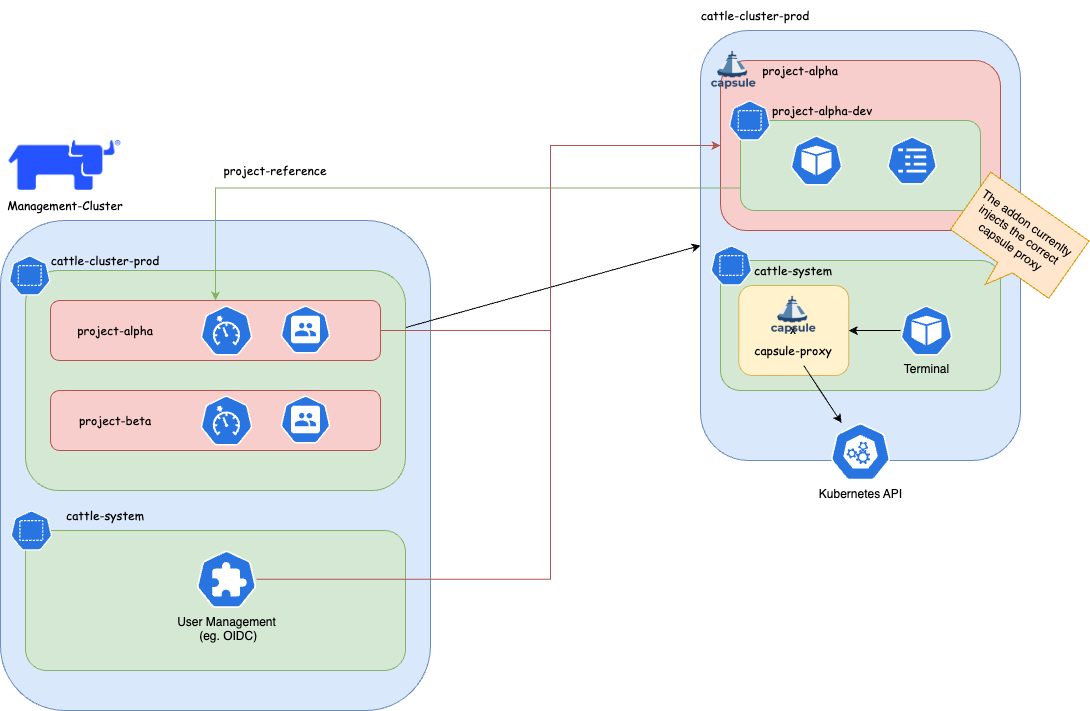
This guide explains how to setup the integration between Capsule and Rancher Projects.
It then explains how for the tenant user, the access to Kubernetes resources is transparent.
Cluster Role in RancherYou can follow this general guide to configure an OIDC authentication for Kubernetes.
For a Keycloak specific setup yon can check this resources list.
/auth makes Rancher crashA custom Rancher Cluster Role is needed to allow Tenant users, to read cluster-scope resources and Rancher doesn’t provide e built-in Cluster Role with this tailored set of privileges.
When logged-in to the Rancher UI as administrator, from the Users & Authentication page, create a Cluster Role named Tenant Member with the following privileges:
get, list, watch operations over IngressClasses resources.get, list, watch operations over StorageClasses resources.get, list, watch operations over PriorityClasses resources.get, list, watch operations over Nodes resources.get, list, watch operations over RuntimeClasses resources.When onboarding tenants, the administrator needs to create the following, in order to bind the Project with the Tenant:
In Rancher, create a Project.
In the target Kubernetes cluster, create a Tenant, with the following specification:
kind: Tenant
...
spec:
  namespaceOptions:
    additionalMetadata:
      annotations:
        field.cattle.io/projectId: ${CLUSTER_ID}:${PROJECT_ID}
      labels:
        field.cattle.io/projectId: ${PROJECT_ID}
where $CLUSTER_ID and $PROEJCT_ID can be retrieved, assuming a valid $CLUSTER_NAME, as:
CLUSTER_NAME=foo
CLUSTER_ID=$(kubectl get cluster -n fleet-default ${CLUSTER_NAME} -o jsonpath='{.status.clusterName}')
PROJECT_IDS=$(kubectl get projects -n $CLUSTER_ID -o jsonpath="{.items[*].metadata.name}")
for project_id in $PROJECT_IDS; do echo "${project_id}"; done
More on declarative Projects here.
In the identity provider, create a user with correct OIDC claim of the Tenant.
In Rancher, add the new user to the Project with the Read-only Role.
In Rancher, add the new user to the Cluster with the Tenant Member Cluster Role.
A custom Project Role is needed to allow Tenant users, with minimum set of privileges and create and delete Namespaces.
Create a Project Role named Tenant Member that inherits the privileges from the following Roles:
When the configuration administrative tasks have been completed, the tenant users are ready to use the Kubernetes cluster transparently.
For example can create Namespaces in a self-service mode, that would be otherwise impossible with the sole use of Rancher Projects.
From the tenant user perspective both CLI and the UI are valid interfaces to communicate with.
kubectl-logs in to the OIDC providerthe Namespace is now part of both the Tenant and the Project.
As administrator, you can verify with:
kubectl get tenant ${TENANT_NAME} -o jsonpath='{.status}'
kubectl get namespace -l field.cattle.io/projectId=${PROJECT_ID}
the Namespace is now part of both the Tenant and the Project.
As administrator, you can verify with:
kubectl get tenant ${TENANT_NAME} -o jsonpath='{.status}'
kubectl get namespace -l field.cattle.io/projectId=${PROJECT_ID}
Before proceeding is recommended to read the official Rancher documentation about Project Monitors.
In summary, the setup is composed by a cluster-level Prometheus, Prometheus Federator via which single Project-level Prometheus federate to.
Before proceeding is recommended to read the official Capsule documentation about NetworkPolicy at Tenant-level`.
As Rancher’s Project Monitor deploys the Prometheus stack in a Namespace that is not part of neither the Project nor the Tenant Namespaces, is important to apply the label selectors in the NetworkPolicy ingress rules to the Namespace created by Project Monitor.
That Project monitoring Namespace will be named as cattle-project-<PROJECT_ID>-monitoring.
For example, if the NetworkPolicy is configured to allow all ingress traffic from Namespace with label capsule.clastix.io/tenant=foo, this label is to be applied to the Project monitoring Namespace too.
Then, a NetworkPolicy can be applied at Tenant-level with Capsule GlobalTenantResources. For example it can be applied a minimal policy for the wind Tenant:
apiVersion: capsule.clastix.io/v1beta2
kind: GlobalTenantResource
metadata:
  name: wind-networkpolicies
spec:
  tenantSelector:
    matchLabels:
      capsule.clastix.io/tenant: wind
  resyncPeriod: 360s
  pruningOnDelete: true
  resources:
    - namespaceSelector:
        matchLabels:
          capsule.clastix.io/tenant: wind
      rawItems:
      - apiVersion: networking.k8s.io/v1
        kind: NetworkPolicy
        metadata:
          name: wind-minimal
        spec:
          podSelector: {}
          policyTypes:
            - Ingress
            - Egress
          ingress:
            # Intra-Tenant
            - from:
              - namespaceSelector:
                  matchLabels:
                    capsule.clastix.io/tenant: wind
            # Rancher Project Monitor stack
            - from:
              - namespaceSelector:
                  matchLabels:
                    role: monitoring
            # Kubernetes nodes
            - from:
              - ipBlock:
                  cidr: 192.168.1.0/24
          egress:
            # Kubernetes DNS server
            - to:
              - namespaceSelector: {}
                podSelector:
                  matchLabels:
                    k8s-app: kube-dns
                ports:
                  - port: 53
                    protocol: UDP
            # Intra-Tenant
            - to:
              - namespaceSelector:
                  matchLabels:
                    capsule.clastix.io/tenant: wind
            # Kubernetes API server
            - to:
              - ipBlock:
                  cidr: 10.43.0.1/32
                ports:
                  - port: 443
This guide explains how to setup the integration between Capsule Proxy and Rancher Projects.
It then explains how for the tenant user, the access to Kubernetes cluster-wide resources is transparent.
In order to integrate the Rancher Shell with Capsule it’s needed to route the Kubernetes API requests made from the shell, via Capsule Proxy.
The capsule-rancher-addon allows the integration transparently.
Add the Clastix Helm repository https://clastix.github.io/charts.
By updating the cache with Clastix’s Helm repository a Helm chart named capsule-rancher-addon is available.
Install keeping attention to the following Helm values:
proxy.caSecretKey: the Secret key that contains the CA certificate used to sign the Capsule Proxy TLS certificate (it should be"ca.crt" when Capsule Proxy has been configured with certificates generated with Cert Manager).proxy.servicePort: the port configured for the Capsule Proxy Kubernetes Service (443 in this setup).proxy.serviceURL: the name of the Capsule Proxy Service (by default "capsule-proxy.capsule-system.svc" hen installed in the capsule-system Namespace).In both CLI and dashboard use cases, the Cluster Agent is responsible for the two-way communication between Rancher and the downstream cluster.
In a standard setup, the Cluster Agents communicates to the API server. In this setup it will communicate with Capsule Proxy to ensure filtering of cluster-scope resources, for Tenants.
Cluster Agents accepts as arguments:
KUBERNETES_SERVICE_HOST environment variableKUBERNETES_SERVICE_PORT environment variablewhich will be set, at cluster import-time, to the values of the Capsule Proxy Service. For example:
KUBERNETES_SERVICE_HOST=capsule-proxy.capsule-system.svcKUBERNETES_SERVICE_PORT=9001. You can skip it by installing Capsule Proxy with Helm value service.port=443.The expected CA is the one for which the certificate is inside the kube-root-ca ConfigMap in the same Namespace of the Cluster Agent (cattle-system).
Capsule Proxy needs to provide a x509 certificate for which the root CA is trusted by the Cluster Agent. The goal can be achieved by, either using the Kubernetes CA to sign its certificate, or by using a dedicated root CA.
Note: this can be achieved when the Kubernetes root CA keypair is accessible. For example is likely to be possibile with on-premise setup, but not with managed Kubernetes services.
With this approach Cert Manager will sign certificates with the Kubernetes root CA for which it’s needed to be provided a Secret.
kubectl create secret tls -n capsule-system kubernetes-ca-key-pair --cert=/path/to/ca.crt --key=/path/to/ca.key
When installing Capsule Proxy with Helm chart, it’s needed to specify to generate Capsule Proxy Certificates with Cert Manager with an external ClusterIssuer:
certManager.externalCA.enabled=truecertManager.externalCA.secretName=kubernetes-ca-key-paircertManager.generateCertificates=trueand disable the job for generating the certificates without Cert Manager:
options.generateCertificates=falseIn order to allow tenant users to list cluster-scope resources, like Nodes, Tenants need to be configured with proper proxySettings, for example:
apiVersion: capsule.clastix.io/v1beta2
kind: Tenant
metadata:
  name: wind
spec:
  owners:
  - kind: User
    name: alice
    proxySettings:
    - kind: Nodes
      operations:
      - List
[...]
Also, in order to assign or filter nodes per Tenant, it’s needed labels on node in order to be selected:
kubectl label node worker-01 capsule.clastix.io/tenant=wind
and a node selector at Tenant level:
apiVersion: capsule.clastix.io/v1beta2
kind: Tenant
metadata:
  name: wind
spec:
  nodeSelector:
    capsule.clastix.io/tenant: wind
[...]
The final manifest is:
apiVersion: capsule.clastix.io/v1beta2
kind: Tenant
metadata:
  name: wind
spec:
  owners:
  - kind: User
    name: alice
    proxySettings:
    - kind: Node
      operations:
      - List
  nodeSelector:
    capsule.clastix.io/tenant: wind
The same appplies for:
NodesStorageClassesIngressClassesPriorityClassesMore on this in the official documentation.
These instructions is specific to a setup made with Keycloak as an OIDC identity provider.
groupsclient audiencefull_group_pathMore on this on the official guide.
Configure an OIDC authentication provider, with Client with issuer, return URLs specific to the Keycloak setup.
Use old and Rancher-standard paths with
/authsubpath (see issues below).Add custom paths, remove
/authsubpath in return and issuer URLs.
CapsuleConfiguration by adding the "keycloakoidc_group://capsule.clastix.io" Kubernetes Group.get of Cluster.Tenant.proxySettings for the Tenant to enable tenant users to access cluster-wide resources.Capsule Operator can be easily installed on a Managed Kubernetes Service. Since you do not have access to the Kubernetes APIs Server, you should check with the provider of the service:
the default cluster-admin ClusterRole is accessible the following Admission Webhooks are enabled on the APIs Server:
PodNodeSelectorLimitRangerResourceQuotaMutatingAdmissionWebhookValidatingAdmissionWebhookThis is an example of how to install AWS EKS cluster and one user manged by Capsule. It is based on Using IAM Groups to manage Kubernetes access
Create EKS cluster:
export AWS_DEFAULT_REGION="eu-west-1"
export AWS_ACCESS_KEY_ID="xxxxx"
export AWS_SECRET_ACCESS_KEY="xxxxx"

eksctl create cluster \
--name=test-k8s \
--managed \
--node-type=t3.small \
--node-volume-size=20 \
--kubeconfig=kubeconfig.conf
Create AWS User alice using CloudFormation, create AWS access files and kubeconfig for such user:
cat > cf.yml << EOF
Parameters:
  ClusterName:
    Type: String
Resources:
  UserAlice:
    Type: AWS::IAM::User
    Properties:
      UserName: !Sub "alice-${ClusterName}"
      Policies:
      - PolicyName: !Sub "alice-${ClusterName}-policy"
        PolicyDocument:
          Version: "2012-10-17"
          Statement:
          - Sid: AllowAssumeOrganizationAccountRole
            Effect: Allow
            Action: sts:AssumeRole
            Resource: !GetAtt RoleAlice.Arn
  AccessKeyAlice:
    Type: AWS::IAM::AccessKey
    Properties:
      UserName: !Ref UserAlice
  RoleAlice:
    Type: AWS::IAM::Role
    Properties:
      Description: !Sub "IAM role for the alice-${ClusterName} user"
      RoleName: !Sub "alice-${ClusterName}"
      AssumeRolePolicyDocument:
        Version: 2012-10-17
        Statement:
        - Effect: Allow
          Principal:
            AWS: !Sub "arn:aws:iam::${AWS::AccountId}:root"
          Action: sts:AssumeRole
Outputs:
  RoleAliceArn:
    Description: The ARN of the Alice IAM Role
    Value: !GetAtt RoleAlice.Arn
    Export:
      Name:
        Fn::Sub: "${AWS::StackName}-RoleAliceArn"
  AccessKeyAlice:
    Description: The AccessKey for Alice user
    Value: !Ref AccessKeyAlice
    Export:
      Name:
        Fn::Sub: "${AWS::StackName}-AccessKeyAlice"
  SecretAccessKeyAlice:
    Description: The SecretAccessKey for Alice user
    Value: !GetAtt AccessKeyAlice.SecretAccessKey
    Export:
      Name:
        Fn::Sub: "${AWS::StackName}-SecretAccessKeyAlice"
EOF

eval aws cloudformation deploy --capabilities CAPABILITY_NAMED_IAM \
  --parameter-overrides "ClusterName=test-k8s" \
  --stack-name "test-k8s-users" --template-file cf.yml

AWS_CLOUDFORMATION_DETAILS=$(aws cloudformation describe-stacks --stack-name "test-k8s-users")
ALICE_ROLE_ARN=$(echo "${AWS_CLOUDFORMATION_DETAILS}" | jq -r ".Stacks[0].Outputs[] | select(.OutputKey==\"RoleAliceArn\") .OutputValue")
ALICE_USER_ACCESSKEY=$(echo "${AWS_CLOUDFORMATION_DETAILS}" | jq -r ".Stacks[0].Outputs[] | select(.OutputKey==\"AccessKeyAlice\") .OutputValue")
ALICE_USER_SECRETACCESSKEY=$(echo "${AWS_CLOUDFORMATION_DETAILS}" | jq -r ".Stacks[0].Outputs[] | select(.OutputKey==\"SecretAccessKeyAlice\") .OutputValue")

eksctl create iamidentitymapping --cluster="test-k8s" --arn="${ALICE_ROLE_ARN}" --username alice --group capsule.clastix.io

cat > aws_config << EOF
[profile alice]
role_arn=${ALICE_ROLE_ARN}
source_profile=alice
EOF

cat > aws_credentials << EOF
[alice]
aws_access_key_id=${ALICE_USER_ACCESSKEY}
aws_secret_access_key=${ALICE_USER_SECRETACCESSKEY}
EOF

eksctl utils write-kubeconfig --cluster=test-k8s --kubeconfig="kubeconfig-alice.conf"
cat >> kubeconfig-alice.conf << EOF
      - name: AWS_PROFILE
        value: alice
      - name: AWS_CONFIG_FILE
        value: aws_config
      - name: AWS_SHARED_CREDENTIALS_FILE
        value: aws_credentials
EOF
Export “admin” kubeconfig to be able to install Capsule:
export KUBECONFIG=kubeconfig.conf
Install Capsule and create a tenant where alice has ownership. Use the default Tenant example:
kubectl apply -f https://raw.githubusercontent.com/clastix/capsule/master/config/samples/capsule_v1beta1_tenant.yaml
Based on the tenant configuration above the user alice should be able to create namespace. Switch to a new terminal and try to create a namespace as user alice:
# Unset AWS_ACCESS_KEY_ID and AWS_SECRET_ACCESS_KEY if defined
unset AWS_ACCESS_KEY_ID
unset AWS_SECRET_ACCESS_KEY
kubectl create namespace test --kubeconfig="kubeconfig-alice.conf"
This reference implementation introduces the recommended starting (baseline) infrastructure architecture for implementing a multi-tenancy Azure AKS cluster using Capsule. See CoAKS.
Canonical Charmed Kubernetes is a Kubernetes distribution coming with out-of-the-box tools that support deployments and operational management and make microservice development easier. Combined with Capsule, Charmed Kubernetes allows users to further reduce the operational overhead of Kubernetes setup and management.
The Charm package for Capsule is available to Charmed Kubernetes users via Charmhub.io.
Introducing a new separation of duties can lead to a significant paradigm shift. This has technical implications and may also impact your organizational structure. Therefore, when designing a multi-tenant platform pattern, carefully consider the following aspects. As Cluster Administrator, ask yourself:
The answer to this question may be influenced by the following aspects:
Are the Cluster Administrators willing to grant permissions to Tenant Owners?
Who is responsible for the deployed workloads within the Tenants?
Who gets paged during a production outage within a Tenant’s application?
Are your customers technically capable of working directly with the Kubernetes API?
In Capsule, we introduce a new persona called the Tenant Owner. The goal is to enable Cluster Administrators to delegate tenant management responsibilities to Tenant Owners. Here’s how it works:
Configure Capsule Administrators. The ClusterRoles assigned to Administrators can be configured in the CapsuleConfiguration as well.
They are promoted to Tenant-Owners for all available tenants. Effectively granting them the ability to manage all namespaces within the cluster, across all tenants.
Note: Granting Capsule Administrator rights should be done with caution, as it provides extensive control over the cluster’s multi-tenant environment. When granting Capsule Administrator rights, the entity gets the privileges to create any namespace (also not part of capsule tenants) and the privileges to delete any tenant namespaces.
Capsule Administrators can:
Administrators come in handy in bootstrap scenarios or GitOps scenarios where certain users/serviceaccounts need to be able to manage namespaces for all tenants.
Any entity which needs to interact with tenants and their namespaces must be defined as a Capsule User. This is where the flexibility of Capsule comes into play. You can define users or groups as Capsule Users, allowing them to create and manage namespaces within any tenant they have access to. If they are not defined as Capsule Users, any interactions will be ignored by Capsule. Often a best practice is to define a single group which identifies all your tenant users. This way you can have one generic group for all your users and then use additional groups to separate responsibilities (e.g. administrators vs normal users).
Only one entry is needed to identify a Capsule User. This is only important for Namespace Admission..
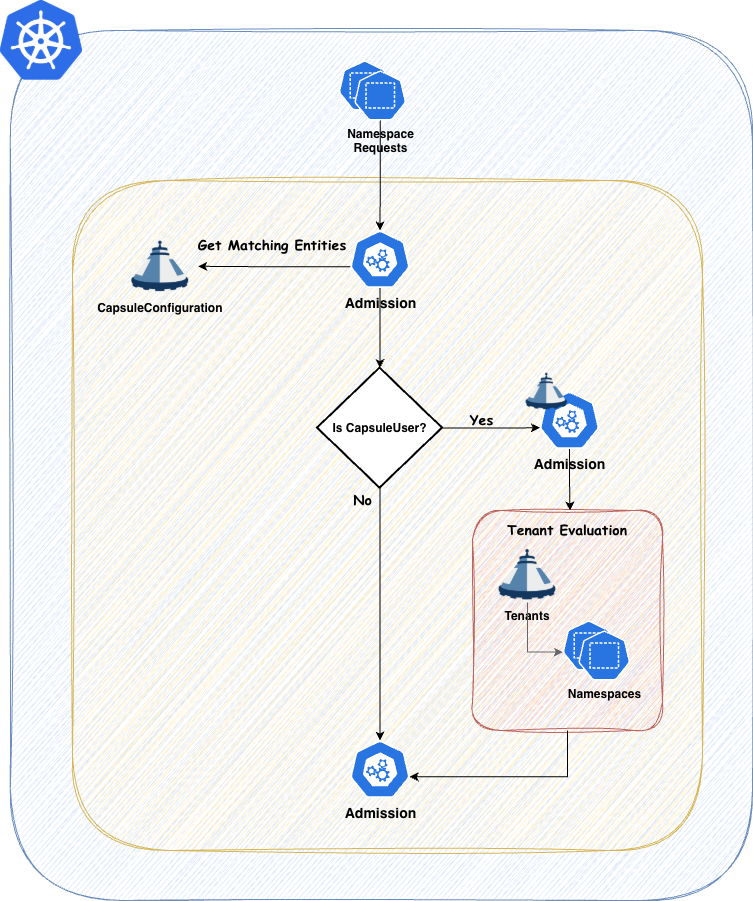
You can always verify the effective Capsule Users by checking the Configuration Status. As this is variable with Tenant Owners, the status will always show the effective users:
kubectl get capsuleconfiguration default -o jsonpath='{.status.users}' | jq

[
  {
    "kind": "Group",
    "name": "oidc:kubernetes:admin"
  },
  {
    "kind": "Group",
    "name": "projectcapsule.dev"
  },
  {
    "kind": "User",
    "name": "test-user"
  }
]
Every Tenant Owner must be a Capsule User. By using the TenantOwner CRD this is automatically handeled.
They manage the namespaces within their tenants and perform administrative tasks confined to their tenant boundaries. This delegation allows teams to operate more autonomously while still adhering to organizational policies. Tenant Owners can be used to shift reposnsability of one tenant towards this user group. promoting them to the SPOC of all namespaces within the tenant.
Tenant Owners can:
Capsule provides robust tools to strictly enforce tenant boundaries, ensuring that each tenant operates within its defined limits. This separation of duties promotes both security and efficient resource management.
Let’s discuss different Tenant Layouts which could be used . These are just approaches we have seen, however you might also find a combination of these which fits your use-case.
With this approach you essentially just provide your Customers with the Tenant on your cluster. The rest is their responsibility. This concludes to a shared responsibility model. This can be achieved when also the Tenant Owners are responsible for everything they are provisiong within their Tenant’s namespaces.
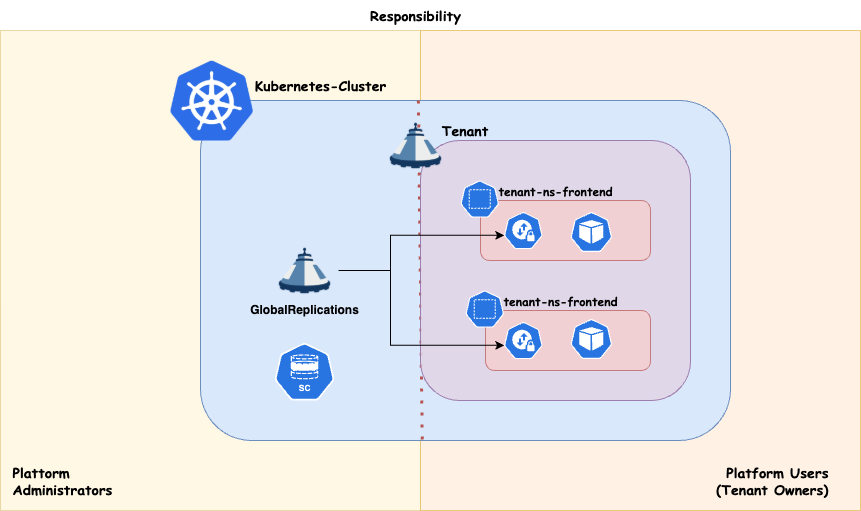
Workload distribution across your compute infrastructure can be approached in various ways, depending on your specific priorities. Regardless of the use case, it’s essential to preserve maximum flexibility for your platform administrators. This means ensuring that:
If your cluster architecture prevents any of these capabilities, or if certain applications block the enforcement of these policies, you should reconsider your approach.
Strong tenant isolation, ensuring that any noisy neighbor effects remain confined within individual tenants (tenant responsibility). This approach may involve higher administrative overhead and costs compared to shared compute. It also provides enhanced security by dedicating nodes to a single customer/application. It is recommended, at a minimum, to separate the cluster’s operator workload from customer workloads.
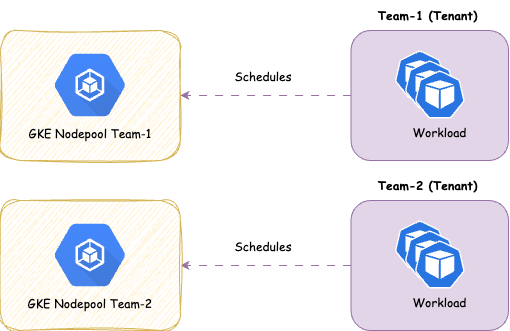
With this approach you share the nodes amongst all Tenants, therefore giving you more potential for optimizing resources on a node level. It’s a common pattern to separate the controllers needed to power your Distribution (operators) from the actual workload. This ensures smooth operations for the cluster
Overview:
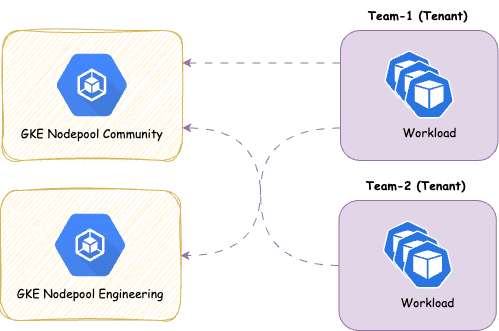
We provide the concept of ResourcePools or CustomQuotas to manage resources cross namespaces. There’s some further aspects you must think about with shared approaches:
As Capsule we try to provide a secure multi-tenant environment out of the box, there are however some additional Admission Policies you should consider to enforce best practices in your cluster. Since Capsule only covers the core multi-tenancy features, such as Namespaces, Resource Quotas, Network Policies, and Container Registries, Classes, you should consider using an additional Admission Controller to enforce best practices on workloads and other resources.
Create custom Policies and reuse data provided via Tenant Status to enforce your own rules.
Let’s say we have the following namespaced ObjectBucketClaim resource:
apiVersion: objectbucket.io/v1alpha1
kind: ObjectBucketClaim
metadata:
  name: admission-class
  namespace: solar-production
  finalizers:
    - objectbucket.io/finalizer
  labels:
    bucket-provisioner: openshift-storage.ceph.rook.io-bucket
spec:
  additionalConfig:
    maxSize: 2G
  bucketName: test-some-uid
  generateBucketName: test
  objectBucketName: obc-test-test
  storageClassName: ocs-storagecluster-ceph-rgw
However since we are allowing Tenant Users to create these ObjectBucketClaims we might want to consider validating the storageClassName field to ensure that only allowed StorageClasses are used.
---
apiVersion: kyverno.io/v1
kind: ClusterPolicy
metadata:
  name: restrict-tenant-class
spec:
  validationFailureAction: Enforce
  rules:
  - name: restrict-storage-class
    context:
      - name: classes
        apiCall:
          urlPath: "/apis/capsule.clastix.io/v1beta2/tenants"
          jmesPath: "items[?contains(status.namespaces, '{{ request.namespace }}')].status.classes | [0]"

      - name: storageClass
        variable:
          jmesPath: "request.object.spec.storageClassName || 'NONE'"
    match:
      resources:
        kinds:
        - ObjectBucketClaim
        namespaceSelector:
          matchExpressions:
          - key: capsule.clastix.io/tenant
            operator: Exists
    validate:
      message: "storageclass {{ storageClass }} is not allowed in tenant ({{classes.storage}})"
      deny:
        conditions:
          - key:   "{{classes.storage}}"
            operator: AnyNotIn
value: "{{ storageClass }}"Policies to harden workloads running in a multi-tenant environment.
If a Pods are not scoped to specific nodes, they could be scheduled on control plane nodes. You should disallow this by enforcing that Pods do not use tolerations for control plane nodes.
---
apiVersion: capsule.clastix.io/v1beta2
kind: Tenant
metadata:
  name: solar
spec:
  owners:
  - name: alice
    kind: User
  nodeSelector:
    node-role.kubernetes.io/worker: ''
---
apiVersion: admissionregistration.k8s.io/v1
kind: ValidatingAdmissionPolicy
metadata:
name: disallow-controlplane-scheduling
spec:
failurePolicy: Fail
matchConstraints:
resourceRules:
- apiGroups: [""]
apiVersions: ["v1"]
resources: ["pods"]
operations: ["CREATE","UPDATE"]
scope: "Namespaced"
validations:
- expression: >
// deny if any toleration targets control-plane taints
!has(object.spec.tolerations) ||
!object.spec.tolerations.exists(t,
t.key in ['node-role.kubernetes.io/master','node-role.kubernetes.io/control-plane']
)
message: "Pods may not use tolerations which schedule on control-plane nodes."
---
apiVersion: admissionregistration.k8s.io/v1
kind: ValidatingAdmissionPolicyBinding
metadata:
name: disallow-controlplane-scheduling
spec:
policyName: disallow-controlplane-scheduling
validationActions: ["Deny"]
matchResources:
namespaceSelector:
matchExpressions:
- key: capsule.clastix.io/tenant
operator: Exists---
apiVersion: kyverno.io/v1
kind: ClusterPolicy
metadata:
name: disallow-controlplane-scheduling
spec:
validationFailureAction: Enforce
rules:
- name: restrict-controlplane-scheduling-master
match:
resources:
kinds:
- Pod
namespaceSelector:
matchExpressions:
- key: capsule.clastix.io/tenant
operator: Exists
validate:
message: Pods may not use tolerations which schedule on control plane nodes.
pattern:
spec:
=(tolerations):
- key: "!node-role.kubernetes.io/master"
- name: restrict-controlplane-scheduling-control-plane
match:
resources:
kinds:
- Pod
namespaceSelector:
matchExpressions:
- key: capsule.clastix.io/tenant
operator: Exists
validate:
message: Pods may not use tolerations which schedule on control plane nodes.
pattern:
spec:
=(tolerations):
- key: "!node-role.kubernetes.io/control-plane"Pod Disruption Budgets (PDBs) are a way to limit the number of concurrent disruptions to your Pods. In multi-tenant environments, it is recommended to enforce the usage of PDBs to ensure that tenants do not accidentally or maliciously block cluster operations.
A PodDisruptionBudget which sets its maxUnavailable value to zero prevents all voluntary evictions including Node drains which may impact maintenance tasks. This policy enforces that if a PodDisruptionBudget specifies the maxUnavailable field it must be greater than zero.
---
# Source: https://kyverno.io/policies/other/pdb-maxunavailable/pdb-maxunavailable/
apiVersion: kyverno.io/v1
kind: ClusterPolicy
metadata:
  name: pdb-maxunavailable
  annotations:
    policies.kyverno.io/title: PodDisruptionBudget maxUnavailable Non-Zero
    policies.kyverno.io/category: Other
    kyverno.io/kyverno-version: 1.9.0
    kyverno.io/kubernetes-version: "1.24"
    policies.kyverno.io/subject: PodDisruptionBudget
    policies.kyverno.io/description: >-
      A PodDisruptionBudget which sets its maxUnavailable value to zero prevents
      all voluntary evictions including Node drains which may impact maintenance tasks.
      This policy enforces that if a PodDisruptionBudget specifies the maxUnavailable field
      it must be greater than zero.
spec:
  validationFailureAction: Enforce
  background: false
  rules:
    - name: pdb-maxunavailable
      match:
        any:
          - resources:
              kinds:
                - PodDisruptionBudget
              namespaceSelector:
                matchExpressions:
                - key: capsule.clastix.io/tenant
                  operator: Exists
      validate:
        message: "The value of maxUnavailable must be greater than zero."
        pattern:
          spec:
=(maxUnavailable): ">0"apiVersion: admissionregistration.k8s.io/v1
kind: ValidatingAdmissionPolicy
metadata:
name: pdb-maxunavailable
spec:
failurePolicy: Fail
matchConstraints:
resourceRules:
- apiGroups: ["policy"]
apiVersions: ["v1"]
operations: ["CREATE", "UPDATE"]
resources: ["poddisruptionbudgets"]
namespaceSelector:
matchExpressions:
- key: capsule.clastix.io/tenant
operator: Exists
validations:
- expression: |
!has(object.spec.maxUnavailable) ||
string(object.spec.maxUnavailable).contains('%') ||
object.spec.maxUnavailable > 0
message: "The value of maxUnavailable must be greater than zero or a percentage."
reason: Invalid
---
apiVersion: admissionregistration.k8s.io/v1
kind: ValidatingAdmissionPolicyBinding
metadata:
name: pdb-maxunavailable-binding
spec:
policyName: pdb-maxunavailable
validationActions: ["Deny"]When a Pod controller which can run multiple replicas is subject to an active PodDisruptionBudget, if the replicas field has a value equal to the minAvailable value of the PodDisruptionBudget it may prevent voluntary disruptions including Node drains which may impact routine maintenance tasks and disrupt operations. This policy checks incoming Deployments and StatefulSets which have a matching PodDisruptionBudget to ensure these two values do not match.
---
# Source: https://kyverno.io/policies/other/pdb-minavailable/pdb-minavailable/
apiVersion: kyverno.io/v1
kind: ClusterPolicy
metadata:
  name: pdb-minavailable-check
  annotations:
    policies.kyverno.io/title: Check PodDisruptionBudget minAvailable
    policies.kyverno.io/category: Other
    kyverno.io/kyverno-version: 1.9.0
    kyverno.io/kubernetes-version: "1.24"
    policies.kyverno.io/subject: PodDisruptionBudget, Deployment, StatefulSet
    policies.kyverno.io/description: >-
      When a Pod controller which can run multiple replicas is subject to an active PodDisruptionBudget,
      if the replicas field has a value equal to the minAvailable value of the PodDisruptionBudget
      it may prevent voluntary disruptions including Node drains which may impact routine maintenance
      tasks and disrupt operations. This policy checks incoming Deployments and StatefulSets which have
      a matching PodDisruptionBudget to ensure these two values do not match.
spec:
  validationFailureAction: Enforce
  background: false
  rules:
    - name: pdb-minavailable
      match:
        any:
          - resources:
              kinds:
                - Deployment
                - StatefulSet
              namespaceSelector:
                matchExpressions:
                - key: capsule.clastix.io/tenant
                  operator: Exists
      preconditions:
        all:
        - key: "{{`{{ request.operation | 'BACKGROUND' }}`}}"
          operator: AnyIn
          value:
          - CREATE
          - UPDATE
        - key: "{{`{{ request.object.spec.replicas | '1' }}`}}"
          operator: GreaterThan
          value: 0
      context:
        - name: minavailable
          apiCall:
            urlPath: "/apis/policy/v1/namespaces/{{`{{ request.namespace }}`}}/poddisruptionbudgets"
            jmesPath: "items[?label_match(spec.selector.matchLabels, `{{`{{ request.object.spec.template.metadata.labels }}`}}`)] | [0].spec.minAvailable | default(`0`)"
      validate:
        message: >-
          The matching PodDisruptionBudget for this resource has its minAvailable value equal to the replica count
          which is not permitted.
        deny:
          conditions:
            any:
              - key: "{{`{{ request.object.spec.replicas }}`}}"
                operator: Equals
value: "{{`{{ minavailable }}`}}"PodDisruptionBudget resources are useful to ensuring minimum availability is maintained at all times.Introducing a PDB where there are already matching Pod controllers may pose a problem if the author is unaware of the existing replica count. This policy ensures that the minAvailable value is not greater or equal to the replica count of any matching existing Deployment. If other Pod controllers should also be included in this check, additional rules may be added to the policy which match those controllers.
---
# Source: https://kyverno.io/policies/other/deployment-replicas-higher-than-pdb/deployment-replicas-higher-than-pdb/
apiVersion: kyverno.io/v1
kind: ClusterPolicy
metadata:
  name: deployment-replicas-higher-than-pdb
  annotations:
    policies.kyverno.io/title: Ensure Deployment Replicas Higher Than PodDisruptionBudget
    policies.kyverno.io/category: Other
    policies.kyverno.io/subject: PodDisruptionBudget, Deployment
    kyverno.io/kyverno-version: 1.11.4
    kyverno.io/kubernetes-version: "1.27"
    policies.kyverno.io/description: >-
      PodDisruptionBudget resources are useful to ensuring minimum availability is maintained at all times.
      Introducing a PDB where there are already matching Pod controllers may pose a problem if the author
      is unaware of the existing replica count. This policy ensures that the minAvailable value is not
      greater or equal to the replica count of any matching existing Deployment. If other Pod controllers
      should also be included in this check, additional rules may be added to the policy which match those
      controllers.
spec:
  validationFailureAction: Enforce
  background: true
  rules:
  - name: deployment-replicas-greater-minAvailable
    match:
      any:
      - resources:
          kinds:
          - PodDisruptionBudget
          operations:
          - CREATE
          - UPDATE
          namespaceSelector:
            matchExpressions:
            - key: capsule.clastix.io/tenant
              operator: Exists
    context:
    - name: deploymentreplicas
      apiCall:
        jmesPath: items[?label_match(`{{`{{ request.object.spec.selector.matchLabels }}`}}`, spec.template.metadata.labels)] || `[]`
        urlPath: /apis/apps/v1/namespaces/{{`{{request.namespace}}`}}/deployments
    preconditions:
      all:
      - key: '{{`{{ length(deploymentreplicas) }}`}}'
        operator: GreaterThan
        value: 0
      - key: '{{`{{ request.object.spec.minAvailable || "" }}`}}'
        operator: NotEquals
        value: ''
    validate:
      message: >-
        PodDisruption budget minAvailable ({{`{{ request.object.spec.minAvailable }}`}}) cannot be
        greater than or equal to the replica count of any matching existing Deployment.
        There are {{`{{ length(deploymentreplicas) }}`}} Deployments which match this labelSelector
        having {{`{{ deploymentreplicas[*].spec.replicas }}`}} replicas.
      foreach:
        - list: deploymentreplicas
          deny:
            conditions:
              all:
              - key: "{{`{{ request.object.spec.minAvailable }}`}}"
                operator: GreaterThanOrEquals
value: "{{`{{ element.spec.replicas }}`}}"When a Pod controller which can run multiple replicas is subject to an active PodDisruptionBudget, if the replicas field has a value equal to the minAvailable value of the PodDisruptionBudget it may prevent voluntary disruptions including Node drains which may impact routine maintenance tasks and disrupt operations. This policy checks incoming CNPG Clusters and their .spec.enablePDB setting.
---
apiVersion: kyverno.io/v1
kind: ClusterPolicy
metadata:
  name: pdb-cnpg-cluster-validation
  annotations:
    policies.kyverno.io/title: Check PodDisruptionBudget minAvailable for cnpgCluster
    policies.kyverno.io/category: Other
    kyverno.io/kyverno-version: 1.9.0
    kyverno.io/kubernetes-version: "1.24"
    policies.kyverno.io/subject: PodDisruptionBudget, Cluster
    policies.kyverno.io/description: >-
      When a Pod controller which can run multiple replicas is subject to an active PodDisruptionBudget,
      if the replicas field has a value equal to the minAvailable value of the PodDisruptionBudget
      it may prevent voluntary disruptions including Node drains which may impact routine maintenance
      tasks and disrupt operations. This policy checks incoming CNPG Clusters and their .spec.enablePDB setting.
spec:
  validationFailureAction: Enforce
  background: false
  rules:
    - name: pdb-cnpg-cluster-validation
      match:
        any:
          - resources:
              kinds:
                - postgresql.cnpg.io/v1/Cluster
              namespaceSelector:
                matchExpressions:
                - key: capsule.clastix.io/tenant
                  operator: Exists
      preconditions:
        any:
        - key: "{{request.operation || 'BACKGROUND'}}"
          operator: AnyIn
          value:
          - CREATE
          - UPDATE
      validate:
        message: >-
          Set `.spec.enablePDB` to `false` for CNPG Clusters when the number of instances is lower than 2.
        deny:
          conditions:
            all:
              - key: "{{request.object.spec.enablePDB }}"
                operator: Equals
                value: true
              - key: "{{request.object.spec.instances }}"
                operator: LessThan
value: 2apiVersion: admissionregistration.k8s.io/v1
kind: ValidatingAdmissionPolicy
metadata:
name: pdb-cnpg-cluster-validation
spec:
failurePolicy: Fail
matchConstraints:
resourceRules:
- apiGroups: ["postgresql.cnpg.io"]
apiVersions: ["v1"]
operations: ["CREATE", "UPDATE"]
resources: ["clusters"]
namespaceSelector:
matchExpressions:
- key: capsule.clastix.io/tenant
operator: Exists
validations:
- expression: |
!has(object.spec.enablePDB) ||
object.spec.enablePDB == false ||
(has(object.spec.instances) && object.spec.instances >= 2)
message: "Set `.spec.enablePDB` to `false` for CNPG Clusters when the number of instances is lower than 2."
messageExpression: |
'Set `.spec.enablePDB` to `false` for CNPG Clusters when the number of instances is lower than 2. Current instances: ' +
string(has(object.spec.instances) ? object.spec.instances : 1)
reason: Invalid
---
apiVersion: admissionregistration.k8s.io/v1
kind: ValidatingAdmissionPolicyBinding
metadata:
name: pdb-cnpg-cluster-validation-binding
spec:
policyName: pdb-cnpg-cluster-validation
validationActions: ["Deny"]You should enforce the usage of User Namespaces. Most Helm-Charts currently don’t support this out of the box. With Kyverno you can enforce this on Pod level.
---
apiVersion: kyverno.io/v1
kind: ClusterPolicy
metadata:
  name: tenants-user-namespace
spec:
  rules:
    - name: enforce-no-host-users
      match:
        any:
        - resources:
            kinds:
            - Pod
            namespaceSelector:
              matchExpressions:
              - key: capsule.clastix.io/tenant
                operator: Exists
            # selector:
            #   matchExpressions:
            #     - key: company.com/allow-host-users
            #       operator: NotIn
            #       values:
            #         - "true"
      preconditions:
        all:
        - key: "{{request.operation || 'BACKGROUND'}}"
          operator: AnyIn
          value:
            - CREATE
            - UPDATE
      skipBackgroundRequests: true
      mutate:
        patchStrategicMerge:
          spec:
            hostUsers: false
Note that users still can override this setting by adding the label company.com/allow-host-users=true to their namespace. You can change the label to your needs. This is because NFS does not support user namespaces and you might want to allow this for specific tenants.
Tenant’s should not be allowed to create Daemonsets, unless they have dedicated nodes.
---
apiVersion: admissionregistration.k8s.io/v1
kind: ValidatingAdmissionPolicy
metadata:
  name: deny-daemonset-create
spec:
  failurePolicy: Fail
  matchConstraints:
    resourceRules:
      - apiGroups: ["apps"]
        apiVersions: ["v1"]
        resources: ["daemonsets"]
        operations: ["CREATE"]
        scope: "Namespaced"
  validations:
    - expression: "false"
      message: "Creating DaemonSets is not allowed in this cluster."
---
apiVersion: admissionregistration.k8s.io/v1
kind: ValidatingAdmissionPolicyBinding
metadata:
  name: deny-daemonset-create-binding
spec:
  policyName: deny-daemonset-create
  validationActions: ["Deny"]
  matchResources:
    namespaceSelector:
      matchExpressions:
        - key: capsule.clastix.io/tenant
          operator: Exists
---
apiVersion: kyverno.io/v1
kind: ClusterPolicy
metadata:
name: tenant-workload-restrictions
spec:
validationFailureAction: Enforce
rules:
- name: block-daemonset-create
match:
any:
- resources:
kinds:
- DaemonSet
namespaceSelector:
matchExpressions:
- key: capsule.clastix.io/tenant
operator: Exists
preconditions:
all:
- key: "{{ request.operation || 'BACKGROUND' }}"
operator: Equals
value: CREATE
validate:
message: "Creating DaemonSets is not allowed in this cluster."
deny:
conditions:
any:
- key: "true"
operator: Equals
value: "true"By Defaults emptyDir Volumes do not have any limits. This could lead to a situation, where a tenant fills up the node disk. To avoid this, you can enforce limits on emptyDir volumes. You may also consider restricting the usage of emptyDir with the medium: Memory option, as this could lead to memory exhaustion on the node.
---
apiVersion: kyverno.io/v1
kind: ClusterPolicy
metadata:
  name: tenant-workload-restrictions
spec:
  rules:
    - name: default-emptydir-sizelimit
      match:
        any:
        - resources:
            kinds:
            - Pod
            namespaceSelector:
              matchExpressions:
              - key: capsule.clastix.io/tenant
                operator: Exists
      mutate:
        foreach:
        - list: "request.object.spec.volumes[]"
          preconditions:
            all:
            - key: "{{element.keys(@)}}"
              operator: AnyIn
              value: emptyDir
            - key: "{{element.emptyDir.sizeLimit || ''}}"
              operator: Equals
              value: ''
          patchesJson6902: |-
            - path: "/spec/volumes/{{elementIndex}}/emptyDir/sizeLimit"
              op: add
value: 250Mi Ephemeral containers, enabled by default in Kubernetes 1.23, allow users to use the kubectl debug functionality and attach a temporary container to an existing Pod. This may potentially be used to gain access to unauthorized information executing inside one or more containers in that Pod. This policy blocks the use of ephemeral containers.
---
apiVersion: admissionregistration.k8s.io/v1
kind: ValidatingAdmissionPolicy
metadata:
  name: block-ephemeral-containers
spec:
  failurePolicy: Fail
  matchConstraints:
    resourceRules:
      # 1) Regular Pods (ensure spec doesn't carry ephemeralContainers)
      - apiGroups: [""]
        apiVersions: ["v1"]
        resources: ["pods"]
        operations: ["CREATE","UPDATE"]
        scope: "Namespaced"
      # 2) Subresource used by `kubectl debug` to inject ephemeral containers
      - apiGroups: [""]
        apiVersions: ["v1"]
        resources: ["pods/ephemeralcontainers"]
        operations: ["UPDATE","CREATE"]  # UPDATE is typical, CREATE included for future-proofing
        scope: "Namespaced"
  validations:
    # Deny any request that targets the pods/ephemeralcontainers subresource
    - expression: request.subResource != "ephemeralcontainers"
      message: "Ephemeral (debug) containers are not permitted (subresource)."
    # For direct Pod create/update, allow only if the field is absent or empty
    - expression: >
        !has(object.spec.ephemeralContainers) ||
        size(object.spec.ephemeralContainers) == 0
      message: "Ephemeral (debug) containers are not permitted in Pod specs."
---
apiVersion: admissionregistration.k8s.io/v1
kind: ValidatingAdmissionPolicyBinding
metadata:
  name: block-ephemeral-containers-binding
spec:
  policyName: block-ephemeral-containers
  validationActions: ["Deny"]
  matchResources:
    namespaceSelector:
      matchExpressions:
        - key: capsule.clastix.io/tenant
          operator: Exists
# Source: https://kyverno.io/policies/other/block-ephemeral-containers/block-ephemeral-containers/
---
apiVersion: kyverno.io/v1
kind: ClusterPolicy
metadata:
name: block-ephemeral-containers
annotations:
policies.kyverno.io/title: Block Ephemeral Containers
policies.kyverno.io/category: Other
policies.kyverno.io/severity: medium
kyverno.io/kyverno-version: 1.6.0
policies.kyverno.io/minversion: 1.6.0
kyverno.io/kubernetes-version: "1.23"
policies.kyverno.io/subject: Pod
policies.kyverno.io/description: >-
Ephemeral containers, enabled by default in Kubernetes 1.23, allow users to use the
`kubectl debug` functionality and attach a temporary container to an existing Pod.
This may potentially be used to gain access to unauthorized information executing inside
one or more containers in that Pod. This policy blocks the use of ephemeral containers.
spec:
validationFailureAction: Enforce
background: true
rules:
- name: block-ephemeral-containers
match:
any:
- resources:
kinds:
- Pod
namespaceSelector:
matchExpressions:
- key: capsule.clastix.io/tenant
operator: Exists
validate:
message: "Ephemeral (debug) containers are not permitted."
pattern:
spec:
X(ephemeralContainers): "null"You may consider the upstream policies, depending on your needs:
Often when working in multi-tenant environments, you want to ensure that tenants are not using ClusterIssuers to issue certificates, but rather use namespaced Issuers within their own namespace. This policy enforces that cert-manager.io/v1/Certificate resources do not reference ClusterIssuers and that the Issuer referenced is in the same namespace as the Certificate.
---
apiVersion: kyverno.io/v1
kind: ClusterPolicy
metadata:
  name: certificates-only-local-issuer
spec:
  validationFailureAction: Enforce
  background: true
  rules:
    - name: deny-clusterissuer-in-certificates
      match:
        any:
          - resources:
              kinds:
                - cert-manager.io/v1/Certificate
              namespaceSelector:
                matchExpressions:
                - key: capsule.clastix.io/tenant
                  operator: Exists
      validate:
        message: "Certificates must not reference ClusterIssuers; use a namespaced Issuer in the same namespace."
        deny:
          conditions:
            any:
              - key: "{{ request.object.spec.issuerRef.kind || 'Issuer' }}"
                operator: Equals
                value: "ClusterIssuer"

    - name: deny-cross-namespace-issuerref-in-certificates
      match:
        any:
          - resources:
              kinds:
                - cert-manager.io/v1/Certificate
      validate:
        message: "Certificates must reference an Issuer in the same namespace (spec.issuerRef.namespace must be empty or equal to the Certificate namespace)."
        deny:
          conditions:
            any:
              # If issuerRef.namespace is set and differs from the Certificate namespace -> deny
              - key: "{{request.object.spec.issuerRef.namespace || '' }}"
                operator: NotEquals
                value: ""
                # AND also not equal to request namespace
              - key: "{{ request.object.spec.issuerRef.namespace || request.namespace  }}"
                operator: NotEquals
                value: "{{ request.namespace }}"
Deny to usage of ClusterIssuers in Gateways by checking for the cert-manager.io/cluster-issuer annotation. This ensures that tenants use namespaced issuer mechanisms instead.
This requires extra permissions to allow Kyverno to read Gateway resources:
admissionController:
  rbac:
    clusterRole:
      extraResources:
       - apiGroups: ["gateway.networking.k8s.io"]
         resources: ["*"]
         verbs: ["get", "list", "watch"]
---
apiVersion: kyverno.io/v1
kind: ClusterPolicy
metadata:
  name: gateways-deny-cluster-issuer-annotation
spec:
  validationFailureAction: Enforce
  background: false
  rules:
    - name: deny-cert-manager-cluster-issuer-annotation
      match:
        any:
          - resources:
              kinds:
                - gateway.networking.k8s.io/v1/Gateway
              namespaceSelector:
                matchExpressions:
                - key: capsule.clastix.io/tenant
                  operator: Exists
      validate:
        message: "Gateways must not use cert-manager.io/cluster-issuer; use namespaced issuer mechanisms instead."
        deny:
          conditions:
            any:
              - key: "{{ request.object.metadata.annotations.\"cert-manager.io/cluster-issuer\" || '' }}"
                operator: NotEquals
value: ""---
apiVersion: capsule.clastix.io/v1beta2
kind: Tenant
metadata:
name: solar
spec:
containerRegistries:
allowed:
- "docker.io"
- "public.ecr.aws"
- "quay.io"
- "mcr.microsoft.com"# Or with a Kyverno Policy. Here the default registry is `docker.io`, when no registry prefix is specified:
---
apiVersion: kyverno.io/v1
kind: ClusterPolicy
metadata:
name: restrict-image-registries
annotations:
policies.kyverno.io/title: Restrict Image Registries
policies.kyverno.io/category: Best Practices, EKS Best Practices
policies.kyverno.io/severity: medium
spec:
validationFailureAction: Audit
background: true
rules:
- name: validate-registries
match:
any:
- resources:
kinds:
- Pod
validate:
message: "Using unknown image registry."
foreach:
- list: "request.object.spec.initContainers"
deny:
conditions:
- key: '{{images.initContainers."{{element.name}}".registry }}'
operator: NotIn
value:
- "docker.io"
- "public.ecr.aws"
- "quay.io"
- "mcr.microsoft.com"
- list: "request.object.spec.ephemeralContainers"
deny:
conditions:
- key: '{{images.ephemeralContainers."{{element.name}}".registry }}'
operator: NotIn
value:
- "docker.io"
- "public.ecr.aws"
- "quay.io"
- "mcr.microsoft.com"
- list: "request.object.spec.containers"
deny:
conditions:
- key: '{{images.containers."{{element.name}}".registry }}'
operator: NotIn
value:
- "docker.io"
- "public.ecr.aws"
- "quay.io"
- "mcr.microsoft.com"---
apiVersion: capsule.clastix.io/v1beta2
kind: Tenant
metadata:
name: solar
spec:
owners:
- name: alice
kind: User
imagePullPolicies:
- Always---
apiVersion: kyverno.io/v1
kind: ClusterPolicy
metadata:
name: always-pull-images
annotations:
policies.kyverno.io/title: Always Pull Images
policies.kyverno.io/category: Sample
policies.kyverno.io/severity: medium
policies.kyverno.io/subject: Pod
policies.kyverno.io/minversion: 1.6.0
policies.kyverno.io/description: >-
By default, images that have already been pulled can be accessed by other
Pods without re-pulling them if the name and tag are known. In multi-tenant scenarios,
this may be undesirable. This policy mutates all incoming Pods to set their
imagePullPolicy to Always. An alternative to the Kubernetes admission controller
AlwaysPullImages.
spec:
rules:
- name: always-pull-images
match:
any:
- resources:
kinds:
- Pod
namespaceSelector:
matchExpressions:
- key: capsule.clastix.io/tenant
operator: Exists
mutate:
patchStrategicMerge:
spec:
initContainers:
- (name): "?*"
imagePullPolicy: Always
containers:
- (name): "?*"
imagePullPolicy: Always
ephemeralContainers:
- (name): "?*"
imagePullPolicy: AlwaysAllow certain ClusterIssuers within Tenants:
---
apiVersion: kyverno.io/v1
kind: ClusterPolicy
metadata:
  name: certificates-restrict-clusterissuer-by-tenant-label
spec:
  validationFailureAction: Enforce
  background: true
  rules:
    - name: allow-clusterissuer-only-when-managed-by-matches
      match:
        any:
          - resources:
              kinds:
                - cert-manager.io/v1/Certificate
              namespaceSelector:
                matchExpressions:
                  - key: capsule.clastix.io/tenant
                    operator: Exists
      context:
        - name: certManagedBy
          variable:
            jmesPath: request.object.metadata.labels."capsule.clastix.io/managed-by" || ''
        - name: clusterIssuerManagedBy
          apiCall:
            urlPath: /apis/cert-manager.io/v1/clusterissuers/{{ request.object.spec.issuerRef.name }}
            jmesPath: metadata.labels."company.com/tenant" || ''
            default: ""
      preconditions:
        all:
          - key: "{{ request.object.spec.issuerRef.kind || 'Issuer' }}"
            operator: Equals
            value: ClusterIssuer
          - key: "{{request.operation || 'BACKGROUND'}}"
            operator: AnyIn
            value:
            - CREATE
            - UPDATE
      validate:
        message: >-
          ClusterIssuer is only allowed when the Certificate label
          capsule.clastix.io/managed-by ({{certManagedBy}}) matches the referenced ClusterIssuer label
          company.com/tenant ({{clusterIssuerManagedBy}}).
        deny:
          conditions:
            any:
              - key: "{{certManagedBy}}"
                operator: Equals
                value: ""
              - key: "{{clusterIssuerManagedBy}}"
                operator: Equals
                value: ""
              - key: "{{certManagedBy}}"
                operator: NotEquals
value: "{{clusterIssuerManagedBy}}"Introducing a new separation of duties can lead to a significant paradigm shift. This has technical implications and may also impact your organizational structure. Therefore, when designing a multi-tenant platform pattern, carefully consider the following aspects. As Cluster Administrator, ask yourself:
The answer to this question may be influenced by the following aspects:
Are the Cluster Administrators willing to grant permissions to Tenant Owners?
Who is responsible for the deployed workloads within the Tenants?
Who gets paged during a production outage within a Tenant’s application?
Are your customers technically capable of working directly with the Kubernetes API?
In Capsule, we introduce a new persona called the Tenant Owner. The goal is to enable Cluster Administrators to delegate tenant management responsibilities to Tenant Owners. Here’s how it works:
Configure Capsule Administrators. The ClusterRoles assigned to Administrators can be configured in the CapsuleConfiguration as well.
They are promoted to Tenant-Owners for all available tenants. Effectively granting them the ability to manage all namespaces within the cluster, across all tenants.
Note: Granting Capsule Administrator rights should be done with caution, as it provides extensive control over the cluster’s multi-tenant environment. When granting Capsule Administrator rights, the entity gets the privileges to create any namespace (also not part of capsule tenants) and the privileges to delete any tenant namespaces.
Capsule Administrators can:
Administrators come in handy in bootstrap scenarios or GitOps scenarios where certain users/serviceaccounts need to be able to manage namespaces for all tenants.
Any entity which needs to interact with tenants and their namespaces must be defined as a Capsule User. This is where the flexibility of Capsule comes into play. You can define users or groups as Capsule Users, allowing them to create and manage namespaces within any tenant they have access to. If they are not defined as Capsule Users, any interactions will be ignored by Capsule. Often a best practice is to define a single group which identifies all your tenant users. This way you can have one generic group for all your users and then use additional groups to separate responsibilities (e.g. administrators vs normal users).
Only one entry is needed to identify a Capsule User. This is only important for Namespace Admission..
You can always verify the effective Capsule Users by checking the Configuration Status. As this is variable with Tenant Owners, the status will always show the effective users:
kubectl get capsuleconfiguration default -o jsonpath='{.status.users}' | jq

[
  {
    "kind": "Group",
    "name": "oidc:kubernetes:admin"
  },
  {
    "kind": "Group",
    "name": "projectcapsule.dev"
  },
  {
    "kind": "User",
    "name": "test-user"
  }
]
Every Tenant Owner must be a Capsule User. By using the TenantOwner CRD this is automatically handeled.
They manage the namespaces within their tenants and perform administrative tasks confined to their tenant boundaries. This delegation allows teams to operate more autonomously while still adhering to organizational policies. Tenant Owners can be used to shift reposnsability of one tenant towards this user group. promoting them to the SPOC of all namespaces within the tenant.
Tenant Owners can:
Capsule provides robust tools to strictly enforce tenant boundaries, ensuring that each tenant operates within its defined limits. This separation of duties promotes both security and efficient resource management.
Let’s discuss different Tenant Layouts which could be used . These are just approaches we have seen, however you might also find a combination of these which fits your use-case.
With this approach you essentially just provide your Customers with the Tenant on your cluster. The rest is their responsibility. This concludes to a shared responsibility model. This can be achieved when also the Tenant Owners are responsible for everything they are provisiong within their Tenant’s namespaces.
Workload distribution across your compute infrastructure can be approached in various ways, depending on your specific priorities. Regardless of the use case, it’s essential to preserve maximum flexibility for your platform administrators. This means ensuring that:
If your cluster architecture prevents any of these capabilities, or if certain applications block the enforcement of these policies, you should reconsider your approach.
Strong tenant isolation, ensuring that any noisy neighbor effects remain confined within individual tenants (tenant responsibility). This approach may involve higher administrative overhead and costs compared to shared compute. It also provides enhanced security by dedicating nodes to a single customer/application. It is recommended, at a minimum, to separate the cluster’s operator workload from customer workloads.
With this approach you share the nodes amongst all Tenants, therefore giving you more potential for optimizing resources on a node level. It’s a common pattern to separate the controllers needed to power your Distribution (operators) from the actual workload. This ensures smooth operations for the cluster
Overview:
We provide the concept of ResourcePools or CustomQuotas to manage resources cross namespaces. There’s some further aspects you must think about with shared approaches:
Labels commonly used in Capsule items are listed below. These labels are applied to the corresponding resources by the Capsule controller and can be used for filtering and selection purposes.
capsule.clastix.io/tenant| Description | Target Objects | Audience |
|---|---|---|
Established the connection between Object and Tenant. It’s value indicates the owning Tenant | * Namespaces having a relationship to Tenants | Controller |
projectcapsule.dev/tenant| Description | Target Objects | Audience |
|---|---|---|
Established the connection between Object and Tenant. It’s value indicates the owning Tenant. Long term replacement for capsule.clastix.io/tenant and capsule.clastix.io/managed-by labels. | * All namespaced items within a Tenant Namespace become the corresponding Tenant Label via Mutating Admission. | Controller |
capsule.clastix.io/managed-by| Description | Target Objects | Audience |
|---|---|---|
Established the connection between Object and Tenant. It’s value indicates the owning Tenant. Long term replacement for capsule.clastix.io/tenant | * All namespaced items within a Tenant Namespace become the corresponding Tenant Label via Mutating Admission. This label is still added to keep compatibility wiht the Capsule Proxy. | User |
projectcapsule.dev/managed-by| Description | Target Objects | |
|---|---|---|
Indicator which controller of capsule or Custom Resource is responsible for managing the corresponding Object. Mainly used in Replications to establish that objects are at least managed by one Replications. | * Any Object being influenced by Replications | User |
projectcapsule.dev/created-by| Description | Target Objects | Audience |
|—|—|
| Indicator which controller of capsule or Custom Resource is responsible for managing the corresponding Object. Mainly used in Replications to establish that objects were originally created by a Replication. | * Any Object being influenced by Replications | Controller |
projectcapsule.dev/name| Description | Target Objects | Audience |
|---|---|---|
| Label for tracking internal name or allowing for faster selects. Mainly used to identify relevant rulestatus | * Tenant Namespaces | Controller |
projectcapsule.dev/cordoned| Description | Target Objects | Audience |
|---|---|---|
Indicator that a namespace is cordoned (when value equals true) | * Tenant Namespaces | User |
projectcapsule.dev/pool| Description | Target Objects | Audience |
|---|---|---|
| Allocation of Resourcepool via ResourcePoolClaims | * ResourcePoolClaims | User |
For simple template cases we provide a fast templating engine. With this engine, you can use Go templates syntax to reference Tenant and Namespace fields. There are no operators or anything else supported.
Available fields are:
{{tenant.name}}: The Name of the Tenant{{namespace}}: The Name of the namespace within the tenant (current context)Our template library is mainly based on the upstream implementation from Sprout. You can find the all available functions here:
We have removed certain functions which could exploit runtime information. Therefor the following functions are not available:
envexpandEnvYou can provide structured data for each Tenant which can be used in templating:
apiVersion: capsule.clastix.io/v1beta2
kind: Tenant
metadata:
  name: solar
spec:
  data:
    bool: true
    foo: bar
    list:
    - a
    - b
    number: 123
    obj:
      nested: value
Custom Functions we provide in our template package.
deterministicUUID generates a deterministic, RFC-4122–compliant UUID (version 5 + RFC4122 variant) from a set of input strings. It is designed for use in templates where you need stable, repeatable IDs derived from meaningful inputs (e.g. cluster name, tenant, role name), instead of random UUIDs.
This is especially useful for:
The function takes any number of strings and turns them into a UUID in a fully deterministic way.
What that means in practice:
So from the outside, it behaves just like a normal UUID, just deterministic.
deterministicUUID(parts ...string) string
Example usage:
{{ deterministicUUID "cluster-a" "app-123" "tenant-x" "some-role" }}
generateAgeKey generates a new age X25519 key pair for use with age. It returns both the private identity and the public recipient key.
This is useful in templates where a resource needs to create an age-compatible encryption identity, for example when generating Kubernetes Secrets that are later used for encrypting or decrypting data.
This is especially useful for:
The function does not return a plain string. It returns an object with two fields:
Identity: the private age identity, e.g. AGE-SECRET-KEY-1...Recipient: the public age recipient, e.g. age1...What that means in practice:
generateAgeKey() any
Example usage:
{{ $key := generateAgeKey }}
apiVersion: v1
kind: Secret
metadata:
  name: age-key
type: Opaque
stringData:
  identity: {{ $key.Identity | quote }}
  recipient: {{ $key.Recipient | quote }}
Output:
apiVersion: v1
kind: Secret
metadata:
  name: age-key
type: Opaque
stringData:
  identity: "AGE-SECRET-KEY-1..."
  recipient: "age1..."
Because this function creates a new random key pair on every call, it should usually only be used when the generated Secret is created once and then reused. For continuously reconciled resources, prefer generating the key in controller logic and persisting it before using it in templates.
generateAgePQKey generates a new age post-quantum hybrid key pair for use with age. It returns both the private identity and the public recipient key.
This is useful in templates where a resource needs to create an age-compatible encryption identity using the newer hybrid recipient format.
This is especially useful for:
The function does not return a plain string. It returns an object with two fields:
Identity: the private age hybrid identity, e.g. AGE-SECRET-KEY-PQ-1...Recipient: the public age recipient, e.g. age1...What that means in practice:
generateAgePQKey() any
Example Usage:
{{ $key := generateAgePQKey }}
apiVersion: v1
kind: Secret
metadata:
  name: age-pq-key
type: Opaque
stringData:
  identity: {{ $key.Identity | quote }}
  recipient: {{ $key.Recipient | quote }}
Output:
apiVersion: v1
kind: Secret
metadata:
  name: age-pq-key
type: Opaque
stringData:
  identity: "AGE-SECRET-KEY-PQ-1..."
  recipient: "age1..."
Because this function creates a new random key pair on every call, it should usually only be used when the generated Secret is created once and then reused. For continuously reconciled resources, prefer generating the key in controller logic and persisting it before using it in templates.
This is general advice you should consider before making Kubernetes Distribution consideration. They are partly relevant for Multi-Tenancy with Capsule.
User authentication for the platform should be handled via a central OIDC-compatible identity provider system (e.g., Keycloak, Azure AD, Okta, or any other OIDC-compliant provider). The rationale is that other central platform components, such as ArgoCD, Grafana, Headlamp, or Harbor, should also integrate with the same authentication mechanism. This enables a unified login experience and reduces administrative complexity in managing users and permissions.
Capsule relies on native Kubernetes RBAC, so it’s important to consider how the Kubernetes API handles user authentication.
By default, Kubernetes clusters pull images directly from upstream registries like docker.io, quay.io, ghcr.io, or gcr.io. In production environments, this can lead to issues, especially because Docker Hub enforces rate limits that may cause image pull failures with just a few nodes or frequent deployments (e.g., when pods are rescheduled).
To ensure availability, performance, and control over container images, it’s essential to provide an on-premise OCI mirror.
This mirror should be configured via the CRI (Container Runtime Interface) by defining it as a mirror endpoint in registries.conf for default registries (e.g., docker.io).
This way, all nodes automatically benefit from caching without requiring developers to change image URLs.
In more complex environments with multiple clusters and applications, managing secrets manually via YAML or Helm is no longer practical. Instead, a centralized secrets management system should be established, such as Vault, AWS Secrets Manager, Azure Key Vault, or the CNCF project OpenBao (formerly the Vault community fork).
To integrate these external secret stores with Kubernetes, the External Secrets Operator (ESO) is a recommended solution. It automatically syncs defined secrets from external sources as Kubernetes secrets, and supports dynamic rotation, access control, and auditing.
If no external secret store is available, there should at least be a secure way to store sensitive data in Git. In our ecosystem, we provide a solution based on SOPS (Secrets OPerationS) for this use case; called the sops-operator.
The FeatureGate UserNamespacesSupport is active by default since Kubernetes 1.33. However every pod must still opt-in
When you are also enabling the FeatureGate UserNamespacesPodSecurityStandards you may relax the Pod Security Standards for your workloads. Read More
A process running as root in a container can run as a different (non-root) user in the host; in other words, the process has full privileges for operations inside the user namespace, but is unprivileged for operations outside the namespace. Read More
On your Kubelet you must use the FeatureGates:
UserNamespacesSupportUserNamespacesPodSecurityStandards (Optional)user.max_user_namespaces: "11255"
To make sure all the workloads are forced to use dedicated User Namespaces, we recommend to mutate pods at admission. See the following examples.
apiVersion: kyverno.io/v1
kind: ClusterPolicy
metadata:
  name: add-hostusers-spec
  annotations:
    policies.kyverno.io/title: Add HostUsers
    policies.kyverno.io/category: Security
    policies.kyverno.io/subject: Pod,User Namespace
    kyverno.io/kubernetes-version: "1.31"
    policies.kyverno.io/description: >-
      Do not use the host's user namespace. A new userns is created for the pod.
      Setting false is useful for mitigating container breakout vulnerabilities even allowing users to run their containers as root
      without actually having root privileges on the host. This field is
      alpha-level and is only honored by servers that enable the
      UserNamespacesSupport feature.
spec:
  rules:
  - name: add-host-users
    match:
      any:
      - resources:
          kinds:
          - Pod
          namespaceSelector:
            matchExpressions:
            - key: capsule.clastix.io/tenant
              operator: Exists
    preconditions:
      all:
      - key: "{{request.operation || 'BACKGROUND'}}"
        operator: AnyIn
        value:
          - CREATE
          - UPDATE
    mutate:
      patchStrategicMerge:
        spec:
          hostUsers: false
In Kubernetes, by default, workloads run with administrative access, which might be acceptable if there is only a single application running in the cluster or a single user accessing it. This is seldom required and you’ll consequently suffer a noisy neighbour effect along with large security blast radiuses.
Many of these concerns were addressed initially by PodSecurityPolicies which have been present in the Kubernetes APIs since the very early days.
The Pod Security Policies are deprecated in Kubernetes 1.21 and removed entirely in 1.25. As replacement, the Pod Security Standards and Pod Security Admission has been introduced. Capsule supports the new standard for tenants under its control as well as the oldest approach.
One of the issues with Pod Security Policies is that it is difficult to apply restrictive permissions on a granular level, increasing security risk. Also the Pod Security Policies get applied when the request is submitted and there is no way of applying them to pods that are already running. For these, and other reasons, the Kubernetes community decided to deprecate the Pod Security Policies.
As the Pod Security Policies get deprecated and removed, the Pod Security Standards is used in place. It defines three different policies to broadly cover the security spectrum. These policies are cumulative and range from highly-permissive to highly-restrictive:
Kubernetes provides a built-in Admission Controller to enforce the Pod Security Standards at either:
For the first case, the cluster admin has to configure the Admission Controller and pass the configuration to the kube-apiserver by mean of the --admission-control-config-file extra argument, for example:
apiVersion: apiserver.config.k8s.io/v1
kind: AdmissionConfiguration
plugins:
- name: PodSecurity
  configuration:
    apiVersion: pod-security.admission.config.k8s.io/v1beta1
    kind: PodSecurityConfiguration
    defaults:
      enforce: "baseline"
      enforce-version: "latest"
      warn: "restricted"
      warn-version: "latest"
      audit: "restricted"
      audit-version: "latest"
    exemptions:
      usernames: []
      runtimeClasses: []
      namespaces: [kube-system]
For the second case, he can just assign labels to the specific namespace he wants enforce the policy since the Pod Security Admission Controller is enabled by default starting from Kubernetes 1.23+:
apiVersion: v1
kind: Namespace
metadata:
  labels:
    pod-security.kubernetes.io/enforce: baseline
    pod-security.kubernetes.io/warn: restricted
    pod-security.kubernetes.io/audit: restricted
  name: development
According to the regular Kubernetes segregation model, the cluster admin has to operate either at cluster level or at namespace level. Since Capsule introduces a further segregation level (the Tenant abstraction), the cluster admin can implement Pod Security Standards at tenant level by simply forcing specific labels on all the namespaces created in the tenant.
You can distribute these profiles via namespace. Here’s how this could look like:
apiVersion: capsule.clastix.io/v1beta2
kind: Tenant
metadata:
  name: solar
spec:
  namespaceOptions:
    additionalMetadataList:
    - namespaceSelector:
        matchExpressions:
          - key: projectcapsule.dev/low_security_profile
            operator: NotIn
            values: ["system"]
      labels:
        pod-security.kubernetes.io/enforce: restricted
        pod-security.kubernetes.io/warn: restricted
        pod-security.kubernetes.io/audit: restricted
    - namespaceSelector:
        matchExpressions:
          - key: company.com/env
            operator: In
            values: ["system"]
      labels:
        pod-security.kubernetes.io/enforce: privileged
        pod-security.kubernetes.io/warn: privileged
        pod-security.kubernetes.io/audit: privileged
All namespaces created by the tenant owner, will inherit the Pod Security labels:
apiVersion: v1
kind: Namespace
metadata:
  labels:
    capsule.clastix.io/tenant: solar
    kubernetes.io/metadata.name: solar-development
    name: solar-development
    pod-security.kubernetes.io/enforce: baseline
    pod-security.kubernetes.io/warn: restricted
    pod-security.kubernetes.io/audit: restricted
  name: solar-development
  ownerReferences:
  - apiVersion: capsule.clastix.io/v1beta2
    blockOwnerDeletion: true
    controller: true
    kind: Tenant
    name: solar
and the regular Pod Security Admission Controller does the magic:
kubectl --kubeconfig alice-wind.kubeconfig apply -f - << EOF
apiVersion: v1
kind: Pod
metadata:
  name: nginx
  namespace: solar-production
spec:
  containers:
  - image: nginx
    name: nginx
    ports:
    - containerPort: 80
    securityContext:
      privileged: true
EOF
The request gets denied:
Error from server (Forbidden): error when creating "STDIN":
pods "nginx" is forbidden: violates PodSecurity "baseline:latest": privileged
(container "nginx" must not set securityContext.privileged=true)
If the tenant owner tries to change or delete the above labels, Capsule will reconcile them to the original tenant manifest set by the cluster admin.
As additional security measure, the cluster admin can also prevent the tenant owner to make an improper usage of the above labels:
kubectl annotate tenant solar \
  capsule.clastix.io/forbidden-namespace-labels-regexp="pod-security.kubernetes.io\/(enforce|warn|audit)"
In that case, the tenant owner gets denied if she tries to use the labels:
kubectl --kubeconfig alice-solar.kubeconfig label ns solar-production \
    pod-security.kubernetes.io/enforce=restricted \
    --overwrite

Error from server (Label pod-security.kubernetes.io/audit is forbidden for namespaces in the current Tenant ...
As stated in the documentation, “PodSecurityPolicies enable fine-grained authorization of pod creation and updates. A Pod Security Policy is a cluster-level resource that controls security sensitive aspects of the pod specification. The PodSecurityPolicy objects define a set of conditions that a pod must run with in order to be accepted into the system, as well as defaults for the related fields.”
Using the Pod Security Policies, the cluster admin can impose limits on pod creation, for example the types of volume that can be consumed, the linux user that the process runs as in order to avoid running things as root, and more. From multi-tenancy point of view, the cluster admin has to control how users run pods in their tenants with a different level of permission on tenant basis.
Assume the Kubernetes cluster has been configured with Pod Security Policy Admission Controller enabled in the APIs server: --enable-admission-plugins=PodSecurityPolicy
The cluster admin creates a PodSecurityPolicy:
apiVersion: policy/v1beta1
kind: PodSecurityPolicy
metadata:
  name: psp:restricted
spec:
  privileged: false
  # Required to prevent escalations to root.
  allowPrivilegeEscalation: false
Then create a ClusterRole using or granting the said item
kind: ClusterRole
apiVersion: rbac.authorization.k8s.io/v1
metadata:
  name: psp:restricted
rules:
- apiGroups: ['policy']
  resources: ['podsecuritypolicies']
  resourceNames: ['psp:restricted']
  verbs: ['use']
He can assign this role to all namespaces in a tenant by setting the tenant manifest:
apiVersion: capsule.clastix.io/v1beta2
kind: Tenant
metadata:
  name: solar
spec:
  owners:
  - name: alice
    kind: User
  additionalRoleBindings:
  - clusterRoleName: psp:privileged
    subjects:
    - kind: "Group"
      apiGroup: "rbac.authorization.k8s.io"
      name: "system:authenticated"
With the given specification, Capsule will ensure that all tenant namespaces will contain a RoleBinding for the specified Cluster Role:
kind: RoleBinding
apiVersion: rbac.authorization.k8s.io/v1
metadata:
  name: 'capsule-solar-psp:privileged'
  namespace: solar-production
  labels:
    capsule.clastix.io/tenant: solar
subjects:
  - kind: Group
    apiGroup: rbac.authorization.k8s.io
    name: 'system:authenticated'
roleRef:
  apiGroup: rbac.authorization.k8s.io
  kind: ClusterRole
  name: 'psp:privileged'
Capsule admission controller forbids the tenant owner to run privileged pods in solar-production namespace and perform privilege escalation as declared by the above Cluster Role psp:privileged.
As tenant owner, creates a namespace:
kubectl --kubeconfig alice-solar.kubeconfig create ns solar-production
and create a pod with privileged permissions:
kubectl --kubeconfig alice-solar.kubeconfig apply -f - << EOF
apiVersion: v1
kind: Pod
metadata:
  name: nginx
  namespace: solar-production
spec:
  containers:
  - image: nginx
    name: nginx
    ports:
    - containerPort: 80
    securityContext:
      privileged: true
EOF
Since the assigned PodSecurityPolicy explicitly disallows privileged containers, the tenant owner will see her request to be rejected by the Pod Security Policy Admission Controller.
It’s a best practice to not allow any traffic outside of a tenant (or a tenant’s namespace). For this we can use Tenant Replications to ensure we have for every namespace Networkpolicies in place.
The following NetworkPolicy is distributed to all namespaces which belong to a Capsule tenant:
apiVersion: capsule.clastix.io/v1beta2
kind: GlobalTenantResource
metadata:
  name: default-networkpolicies
  namespace: solar-system
spec:
  resyncPeriod: 60s
  resources:
    - rawItems:
        - apiVersion: networking.k8s.io/v1
          kind: NetworkPolicy
          metadata:
            name: default-policy
          spec:
            # Apply to all pods in this namespace
            podSelector: {}
            policyTypes:
              - Ingress
              - Egress
            ingress:
              # Allow traffic from the same namespace (intra-namespace communication)
              - from:
                  - podSelector: {}

              # Allow traffic from all namespaces within the tenant
              - from:
                  - namespaceSelector:
                      matchLabels:
                        capsule.clastix.io/tenant: "{{tenant.name}}"

              # Allow ingress from other namespaces labeled (System Namespaces, eg. Monitoring, Ingress)
              - from:
                  - namespaceSelector:
                      matchLabels:
                        company.com/system: "true"

            egress:
              # Allow DNS to kube-dns service IP (might be different in your setup)
              - to:
                  - ipBlock:
                      cidr: 10.96.0.10/32
                ports:
                  - protocol: UDP
                    port: 53
                  - protocol: TCP
                    port: 53

              # Allow traffic to all namespaces within the tenant
              - to:
                  - namespaceSelector:
                      matchLabels:
                        capsule.clastix.io/tenant: "{{tenant.name}}"
In the above example we allow traffic from namespaces with the label company.com/system: "true". This is meant for Kubernetes Operators to eg. scrape the workloads within a tenant. However without further enforcement any namespace can set this label and therefore gain access to any tenant namespace. To prevent this, we must restrict, who can declare this label on namespaces.
We can deny such labels on tenant basis. So in this scenario every tenant should disallow the use of these labels on namespaces:
apiVersion: capsule.clastix.io/v1beta2
kind: Tenant
metadata:
  name: solar
spec:
  namespaceOptions:
    forbiddenLabels:
      denied:
          - company.com/system
Or you can implement a Kyverno-Policy, which solves this.
The same principle can be applied with alternative CNI solutions. In this example we are using Cilium:
apiVersion: capsule.clastix.io/v1beta2
kind: GlobalTenantResource
metadata:
  name: default-networkpolicies
  namespace: solar-system
spec:
  resyncPeriod: 60s
  resources:
    - rawItems:
        - apiVersion: cilium.io/v2
          kind: CiliumNetworkPolicy
          metadata:
            name: default-policy
          spec:
            endpointSelector: {}  # Apply to all pods in the namespace
            ingress:
              - fromEndpoints:
                  - matchLabels: {}  # Same namespace pods (intra-namespace)
              - fromEntities:
                  - cluster  # For completeness; can be used to allow internal cluster traffic if needed
              - fromEndpoints:
                  - matchLabels:
                      capsule.clastix.io/tenant: "{{tenant.name}}"  # Pods in other namespaces with same tenant
              - fromNamespaces:
                  - matchLabels:
                      company.com/system: "true"  # System namespaces (monitoring, ingress, etc.)

            egress:
              - toCIDR:
                  - 10.96.0.10/32  # kube-dns IP
                toPorts:
                  - ports:
                      - port: "53"
                        protocol: UDP
                      - port: "53"
                        protocol: TCP

              - toNamespaces:
                  - matchLabels:
                      capsule.clastix.io/tenant: "{{tenant.name}}"  # Egress to all tenant namespaces
it’s recommended to use the ImagePullPolicy Always for private registries on shared nodes. This ensures that no images can be used which are already pulled to the node.
Capsule does not care about the authentication strategy used in the cluster and all the Kubernetes methods of authentication are supported. The only requirement to use Capsule is to assign tenant users to the group defined by userGroups option in the CapsuleConfiguration, which defaults to projectcapsule.dev.
In the following guide, we’ll use Keycloak an Open Source Identity and Access Management server capable to authenticate users via OIDC and release JWT tokens as proof of authentication.
Configure Keycloak as OIDC server:
projectcapsule.devprojectcapsule.devkubernetes (Public)kubernetes-auth (Confidential (Client Secret))For the kubernetes client, create protocol mappers called groups and audience If everything is done correctly, now you should be able to authenticate in Keycloak and see user groups in JWT tokens. Use the following snippet to authenticate in Keycloak as alice user:
$ KEYCLOAK=sso.clastix.io
$ REALM=kubernetes-auth
$ OIDC_ISSUER=${KEYCLOAK}/realms/${REALM}

$ curl -k -s https://${OIDC_ISSUER}/protocol/openid-connect/token \
     -d grant_type=password \
     -d response_type=id_token \
     -d scope=openid \
     -d client_id=${OIDC_CLIENT_ID} \
     -d client_secret=${OIDC_CLIENT_SECRET} \
     -d username=${USERNAME} \
     -d password=${PASSWORD} | jq
The result will include an ACCESS_TOKEN, a REFRESH_TOKEN, and an ID_TOKEN. The access-token can generally be disregarded for Kubernetes. It would be used if the identity provider was managing roles and permissions for the users but that is done in Kubernetes itself with RBAC. The id-token is short lived while the refresh-token has longer expiration. The refresh-token is used to fetch a new id-token when the id-token expires.
{
   "access_token":"ACCESS_TOKEN",
   "refresh_token":"REFRESH_TOKEN",
   "id_token": "ID_TOKEN",
   "token_type":"bearer",
   "scope": "openid groups profile email"
}
To introspect the ID_TOKEN token run:
$ curl -k -s https://${OIDC_ISSUER}/protocol/openid-connect/introspect \
     -d token=${ID_TOKEN} \
     --user kubernetes-auth:${OIDC_CLIENT_SECRET} | jq
The result will be like the following:
{
  "exp": 1601323086,
  "iat": 1601322186,
  "aud": "kubernetes",
  "typ": "ID",
  "azp": "kubernetes",
  "preferred_username": "alice",
  "email_verified": false,
  "acr": "1",
  "groups": [
    "capsule.clastix.io"
  ],
  "client_id": "kubernetes",
  "username": "alice",
  "active": true
}
Configuring Kubernetes for OIDC Authentication requires adding several parameters to the API Server. Please, refer to the documentation for details and examples. Most likely, your kube-apiserver.yaml manifest will looks like the following:
The configuration file approach allows you to configure multiple JWT authenticators, each with a unique issuer.url and issuer.discoveryURL. The configuration file even allows you to specify CEL expressions to map claims to user attributes, and to validate claims and user information.
apiVersion: apiserver.config.k8s.io/v1beta1
kind: AuthenticationConfiguration
jwt:
- issuer:
    url: https://${OIDC_ISSUER}
    audiences:
    - kubernetes
    - kubernetes-auth
    audienceMatchPolicy: MatchAny
  claimMappings:
    username:
      claim: 'email'
      prefix: ""
    groups:
      claim: 'groups'
      prefix: ""
  certificateAuthority: <PEM encoded CA certificates>
This file must be present and consistent across all kube-apiserver instances in the cluster. Add the following flag to the kube-apiserver manifest:
spec:
  containers:
  - command:
    - kube-apiserver
    ...
    - --authentication-configuration-file=/etc/kubernetes/authentication/authentication.yaml
spec:
  containers:
  - command:
    - kube-apiserver
    ...
    - --oidc-issuer-url=https://${OIDC_ISSUER}
    - --oidc-ca-file=/etc/kubernetes/oidc/ca.crt
    - --oidc-client-id=kubernetes
    - --oidc-username-claim=preferred_username
    - --oidc-groups-claim=groups
    - --oidc-username-prefix=-
As reference, here is an example of a KinD configuration for OIDC Authentication, which can be useful for local testing:
apiVersion: kind.x-k8s.io/v1alpha4
kind: Cluster
nodes:
  - role: control-plane
    kubeadmConfigPatches:
     - |
       kind: ClusterConfiguration
       apiServer:
           extraArgs:
             oidc-issuer-url: https://${OIDC_ISSUER}
             oidc-username-claim: preferred_username
             oidc-client-id: kubernetes
             oidc-username-prefix: "keycloak:"
             oidc-groups-claim: groups
             oidc-groups-prefix: "keycloak:"
             enable-admission-plugins: PodNodeSelector
There are two options to use kubectl with OIDC:
Plugin
One way to use OIDC authentication is the use of a kubectl plugin. The Kubelogin Plugin for kubectl simplifies the process of obtaining an OIDC token and configuring kubectl to use it. Follow the link to obtain installation instructions.
kubectl oidc-login setup \
	--oidc-issuer-url=https://${OIDC_ISSUER} \
	--oidc-client-id=kubernetes-auth \
	--oidc-client-secret=${OIDC_CLIENT_SECRET}
Manual
To use the OIDC Authenticator, add an oidc user entry to your kubeconfig file:
$ kubectl config set-credentials oidc \
    --auth-provider=oidc \
    --auth-provider-arg=idp-issuer-url=https://${OIDC_ISSUER} \
    --auth-provider-arg=idp-certificate-authority=/path/to/ca.crt \
    --auth-provider-arg=client-id=kubernetes-auth \
    --auth-provider-arg=client-secret=${OIDC_CLIENT_SECRET} \
    --auth-provider-arg=refresh-token=${REFRESH_TOKEN} \
    --auth-provider-arg=id-token=${ID_TOKEN} \
    --auth-provider-arg=extra-scopes=groups
To use the --token option:
$ kubectl config set-credentials oidc --token=${ID_TOKEN}
Point the kubectl to the URL where the Kubernetes APIs Server is reachable:
$ kubectl config set-cluster mycluster \
    --server=https://kube.projectcapsule.io:6443 \
    --certificate-authority=~/.kube/ca.crt
If your APIs Server is reachable through the capsule-proxy, make sure to use the URL of the capsule-proxy.
Create a new context for the OIDC authenticated users:
$ kubectl config set-context alice-oidc@mycluster \
    --cluster=mycluster \
    --user=oidc
As user alice, you should be able to use kubectl to create some namespaces:
$ kubectl --context alice-oidc@mycluster create namespace wind-production
$ kubectl --context alice-oidc@mycluster create namespace wind-development
$ kubectl --context alice-oidc@mycluster create namespace water-marketing
Warning: once your ID_TOKEN expires, the kubectl OIDC Authenticator will attempt to refresh automatically your ID_TOKEN using the REFRESH_TOKEN. In case the OIDC uses a self signed CA certificate, make sure to specify it with the idp-certificate-authority option in your kubeconfig file, otherwise you’ll not able to refresh the tokens.
Velero is a backup and restore solution that performs data protection, disaster recovery and migrates Kubernetes cluster from on-premises to the Cloud or between different Clouds.
When coming to backup and restore in Kubernetes, we have two main requirements:
The first requirement aims to backup all the resources stored into etcd database, for example: namespaces, pods, services, deployments, etc. The second is about how to backup stateful application data as volumes.
The main limitation of Velero is the multi tenancy. Currently, Velero does not support multi tenancy meaning it can be only used from admin users and so it cannot provided “as a service” to the users. This means that the cluster admin needs to take care of users’ backup.
Assuming you have multiple tenants managed by Capsule, for example wind and water, as cluster admin, you can to take care of scheduling backups for:
Create a backup of the tenant solar. It consists in two different backups:
To backup the wind tenant selectively, label the tenant as:
kubectl label tenant wind capsule.clastix.io/tenant=solar
and create the backup
velero create backup solar-tenant \
    --include-cluster-resources=true \
    --include-resources=tenants.capsule.clastix.io \
    --selector capsule.clastix.io/tenant=solar
resulting in the following Velero object:
apiVersion: velero.io/v1
kind: Backup
metadata:
  name: solar-tenant
spec:
  defaultVolumesToRestic: false
  hooks: {}
  includeClusterResources: true
  includedNamespaces:
  - '*'
  includedResources:
  - tenants.capsule.clastix.io
  labelSelector:
    matchLabels:
      capsule.clastix.io/tenant: solar
  metadata: {}
  storageLocation: default
  ttl: 720h0m0s
Create a backup of all the resources belonging to the wind tenant namespaces:
velero create backup solar-namespaces \
    --include-cluster-resources=false \
    --include-namespaces solar-production,solar-development,solar-marketing
resulting in the following Velero object:
apiVersion: velero.io/v1
kind: Backup
metadata:
  name: solar-namespaces
spec:
  defaultVolumesToRestic: false
  hooks: {}
  includeClusterResources: false
  includedNamespaces:
  - solar-production
  - solar-development
  - solar-marketing
  metadata: {}
  storageLocation: default
  ttl: 720h0m0s
Velero requires an Object Storage backend where to store backups, you should take care of this requirement before using Velero.
To recover the tenant after a disaster, or to migrate it to another cluster, create a restore from the previous backups:
velero create restore --from-backup solar-tenant
velero create restore --from-backup solar-namespaces
Using Velero to restore a Capsule tenant can lead to an incomplete recovery of tenant because the namespaces restored with Velero do not have the OwnerReference field used to bind the namespaces to the tenant. For this reason, all restored namespaces are not bound to the tenant:
kubectl get tnt
NAME   STATE    NAMESPACE QUOTA   NAMESPACE COUNT   NODE SELECTOR     AGE
water    active   9                 5                 {"pool":"water"}    34m
wind  active   9                 8                 {"pool":"wind"}  33m
solar    active   9                 0 # <<<           {"pool":"solar"}    54m
To avoid this problem you can use the script velero-restore.sh located under the hack/ folder:
./velero-restore.sh --kubeconfing /path/to/your/kubeconfig --tenant "wind" restore
Running this command, we are going to patch the tenant’s namespaces manifests that are actually ownerReferences-less. Once the command has finished its run, you got the tenant back.
kubectl get tnt
NAME   STATE    NAMESPACE QUOTA   NAMESPACE COUNT   NODE SELECTOR     AGE
water    active   9                 5                 {"pool":"water"}    44m
solar  active   9                 8                 {"pool":"wind"}  43m
wind    active   9                 3 # <<<           {"pool":"solar"}    12s
The Capsule dashboard allows you to track the health and performance of Capsule manager and tenants, with particular attention to resources saturation, server responses, and latencies. Prometheus and Grafana are requirements for monitoring Capsule.
Capsule can export OpenTelemetry traces for admission webhook requests through the OTLP gRPC exporter. Enable tracing with manager.options.tracing.enabled=true and set manager.options.tracing.endpoint to your collector or tracing backend, for example tempo.monitoring-system.svc:4317. The exporter supports insecure transport for local clusters, TLS server name overrides, gzip compression, export timeouts, custom OTLP headers, and basic authentication. For production, prefer manager.options.tracing.basicAuth.existingSecret so credentials are loaded from a Kubernetes Secret instead of being rendered into controller arguments. Use manager.options.tracing.sampleRatio to control trace volume.
Instrumentation for Tenants.
The following Metrics are exposed and can be used for monitoring:
# HELP capsule_tenant_condition Provides per tenant condition status for each condition
# TYPE capsule_tenant_condition gauge
capsule_tenant_condition{condition="Cordoned",tenant="solar"} 0
capsule_tenant_condition{condition="Ready",tenant="solar"} 1


# HELP capsule_tenant_namespace_condition Provides per namespace within a tenant condition status for each condition
# TYPE capsule_tenant_namespace_condition gauge
capsule_tenant_namespace_condition{condition="Cordoned",target_namespace="earth",tenant="solar"} 0
capsule_tenant_namespace_condition{condition="Cordoned",target_namespace="fire",tenant="solar"} 0
capsule_tenant_namespace_condition{condition="Cordoned",target_namespace="foild",tenant="solar"} 0
capsule_tenant_namespace_condition{condition="Cordoned",target_namespace="green",tenant="solar"} 0
capsule_tenant_namespace_condition{condition="Cordoned",target_namespace="solar",tenant="solar"} 0
capsule_tenant_namespace_condition{condition="Cordoned",target_namespace="wind",tenant="solar"} 0
capsule_tenant_namespace_condition{condition="Ready",target_namespace="earth",tenant="solar"} 1
capsule_tenant_namespace_condition{condition="Ready",target_namespace="fire",tenant="solar"} 1
capsule_tenant_namespace_condition{condition="Ready",target_namespace="foild",tenant="solar"} 1
capsule_tenant_namespace_condition{condition="Ready",target_namespace="green",tenant="solar"} 1
capsule_tenant_namespace_condition{condition="Ready",target_namespace="solar",tenant="solar"} 1
capsule_tenant_namespace_condition{condition="Ready",target_namespace="wind",tenant="solar"} 1

# HELP capsule_tenant_namespace_count Total number of namespaces currently owned by the tenant
# TYPE capsule_tenant_namespace_count gauge
capsule_tenant_namespace_count{tenant="solar"} 6

# HELP capsule_tenant_namespace_relationship Mapping metric showing namespace to tenant relationships
# TYPE capsule_tenant_namespace_relationship gauge
capsule_tenant_namespace_relationship{target_namespace="earth",tenant="solar"} 1
capsule_tenant_namespace_relationship{target_namespace="fire",tenant="solar"} 1
capsule_tenant_namespace_relationship{target_namespace="soil",tenant="solar"} 1
capsule_tenant_namespace_relationship{target_namespace="green",tenant="solar"} 1
capsule_tenant_namespace_relationship{target_namespace="solar",tenant="solar"} 1
capsule_tenant_namespace_relationship{target_namespace="wind",tenant="solar"} 1

# HELP capsule_tenant_resource_limit Current resource limit for a given resource in a tenant
# TYPE capsule_tenant_resource_limit gauge
capsule_tenant_resource_limit{resource="limits.cpu",resourcequotaindex="0",tenant="solar"} 2
capsule_tenant_resource_limit{resource="limits.memory",resourcequotaindex="0",tenant="solar"} 2.147483648e+09
capsule_tenant_resource_limit{resource="pods",resourcequotaindex="1",tenant="solar"} 7
capsule_tenant_resource_limit{resource="requests.cpu",resourcequotaindex="0",tenant="solar"} 2
capsule_tenant_resource_limit{resource="requests.memory",resourcequotaindex="0",tenant="solar"} 2.147483648e+09

# HELP capsule_tenant_resource_usage Current resource usage for a given resource in a tenant
# TYPE capsule_tenant_resource_usage gauge
capsule_tenant_resource_usage{resource="limits.cpu",resourcequotaindex="0",tenant="solar"} 0
capsule_tenant_resource_usage{resource="limits.memory",resourcequotaindex="0",tenant="solar"} 0
capsule_tenant_resource_usage{resource="namespaces",resourcequotaindex="",tenant="solar"} 2
capsule_tenant_resource_usage{resource="pods",resourcequotaindex="1",tenant="solar"} 0
capsule_tenant_resource_usage{resource="requests.cpu",resourcequotaindex="0",tenant="solar"} 0
capsule_tenant_resource_usage{resource="requests.memory",resourcequotaindex="0",tenant="solar"} 0
You can gather more information based on the status of the tenants. These can be scrapped via Kube-State-Metrics CustomResourcesState Metrics. With these you have the possibility to create custom metrics based on the status of the tenants.
Here as an example with the kube-prometheus-stack chart, set the following values:
kube-state-metrics:
  rbac:
    extraRules:
      - apiGroups: [ "capsule.clastix.io" ]
        resources: ["tenants"]
        verbs: [ "list", "watch" ]
  customResourceState:
    enabled: true
    config:
      spec:
        resources:
          - groupVersionKind:
              group: capsule.clastix.io
              kind: "Tenant"
              version: "v1beta2"
            labelsFromPath:
              name: [metadata, name]
            metrics:
              - name: "tenant_size"
                help: "Count of namespaces in the tenant"
                each:
                  type: Gauge
                  gauge:
                    path: [status, size]
                commonLabels:
                  custom_metric: "yes"
                labelsFromPath:
                  capsule_tenant: [metadata, name]
                  kind: [ kind ]
              - name: "tenant_state"
                help: "The operational state of the Tenant"
                each:
                  type: StateSet
                  stateSet:
                    labelName: state
                    path: [status, state]
                    list: [Active, Cordoned]
                commonLabels:
                  custom_metric: "yes"
                labelsFromPath:
                  capsule_tenant: [metadata, name]
                  kind: [ kind ]
              - name: "tenant_namespaces_info"
                help: "Namespaces of a Tenant"
                each:
                  type: Info
                  info:
                    path: [status, namespaces]
                    labelsFromPath:
                      tenant_namespace: []
                commonLabels:
                  custom_metric: "yes"
                labelsFromPath:
                  capsule_tenant: [metadata, name]
                  kind: [ kind ]
This example creates three custom metrics:
tenant_size is a gauge that counts the number of namespaces in the tenant.tenant_state is a state set that shows the operational state of the tenant.tenant_namespaces_info is an info metric that shows the namespaces of the tenant.Velero is a backup and restore solution that performs data protection, disaster recovery and migrates Kubernetes cluster from on-premises to the Cloud or between different Clouds.
When coming to backup and restore in Kubernetes, we have two main requirements:
The first requirement aims to backup all the resources stored into etcd database, for example: namespaces, pods, services, deployments, etc. The second is about how to backup stateful application data as volumes.
The main limitation of Velero is the multi tenancy. Currently, Velero does not support multi tenancy meaning it can be only used from admin users and so it cannot provided “as a service” to the users. This means that the cluster admin needs to take care of users’ backup.
Assuming you have multiple tenants managed by Capsule, for example wind and water, as cluster admin, you can to take care of scheduling backups for:
Create a backup of the tenant solar. It consists in two different backups:
To backup the wind tenant selectively, label the tenant as:
kubectl label tenant wind capsule.clastix.io/tenant=solar
and create the backup
velero create backup solar-tenant \
    --include-cluster-resources=true \
    --include-resources=tenants.capsule.clastix.io \
    --selector capsule.clastix.io/tenant=solar
resulting in the following Velero object:
apiVersion: velero.io/v1
kind: Backup
metadata:
  name: solar-tenant
spec:
  defaultVolumesToRestic: false
  hooks: {}
  includeClusterResources: true
  includedNamespaces:
  - '*'
  includedResources:
  - tenants.capsule.clastix.io
  labelSelector:
    matchLabels:
      capsule.clastix.io/tenant: solar
  metadata: {}
  storageLocation: default
  ttl: 720h0m0s
Create a backup of all the resources belonging to the wind tenant namespaces:
velero create backup solar-namespaces \
    --include-cluster-resources=false \
    --include-namespaces solar-production,solar-development,solar-marketing
resulting in the following Velero object:
apiVersion: velero.io/v1
kind: Backup
metadata:
  name: solar-namespaces
spec:
  defaultVolumesToRestic: false
  hooks: {}
  includeClusterResources: false
  includedNamespaces:
  - solar-production
  - solar-development
  - solar-marketing
  metadata: {}
  storageLocation: default
  ttl: 720h0m0s
Velero requires an Object Storage backend where to store backups, you should take care of this requirement before using Velero.
To recover the tenant after a disaster, or to migrate it to another cluster, create a restore from the previous backups:
velero create restore --from-backup solar-tenant
velero create restore --from-backup solar-namespaces
Using Velero to restore a Capsule tenant can lead to an incomplete recovery of tenant because the namespaces restored with Velero do not have the OwnerReference field used to bind the namespaces to the tenant. For this reason, all restored namespaces are not bound to the tenant:
kubectl get tnt
NAME   STATE    NAMESPACE QUOTA   NAMESPACE COUNT   NODE SELECTOR     AGE
water    active   9                 5                 {"pool":"water"}    34m
wind  active   9                 8                 {"pool":"wind"}  33m
solar    active   9                 0 # <<<           {"pool":"solar"}    54m
To avoid this problem you can use the script velero-restore.sh located under the hack/ folder:
./velero-restore.sh --kubeconfing /path/to/your/kubeconfig --tenant "wind" restore
Running this command, we are going to patch the tenant’s namespaces manifests that are actually ownerReferences-less. Once the command has finished its run, you got the tenant back.
kubectl get tnt
NAME   STATE    NAMESPACE QUOTA   NAMESPACE COUNT   NODE SELECTOR     AGE
water    active   9                 5                 {"pool":"water"}    44m
solar  active   9                 8                 {"pool":"wind"}  43m
wind    active   9                 3 # <<<           {"pool":"solar"}    12s
This page covers the most common issues encountered when running Capsule. Each section describes the symptom, the likely cause, and how to resolve it.
Symptom: A user runs kubectl create namespace my-ns and gets a generic Forbidden error, or Capsule completely ignores the request and does not assign the namespace to any tenant.
Cause: The user is not recognized as a Capsule User. Capsule only acts on namespace creation requests from subjects that are configured as Capsule Users in the CapsuleConfiguration.
Resolution: Check which subjects are currently recognized:
kubectl get capsuleconfiguration default -o jsonpath='{.status.users}' | jq
If the user (or any of their groups) is not listed, add them. The recommended approach is to create a TenantOwner resource for the user:
apiVersion: capsule.clastix.io/v1beta2
kind: TenantOwner
metadata:
  name: alice
  labels:
    projectcapsule.dev/tenant: "solar"
spec:
  kind: User
  name: "alice"
Alternatively, configure a group in the CapsuleConfiguration:
manager:
  options:
    users:
      - kind: Group
        name: projectcapsule.dev
Symptom: Error from server (Forbidden): admission webhook "namespaces.mutating.projectcapsule.dev" denied the request.
Two common reasons:
The tenant has reached its namespace quota. The error message will include Cannot exceed Namespace quota.
# Check the current namespace count vs quota
kubectl get tenant solar -o jsonpath='{.status.namespaceCount} / {.spec.namespaceOptions.quota}'
Contact your cluster administrator to increase the quota, or delete unused namespaces.
The tenant has forceTenantPrefix: true and the namespace name does not start with the tenant name.
# Wrong
kubectl create namespace my-app

# Correct
kubectl create namespace solar-my-app
If you belong to multiple tenants, Capsule cannot infer which one to use. Prefix the namespace name with the tenant you intend to use.
Symptom: Error from server (Forbidden): admission webhook "namespaces.validating.projectcapsule.dev" denied the request: metadata label "..." is not allowed.
Cause: A rule on the tenant restricts which values are allowed for that label. The error message contains the exact label key and the list of allowed values.
Resolution:
# Example: allowed values are restricted and baseline
kubectl label namespace solar-development pod-security.kubernetes.io/enforce=baseline --overwrite
managed, it is controlled entirely by Capsule and cannot be changed by tenant users. Contact your cluster administrator.Symptom: kubectl get namespaces returns an error such as Error from server (Forbidden): namespaces is forbidden: User "alice" cannot list resource "namespaces" in API group "" at the cluster scope.
Cause: The Capsule Proxy is not in use. Without the proxy, Kubernetes RBAC prevents non-admin users from listing cluster-scoped resources. The proxy intercepts those requests and filters results to show only resources belonging to the user’s tenants.
Resolution: Verify that the Capsule Proxy is installed and that your kubeconfig points to the proxy endpoint rather than the Kubernetes API server directly. See the Proxy documentation for setup instructions.
# Confirm which server your kubeconfig is pointing to
kubectl config view --minify -o jsonpath='{.clusters[0].cluster.server}'
Symptom: A TenantOwner resource was created but the user still cannot interact with the tenant.
Cause: The TenantOwner CRD uses aggregation to bind owners to tenants. The resource must carry the correct label for implicit assignment, and the tenant must reference it via matchOwners or the owner must be listed directly.
Checklist:
TenantOwner has the correct tenant label:kubectl get tenantowner alice -o jsonpath='{.metadata.labels}'
# Expected: {"projectcapsule.dev/tenant":"solar"}
kubectl get tenant solar -o jsonpath='{.status.owners}' | jq
Confirm the user is recognized as a Capsule User (see the first section above).
If using matchOwners with label selectors, verify the TenantOwner carries the matching labels:
kubectl get tenantowner platform-team --show-labels
Symptom: Clients talking through the Capsule Proxy receive connection errors such as:
net/http: abort Handler
or requests hang and are dropped without a response.
Cause: The Capsule Proxy is sending more requests to the Kubernetes API server than its configured QPS and burst limits allow. Because the proxy sits between clients and the API server, the client is the first to see the resulting aborted connections.
Resolution: Increase the clientConnectionQPS and clientConnectionBurst values for the Capsule Proxy. See the Proxy production installation guide for the recommended Helm values:
options:
  clientConnectionQPS: 200
  clientConnectionBurst: 400
Symptom: The Capsule controller pod restarts repeatedly or never reaches Running. Logs contain errors such as:
E0707 08:38:18.319041  1 leaderelection.go:452] "Error retrieving lease lock"
  err="...net/http: request canceled (Client.Timeout exceeded while awaiting headers)"
or the controller stalls silently during startup on clusters with many resources.
Cause: Two common sources of startup timeouts:
Resolution: Adjust the cacheSyncTimeout and leaderElection values for the Capsule controller. See the Production installation guide for the recommended Helm values.
For simple template cases we provide a fast templating engine. With this engine, you can use Go templates syntax to reference Tenant and Namespace fields. There are no operators or anything else supported.
Available fields are:
{{tenant.name}}: The Name of the Tenant{{namespace}}: The Name of the namespace within the tenant (current context)Our template library is mainly based on the upstream implementation from Sprout. You can find the all available functions here:
We have removed certain functions which could exploit runtime information. Therefor the following functions are not available:
envexpandEnvYou can provide structured data for each Tenant which can be used in templating:
apiVersion: capsule.clastix.io/v1beta2
kind: Tenant
metadata:
  name: solar
spec:
  data:
    bool: true
    foo: bar
    list:
    - a
    - b
    number: 123
    obj:
      nested: value
Custom Functions we provide in our template package.
deterministicUUID generates a deterministic, RFC-4122–compliant UUID (version 5 + RFC4122 variant) from a set of input strings. It is designed for use in templates where you need stable, repeatable IDs derived from meaningful inputs (e.g. cluster name, tenant, role name), instead of random UUIDs.
This is especially useful for:
The function takes any number of strings and turns them into a UUID in a fully deterministic way.
What that means in practice:
So from the outside, it behaves just like a normal UUID, just deterministic.
deterministicUUID(parts ...string) string
Example usage:
{{ deterministicUUID "cluster-a" "app-123" "tenant-x" "some-role" }}
generateAgeKey generates a new age X25519 key pair for use with age. It returns both the private identity and the public recipient key.
This is useful in templates where a resource needs to create an age-compatible encryption identity, for example when generating Kubernetes Secrets that are later used for encrypting or decrypting data.
This is especially useful for:
The function does not return a plain string. It returns an object with two fields:
Identity: the private age identity, e.g. AGE-SECRET-KEY-1...Recipient: the public age recipient, e.g. age1...What that means in practice:
generateAgeKey() any
Example usage:
{{ $key := generateAgeKey }}
apiVersion: v1
kind: Secret
metadata:
  name: age-key
type: Opaque
stringData:
  identity: {{ $key.Identity | quote }}
  recipient: {{ $key.Recipient | quote }}
Output:
apiVersion: v1
kind: Secret
metadata:
  name: age-key
type: Opaque
stringData:
  identity: "AGE-SECRET-KEY-1..."
  recipient: "age1..."
Because this function creates a new random key pair on every call, it should usually only be used when the generated Secret is created once and then reused. For continuously reconciled resources, prefer generating the key in controller logic and persisting it before using it in templates.
generateAgePQKey generates a new age post-quantum hybrid key pair for use with age. It returns both the private identity and the public recipient key.
This is useful in templates where a resource needs to create an age-compatible encryption identity using the newer hybrid recipient format.
This is especially useful for:
The function does not return a plain string. It returns an object with two fields:
Identity: the private age hybrid identity, e.g. AGE-SECRET-KEY-PQ-1...Recipient: the public age recipient, e.g. age1...What that means in practice:
generateAgePQKey() any
Example Usage:
{{ $key := generateAgePQKey }}
apiVersion: v1
kind: Secret
metadata:
  name: age-pq-key
type: Opaque
stringData:
  identity: {{ $key.Identity | quote }}
  recipient: {{ $key.Recipient | quote }}
Output:
apiVersion: v1
kind: Secret
metadata:
  name: age-pq-key
type: Opaque
stringData:
  identity: "AGE-SECRET-KEY-PQ-1..."
  recipient: "age1..."
Because this function creates a new random key pair on every call, it should usually only be used when the generated Secret is created once and then reused. For continuously reconciled resources, prefer generating the key in controller logic and persisting it before using it in templates.
Capsule is a framework to implement multi-tenant and policy-driven scenarios in Kubernetes. In this tutorial, we’ll focus on a hypothetical case covering the main features of the Capsule Operator. This documentation is styled in a tutorial format, and it’s designed to be read in sequence. We’ll start with the basics and then move to more advanced topics.
Acme Corp, our sample organization, is building a Container as a Service platform (CaaS) to serve multiple lines of business, or departments, e.g. Solar, Wind, Water. Each department has its team of engineers that are responsible for the development, deployment, and operating of their digital products. We’ll work with the following actors:
This scenario will guide you through the following topics.
This guide is for Tenant Owners: users who have been assigned ownership of a Capsule Tenant and are responsible for managing namespaces and team access within it. You do not need cluster-admin rights. Everything here is done with your own kubeconfig.
If you have not set up your kubeconfig yet, ask your cluster administrator or follow the Proxy Access section of the Quickstart.
Start by confirming which Tenant you own:
kubectl get tnt
Example output:
NAME    STATE    NAMESPACE QUOTA   NAMESPACE COUNT   NODE SELECTOR   READY   STATUS       AGE
solar   Active   5                 2                                 True    reconciled   3d
The NAMESPACE QUOTA column shows the maximum number of namespaces you are allowed to create. NAMESPACE COUNT shows how many you have used.
To see the full detail of your Tenant, including its owners, active rules, and resource quotas:
kubectl get tenant solar -o yaml
To see who the current owners are:
kubectl get tenant solar -o jsonpath='{.status.owners}' | jq
As a Tenant Owner, you can create namespaces inside your Tenant without needing cluster-admin rights:
kubectl create namespace solar-development
If your cluster administrator has enabled forceTenantPrefix, all namespaces must start with your Tenant name. Attempting to create development directly will be rejected:
Error from server (Forbidden): admission webhook "namespaces.mutating.projectcapsule.dev" denied the request: The Namespace name must start with 'solar-' when ForceTenantPrefix is enabled in the Tenant.
Use solar-development instead.
If you belong to multiple Tenants, Capsule cannot infer which one to use from the namespace name alone. Prefix the namespace explicitly with the correct Tenant name. See Multiple Tenants for details.
Your cluster administrator may require certain labels to be present when you create a namespace. If a label is missing or has a disallowed value, the webhook returns an error that states exactly which label is expected and what values are permitted:
Error from server (Forbidden): admission webhook "namespaces.validating.projectcapsule.dev" denied the request: metadata label "environment" is required
Some labels may be automatically defaulted or managed (controlled entirely by Capsule). Those cannot be changed. Others can be set to any of the listed allowed values.
View all namespaces belonging to your Tenant and their status:
kubectl get tnt solar -o jsonpath='{.status.namespaces}'
Before deploying workloads, check what limits and rules apply.
Each namespace may have a ResourceQuota that limits CPU, memory, and other resources. Check what quota is in place and how much has been used:
kubectl get resourcequota -A
Example output:
NAMESPACE           NAME              REQUEST                                                LIMIT
solar-development   capsule-solar-0   requests.cpu: 0/7900m, requests.memory: 0/16Gi        limits.cpu: 0/7900m, limits.memory: 0/16Gi
solar-production    capsule-solar-0   requests.cpu: 100m/8, requests.memory: 128Mi/16Gi     limits.cpu: 100m/8, limits.memory: 128Mi/16Gi
The quota is shared across all your namespaces. Resources consumed in one namespace reduce what is available in the others.
Your cluster administrator may have restricted which types of workloads can run in your namespaces. Common examples:
Guaranteed pods (explicit CPU and memory requests/limits). Development namespaces may allow BestEffort.restricted, baseline, or privileged) that controls what security contexts are allowed.Check the labels on your namespace to understand what is enforced:
kubectl get namespace solar-production --show-labels
Look for pod-security.kubernetes.io/enforce.
Service type restrictions may apply. For example, only ClusterIP and ExternalName may be allowed, with ExternalName hostnames restricted to a specific pattern. Attempting to create a NodePort or LoadBalancer service in such a Tenant will be denied by the webhook.
You can grant access to your namespaces by creating RoleBindings. Capsule does not prevent you from doing standard Kubernetes RBAC within your own namespaces.
To give a developer view access to a specific namespace:
kubectl create rolebinding developer-view \
  --clusterrole=view \
  --user=joe \
  -n solar-development
To give a group edit access:
kubectl create rolebinding ops-edit \
  --clusterrole=edit \
  --group=solar:operators \
  -n solar-development
Your cluster administrator may also configure automatic RoleBinding distribution across all your namespaces via Permission Rules. These are defined in the Tenant spec and applied to every namespace you create.
Use TenantResource to automatically replicate a Kubernetes resource into all namespaces of your Tenant. This is useful for Secrets, ConfigMaps, or any resource that should be present everywhere.
You need RBAC permission to create TenantResource objects. Ask your cluster administrator to apply the prerequisite ClusterRole if it is not already in place.
Example: distribute an image pull Secret to every namespace:
apiVersion: capsule.clastix.io/v1beta2
kind: TenantResource
metadata:
  name: registry-credentials
  namespace: solar-system
spec:
  resyncPeriod: 60s
  resources:
    - rawItems:
        - apiVersion: v1
          kind: Secret
          metadata:
            name: registry-credentials
          type: kubernetes.io/dockerconfigjson
          data:
            .dockerconfigjson: <base64-encoded-credentials>
See TenantResources for full documentation.
As a Tenant Owner you can promote a ServiceAccount within your Tenant so it automatically receives the ClusterRoles your cluster administrator has defined in the Tenant’s promotion rules. This gives the ServiceAccount consistent permissions across all Tenant namespaces. A common use case is referencing the promoted ServiceAccount in spec.serviceAccount.name of a TenantResource, so replication operations run under a scoped identity rather than the Capsule controller.
Label the ServiceAccount to promote it:
kubectl label sa gitops-reconciler -n solar-development projectcapsule.dev/promote=true
This feature must be enabled by your cluster administrator. If it is not, the webhook will reject the label and return:
Error from server (Forbidden): admission webhook "serviceaccounts.projectcapsule.dev" denied the request: service account promotion is disabled. Contact cluster administrators
Once promoted, verify that the expected RoleBindings have been distributed across your namespaces:
kubectl get tnt solar -o jsonpath='{.status.promotions}' | jq
To revoke the promotion, remove the label:
kubectl label sa gitops-reconciler -n solar-development projectcapsule.dev/promote-
See Promotions for full details.
When using the Capsule Proxy, your kubectl commands are filtered to show only resources that belong to your Tenant.
# Lists only namespaces you own, not all namespaces in the cluster
kubectl get namespaces -A

# Lists events across all your namespaces
kubectl get events -A
Without the Proxy, kubectl get namespaces -A returns Forbidden. If you are hitting this, confirm with your cluster administrator that the Proxy is installed and that your kubeconfig points to the Proxy endpoint:
kubectl config view --minify -o jsonpath='{.clusters[0].cluster.server}'
Capsule emits events when it blocks or modifies a request. These are visible in the default namespace:
kubectl get events -A
Example events:
NAMESPACE   LAST SEEN   TYPE      REASON              OBJECT                       MESSAGE
default     2m          Warning   ForbiddenMetadata   namespace/solar-development  metadata label "privileged" at metadata.labels["pod-security.kubernetes.io/enforce"] is not allowed
default     5m          Normal    TenantAssigned      namespace/solar-production   namespace has been assigned to the desired tenant solar
default     10m         Warning   Overprovisioned     namespace/solar-test         namespace cannot be attached, quota exceeded for the elected tenant
Each admission webhook error message names the exact label, value, or rule that caused the rejection. If the error message references a managed label or a rule you cannot change, contact your cluster administrator to adjust the Tenant configuration.
For more common issues and their solutions, see the Troubleshooting guide.
Alice, once logged with her credentials, can create a new Namespace in her Tenant, as simply issuing:
kubectl create ns solar-production
Alice started the name of the Namespace prepended by the name of the Tenant: this is not a strict requirement but it is highly suggested because it is likely that many different Tenants would like to call their Namespaces production, test, or demo, etc. The enforcement of this naming convention is optional and can be controlled by the cluster administrator with forceTenantPrefix option.
Alice can deploy any resource in any of the Namespaces. That is because she is the owner of the tenant solar and therefore she has full control over all Namespaces assigned to that Tenant.
kubectl -n solar-development run nginx --image=docker.io/nginx
kubectl -n solar-development get pods
Every Namespaces assigned to a Tenant has an owner reference pointing to the Tenant object itself. In Addition each Namespaces has a label capsule.clastix.io/tenant=<tenant_name> identifying the Tenant it belongs to (Read More).
The Namespaces are tracked as part of the Tenant status:
$ kubectl get tnt solar -o yaml
...
status:
  ...

  # Simplie list of namespaces
  namespaces:
  - solar-dev
  - solar-prod
  - solar-test

  # Size (Amount of namespaces)
  size: 3

  # Detailed information about each namespace
  spaces:
  - conditions:
    - lastTransitionTime: "2025-12-04T10:23:17Z"
      message: reconciled
      reason: Succeeded
      status: "True"
      type: Ready
    - lastTransitionTime: "2025-12-04T10:23:17Z"
      message: not cordoned
      reason: Active
      status: "False"
      type: Cordoned
    metadata: {}
    name: solar-prod
    uid: ad8ea663-9457-4b00-ac67-0778c4160171
  - conditions:
    - lastTransitionTime: "2025-12-04T10:23:25Z"
      message: reconciled
      reason: Succeeded
      status: "True"
      type: Ready
    - lastTransitionTime: "2025-12-04T10:23:25Z"
      message: not cordoned
      reason: Active
      status: "False"
      type: Cordoned
    metadata: {}
    name: solar-test
    uid: 706e3d30-af2b-4acc-9929-acae7b887ab9
  - conditions:
    - lastTransitionTime: "2025-12-04T10:23:33Z"
      message: reconciled
      reason: Succeeded
      status: "True"
      type: Ready
    - lastTransitionTime: "2025-12-04T10:23:33Z"
      message: not cordoned
      reason: Active
      status: "False"
      type: Cordoned
    metadata: {}
    name: solar-dev
    uid: e4af5283-aad8-43ef-b8b8-abe7092e25d0
By default the following rules apply for namespaces:
Namespace can not be moved from a Tenant to another one (or anywhere else).Namespaces are deleted when the Tenant is deleted.If you feel like these rules are too restrictive, you must implement your own custom logic to handle these cases, for example, with Finalizers for Namespaces.
If namespaces are not correctly assigned to tenants, make sure to evaluate your Capsule Users Configuration.
A single team is likely responsible for multiple lines of business. For example, in our sample organization Acme Corp., Alice is responsible for both the Solar and Green lines of business. It’s more likely that Alice requires two different Tenants, for example, solar and green to keep things isolated.
By design, the Capsule operator does not permit a hierarchy of Tenants, since all Tenants are at the same levels. However, we can assign the ownership of multiple Tenants to the same user or group of users.
Bill, the cluster admin, creates multiple Tenants having alice as owner:
apiVersion: capsule.clastix.io/v1beta2
kind: Tenant
metadata:
  name: solar
spec:
  owners:
  - name: alice
    kind: User
and
apiVersion: capsule.clastix.io/v1beta2
kind: Tenant
metadata:
  name: green
spec:
  owners:
  - name: alice
    kind: User
Alternatively, the ownership can be assigned to a group called solar-and-green for both Tenants:
apiVersion: capsule.clastix.io/v1beta2
kind: Tenant
metadata:
  name: solar
spec:
  owners:
  - name: solar-and-green
    kind: Group
See Ownership for more details on how to assign ownership to a group of users.
The two tenants remain isolated from each other in terms of resources assignments, e.g. ResourceQuotas, Nodes, StorageClasses and IngressClasses, and in terms of governance, e.g. NetworkPolicies, PodSecurityPolicies, Trusted Registries, etc.
When Alice logs in, she has access to all namespaces belonging to both the solar and green Tenants.
We recommend to use the forceTenantPrefix for production environments.
If the forceTenantPrefix option is enabled, which is not the case by default, the Namespaces are automatically assigned to the right tenant by Capsule because the operator does a lookup on the tenant names.
For example, Alice creates a Namespace called solar-production and green-production:
kubectl create ns solar-production
kubectl create ns green-production
And they are assigned to the Tenant based on their prefix:
$ kubectl get tnt
NAME    STATE    NAMESPACE QUOTA   NAMESPACE COUNT   NODE SELECTOR   AGE
green   Active                     1                                 3m26s
solar   Active                     1                                 3m26s
However alice can create any Namespace, which does not have a prefix of any of the Tenants she owns, for example production:
$ kubectl create ns production
Error from server (Forbidden): admission webhook "owner.namespace.capsule.clastix.io" denied the request: The Namespace prefix used doesn't match any available Tenant
The default behavior, if the forceTenantPrefix option is not enabled, Alice needs to specify the Tenant name as a label capsule.clastix.io/tenant=<desired_tenant> in the Namespace manifest:
kind: Namespace
apiVersion: v1
metadata:
name: solar-production
labels:
capsule.clastix.io/tenant: solar
If not specified, Capsule will deny with the following message: Unable to assign Namespace to Tenant:
$ kubectl create ns solar-production
Error from server (Forbidden): admission webhook "owner.namespace.capsule.clastix.io" denied the request: Please use capsule.clastix.io/tenant label when creating a namespace
Administration of Namespaces is done by the Administrators, who can assign Namespaces to Tenants, Migrate Namespaces between Tenants and remove Namespaces from Tenants.
When you want to join existing Namespace to a Tenant, you can use the following command to set the OwnerReference of the Namespace to point to the Tenant definition. This is mainly intended to join existing Namespaces to a Tenant that were created before the Tenant itself.
export TARGET_TENANT_NAME=green
export TARGET_NAMESPACE=green
cat <<EOF | kubectl apply -f -
apiVersion: v1
kind: Namespace
metadata:
name: $TARGET_NAMESPACE
labels:
capsule.clastix.io/tenant: $TARGET_TENANT_NAME
ownerReferences:
- apiVersion: capsule.clastix.io/v1beta2
kind: Tenant
name: $TARGET_TENANT_NAME
uid: $(kubectl get tnt/$TARGET_TENANT_NAME -o jsonpath='{.metadata.uid}')
EOF
When you want to migrate existing Namespace from a Tenant to another Tenant, you can use the following command to set the OwnerReference of the Namespace to point to the new Tenant definition.
export TARGET_TENANT_NAME=wind
export TARGET_NAMESPACE=green
kubectl patch namespace "$TARGET_NAMESPACE" \
--type=merge \
--patch "$(cat <<EOF
{
"metadata": {
"labels": {
"capsule.clastix.io/tenant": "$TARGET_TENANT_NAME"
},
"ownerReferences": [
{
"apiVersion": "capsule.clastix.io/v1beta2",
"kind": "Tenant",
"name": "$TARGET_TENANT_NAME",
"uid": "$(kubectl get tenant "$TARGET_TENANT_NAME" -o jsonpath='{.metadata.uid}')",
"controller": true,
"blockOwnerDeletion": true
}
]
}
}
EOF
)"
When you want to remove existing Namespace from a Tenant, you can use the following command to remove the OwnerReference of the Namespace to point to the Tenant definition. Removing a Namespace from a Tenant will not delete the Namespace itself, but it will remove the Tenant’s control over it and other artifacts like LimitRange, ResourceQuota, NetworkPolicy, RuleStatus etc. will not be applied anymore.
export TARGET_NAMESPACE=green
kubectl patch namespace "$TARGET_NAMESPACE" \
--type=merge \
--patch '{"metadata":{"labels":{"capsule.clastix.io/tenant":null},"ownerReferences":[]}}'
Capsule keeps it’s managed resources as long as possible. Meaning even if a Namespace is terminated we verify the following things, before any capsule managed resources are finally removed:
This ensures proper cleanup of namespaces without having namespaces being stuck in Terminating phase and requiring administrator attention.
If you are running a Kubernetes Version below 1.33 you should make sure, that the FeatureGate OrderedNamespaceDeletion is enabled. This already enforces this order by default:
As stated in the following KEP.
It is possible to cordon a Namespace from a Tenant, preventing anything from being changed within this Namespace. This is useful for production Namespaces where you want to avoid any accidental changes or if you have some sort of change freeze period.
This action can be performed by the TenantOwner by adding the label projectcapsule.dev/cordoned=true to the Namespace:
kubectl patch namespace solar-production --patch '{"metadata": {"labels": {"projectcapsule.dev/cordoned": "true"}}}' --as alice --as-group projectcapsule.dev
To uncordon the Namespace, simply remove the label or set it to false:
kubectl patch namespace solar-production --patch '{"metadata": {"labels": {"projectcapsule.dev/cordoned": "false"}}}' --as alice --as-group projectcapsule.dev
Note: If the entire Tenant is cordoned all Namespaces within the Tenant will be cordoned as well. Meaning a single Namespace can not be uncordoned if the Tenant is cordoned.
Administrators are users that have full control over all Tenants and their namespaces. They are typically cluster administrators or operators who need to manage the entire cluster and all its Tenants. However as administrator you are automatically Owner of all Tenants.Tenants This means that administrators can create, delete, and manage namespaces and other resources within any Tenant, given you are using label assignments for tenants.
Capsule introduces the principal, that tenants must have owners (Tenant Owners). The owner of a tenant is a user or a group of users that have the right to create, delete, and manage the tenant’s namespaces and other tenant resources. However an owner does not have the permissions to manage the tenants they are owner of. This is still done by cluster-administrators.
At any time you are able to verify which users or groups are owners of a tenant by checking the owners field of the Tenant status subresource:
apiVersion: capsule.clastix.io/v1beta2
kind: Tenant
metadata:
name: solar
...
status:
owners:
- clusterRoles:
- admin
- capsule-namespace-deleter
kind: Group
name: oidc:org:devops:a
- clusterRoles:
- admin
- capsule-namespace-deleter
- mega-admin
- controller
kind: ServiceAccount
name: system:serviceaccount:capsule:controller
- clusterRoles:
- admin
- capsule-namespace-deleter
kind: User
name: alice
To explain these entries, let’s inspect one of them:
kind: It can be User, Group or ServiceAccountname: Is the reference name of the user, group or serviceaccount we want to bindclusterRoles: ClusterRoles which are bound for each namespace of the tenant to the owner. By default, Capsule assigns admin and capsule-namespace-deleter roles to each owner, but you can customize them as explained in Owner Roles section.With this information available you
Tenant Owners can be declared as dedicated cluster scoped Resources called TenantOwner. This allows the cluster admin to manage the ownership of tenants in a more flexible way, for example by adding labels and annotations to the TenantOwner resources.
apiVersion: capsule.clastix.io/v1beta2
kind: TenantOwner
metadata:
labels:
team: devops
name: devops
spec:
kind: Group
name: "oidc:org:devops:a"
This TenantOwner can now be matched by any tenant. Essentially we define on a per tenant basis which TenantOwners should be owners of the tenant (Each item under spec.permissions.matchOwners is understood as OR selection.):
apiVersion: capsule.clastix.io/v1beta2
kind: Tenant
metadata:
labels:
kubernetes.io/metadata.name: solar
name: solar
spec:
permissions:
matchOwners:
- matchLabels:
team: devops
- matchLabels:
customer: x
Since the ownership is now loosely coupled, all TenantOwners matching the given labels will be owners of the tenant. We can verify this via the .status.owners field of the Tenant resource:
apiVersion: capsule.clastix.io/v1beta2
kind: Tenant
metadata:
name: solar
...
status:
owners:
- clusterRoles:
- admin
- capsule-namespace-deleter
kind: Group
name: oidc:org:devops:a
- clusterRoles:
- admin
- capsule-namespace-deleter
kind: User
name: alice
This can also be combined with direct owner declarations. In the example, both alice user and all TenantOwners with label team: devops and TenantOwners with label customer: x will be owners of the solar tenant.
apiVersion: capsule.clastix.io/v1beta2
kind: Tenant
metadata:
name: solar
spec:
owners:
- clusterRoles:
- admin
- capsule-namespace-deleter
kind: User
name: alice
- clusterRoles:
- admin
- capsule-namespace-deleter
kind: ServiceAccount
name: system:serviceaccount:capsule:controller
permissions:
matchOwners:
- matchLabels:
team: devops
- matchLabels:
customer: x
If we create a TenantOwner where the .spec.name and .spec.kind matches one of the owners declared in the tenant, the entries wille be merged. That’s mainly relevant for the clusterRoles:
apiVersion: capsule.clastix.io/v1beta2
kind: TenantOwner
metadata:
labels:
customer: x
name: controller
spec:
kind: ServiceAccount
name: "system:serviceaccount:capsule:controller"
clusterRoles:
- "mega-admin"
- "controller"
Again we can verify the resulting owners via the .status.owners field of the Tenant resource:
apiVersion: capsule.clastix.io/v1beta2
kind: Tenant
metadata:
name: solar
...
status:
owners:
- clusterRoles:
- admin
- capsule-namespace-deleter
kind: Group
name: oidc:org:devops:a
- clusterRoles:
- admin
- capsule-namespace-deleter
- mega-admin
- controller
kind: ServiceAccount
name: system:serviceaccount:capsule:controller
- clusterRoles:
- admin
- capsule-namespace-deleter
kind: User
name: alice
We can see that the system:serviceaccount:capsule:controller ServiceAccount now has additional mega-admin and controller roles assigned.
If a TenantOwner is created all Tenants are always matching the label projectcapsule.dev/tenant on TenantOwner with the name of the Tenant. This means that if you create a TenantOwner with the name solar, it will automatically become owner of the solar Tenant. This can only be done for one tenant at a time (because the label is unique) and is intended that way.
apiVersion: capsule.clastix.io/v1beta2
kind: TenantOwner
metadata:
labels:
projectcapsule.dev/tenant: "solar"
name: solar-test-gitops-reconciler
spec:
kind: ServiceAccount
name: "system:serviceaccount:solar-test:gitops-reconciler"
With this Tenant specification:
---
apiVersion: capsule.clastix.io/v1beta2
kind: Tenant
metadata:
name: solar
spec: {}
We can observe that the owner is automatically assigned for the Tenant solar:
kubectl get tnt solar -o yaml
apiVersion: capsule.clastix.io/v1beta2
kind: Tenant
metadata:
name: solar
spec:
cordoned: false
preventDeletion: false
status:
owners:
- clusterRoles:
- admin
- capsule-namespace-deleter
kind: ServiceAccount
name: system:serviceaccount:solar-test:gitops-reconciler
All subjects defined in TenantOwner resources are automatically considered Capsule Users and don’t need to mentioned further in the CapsuleConfiguration User Scope. If you don’t want this behavior, you can disable it by setting aggregate: false in the TenantOwner spec:
apiVersion: capsule.clastix.io/v1beta2
kind: TenantOwner
metadata:
labels:
customer: x
name: controller
spec:
kind: ServiceAccount
name: "system:serviceaccount:capsule:controller"
aggregate: false
Bill, the cluster admin, receives a new request from Acme Corp’s CTO asking for a new Tenant to be onboarded and Alice user will be the TenantOwner. Bill then assigns Alice’s identity of alice in the Acme Corp. identity management system. Since Alice is a TenantOwner, Bill needs to assign alice the Capsule group defined by –capsule-user-group option, which defaults to projectcapsule.dev.
To keep things simple, we assume that Bill just creates a client certificate for authentication using X.509 Certificate Signing Request, so Alice’s certificate has "/CN=alice/O=projectcapsule.dev".
Bill creates a new Tenant solar in the CaaS management portal according to the Tenant’s profile:
apiVersion: capsule.clastix.io/v1beta2
kind: Tenant
metadata:
name: solar
spec:
owners:
- name: alice
kind: User
Bill checks if the new Tenant is created and operational:
kubectl get tenant solar
NAME STATE NAMESPACE QUOTA NAMESPACE COUNT NODE SELECTOR AGE
solar Active 0 33m
Note that namespaces are not yet assigned to the new
Tenant. TheTenantowners are free to create their namespaces in a self-service fashion and without any intervention from Bill.
Once the new Tenant solar is in place, Bill sends the login credentials to Alice. Alice can log in using her credentials and check if she can create a namespace
kubectl auth can-i create namespaces
yes
or even delete the namespace
kubectl auth can-i delete ns -n solar-production
yes
However, cluster resources are not accessible to Alice
kubectl auth can-i get namespaces
no
kubectl auth can-i get nodes
no
kubectl auth can-i get persistentvolumes
no
including the Tenant resources
kubectl auth can-i get tenants
no
In the example above, Bill assigned the ownership of solar Tenant to alice user. If another user, e.g. Bob needs to administer the solar Tenant, Bill can assign the ownership of solar Tenant to such user too:
apiVersion: capsule.clastix.io/v1beta2
kind: Tenant
metadata:
name: solar
spec:
owners:
- name: alice
kind: User
- name: bob
kind: User
However, it’s more likely that Bill assigns the ownership of the solar Tenant to a group of users instead of a single one, especially if you use OIDC Authentication. Bill creates a new group account solar-users in the Acme Corp. identity management system and then he assigns Alice and Bob identities to the solar-users group.
apiVersion: capsule.clastix.io/v1beta2
kind: Tenant
metadata:
name: solar
spec:
owners:
- name: solar-users
kind: Group
With the configuration above, any user belonging to the solar-users group will be the owner of the solar Tenant with the same permissions of Alice. For example, Bob can log in with his credentials and issue
kubectl auth can-i create namespaces
yes
All the groups you want to promote to TenantOwners must be part of the Group Scope. You have to add solar-users to the CapsuleConfiguration Group Scope to make it work.
You can use the Group subject to grant ServiceAccounts the ownership of a Tenant. For example, you can create a group of ServiceAccounts and assign it to the Tenant:
apiVersion: capsule.clastix.io/v1beta2
kind: Tenant
metadata:
name: solar
spec:
owners:
- name: system:serviceaccount:tenant-system:robot
kind: ServiceAccount
Bill can create a ServiceAccount called robot, for example, in the tenant-system namespace and leave it to act as TenantOwner of the solar Tenant
kubectl --as system:serviceaccount:tenant-system:robot --as-group projectcapsule.dev auth can-i create namespaces
yes
since each service account in a namespace is a member of following group:
system:serviceaccounts:{service-account-namespace}
You have to add system:serviceaccounts:{service-account-namespace} to the CapsuleConfiguration Group Scope or system:serviceaccounts:{service-account-namespace}:{service-account-name} to the CapsuleConfiguration User Scope to make it work.
By default, all TenantOwners will be granted with two ClusterRole resources using the RoleBinding API:
admin: the Kubernetes default one, admin, that grants most of the namespace scoped resourcescapsule-namespace-deleter: a custom clusterrole, created by Capsule, allowing to delete the created namespacesYou can observe this behavior when you get the Tenant solar:
$ kubectl get tnt solar -o yaml
apiVersion: capsule.clastix.io/v1beta2
kind: Tenant
metadata:
labels:
kubernetes.io/metadata.name: solar
name: solar
spec:
ingressOptions:
hostnameCollisionScope: Disabled
limitRanges: {}
networkPolicies: {}
owners:
# -- HERE -- #
- clusterRoles:
- admin
- capsule-namespace-deleter
kind: User
name: alice
labels:
projectcapsule.dev/sample: "true"
annotations:
projectcapsule.dev/sample: "true"
resourceQuotas:
scope: Tenant
status:
namespaces:
- solar-production
- solar-system
size: 2
state: Active
In the example below, assuming the TenantOwner creates a namespace solar-production in Tenant solar, you’ll see the Role Bindings giving the TenantOwner full permissions on the Tenant namespaces:
$ kubectl get rolebinding -n solar-production
NAME ROLE AGE
capsule-solar-0-admin ClusterRole/admin 111m
capsule-solar-1-capsule-namespace-deleter ClusterRole/capsule-namespace-deleter 111m
When Alice creates the namespaces, the Capsule controller assigns to Alice the following permissions, so that Alice can act as the admin of all the Tenant namespaces:
$ kubectl get rolebinding -n solar-production -o yaml
apiVersion: v1
items:
- apiVersion: rbac.authorization.k8s.io/v1
kind: RoleBinding
metadata:
creationTimestamp: "2024-02-25T14:02:36Z"
labels:
capsule.clastix.io/role-binding: 8fb969aaa7a67b71
capsule.clastix.io/tenant: solar
projectcapsule.dev/sample: "true"
annotations:
projectcapsule.dev/sample: "true"
name: capsule-solar-0-admin
namespace: solar-production
ownerReferences:
- apiVersion: capsule.clastix.io/v1beta2
blockOwnerDeletion: true
controller: true
kind: Tenant
name: solar
uid: 1e6f11b9-960b-4fdd-82ee-7cd91a2db052
resourceVersion: "2980"
uid: 939da5ae-7fec-4300-8db2-223d3049b43f
roleRef:
apiGroup: rbac.authorization.k8s.io
kind: ClusterRole
name: admin
subjects:
- apiGroup: rbac.authorization.k8s.io
kind: User
name: alice
- apiVersion: rbac.authorization.k8s.io/v1
kind: RoleBinding
metadata:
creationTimestamp: "2024-02-25T14:02:36Z"
labels:
capsule.clastix.io/role-binding: b8822dde20953fb1
capsule.clastix.io/tenant: solar
projectcapsule.dev/sample: "true"
annotations:
projectcapsule.dev/sample: "true"
name: capsule-solar-1-capsule-namespace-deleter
namespace: solar-production
ownerReferences:
- apiVersion: capsule.clastix.io/v1beta2
blockOwnerDeletion: true
controller: true
kind: Tenant
name: solar
uid: 1e6f11b9-960b-4fdd-82ee-7cd91a2db052
resourceVersion: "2982"
uid: bbb4cd79-ce0d-41b0-a52d-dbed71a9b48a
roleRef:
apiGroup: rbac.authorization.k8s.io
kind: ClusterRole
name: capsule-namespace-deleter
subjects:
- apiGroup: rbac.authorization.k8s.io
kind: User
name: alice
kind: List
metadata:
resourceVersion: ""
In some cases, the cluster admin needs to narrow the range of permissions assigned to TenantOwners by assigning a Cluster Role with less permissions than above. Capsule supports the dynamic assignment of any ClusterRole resources for each TenantOwner.
For example, assign user Joe the Tenant ownership with only view permissions on Tenant namespaces:
apiVersion: capsule.clastix.io/v1beta2
kind: Tenant
metadata:
name: solar
spec:
owners:
- name: alice
kind: User
- name: joe
kind: User
clusterRoles:
- view
you’ll see the new Role Bindings assigned to Joe:
$ kubectl get rolebinding -n solar-production
NAME ROLE AGE
capsule-solar-0-admin ClusterRole/admin 114m
capsule-solar-1-capsule-namespace-deleter ClusterRole/capsule-namespace-deleter 114m
capsule-solar-2-view ClusterRole/view 1s
so that Joe can only view resources in the Tenant namespaces:
kubectl --as joe --as-group projectcapsule.dev auth can-i delete pods -n solar-production
no
Please, note that, despite created with more restricted permissions, a
TenantOwnercan still create namespaces in theTenantbecause he belongs to theprojectcapsule.devgroup. If you want a user not acting asTenantOwner, but still operating in theTenant, you can assign additional RoleBindings without assigning him theTenantownership.
Custom ClusterRoles are also supported. Assuming the cluster admin creates:
kubectl apply -f - << EOF
apiVersion: rbac.authorization.k8s.io/v1
kind: ClusterRole
metadata:
name: tenant-resources
rules:
- apiGroups: ["capsule.clastix.io"]
resources: ["tenantresources"]
verbs: ["get", "list", "watch", "create", "update", "patch", "delete"]
EOF
These permissions can be granted to Joe
apiVersion: capsule.clastix.io/v1beta2
kind: Tenant
metadata:
name: solar
spec:
owners:
- name: alice
kind: User
- name: joe
kind: User
clusterRoles:
- view
- tenant-resources
For the given configuration, the resulting RoleBinding resources are the following ones:
$ kubectl -n solar-production get rolebindings
NAME ROLE AGE
capsule-solar-0-admin ClusterRole/admin 90s
capsule-solar-1-capsule-namespace-deleter ClusterRole/capsule-namespace-deleter 90s
capsule-solar-2-view ClusterRole/view 90s
capsule-solar-3-tenant-resources ClusterRole/prometheus-servicemonitors-viewer 25s
Sometimes the admin role is missing certain permissions. You can aggregate the admin role with a custom role, for example, gateway-resources:
kubectl apply -f - << EOF
kind: ClusterRole
apiVersion: rbac.authorization.k8s.io/v1
metadata:
name: gateway-resources
labels:
rbac.authorization.k8s.io/aggregate-to-admin: "true"
rules:
- apiGroups: ["gateway.networking.k8s.io"]
resources: ["gateways"]
verbs: ["*"]
EOF
This feature will be deprecated in a future release of Capsule. Instead use ProxySettings
When you are using the Capsule Proxy, the tenant owner can list the cluster-scoped resources. You can control the permissions to cluster scoped resources by defining proxySettings for a tenant owner.
apiVersion: capsule.clastix.io/v1beta2
kind: Tenant
metadata:
name: solar
spec:
owners:
- name: joe
kind: User
clusterRoles:
- view
- tenant-resources
As Tenant Owner you can perform ServiceAccount Promotion.
Within a Tenant, a ServiceAccount can be promoted to a TenantOwner. For example, Alice can create a ServiceAccount called robot in the solar Tenant and promote it to be a TenantOwner (This requires Alice to be an owner of the Tenant as well):
kubectl label sa gitops-reconcile -n green-test owner.projectcapsule.dev/promote=true --as alice --as-group projectcapsule.dev
Note: Promotion is only triggered on the label owner.projectcapsule.dev/promote with the value true
We can now verify if the promotion was successful by checking the Tenant status:
kubectl get tnt green -o jsonpath='{.status.owners}' | jq
[
{
"clusterRoles": [
"capsule-namespace-provisioner",
"capsule-namespace-deleter"
],
"kind": "ServiceAccount",
"name": "system:serviceaccount:green-test:gitops-reconcile"
},
{
"clusterRoles": [
"view",
"tenant-resources"
],
"kind": "User",
"name": "joe"
}
]
Now the ServiceAccount robot can create namespaces in the solar Tenant:
kubectl create ns green-valkey--as system:serviceaccount:green-test:gitops-reconcile
To revoke the promotion, Alice can just remove the label:
kubectl label sa gitops-reconcile -n green-test owner.projectcapsule.dev/promote- --as alice --as-group projectcapsule.dev
This feature must be enabled in the CapsuleConfiguration. The ClusterRoles assigned to promoted ServiceAccounts can be configured in the CapsuleConfiguration as well.
You can also dis/enable Owner Promotion per Tenant. By default it’s enabled, however since it’s disabled in the CapsuleConfiguration it can’t be used, unless that’s enabled as well.
---
apiVersion: capsule.clastix.io/v1beta2
kind: Tenant
metadata:
name: solar
spec:
permissions:
promotions:
allowOwnerPromotion: false
With Tenant rolebindings you can distribute namespaced rolebindings to all namespaces which are assigned to a namespace. Essentially it is then ensured the defined rolebindings are present and reconciled in all namespaces of the Tenant. This is useful if users should have more insights on Tenant basis. Let’s look at an example.
Assuming a cluster-administrator creates the following clusterRole:
kubectl apply -f - << EOF
kind: ClusterRole
apiVersion: rbac.authorization.k8s.io/v1
metadata:
name: prometheus-servicemonitors-viewer
rules:
- apiGroups: ["monitoring.coreos.com"]
resources: ["servicemonitors"]
verbs: ["get", "list", "watch"]
EOF
Now the cluster-administrator creates wants to bind this clusterRole in each namespace of the solar Tenant. He creates a tenantRoleBinding:
kubectl apply -f - << EOF
apiVersion: capsule.clastix.io/v1beta2
kind: Tenant
metadata:
name: solar
spec:
owners:
- name: alice
kind: User
additionalRoleBindings:
- clusterRoleName: 'prometheus-servicemonitors-viewer'
subjects:
- apiGroup: rbac.authorization.k8s.io
kind: User
name: joe
labels:
projectcapsule.dev/sample: "true"
annotations:
projectcapsule.dev/sample: "true"
EOF
As you can see the subjects is a classic rolebinding subject. This way you grant permissions to the subject user Joe, who only can list and watch servicemonitors in the solar tenant namespaces, but has no other permissions.
If you have strict RBAC enabled for the controller, you need to ensure that the controller ServiceAccount has the permission to create RoleBindings for the specified ClusterRole. The Controller Aggregates ClusterRoles with the labels (OR):
projectcapsule.dev/aggregate-to-controller: "true"projectcapsule.dev/aggregate-to-controller-instance: {{ .Release.Name }}So for the above example, you need to label the prometheus-servicemonitors-viewer ClusterRole like this:
kind: ClusterRole
apiVersion: rbac.authorization.k8s.io/v1
metadata:
name: prometheus-servicemonitors-viewer
labels:
projectcapsule.dev/aggregate-to-controller: "true"
rules:
- apiGroups: ["monitoring.coreos.com"]
resources: ["servicemonitors"]
verbs: ["get", "list", "watch"]
We strongly recommend you use custom ClusterRoles for your Tenant rolebindings, but you can also use built-in ClusterRoles (admin (default for Tenant Owners), view and edit). For example, if you want to give the view permissions to Joe in all namespaces of the solar Tenant, you can use the built-in view ClusterRole.
In that case it also makes sense to use ClusterRole Aggregation. In the following example we are creating custom aggregated ClusterRoles for these three built-in clusterroles, to allow interactions with the GatewayAPI resources:
apiVersion: rbac.authorization.k8s.io/v1
kind: ClusterRole
metadata:
name: tenant:admins:extension
labels:
rbac.authorization.k8s.io/aggregate-to-admin: "true"
rules:
- apiGroups: ["gateway.networking.k8s.io"]
resources:
- gateways
- httproutes
- grpcroutes
- tlsroutes
- tcproutes
- udproutes
- referencegrants
- backendtlspolicies
verbs: ["get", "list", "watch", "create", "update", "patch", "delete"]
- apiGroups: ["gateway.networking.k8s.io"]
resources:
- gateways/status
- httproutes/status
- grpcroutes/status
- tlsroutes/status
- tcproutes/status
- udproutes/status
- referencegrants/status
- backendtlspolicies/status
verbs: ["get"]
- apiGroups: ["gateway.envoyproxy.io"]
resources:
- clienttrafficpolicies
- backendtrafficpolicies
- securitypolicies
verbs: ["get", "list", "watch", "create", "update", "patch", "delete"]
- apiGroups: ["gateway.envoyproxy.io"]
resources:
- clienttrafficpolicies/status
- backendtrafficpolicies/status
- securitypolicies/status
verbs: ["get"]
---
apiVersion: rbac.authorization.k8s.io/v1
kind: ClusterRole
metadata:
name: tenant:members:extension
labels:
rbac.authorization.k8s.io/aggregate-to-edit: "true"
rules:
- apiGroups: ["gateway.networking.k8s.io"]
resources:
- gateways
- httproutes
- grpcroutes
- tlsroutes
- tcproutes
- udproutes
- referencegrants
- backendtlspolicies
verbs: ["get", "list", "watch", "create", "update", "patch", "delete"]
- apiGroups: ["gateway.networking.k8s.io"]
resources:
- gateways/status
- httproutes/status
- grpcroutes/status
- tlsroutes/status
- tcproutes/status
- udproutes/status
- referencegrants/status
- backendtlspolicies/status
verbs: ["get"]
- apiGroups: ["gateway.envoyproxy.io"]
resources:
- clienttrafficpolicies
- backendtrafficpolicies
- securitypolicies
verbs: ["get", "list", "watch", "create", "update", "patch", "delete"]
- apiGroups: ["gateway.envoyproxy.io"]
resources:
- clienttrafficpolicies/status
- backendtrafficpolicies/status
- securitypolicies/status
verbs: ["get"]
---
apiVersion: rbac.authorization.k8s.io/v1
kind: ClusterRole
metadata:
name: tenant:viewers:extension
labels:
rbac.authorization.k8s.io/aggregate-to-view: "true"
rules:
- apiGroups: ["gateway.networking.k8s.io"]
resources:
- gateways
- httproutes
- grpcroutes
- tlsroutes
- tcproutes
- udproutes
- referencegrants
- backendtlspolicies
verbs: ["get", "list", "watch"]
- apiGroups: ["gateway.networking.k8s.io"]
resources:
- gateways/status
- httproutes/status
- grpcroutes/status
- tlsroutes/status
- tcproutes/status
- udproutes/status
- referencegrants/status
- backendtlspolicies/status
verbs: ["get"]
- apiGroups: ["gateway.envoyproxy.io"]
resources:
- clienttrafficpolicies
- backendtrafficpolicies
- securitypolicies
verbs: ["get", "list", "watch", "create"]
- apiGroups: ["gateway.envoyproxy.io"]
resources:
- clienttrafficpolicies/status
- backendtrafficpolicies/status
- securitypolicies/status
verbs: ["get"]
You may have the use-case where you want to distribute different ClusterRoles to different namespaces of the same Tenant. For example, you want to give view permissions to a operational group in all namespaces of the solar Tenant with environment=production label, but you want to give edit permissions to the operations group inall other namespaces. You can achieve this by leveraging GlobalTenantResources:
---
apiVersion: capsule.clastix.io/v1beta2
kind: GlobalTenantResource
metadata:
name: operators-rolebindings
spec:
resyncPeriod: 60s
resources:
- namespaceSelector:
matchExpressions:
- key: environment
operator: NotIn
values:
- prod
rawItems:
- apiVersion: rbac.authorization.k8s.io/v1
kind: RoleBinding
metadata:
name: operators-rw
subjects:
- kind: Group
name: tenant:{{tenant.name}}:operators
namespace: "{{namespace}}"
roleRef:
kind: ClusterRole
name: view
apiGroup: rbac.authorization.k8s.io
- namespaceSelector:
matchLabels:
environment: prod
rawItems:
- apiVersion: rbac.authorization.k8s.io/v1
kind: RoleBinding
metadata:
name: operators-view-only
subjects:
- kind: Group
name: tenant:{{tenant.name}}:operators
namespace: "{{namespace}}"
roleRef:
kind: ClusterRole
name: edit
apiGroup: rbac.authorization.k8s.io
Capsule grants admin permissions to the TenantOwners but is only limited to their namespaces. To achieve that, it assigns the ClusterRole admin to the TenantOwner. This ClusterRole does not permit the installation of custom resources in the namespaces.
In order to leave the TenantOwner to create Custom Resources in their namespaces, the cluster admin defines a proper Cluster Role. For example:
kubectl apply -f - << EOF
apiVersion: rbac.authorization.k8s.io/v1
kind: ClusterRole
metadata:
name: argoproj-provisioner
rules:
- apiGroups:
- argoproj.io
resources:
- applications
- appprojects
verbs:
- create
- get
- list
- watch
- update
- patch
- delete
EOF
Bill can assign this role to any namespace in the Alice’s Tenant by setting it in the Tenant manifest:
apiVersion: capsule.clastix.io/v1beta2
kind: Tenant
metadata:
name: solar
spec:
owners:
- name: alice
kind: User
- name: joe
kind: User
additionalRoleBindings:
- clusterRoleName: 'argoproj-provisioner'
subjects:
- apiGroup: rbac.authorization.k8s.io
kind: User
name: alice
- apiGroup: rbac.authorization.k8s.io
kind: User
name: joe
With the given specification, Capsule will ensure that all Alice’s namespaces will contain a RoleBinding for the specified Cluster Role. For example, in the solar-production namespace, Alice will see:
kind: RoleBinding
apiVersion: rbac.authorization.k8s.io/v1
metadata:
name: capsule-solar-argoproj-provisioner
namespace: solar-production
subjects:
- kind: User
apiGroup: rbac.authorization.k8s.io
name: alice
roleRef:
apiGroup: rbac.authorization.k8s.io
kind: ClusterRole
name: argoproj-provisioner
With the above example, Capsule is leaving the TenantOwner to create namespaced custom resources.
Take Note: a
TenantOwnerhaving the admin scope on its namespaces only, does not have the permission to create Custom Resources Definitions (CRDs) because this requires a cluster admin permission level. Only Bill, the cluster admin, can create CRDs. This is a known limitation of any multi-tenancy environment based on a single shared control plane.
Bill needs to cordon a Tenant and its Namespaces for several reasons:
With the default installation of Capsule all CREATE, UPDATE and DELETE operations performed by Capsule Users are dropped. Any Updates to Subresources (i.e. status updates) and events are allowed to proceed as usual. If you wish to allow specific Operations, you can change the values for the Cordoning Admission via Values (eg. allow Pod/DELETE operations):
webhooks:
hooks:
cordoning:
matchConditions:
- name: skip-pod-create-delete
expression: '!(request.resource.resource == "pods" && request.operation in ["DELETE"])'
# Default conditions to ignore subresources and events
- name: ignore-subresources
expression: '!has(request.subResource) || request.subResource == ""'
- name: ignore-events
expression: 'request.resource.resource != "events"'
This is possible by just toggling the specific Tenant specification:
apiVersion: capsule.clastix.io/v1beta2
kind: Tenant
metadata:
name: solar
spec:
cordoned: true
owners:
- kind: User
name: alice
Any operation performed by Alice, the TenantOwner, will be rejected by the Admission controller:
kubectl delete pod --all -n solar-test --as alice --as-group projectcapsule.dev
Error from server (Forbidden): admission webhook "cordoning.misc.projectcapsule.dev" denied the request: The current namespace 'solar-test' is cordoned. The attempted operation DELETE for /v1/Pod/nginx-deployment-56f567c7cb-pj86t is not permitted during cordoning status.
Uncordoning can be done by removing the said specification key:
$ cat <<EOF | kubectl apply -f -
apiVersion: capsule.clastix.io/v1beta2
kind: Tenant
metadata:
name: solar
spec:
cordoned: false
owners:
- kind: User
name: alice
EOF
$ kubectl --as alice --as-group projectcapsule.dev -n solar-dev create deployment nginx --image nginx
deployment.apps/nginx created
Status of cordoning is also reported in the state of the Tenant:
kubectl get tenants
NAME STATE NAMESPACE QUOTA NAMESPACE COUNT NODE SELECTOR AGE
bronze Active 2 3d13h
gold Active 2 3d13h
solar Cordoned 4 2d11h
silver Active 2 3d13h
Use this if you want to disable/enable the Tenant name prefix to specific Tenants, overriding global forceTenantPrefix in CapsuleConfiguration. When set to ’true’, it enforces Namespaces created for this Tenant to be named with the Tenant name prefix, separated by a dash (i.e. for Tenant ‘foo’, Namespace names must be prefixed with ‘foo-’), this is useful to avoid Namespace name collision. When set to ‘false’, it allows Namespaces created for this Tenant to be named anything. Overrides CapsuleConfiguration global forceTenantPrefix for the Tenant only. If unset, Tenant uses CapsuleConfiguration’s forceTenantPrefix
apiVersion: capsule.clastix.io/v1beta2
kind: Tenant
metadata:
name: solar
spec:
owners:
- name: alice
kind: User
forceTenantPrefix: true
Sometimes it is important to protect business critical Tenants from accidental deletion. This can be achieved by toggling preventDeletion specification key on the Tenant:
apiVersion: capsule.clastix.io/v1beta2
kind: Tenant
metadata:
name: solar
spec:
owners:
- name: alice
kind: User
preventDeletion: true
By default all namespaced resources within a Namespace which are part of a Tenant labeled at admission with the following labels:
capsule.clastix.io/managed-by: <tenant-name> (Legacy label)projectcapsule.dev/tenant: <tenant-name>The labels are used by Capsule to identify resources belonging to a specific tenant. This is currently important for the Capsule Proxy to filter resources accordingly.
Disallows any further metadata to be added to the Namespaces created by the tenant owners.
---
apiVersion: capsule.clastix.io/v1beta2
kind: Tenant
metadata:
name: solar
spec:
namespaceOptions:
managedMetadataOnly: true
The cluster admin can enforce tenant owners to add specific metadata as Labels and Annotations to the Namespaces they create. This is a useful feature to enforce a set of Rules based on Labels.
---
apiVersion: capsule.clastix.io/v1beta2
kind: Tenant
metadata:
name: solar
spec:
namespaceOptions:
requiredMetadata:
labels:
env: "^(prod|test|dev)$"
annotations:
example.corp/cost-center: "^INV-[0-9]{4}$"
If you add these properties to a Tenant, and there’s already a Namespace in that Tenant that does not comply with the required metadata, the Namespace will have admission errors until the required metadata is added to it.
Example with Rules:
---
apiVersion: capsule.clastix.io/v1beta2
kind: Tenant
metadata:
name: solar
spec:
namespaceOptions:
requiredMetadata:
labels:
env: "^(prod|test|dev)$"
annotations:
example.corp/cost-center: "^INV-[0-9]{4}$"
rules:
# Select a subset of namespaces (enviornment=prod) to allow further registries
- namespaceSelector:
matchExpressions:
- key: env
operator: In
values: ["prod"]
enforce:
registries:
- url: "harbor/v2/prod-registry/.*"
policy: [ "ifNotPresent" ]
apiVersion: capsule.clastix.io/v1beta2
kind: Tenant
metadata:
name: solar
spec:
owners:
- name: alice
kind: User
namespaceOptions:
additionalMetadataList:
- annotations:
templated-annotation: {{ tenant.name }}
labels:
templated-label: {{ namespace }}
The cluster admin can “taint” the namespaces created by tenant owners with additional metadata as labels and annotations. There is no specific semantic assigned to these labels and annotations: they will be assigned to the namespaces in the tenant as they are created. However you have the option to be more specific by selecting to which namespaces you want to assign what kind of metadata:
apiVersion: capsule.clastix.io/v1beta2
kind: Tenant
metadata:
name: solar
spec:
owners:
- name: alice
kind: User
namespaceOptions:
additionalMetadataList:
# An item without any further selectors is applied to all namspaces
- annotations:
storagelocationtype: s3
labels:
projectcapsule.dev/backup: "true"
# Select a subset of namespaces to apply metadata on
- namespaceSelector:
matchExpressions:
- key: projectcapsule.dev/low_security_profile
operator: NotIn
values: ["true"]
labels:
pod-security.kubernetes.io/enforce: baseline
- namespaceSelector:
matchExpressions:
- key: projectcapsule.dev/low_security_profile
operator: In
values: ["true"]
labels:
pod-security.kubernetes.io/enforce: privileged
The cluster admin can “taint” the namespaces created by tenant owners with additional metadata as labels and annotations. There is no specific semantic assigned to these labels and annotations: they will be assigned to the namespaces in the tenant as they are created. This can help the cluster admin to implement specific use cases as, for example, leave only a given tenant to be backed up by a backup service.
Assigns additional labels and annotations to all namespaces created in the solar tenant:
apiVersion: capsule.clastix.io/v1beta2
kind: Tenant
metadata:
name: solar
spec:
owners:
- name: alice
kind: User
namespaceOptions:
additionalMetadata:
annotations:
storagelocationtype: s3
labels:
projectcapsule.dev/backup: "true"
When the tenant owner creates a namespace, it inherits the given label and/or annotation:
apiVersion: v1
kind: Namespace
metadata:
annotations:
storagelocationtype: s3
labels:
capsule.clastix.io/tenant: solar
kubernetes.io/metadata.name: solar-production
name: solar-production
projectcapsule.dev/backup: "true"
name: solar-production
ownerReferences:
- apiVersion: capsule.clastix.io/v1beta2
blockOwnerDeletion: true
controller: true
kind: Tenant
name: solar
spec:
finalizers:
- kubernetes
status:
phase: Active
By default, capsule allows tenant owners to add and modify any label or annotation on their namespaces.
But there are some scenarios, when tenant owners should not have an ability to add or modify specific labels or annotations (for example, this can be labels used in Kubernetes network policies which are added by cluster administrator).
Bill, the cluster admin, can deny Alice to add specific labels and annotations on namespaces:
apiVersion: capsule.clastix.io/v1beta2
kind: Tenant
metadata:
name: solar
spec:
namespaceOptions:
forbiddenAnnotations:
denied:
- foo.acme.net
- bar.acme.net
deniedRegex: .*.acme.net
forbiddenLabels:
denied:
- foo.acme.net
- bar.acme.net
deniedRegex: .*.acme.net
owners:
- name: alice
kind: User
When using capsule together with capsule-proxy, Bill can allow Tenant Owners to modify Nodes.
By default, it will allow tenant owners to add and modify any label or annotation on their nodes.
But there are some scenarios, when tenant owners should not have an ability to add or modify specific labels or annotations (there are some types of labels or annotations, which must be protected from modifications - for example, which are set by cloud-providers or autoscalers).
Bill, the cluster admin, can deny Tenant Owners to add or modify specific labels and annotations on Nodes:
apiVersion: capsule.clastix.io/v1beta2
kind: CapsuleConfiguration
metadata:
name: default
spec:
nodeMetadata:
forbiddenAnnotations:
denied:
- foo.acme.net
- bar.acme.net
deniedRegex: .*.acme.net
forbiddenLabels:
denied:
- foo.acme.net
- bar.acme.net
deniedRegex: .*.acme.net
userGroups:
- projectcapsule.dev
- system:serviceaccounts:default
The cluster admin can “taint” the services created by the tenant owners with additional metadata as labels and annotations.
Assigns additional labels and annotations to all services created in the solar tenant:
apiVersion: capsule.clastix.io/v1beta2
kind: Tenant
metadata:
name: solar
spec:
owners:
- name: alice
kind: User
serviceOptions:
additionalMetadata:
annotations:
storagelocationtype: s3
labels:
projectcapsule.dev/backup: "true"
When the tenant owner creates a service in a tenant namespace, it inherits the given label and/or annotation:
apiVersion: v1
kind: Service
metadata:
name: nginx
namespace: solar-production
labels:
projectcapsule.dev/backup: "true"
annotations:
storagelocationtype: s3
spec:
ports:
- protocol: TCP
port: 80
targetPort: 8080
selector:
run: nginx
type: ClusterIP
The cluster admin can “taint” the pods created by the tenant owners with additional metadata as labels and annotations.
Assigns additional labels and annotations to all services created in the solar tenant:
apiVersion: capsule.clastix.io/v1beta2
kind: Tenant
metadata:
name: solar
spec:
owners:
- name: alice
kind: User
podOptions:
additionalMetadata:
annotations:
storagelocationtype: s3
labels:
projectcapsule.dev/backup: "true"
When the tenant owner creates a service in a tenant namespace, it inherits the given label and/or annotation:
apiVersion: v1
kind: Pod
metadata:
name: nginx
namespace: solar-production
labels:
projectcapsule.dev/backup: "true"
annotations:
storagelocationtype: s3
...
This feature will be deprecated in a future release of Capsule. Instead use TenantReplications
Bill, the cluster admin, can also set Limit Ranges for each Namespace in Alice’s Tenant by defining limits for pods and containers in the Tenant spec:
apiVersion: capsule.clastix.io/v1beta2
kind: Tenant
metadata:
name: solar
spec:
...
limitRanges:
items:
- limits:
- type: Pod
min:
cpu: "50m"
memory: "5Mi"
max:
cpu: "1"
memory: "1Gi"
- limits:
- type: Container
defaultRequest:
cpu: "100m"
memory: "10Mi"
default:
cpu: "200m"
memory: "100Mi"
min:
cpu: "50m"
memory: "5Mi"
max:
cpu: "1"
memory: "1Gi"
- limits:
- type: PersistentVolumeClaim
min:
storage: "1Gi"
max:
storage: "10Gi"
Limits will be inherited by all the Namespaces created by Alice. In our case, when Alice creates the Namespace solar-production, Capsule creates the following:
apiVersion: v1
kind: LimitRange
metadata:
name: capsule-solar-0
namespace: solar-production
spec:
limits:
- max:
cpu: "1"
memory: 1Gi
min:
cpu: 50m
memory: 5Mi
type: Pod
---
apiVersion: v1
kind: LimitRange
metadata:
name: capsule-solar-1
namespace: solar-production
spec:
limits:
- default:
cpu: 200m
memory: 100Mi
defaultRequest:
cpu: 100m
memory: 10Mi
max:
cpu: "1"
memory: 1Gi
min:
cpu: 50m
memory: 5Mi
type: Container
---
apiVersion: v1
kind: LimitRange
metadata:
name: capsule-solar-2
namespace: solar-production
spec:
limits:
- max:
storage: 10Gi
min:
storage: 1Gi
type: PersistentVolumeClaim
Note: being the limit range specific of single resources, there is no aggregate to count.
Alice doesn’t have permission to change or delete the resources according to the assigned RBAC profile.
kubectl -n solar-production auth can-i patch resourcequota
no
kubectl -n solar-production auth can-i delete resourcequota
no
kubectl -n solar-production auth can-i patch limitranges
no
kubectl -n solar-production auth can-i delete limitranges
no
In the future Cluster-Administrators must distribute LimitRanges via TenantReplications. This is a more flexible and powerful way to distribute LimitRanges, as it allows to distribute any kind of resource, not only LimitRanges. Here’s an example of how to distribute a LimitRange to all the Namespaces of a tenant:
apiVersion: capsule.clastix.io/v1beta2
kind: TenantResource
metadata:
name: solar-limitranges
namespace: solar-system
spec:
resyncPeriod: 60s
resources:
- namespaceSelector:
matchLabels:
capsule.clastix.io/tenant: solar
rawItems:
- apiVersion: v1
kind: LimitRange
metadata:
name: cpu-resource-constraint
spec:
limits:
- default: # this section defines default limits
cpu: 500m
defaultRequest: # this section defines default requests
cpu: 500m
max: # max and min define the limit range
cpu: "1"
min:
cpu: 100m
type: Container
Pods can have priority. Priority indicates the importance of a Pod relative to other Pods. If a Pod cannot be scheduled, the scheduler tries to preempt (evict) lower priority Pods to make scheduling of the pending Pod possible. See Kubernetes documentation.
In a multi-tenant cluster, not all users can be trusted, as a tenant owner could create Pods at the highest possible priorities, causing other Pods to be evicted/not get scheduled.
To prevent misuses of Pod PriorityClass, Bill, the cluster admin, can enforce the allowed Pod PriorityClass at tenant level:
apiVersion: capsule.clastix.io/v1beta2
kind: Tenant
metadata:
name: solar
spec:
owners:
- name: alice
kind: User
priorityClasses:
matchLabels:
env: "production"
With the said Tenant specification, Alice can create a Pod resource if spec.priorityClassName equals to:
PriorityClass which has the label env with the value productionIf a Pod is going to use a non-allowed PriorityClass, it will be rejected by the Validation Webhook enforcing it.
Note: This feature supports type
PriorityClassonly on API version scheduling.k8s.io/v1
This feature allows specifying a custom default value on a Tenant basis, bypassing the global cluster default (globalDefault=true) that acts only at the cluster level.
It’s possible to assign each Tenant a PriorityClass which will be used, if no PriorityClass is set on pod basis:
apiVersion: capsule.clastix.io/v1beta2
kind: Tenant
metadata:
name: solar
spec:
owners:
- name: alice
kind: User
priorityClasses:
default: "tenant-default"
matchLabels:
env: "production"
Let’s create a PriorityClass which is used as the default:
kubectl apply -f - << EOF
apiVersion: scheduling.k8s.io/v1
kind: PriorityClass
metadata:
name: tenant-default
labels:
env: "production"
value: 1313
preemptionPolicy: Never
globalDefault: false
description: "This is the default PriorityClass for the solar-tenant"
EOF
Note the globalDefault: false which is important to avoid the PriorityClass to be used as the default for all the Tenants. If a Pod has no value for spec.priorityClassName, the default value for PriorityClass (tenant-default) will be used.
Pods can be assigned different RuntimeClasses. With the assigned runtime you can control Container Runtime Interface (CRI) is used for each pod. See Kubernetes documentation for more information.
To prevent misuses of Pod RuntimeClasses, Bill, the cluster admin, can enforce the allowed PodRuntimeClasses at Tenant level:
apiVersion: capsule.clastix.io/v1beta2
kind: Tenant
metadata:
name: solar
spec:
owners:
- name: alice
kind: User
runtimeClasses:
matchLabels:
env: "production"
With the said Tenant specification, Alice can create a Pod resource if spec.runtimeClassName equals to:
RuntimeClass which has the label env with the value productionIf a Pod is going to use a non-allowed RuntimeClass, it will be rejected by the Validation Webhook enforcing it.
This feature allows specifying a custom default value on a Tenant basis- It’s possible to assign each tenant a Runtime which will be used, if no Runtime is set on pod basis:
apiVersion: capsule.clastix.io/v1beta2
kind: Tenant
metadata:
name: solar
spec:
owners:
- name: alice
kind: User
runtimeClasses:
default: "tenant-default"
matchLabels:
env: "production"
Let’s create a RuntimeClass which is used as the default:
kubectl apply -f - << EOF
apiVersion: node.k8s.io/v1
kind: RuntimeClass
metadata:
name: tenant-default
labels:
env: "production"
handler: myconfiguration
EOF
If a Pod has no value for spec.runtimeclass, the default value for RuntimeClass (tenant-default) will be used.
Bill, the cluster admin, can dedicate a pool of worker nodes to the solar Tenant, to isolate the tenant applications from other noisy neighbors.
These nodes are labeled by Bill as pool=renewable
kubectl get nodes --show-labels
NAME STATUS ROLES AGE VERSION LABELS
...
worker06.acme.com Ready worker 8d v1.25.2 pool=renewable
worker07.acme.com Ready worker 8d v1.25.2 pool=renewable
worker08.acme.com Ready worker 8d v1.25.2 pool=renewable
This approach requires
PodNodeSelectorAdmission Controller plugin to be active. If the plugin is not active, the pods will be scheduled to any node. If your distribution does not support this feature, you can use Expression Node Selectors.
The label pool=renewable is defined as .spec.nodeSelector in the Tenant manifest:
apiVersion: capsule.clastix.io/v1beta2
kind: Tenant
metadata:
name: solar
spec:
owners:
- name: alice
kind: User
nodeSelector:
pool: renewable
kubernetes.io/os: linux
The Capsule controller makes sure that any Namespace created in the Tenant has the annotation: scheduler.alpha.kubernetes.io/node-selector: pool=renewable. This annotation tells the scheduler of Kubernetes to assign the node selector pool=renewable to all the Pods deployed in the Tenant. The effect is that all the Pods deployed by Alice are placed only on the designated pool of nodes.
Multiple node selector labels can be defined as in the following snippet:
apiVersion: capsule.clastix.io/v1beta2
kind: Tenant
metadata:
name: solar
spec:
owners:
- name: alice
kind: User
nodeSelector:
pool: renewable
kubernetes.io/os: linux
kubernetes.io/arch: amd64
hardware: gpu
Any attempt of Alice to change the selector on the Pods will result in an error from the PodNodeSelector Admission Controller plugin.
kubectl auth can-i edit ns -n solar-production
no
Dynamic Resource Allocation (DRA) is a Kubernetes capability that allows Pods to request and use shared resources, typically external devices such as hardware accelerators. See Kubernetes documentation for more information.
Bill can assign a set of dedicated DeviceClasses to tell the solar Tenant what devices they can request.
apiVersion: resource.k8s.io/v1
kind: DeviceClass
metadata:
name: gpu.example.com
labels:
env: "production"
spec:
selectors:
- cel:
expression: device.driver == 'gpu.example.com' && device.attributes['gpu.example.com'].type
== 'gpu'
extendedResourceName: example.com/gpu
apiVersion: capsule.clastix.io/v1beta2
kind: Tenant
metadata:
name: solar
spec:
owners:
- name: alice
kind: User
deviceClasses:
matchLabels:
env: "production"
With the said Tenant specification, Alice can create a ResourceClaim or ResourceClaimTemplate resource if spec.devices.requests[].deviceClassName ( ResourceClaim) or spec.spec.devices.requests[].deviceClassName ( ResourceClaimTemplate) equals to:
If any of the devices in the ResourceClaim or ResourceClaimTemplate spec is going to use a non-allowed DeviceClass, the entire request will be rejected by the Validation Webhook enforcing it.
Alice now can create a ResourceClaim using only an allowed DeviceClass:
apiVersion: resource.k8s.io/v1
kind: ResourceClaim
metadata:
name: example-resource-claim
namespace: solar-production
spec:
devices:
requests:
- name: gpu-request
exactly:
deviceClassName: 'gpu.example.com'
Specifies the external IPs that can be used in Services with type ClusterIP. An empty list means no IPs are allowed, which is recommended in multi-tenant environments (can be misused for traffic hijacking):
apiVersion: capsule.clastix.io/v1beta2
kind: Tenant
metadata:
name: solar
spec:
owners:
- name: alice
kind: User
serviceOptions:
externalIPs:
allowed: []
By default, capsule allows Tenant owners to add and modify any label or annotation on their Services.
apiVersion: capsule.clastix.io/v1beta2
kind: Tenant
metadata:
name: solar
spec:
serviceOptions:
forbiddenAnnotations:
denied:
- loadbalancer.class.acme.net
deniedRegex: .*.acme.net
forbiddenLabels:
denied:
- loadbalancer.class.acme.net
deniedRegex: .*.acme.net
Bill, the cluster admin, can prevent the creation of Services with specific Service types.
When dealing with a shared multi-tenant scenario, multiple NodePort services can start becoming cumbersome to manage. The reason behind this could be related to the overlapping needs by the Tenant owners, since a NodePort is going to be open on all nodes and, when using hostNetwork=true, accessible to any Pod although any specific NetworkPolicy.
Bill, the cluster admin, can block the creation of Services with NodePort service type for a given Tenant
apiVersion: capsule.clastix.io/v1beta2
kind: Tenant
metadata:
name: solar
spec:
owners:
- name: alice
kind: User
serviceOptions:
allowedServices:
nodePort: false
With the above configuration, any attempt of Alice to create a Service of type NodePort is denied by the Validation Webhook enforcing it. Default value is true.
Service with the type of ExternalName has been found subject to many security issues. To prevent TenantOwners to create services with the type of ExternalName, the cluster admin can prevent a tenant to create them:
apiVersion: capsule.clastix.io/v1beta2
kind: Tenant
metadata:
name: solar
spec:
owners:
- name: alice
kind: User
serviceOptions:
allowedServices:
externalName: false
With the above configuration, any attempt of Alice to create a Service of type externalName is denied by the Validation Webhook enforcing it. Default value is true.
Same as previously, the Service of type of LoadBalancer could be blocked for various reasons. To prevent TenantOwners to create these kinds of Services, the cluster admin can Tenant a tenant to create them:
apiVersion: capsule.clastix.io/v1beta2
kind: Tenant
metadata:
name: solar
spec:
owners:
- name: alice
kind: User
serviceOptions:
allowedServices:
loadBalancer: false
With the above configuration, any attempt of Alice to create a Service of type LoadBalancer is denied by the Validation Webhook enforcing it. Default value is true.
Note: This feature is offered only by API type
GatewayClassin groupgateway.networking.k8s.ioversionv1.
GatewayClass is cluster-scoped resource defined by the infrastructure provider. This resource represents a class of Gateways that can be instantiated. Read More
Bill can assign a set of dedicated GatewayClasses to the solar Tenant to force the applications in the solar Tenant to be published only by the assigned Gateway Controller:
apiVersion: capsule.clastix.io/v1beta2
kind: Tenant
metadata:
name: solar
spec:
owners:
- name: alice
kind: User
gatewayOptions:
allowedClasses:
matchLabels:
env: "production"
With the said Tenant specification, Alice can create a Gateway resource if spec.gatewayClassName equals to:
GatewayClass which has the label env with the value productionIf an Gateway is going to use a non-allowed GatewayClass, it will be rejected by the Validation Webhook enforcing it.
Alice can create an Gateway using only an allowed GatewayClass:
apiVersion: gateway.networking.k8s.io/v1
kind: Gateway
metadata:
name: example-gateway
namespace: solar-production
spec:
gatewayClassName: customer-class
listeners:
- name: http
protocol: HTTP
port: 80
Any attempt of Alice to use a non-valid GatewayClass, or missing it, is denied by the Validation Webhook enforcing it.
Note: The Default
GatewayClassmust have a label which is allowed within the tenant. This behavior is only implemented this way for theGatewayClassdefault.
This feature allows specifying a custom default value on a Tenant basis. Currently there is no global default feature for a GatewayClass. Each Gateway must have a spec.gatewayClassName set.
apiVersion: capsule.clastix.io/v1beta2
kind: Tenant
metadata:
name: solar
spec:
owners:
- name: alice
kind: User
gatewayOptions:
allowedClasses:
default: "tenant-default"
matchLabels:
env: "production"
Here’s how the Tenant default GatewayClass could look like:
kubectl apply -f - << EOF
apiVersion: gateway.networking.k8s.io/v1
kind: GatewayClass
metadata:
name: tenant-default
labels:
env: "production"
spec:
controllerName: example.com/gateway-controller
EOF
If a Gateway has no value for spec.gatewayClassName, the tenant-default GatewayClass is automatically applied to the Gateway resource.
Bill can control ingress hostnames in the solar Tenant to force the applications to be published only using the given hostname or set of hostnames:
apiVersion: capsule.clastix.io/v1beta2
kind: Tenant
metadata:
name: solar
spec:
owners:
- name: alice
kind: User
ingressOptions:
allowedHostnames:
allowed:
- solar.acmecorp.com
allowedRegex: ^.*acmecorp.com$
The Capsule controller assures that all Ingresses created in the Tenant can use only one of the valid hostnames. Alice can create an Ingress using any allowed hostname:
kubectl apply -f - << EOF
apiVersion: networking.k8s.io/v1
kind: Ingress
metadata:
name: nginx
namespace: solar-production
spec:
ingressClassName: solar
rules:
- host: web.solar.acmecorp.com
http:
paths:
- path: /
pathType: Prefix
backend:
service:
name: nginx
port:
number: 80
EOF
Any attempt of Alice to use a non-valid hostname is denied by the Validation Webhook enforcing it.
In a multi-tenant environment, as more and more ingresses are defined, there is a chance of collision on the hostname leading to unpredictable behavior of the Ingress Controller. Bill, the cluster admin, can enforce hostname collision detection at different scope levels:
apiVersion: capsule.clastix.io/v1beta2
kind: Tenant
metadata:
name: solar
spec:
owners:
- name: alice
kind: User
- name: joe
kind: User
ingressOptions:
hostnameCollisionScope: Tenant
When a TenantOwner creates an Ingress resource, Capsule will check the collision of hostname in the current ingress with all the hostnames already used, depending on the defined scope.
For example, Alice, one of the TenantOwners, creates an Ingress:
kubectl apply -f - << EOF
apiVersion: networking.k8s.io/v1
kind: Ingress
metadata:
name: nginx
namespace: solar-production
spec:
rules:
- host: web.solar.acmecorp.com
http:
paths:
- path: /
pathType: Prefix
backend:
service:
name: nginx
port:
number: 80
EOF
Another user, Joe creates an Ingress having the same hostname:
kubectl apply -f - << EOF
apiVersion: networking.k8s.io/v1
kind: Ingress
metadata:
name: nginx
namespace: solar-development
spec:
rules:
- host: web.solar.acmecorp.com
http:
paths:
- path: /
pathType: Prefix
backend:
service:
name: nginx
port:
number: 80
EOF
When a collision is detected at scope defined by spec.ingressOptions.hostnameCollisionScope, the creation of the Ingress resource will be rejected by the Validation Webhook enforcing it. When spec.ingressOptions.hostnameCollisionScope=Disabled (default), no collision detection is made at all.
Bill, the cluster admin, can deny the use of wildcard hostname in Ingresses. Let’s assume that Acme Corp. uses the domain acme.com.
As a TenantOwner of solar, Alice creates an Ingress with the host like - host: "*.acme.com". That can lead problems for the water tenant because Alice can deliberately create ingress with host: water.acme.com.
To avoid this kind of problems, Bill can deny the use of wildcard hostnames in the following way:
apiVersion: capsule.clastix.io/v1beta2
kind: Tenant
metadata:
name: solar
spec:
owners:
- name: alice
kind: User
ingressOptions:
allowWildcardHostnames: false
Doing this, Alice will not be able to use *.water.acme.com, being the tenant owner of solar and green only.
An Ingress Controller is used in Kubernetes to publish services and applications outside of the cluster. An Ingress Controller can be provisioned to accept only Ingresses with a given IngressClass.
Bill can assign a set of dedicated IngressClass to the solar Tenant to force the applications in the solar tenant to be published only by the assigned Ingress Controller:
apiVersion: capsule.clastix.io/v1beta2
kind: Tenant
metadata:
name: solar
spec:
owners:
- name: alice
kind: User
ingressOptions:
allowedClasses:
matchLabels:
env: "production"
With the said Tenant specification, Alice can create a Ingress resource if spec.ingressClassName or metadata.annotations."kubernetes.io/ingress.class" equals to:
IngressClass which has the label env with the value productionIf an Ingress is going to use a non-allowed IngressClass, it will be rejected by the Validation Webhook enforcing it.
Alice can create an Ingress using only an allowed IngressClass:
apiVersion: networking.k8s.io/v1
kind: Ingress
metadata:
name: nginx
namespace: solar-production
spec:
ingressClassName: legacy
rules:
- host: solar.acmecorp.com
http:
paths:
- backend:
service:
name: nginx
port:
number: 80
path: /
pathType: ImplementationSpecific
Any attempt of Alice to use a non-valid Ingress Class, or missing it, is denied by the Validation Webhook enforcing it.
Note: This feature is offered only by API type
IngressClassin group networking.k8s.io version v1. However, resourceIngressis supported innetworking.k8s.io/v1andnetworking.k8s.io/v1beta1
This feature allows specifying a custom default value on a Tenant basis, bypassing the global cluster default (with the annotation metadata.annotations.ingressclass.kubernetes.io/is-default-class=true) that acts only at the cluster level. More information: Default IngressClass
It’s possible to assign each Tenant an IngressClass which will be used, if a class is not set on Ingress basis:
apiVersion: capsule.clastix.io/v1beta2
kind: Tenant
metadata:
name: solar
spec:
owners:
- name: alice
kind: User
ingressOptions:
allowedClasses:
default: "tenant-default"
matchLabels:
env: "production"
Here’s how the Tenant default IngressClass could look like:
kubectl apply -f - << EOF
apiVersion: networking.k8s.io/v1
kind: IngressClass
metadata:
labels:
env: "production"
app.kubernetes.io/component: controller
name: tenant-default
annotations:
ingressclass.kubernetes.io/is-default-class: "false"
spec:
controller: k8s.io/customer-nginx
EOF
If an Ingress has no value for spec.ingressClassName or metadata.annotations."kubernetes.io/ingress.class", the tenant-default IngressClass is automatically applied to the Ingress resource.
This feature will be deprecated in a future release of Capsule. Instead use TenantReplications. This is also true if you would like other NetworkPolicy implementation like Cilium.
Kubernetes network policies control network traffic between Namespaces and between pods in the same Namespace. Bill, the cluster admin, can enforce network traffic isolation between different Tenants while leaving to Alice, the TenantOwner, the freedom to set isolation between Namespaces in the same Tenant or even between pods in the same Namespace.
To meet this requirement, Bill needs to define network policies that deny pods belonging to Alice’s Namespaces to access pods in Namespaces belonging to other Tenants, e.g. Bob’s Tenant water, or in system Namespaces, e.g. kube-system.
Keep in mind, that because of how the
NetworkPoliciesAPI works, the users can still add a policy which contradicts what theTenanthas set, resulting in users being able to circumvent the initial limitation set by theTenantadmin. Two options can be put in place to mitigate this potential privilege escalation: 1. providing a restricted role rather than the default admin one 2. using Calico’sGlobalNetworkPolicy, or Cilium’sCiliumClusterwideNetworkPolicywhich are defined at the cluster-level, thus creating an order of packet filtering.
Also, Bill can make sure pods belonging to a Tenant Namespace cannot access other network infrastructures like cluster nodes, load balancers, and virtual machines running other services.
Bill can set network policies in the Tenant manifest, according to the requirements:
apiVersion: capsule.clastix.io/v1beta2
kind: Tenant
metadata:
name: solar
spec:
owners:
- name: alice
kind: User
networkPolicies:
items:
- policyTypes:
- Ingress
- Egress
egress:
- to:
- ipBlock:
cidr: 0.0.0.0/0
except:
- 192.168.0.0/16
ingress:
- from:
- namespaceSelector:
matchLabels:
capsule.clastix.io/tenant: water
- podSelector: {}
- ipBlock:
cidr: 192.168.0.0/16
podSelector: {}
The Capsule controller, watching for Namespace creation, creates the Network Policies for each Namespace in the Tenant.
Alice has access to network policies:
kubectl -n solar-production get networkpolicies
NAME POD-SELECTOR AGE
capsule-solar-0 <none> 42h
Alice can create, patch, and delete additional network policies within her Namespaces:
kubectl -n solar-production auth can-i get networkpolicies
yes
kubectl -n solar-production auth can-i delete networkpolicies
yes
kubectl -n solar-production auth can-i patch networkpolicies
yes
For example, she can create:
kubectl apply -f - << EOF
apiVersion: networking.k8s.io/v1
kind: NetworkPolicy
metadata:
labels:
name: production-network-policy
namespace: solar-production
spec:
podSelector: {}
policyTypes:
- Ingress
- Egress
EOF
Check all the network policies
kubectl -n solar-production get networkpolicies
NAME POD-SELECTOR AGE
capsule-solar-0 <none> 42h
production-network-policy <none> 3m
And delete the Namespace network policies:
kubectl -n solar-production delete networkpolicy production-network-policy
Any attempt of Alice to delete the Tenant network policy defined in the tenant manifest is denied by the Validation Webhook enforcing it. Any deletion by a cluster-administrator will cause the network policy to be recreated by the Capsule controller.
In the future Cluster-Administrators must distribute NetworkPolicies via TenantReplications. This is a more flexible and powerful way to distribute NetworkPolicies, as it allows to distribute any kind of resource. Here’s an example of how to distribute a CiliumNetworkPolicy to all the Namespaces of a Tenant:
apiVersion: capsule.clastix.io/v1beta2
kind: TenantResource
metadata:
name: solar-limitranges
namespace: solar-system
spec:
resyncPeriod: 60s
resources:
- namespaceSelector:
matchLabels:
capsule.clastix.io/tenant: solar
rawItems:
- apiVersion: "cilium.io/v2"
kind: CiliumNetworkPolicy
metadata:
name: "l3-rule"
spec:
endpointSelector:
matchLabels:
role: backend
ingress:
- fromEndpoints:
- matchLabels:
role: frontend
Any Tenant owner is able to create a PersistentVolumeClaim that, backed by a given StorageClass, will provide volumes for their applications.
In most cases, once a PersistentVolumeClaim is deleted, the bounded PersistentVolume will be recycled due.
However, in some scenarios, the StorageClass or the provisioned PersistentVolume itself could change the retention policy of the volume, keeping it available for recycling and being consumable for another Pod.
In such a scenario, Capsule enforces the Volume mount only to the Namespaces belonging to the Tenant on which it’s been consumed, by adding a label to the Volume as follows.
apiVersion: v1
kind: PersistentVolume
metadata:
annotations:
pv.kubernetes.io/provisioned-by: rancher.io/local-path
creationTimestamp: "2022-12-22T09:54:46Z"
finalizers:
- kubernetes.io/pv-protection
labels:
capsule.clastix.io/tenant: solar
name: pvc-1b3aa814-3b0c-4912-9bd9-112820da38fe
resourceVersion: "2743059"
uid: 9836ae3e-4adb-41d2-a416-0c45c2da41ff
spec:
accessModes:
- ReadWriteOnce
capacity:
storage: 10Gi
claimRef:
apiVersion: v1
kind: PersistentVolumeClaim
name: melange
namespace: caladan
resourceVersion: "2743014"
uid: 1b3aa814-3b0c-4912-9bd9-112820da38fe
Once the PeristentVolume become available again, it can be referenced by any PersistentVolumeClaim in the solar Tenant Namespace resources.
If another Tenant, like green, tries to use it, it will get an error:
$ kubectl describe pv pvc-9788f5e4-1114-419b-a830-74e7f9a33f5d
Name: pvc-9788f5e4-1114-419b-a830-74e7f9a33f5d
Labels: capsule.clastix.io/tenant=solar
Annotations: pv.kubernetes.io/provisioned-by: rancher.io/local-path
Finalizers: [kubernetes.io/pv-protection]
StorageClass: standard
Status: Available
...
$ cat /tmp/pvc.yaml
apiVersion: v1
kind: PersistentVolumeClaim
metadata:
name: melange
namespace: green-energy
spec:
storageClassName: standard
accessModes:
- ReadWriteOnce
resources:
requests:
storage: 3Gi
volumeName: pvc-9788f5e4-1114-419b-a830-74e7f9a33f5d
$ kubectl apply -f /tmp/pvc.yaml
Error from server: error when creating "/tmp/pvc.yaml": admission webhook "pvc.capsule.clastix.io" denied the request: PeristentVolume pvc-9788f5e4-1114-419b-a830-74e7f9a33f5d cannot be used by the following Tenant, preventing a cross-tenant mount
Persistent storage infrastructure is provided to Tenants. Different types of storage requirements, with different levels of QoS, eg. SSD versus HDD, are available for different tenants according to the Tenant’s profile. To meet these different requirements, Bill, the cluster admin can provision different StorageClasses and assign them to the tenant:
apiVersion: capsule.clastix.io/v1beta2
kind: Tenant
metadata:
name: solar
spec:
owners:
- name: alice
kind: User
storageClasses:
matchLabels:
env: "production"
With the said Tenant specification, Alice can create a Persistent Volume Claims if spec.storageClassName equals to:
StorageClass which has the label env with the value productionCapsule assures that all PersistentVolumeClaims created by Alice will use only one of the valid storage classes. Assume the StorageClass ceph-rbd has the label env: production:
kubectl apply -f - << EOF
kind: PersistentVolumeClaim
apiVersion: v1
metadata:
name: pvc
namespace: solar-production
spec:
storageClassName: ceph-rbd
accessModes:
- ReadWriteOnce
resources:
requests:
storage: 12Gi
EOF
If a PersistentVolumeClaim is going to use a non-allowed Storage Class, it will be rejected by the Validation Webhook enforcing it.
Note: This feature supports type
StorageClassonly on API versionstorage.k8s.io/v1
This feature allows specifying a custom default value on a Tenant basis, bypassing the global cluster default (.metadata.annotations.storageclass.kubernetes.io/is-default-class=true) that acts only at the cluster level. See the Default Storage Class section on Kubernetes documentation.
It’s possible to assign each tenant a StorageClass which will be used, if no value is set on PersistentVolumeClaim basis:
apiVersion: capsule.clastix.io/v1beta2
kind: Tenant
metadata:
name: solar
spec:
owners:
- name: alice
kind: User
storageClasses:
default: "tenant-default"
matchLabels:
env: "production"
Here’s how the new StorageClass could look like:
kubectl apply -f - << EOF
apiVersion: storage.k8s.io/v1
kind: StorageClass
metadata:
name: tenant-default
labels:
env: production
annotations:
storageclass.kubernetes.io/is-default-class: "false"
provisioner: kubernetes.io/no-provisioner
volumeBindingMode: WaitForFirstConsumer
EOF
If a PersistentVolumeClaim has no value for spec.storageClassName the tenant-default value will be used on new PersistentVolumeClaim resources.
Bill is a cluster admin providing a Container as a Service platform using shared nodes.
Alice, a TenantOwner, can start container images using private images: according to the Kubernetes architecture, the kubelet will download the layers on its cache.
Bob, an attacker, could try to schedule a Pod on the same node where Alice is running her Pods backed by private images: they could start new Pods using ImagePullPolicy=IfNotPresent and be able to start them, even without required authentication since the image is cached on the node.
To avoid this kind of attack, Bill, the cluster admin, can force Alice, the TenantOwner, to start her Pods using only the allowed values for ImagePullPolicy, enforcing the Kubelet to check the authorization first.
apiVersion: capsule.clastix.io/v1beta2
kind: Tenant
metadata:
name: solar
spec:
owners:
- name: alice
kind: User
imagePullPolicies:
- Always
Allowed values are: Always, IfNotPresent, Never. As defined by the Kubernetes API
Any attempt of Alice to use a disallowed imagePullPolicies value is denied by the Validation Webhook enforcing it.
Bill, the cluster admin, can set a strict policy on the applications running into Alice’s Tenant: he’d like to allow running just images hosted on a list of specific container registries.
The spec.containerRegistries addresses this task and can provide a combination with hard enforcement using a list of allowed values.
apiVersion: capsule.clastix.io/v1beta2
kind: Tenant
metadata:
name: solar
spec:
owners:
- name: alice
kind: User
containerRegistries:
allowed:
- docker.io
- quay.io
allowedRegex: 'internal.registry.\\w.tld'
In case of
Podrunning non-FQCI (non fully qualified container image) containers, the container registry enforcement will disallow the execution. If you would like to run a bbusybox:latestcontainer that is commonly hosted on Docker Hub, theTenantOwnerhas to specify its name explicitly, likedocker.io/library/busybox:latest.
A Pod running internal.registry.foo.tld/capsule:latest as registry will be allowed, as well internal.registry.bar.tld since these are matching the regular expression.
A catch-all regex entry as
.*allows every kind of registry, which would be the same result of unsetting.spec.containerRegistriesat all.
Any attempt of Alice to use a not allowed .spec.containerRegistries value is denied by the Validation Webhook enforcing it.
With help of Capsule, Bill, the cluster admin, can set and enforce resources quota and limits for Alice’s Tenant.
With help of Capsule, Bill, the cluster admin, can set and enforce resources quota and limits for Alice’s Tenant. Set resources quota for each Namespace in the Alice’s Tenant by defining them in the Tenant spec:
apiVersion: capsule.clastix.io/v1beta2
kind: Tenant
metadata:
name: solar
spec:
owners:
- name: alice
kind: User
namespaceOptions:
quota: 3
resourceQuotas:
scope: Tenant
items:
- hard:
limits.cpu: "8"
limits.memory: 16Gi
requests.cpu: "8"
requests.memory: 16Gi
- hard:
pods: "10"
The resource quotas above will be inherited by all the Namespaces created by Alice. In our case, when Alice creates the Namespace solar-production, Capsule creates the following resource quotas:
kind: ResourceQuota
apiVersion: v1
metadata:
name: capsule-solar-0
namespace: solar-production
labels:
tenant: solar
spec:
hard:
limits.cpu: "8"
limits.memory: 16Gi
requests.cpu: "8"
requests.memory: 16Gi
---
kind: ResourceQuota
apiVersion: v1
metadata:
name: capsule-wind-1
namespace: solar-production
labels:
tenant: solar
spec:
hard:
pods : "10"
Alice can create any resource according to the assigned quotas:
kubectl -n solar-production create deployment nginx --image nginx:latest --replicas 4
At Namespaces solar-production level, Alice can see the used resources by inspecting the status in ResourceQuota:
kubectl -n solar-production get resourcequota capsule-solar-1 -o yaml
...
status:
hard:
pods: "10"
services: "50"
used:
pods: "4"
When defining ResourceQuotas you might want to consider distributing LimitRanges via Tenant Replications:
apiVersion: capsule.clastix.io/v1beta2
kind: TenantResource
metadata:
name: solar-limitranges
namespace: solar-system
spec:
resyncPeriod: 60s
resources:
- namespaceSelector:
matchLabels:
capsule.clastix.io/tenant: solar
rawItems:
- apiVersion: v1
kind: LimitRange
metadata:
name: cpu-resource-constraint
spec:
limits:
- default: # this section defines default limits
cpu: 500m
defaultRequest: # this section defines default requests
cpu: 500m
max: # max and min define the limit range
cpu: "1"
min:
cpu: 100m
type: Container
By setting enforcement at Tenant level, i.e. spec.resourceQuotas.scope=Tenant, Capsule aggregates resources usage for all Namespaces in the Tenant and adjusts all the ResourceQuota usage as aggregate. In such case, Alice can check the used resources at the Tenant level by inspecting the annotations in ResourceQuota object of any Namespace in the Tenant:
kubectl -n solar-production get resourcequotas capsule-solar-1 -o yaml
apiVersion: v1
kind: ResourceQuota
metadata:
annotations:
quota.capsule.clastix.io/used-pods: "4"
quota.capsule.clastix.io/hard-pods: "10"
...
or
kubectl -n solar-development get resourcequotas capsule-solar-1 -o yaml
apiVersion: v1
kind: ResourceQuota
metadata:
annotations:
quota.capsule.clastix.io/used-pods: "4"
quota.capsule.clastix.io/hard-pods: "10"
...
When the aggregate usage for all Namespaces crosses the hard quota, then the native ResourceQuota Admission Controller in Kubernetes denies Alice’s request to create resources exceeding the quota:
kubectl -n solar-development create deployment nginx --image nginx:latest --replicas 10
Alice cannot schedule more pods than the admitted at Tenant aggregate level.
kubectl -n solar-development get pods
NAME READY STATUS RESTARTS AGE
nginx-55649fd747-6fzcx 1/1 Running 0 12s
nginx-55649fd747-7q6x6 1/1 Running 0 12s
nginx-55649fd747-86wr5 1/1 Running 0 12s
nginx-55649fd747-h6kbs 1/1 Running 0 12s
nginx-55649fd747-mlhlq 1/1 Running 0 12s
nginx-55649fd747-t48s5 1/1 Running 0 7s
and
kubectl -n solar-production get pods
NAME READY STATUS RESTARTS AGE
nginx-55649fd747-52fsq 1/1 Running 0 22m
nginx-55649fd747-9q8n5 1/1 Running 0 22m
nginx-55649fd747-r8vzr 1/1 Running 0 22m
nginx-55649fd747-tkv7m 1/1 Running 0 22m
By setting enforcement at the Namespace level, i.e. spec.resourceQuotas.scope=Namespace, Capsule does not aggregate the resources usage and all enforcement is done at the Namespace level.
The cluster admin, can control how many Namespaces Alice, creates by setting a quota in the Tenant manifest spec.namespaceOptions.quota:
apiVersion: capsule.clastix.io/v1beta2
kind: Tenant
metadata:
name: solar
spec:
owners:
- name: alice
kind: User
namespaceOptions:
quota: 3
Alice can create additional Namespaces according to the quota:
kubectl create ns solar-development
kubectl create ns solar-test
While Alice creates Namespaces, the Capsule controller updates the status of the Tenant so Bill, the cluster admin, can check the status:
$ kubectl describe tenant solar
...
status:
Namespaces:
solar-development
solar-production
solar-test
Size: 3 # current namespace count
State: Active
...
Once the Namespace quota assigned to the tenant has been reached, Alice cannot create further Namespaces:
$ kubectl create ns solar-training
Error from server (Cannot exceed Namespace quota: please, reach out to the system administrators):
admission webhook "namespace.capsule.clastix.io" denied the request.
The enforcement on the maximum number of Namespaces per Tenant is the responsibility of the Capsule controller via its Dynamic Admission Webhook capability.
This feature is still in an alpha stage and requires a high amount of computing resources due to the dynamic client requests.
Kubernetes offers by default ResourceQuota resources, aimed to limit the number of basic primitives in a Namespace.
Capsule already provides the sharing of these constraints across the Tenant Namespaces, however, limiting the amount of namespaced Custom Resources instances is not upstream-supported.
Starting from Capsule v0.1.1, this can be done using a special annotation in the Tenant manifest.
Imagine the case where a Custom Resource named mysqls in the API group databases.acme.corp/v1 usage must be limited in the Tenant solar: this can be done as follows.
apiVersion: capsule.clastix.io/v1beta2
kind: Tenant
metadata:
name: solar
annotations:
quota.resources.capsule.clastix.io/mysqls.databases.acme.corp_v1: "3"
spec:
additionalRoleBindings:
- clusterRoleName: mysql-namespace-admin
subjects:
- kind: User
name: alice
owners:
- name: alice
kind: User
The Additional Role Binding referring to the Cluster Role mysql-namespace-admin is required to let Alice manage their Custom Resource instances.
The pattern for the quota.resources.capsule.clastix.io annotation is the following:
quota.resources.capsule.clastix.io/${PLURAL_NAME}.${API_GROUP}_${API_VERSION}You can figure out the required fields using kubectl api-resources.
When alice will create a MySQL instance in one of their Tenant Namespace, the Cluster Administrator can easily retrieve the overall usage.
apiVersion: capsule.clastix.io/v1beta2
kind: Tenant
metadata:
name: solar
annotations:
quota.resources.capsule.clastix.io/mysqls.databases.acme.corp_v1: "3"
used.resources.capsule.clastix.io/mysqls.databases.acme.corp_v1: "1"
spec:
owners:
- name: alice
kind: User
Bill, the cluster admin, can dedicate a pool of worker nodes to the wind Tenant, to isolate the Tenant applications from other noisy neighbors. To achieve this approach use NodeSelectors.
Enforcement rules allow Bill, the cluster administrator, to set policies and restrictions on a per-Tenant basis. These rules are enforced by Capsule admission webhooks when Alice, the TenantOwner, creates or modifies resources in her Namespaces. With the rule construct, namespaces within the same tenant can be profiled differently depending on their metadata.
Rules cover two areas:
Declare permission distribution rules for the selected namespaces.
With Tenant RoleBindings you can distribute namespaced RoleBindings to all namespaces which are assigned to a Tenant. This ensures the defined RoleBindings are present and reconciled in all namespaces of the Tenant. This is useful if users should have more insights on a Tenant basis. Let’s look at an example.
Assuming a cluster-administrator creates the following clusterRole:
kubectl apply -f - << EOF
kind: ClusterRole
apiVersion: rbac.authorization.k8s.io/v1
metadata:
name: prometheus-servicemonitors-viewer
rules:
- apiGroups: ["monitoring.coreos.com"]
resources: ["servicemonitors"]
verbs: ["get", "list", "watch"]
EOF
Now the cluster administrator wants to bind this ClusterRole in each namespace of the solar Tenant. They can configure this with a Tenant manifest:
kubectl apply -f - << EOF
apiVersion: capsule.clastix.io/v1beta2
kind: Tenant
metadata:
name: solar
spec:
owners:
- name: alice
kind: User
rules:
- permissions:
bindings:
- clusterRoleName: 'prometheus-servicemonitors-viewer'
subjects:
- kind: User
name: alice
labels:
projectcapsule.dev/sample: "true"
annotations:
projectcapsule.dev/sample: "true"
EOF
As you can see, subjects uses the standard RoleBinding subject format. This grants permissions to the subject user alice, who can get, list, and watch ServiceMonitors in the solar Tenant namespaces, but has no other permissions.
If you have strict RBAC enabled for the controller, you need to ensure that the controller ServiceAccount has the permission to create RoleBindings for the specified ClusterRole. The Controller Aggregates ClusterRoles with the labels (OR):
projectcapsule.dev/aggregate-to-controller: "true"projectcapsule.dev/aggregate-to-controller-instance: {{ .Release.Name }}So for the above example, you need to label the prometheus-servicemonitors-viewer ClusterRole like this:
kind: ClusterRole
apiVersion: rbac.authorization.k8s.io/v1
metadata:
name: prometheus-servicemonitors-viewer
labels:
projectcapsule.dev/aggregate-to-controller: "true"
rules:
- apiGroups: ["monitoring.coreos.com"]
resources: ["servicemonitors"]
verbs: ["get", "list", "watch"]
You may have the use-case where you want to distribute different ClusterRoles to different namespaces of the same Tenant. For example, you want to give view permissions to an operational group in all namespaces of the solar Tenant with environment=prod label, but you want to give edit permissions to the operations group in all other namespaces. You can achieve this by leveraging GlobalTenantResources:
apiVersion: capsule.clastix.io/v1beta2
kind: Tenant
metadata:
name: solar
spec:
owners:
- name: alice
kind: User
- name: joe
kind: User
rules:
- namespaceSelector:
matchExpressions:
- key: environment
operator: NotIn
values:
- prod
permissions:
bindings:
- clusterRoleName: 'edit'
subjects:
- kind: Group
name: tenant:{{ .tenant.metadata.name }}:operators
- namespaceSelector:
matchLabels:
environment: prod
permissions:
bindings:
- clusterRoleName: 'view'
subjects:
- kind: Group
name: tenant:{{ .tenant.metadata.name }}:operators
We strongly recommend you use custom ClusterRoles for your Tenant rolebindings, but you can also use built-in ClusterRoles (admin (default for Tenant Owners), view and edit). For example, if you want to give the view permissions to Joe in all namespaces of the solar Tenant, you can use the built-in view ClusterRole.
In that case it also makes sense to use ClusterRole Aggregation. In the following example we are creating custom aggregated ClusterRoles for these three built-in clusterroles, to allow interactions with the GatewayAPI resources:
apiVersion: rbac.authorization.k8s.io/v1
kind: ClusterRole
metadata:
name: tenant:admins:extension
labels:
rbac.authorization.k8s.io/aggregate-to-admin: "true"
rules:
- apiGroups: ["gateway.networking.k8s.io"]
resources:
- gateways
- httproutes
- grpcroutes
- tlsroutes
- tcproutes
- udproutes
- referencegrants
- backendtlspolicies
verbs: ["get", "list", "watch", "create", "update", "patch", "delete"]
- apiGroups: ["gateway.networking.k8s.io"]
resources:
- gateways/status
- httproutes/status
- grpcroutes/status
- tlsroutes/status
- tcproutes/status
- udproutes/status
- referencegrants/status
- backendtlspolicies/status
verbs: ["get"]
- apiGroups: ["gateway.envoyproxy.io"]
resources:
- clienttrafficpolicies
- backendtrafficpolicies
- securitypolicies
verbs: ["get", "list", "watch", "create", "update", "patch", "delete"]
- apiGroups: ["gateway.envoyproxy.io"]
resources:
- clienttrafficpolicies/status
- backendtrafficpolicies/status
- securitypolicies/status
verbs: ["get"]
---
apiVersion: rbac.authorization.k8s.io/v1
kind: ClusterRole
metadata:
name: tenant:members:extension
labels:
rbac.authorization.k8s.io/aggregate-to-edit: "true"
rules:
- apiGroups: ["gateway.networking.k8s.io"]
resources:
- gateways
- httproutes
- grpcroutes
- tlsroutes
- tcproutes
- udproutes
- referencegrants
- backendtlspolicies
verbs: ["get", "list", "watch", "create", "update", "patch", "delete"]
- apiGroups: ["gateway.networking.k8s.io"]
resources:
- gateways/status
- httproutes/status
- grpcroutes/status
- tlsroutes/status
- tcproutes/status
- udproutes/status
- referencegrants/status
- backendtlspolicies/status
verbs: ["get"]
- apiGroups: ["gateway.envoyproxy.io"]
resources:
- clienttrafficpolicies
- backendtrafficpolicies
- securitypolicies
verbs: ["get", "list", "watch", "create", "update", "patch", "delete"]
- apiGroups: ["gateway.envoyproxy.io"]
resources:
- clienttrafficpolicies/status
- backendtrafficpolicies/status
- securitypolicies/status
verbs: ["get"]
---
apiVersion: rbac.authorization.k8s.io/v1
kind: ClusterRole
metadata:
name: tenant:viewers:extension
labels:
rbac.authorization.k8s.io/aggregate-to-view: "true"
rules:
- apiGroups: ["gateway.networking.k8s.io"]
resources:
- gateways
- httproutes
- grpcroutes
- tlsroutes
- tcproutes
- udproutes
- referencegrants
- backendtlspolicies
verbs: ["get", "list", "watch"]
- apiGroups: ["gateway.networking.k8s.io"]
resources:
- gateways/status
- httproutes/status
- grpcroutes/status
- tlsroutes/status
- tcproutes/status
- udproutes/status
- referencegrants/status
- backendtlspolicies/status
verbs: ["get"]
- apiGroups: ["gateway.envoyproxy.io"]
resources:
- clienttrafficpolicies
- backendtrafficpolicies
- securitypolicies
verbs: ["get", "list", "watch", "create"]
- apiGroups: ["gateway.envoyproxy.io"]
resources:
- clienttrafficpolicies/status
- backendtrafficpolicies/status
- securitypolicies/status
verbs: ["get"]
Capsule grants admin permissions to the TenantOwners but is only limited to their namespaces. To achieve that, it assigns the ClusterRole admin to the TenantOwner. This ClusterRole does not permit the installation of custom resources in the namespaces.
In order to leave the TenantOwner to create Custom Resources in their namespaces, the cluster admin defines a proper Cluster Role. For example:
kubectl apply -f - << EOF
apiVersion: rbac.authorization.k8s.io/v1
kind: ClusterRole
metadata:
name: argoproj-provisioner
rules:
- apiGroups:
- argoproj.io
resources:
- applications
- appprojects
verbs:
- create
- get
- list
- watch
- update
- patch
- delete
EOF
Bill can assign this role to any namespace in the Alice’s Tenant by setting it in the Tenant manifest:
---
apiVersion: capsule.clastix.io/v1beta2
kind: Tenant
metadata:
name: solar
spec:
owners:
- name: alice
kind: User
- name: joe
kind: User
rules:
- permissions:
bindings:
- clusterRoleName: 'argoproj-provisioner'
subjects:
- apiGroup: rbac.authorization.k8s.io
kind: User
name: alice
- apiGroup: rbac.authorization.k8s.io
kind: User
name: joe
With the given specification, Capsule will ensure that all Alice’s namespaces will contain a RoleBinding for the specified Cluster Role. For example, in the solar-production namespace, Alice will see:
kind: RoleBinding
apiVersion: rbac.authorization.k8s.io/v1
metadata:
name: capsule-solar-argoproj-provisioner
namespace: solar-production
subjects:
- kind: User
apiGroup: rbac.authorization.k8s.io
name: alice
roleRef:
apiGroup: rbac.authorization.k8s.io
kind: ClusterRole
name: argoproj-provisioner
With the above example, Capsule is leaving the TenantOwner to create namespaced custom resources.
Take Note: a
TenantOwnerhaving the admin scope on its namespaces only, does not have the permission to create Custom Resources Definitions (CRDs) because this requires a cluster admin permission level. Only Bill, the cluster admin, can create CRDs. This is a known limitation of any multi-tenancy environment based on a single shared control plane.
As an administrator, you can define promotion rules. A promotion rule selects ServiceAccounts within a Tenant based on specified conditions and assigns them predefined ClusterRoles.
The selected ClusterRoles are then applied across all namespaces belonging to the Tenant, or a selected subset of namespaces, with the corresponding ServiceAccounts configured as subjects. This allows a ServiceAccount in one namespace to automatically receive equivalent permissions in other namespaces of the same Tenant.
This feature is particularly useful in scenarios involving Tenant Replications, where consistent permissions across namespaces are required.
---
apiVersion: capsule.clastix.io/v1beta2
kind: Tenant
metadata:
name: solar
spec:
...
rules:
- permissions:
promotions:
# Every promoted ServiceAccount receives this ClusterRole in all Namespaces of Tenant solar.
- clusterRoles:
- "configmap-replicator"
# Every promoted ServiceAccount with the matching labels receives this ClusterRole.
- clusterRoles:
- "secret-replicator"
selector:
matchLabels:
super: "account"
- namespaceSelector:
matchExpressions:
- key: env
operator: In
values: ["prod"]
permissions:
promotions:
# Promoted ServiceAccounts receive this ClusterRole only in namespaces matching env=prod.
- clusterRoles:
- "secret-replicator:prod"
Make sure the ClusterRoles exist. Otherwise, the corresponding Tenant reports a reconciliation error:
conditions:
- lastTransitionTime: "2026-02-16T23:08:59Z"
message: 'cannot sync rolebindings items: rolebindings.rbac.authorization.k8s.io
"tenant-replicator" not found'
If you run Capsule in Strict Mode, the controller must be allowed to grant the corresponding permissions to the ServiceAccount in all selected Namespaces. You can aggregate the same ClusterRoles to the controller:
---
apiVersion: rbac.authorization.k8s.io/v1
kind: ClusterRole
metadata:
name: configmap-replicator
labels:
projectcapsule.dev/aggregate-to-controller: "true"
rules:
- apiGroups: [""]
resources: ["configmaps"]
verbs: ["get", "create", "patch", "watch", "list", "delete"]
---
apiVersion: rbac.authorization.k8s.io/v1
kind: ClusterRole
metadata:
name: secret-replicator
labels:
projectcapsule.dev/aggregate-to-controller: "true"
rules:
- apiGroups: [""]
resources: ["secrets"]
verbs: ["get", "create", "patch", "watch", "list", "delete"]
As a Tenant Owner, Alice can promote ServiceAccounts by labeling them with projectcapsule.dev/promote=true. This feature must be enabled in the CapsuleConfiguration. If the feature is disabled, admission fails:
Error from server (Forbidden): admission webhook "serviceaccounts.projectcapsule.dev" denied the request: service account promotion is disabled. Contact cluster administrators
When the feature is enabled, the following command succeeds, assuming alice is a Tenant Owner of the solar Tenant:
kubectl label sa gitops-reconcile -n solar-test projectcapsule.dev/promote=true --as alice --as-group projectcapsule.dev
Verify the promotion in the Tenant status:
kubectl get tnt solar -o jsonpath='{.status.promotions}' | jq
Example status:
[
{
"clusterRoles": [
"tenant-replicator"
],
"kind": "ServiceAccount",
"name": "system:serviceaccount:solar-test:gitops-reconcile",
"targets": [
"solar-test",
"solar-prod"
]
}
]
You can verify that the RoleBinding was distributed to other namespaces of the solar Tenant:
kubectl get rolebinding -n solar-prod
NAME ROLE AGE
..
capsule:managed:7ad688b586eada40 ClusterRole/configmap-replicator 21s
..
To revoke the promotion, Alice can remove the label:
kubectl label sa gitops-reconcile -n solar-test projectcapsule.dev/promote- --as alice --as-group projectcapsule.dev
Namespace rules can enforce admission behavior for selected resources in Tenant namespaces. Each enforce block can define an action and one or more matchers.
Rules are evaluated in declaration order. If multiple allow or deny rules match the same request, the last matching allow or deny rule wins. If at least one allow rule is configured for a workload matcher and no allow or deny rule matches the evaluated value, Capsule denies the request. In other words, allow rules create an allow-list for that matcher. audit rules are purely observational: they never influence the allow/deny decision, but all matching audit rules emit Kubernetes events and add admission warnings.
Each enforce block supports an action field:
| Action | Behavior |
|---|---|
allow | Allows the matching request and enables allow-list behavior for the matcher. If at least one allow rule exists and no allow or deny rule matches a value, Capsule denies that value. Additional constraints, such as image pull policy, must also be satisfied. |
deny | Denies the matching request. A later matching allow rule can override it. |
audit | Emits a Kubernetes event and returns an admission warning when it matches. It does not allow or deny the request. |
If action is omitted, Capsule treats the rule as deny.
Allow-list behavior is evaluated per workload matcher and per evaluated value. For example, if a registry allow rule exists for harbor/.*, a Pod image from docker.io/library/nginx:latest is denied unless another later or earlier allow rule also matches that image. Audit rules do not satisfy this allow-list requirement.
This precedence model allows both broad defaults and specific exceptions. For example, you can allow all Harbor images but deny a customer path afterwards:
rules:
- enforce:
action: allow
workloads:
registries:
- exp: "harbor/.*"
- enforce:
action: deny
workloads:
registries:
- exp: "harbor/customer/.*"
In this example, harbor/nginx:1.14.2 is allowed, while harbor/customer/app:1.0.0 is denied because the later, more specific deny rule also matches.
You can also deny broadly and allow a more specific exception afterwards:
rules:
- enforce:
action: deny
workloads:
registries:
- exp: "harbor/customer/.*"
- enforce:
action: allow
workloads:
registries:
- exp: "harbor/customer/prod-image/.*"
In this example, harbor/customer/test-image/app:1.0.0 is denied, while harbor/customer/prod-image/app:1.0.0 is allowed.
Use audience to restrict a rule to requests made by specific users, groups,
service accounts, or Capsule-defined subject categories. The property belongs to
the root of a rule, alongside enforce:
spec:
rules:
- audience:
- kind: Group
name: system:authenticated
enforce:
action: allow
metadata:
- kinds:
- ConfigMap
annotations:
example.corp/cost-center:
required: true
values:
- exp: "^INV-[0-9]{4}$"
When audience is omitted or empty, the rule applies to every request, which is
the same behavior as rules created before audience filtering was introduced.
When an audience is configured, the rule applies if the requesting subject matches at least one entry. In other words, entries are combined with logical OR semantics. Audience matching is performed consistently for both validation and mutation, so a subject excluded from a rule is neither validated nor mutated by that rule.
The supported standard audience kinds are User, Group, and
ServiceAccount:
spec:
rules:
- audience:
# Match one exact Kubernetes username.
- kind: User
name: alice@example.com
# Match any request carrying this group.
- kind: Group
name: oidc:engineering
# Match one Kubernetes service account.
- kind: ServiceAccount
name: system:serviceaccount:delivery:deployer
enforce:
action: deny
metadata:
- apiGroups:
- v1
kinds:
- Namespace
labels:
pod-security.kubernetes.io/enforce:
managed: restricted
For User, Group, and ServiceAccount, name is compared with the identity
information provided in the Kubernetes admission request. A service account is
represented by its canonical Kubernetes username:
system:serviceaccount:<namespace>:<service-account-name>
For example, a request from the deployer service account in the delivery
namespace has the username
system:serviceaccount:delivery:deployer.
The Custom kind exposes audiences based on Capsule’s internal identity and
tenant resolution. Its name must be one of the supported values below.
| name | description |
|---|---|
CapsuleUser | Matches subjects listed by configuration.Users(). |
Administrator | Matches subjects listed by configuration.Administrators(). |
TenantOwner | Matches an owner of the tenant resolved for the current request. A request cannot match when no tenant can be resolved. |
Controller | Matches the service account used by the Capsule controller. |
Custom audiences can be combined with standard audiences. The following rule
applies to Capsule users, Capsule administrators, tenant owners, the Capsule
controller, or members of the Kubernetes system:masters group:
spec:
rules:
- audience:
- kind: Custom
name: CapsuleUser
- kind: Custom
name: Administrator
- kind: Custom
name: TenantOwner
- kind: Custom
name: Controller
- kind: Group
name: system:masters
enforce:
action: allow
metadata:
- apiGroups:
- v1
kinds:
- Namespace
annotations:
example.corp/cost-center:
default: II-1
TenantOwner is request-scoped. Capsule first resolves the tenant associated
with the admission request and then checks the requesting subject against that
tenant’s owners. This makes it suitable for rules that should affect tenant
owners but not unrelated Capsule users:
spec:
rules:
- audience:
- kind: Custom
name: TenantOwner
enforce:
action: allow
metadata:
- kinds:
- ConfigMap
labels:
owner-managed:
default: "true"
Controller specifically identifies the Capsule controller service account. It
is useful when internal reconciliation requests need different policy behavior
from requests made by ordinary users:
spec:
rules:
- audience:
- kind: Custom
name: Controller
enforce:
action: allow
metadata:
- kinds:
- Secret
labels:
capsule.clastix.io/reconciled:
managed: "true"
Unknown audience kinds and unsupported Custom names are rejected when the
rule is admitted. This catches spelling mistakes and prevents a rule from being
silently configured with an audience that can never match.
Several workload rule types use a common match expression structure. A matcher must define at least one of exact or exp. Both fields may be set together; in that case, the matcher succeeds when either the exact list or the regular expression matches.
exact:
- value-a
- value-b
exp: "value-[0-9]+"
| Field | Description |
|---|---|
exact | A list of exact values. The matcher succeeds when the evaluated value equals one of the listed values. |
exp | A regular expression matched against the evaluated value. |
negate | Negates the final match result. This applies to both exact and exp. |
For example, this matcher matches registry.local/team-a/app:1.0.0, registry.local/team-b/app:1.0.0, or any reference under registry.local/shared/*:
exact:
- registry.local/team-a/app:1.0.0
- registry.local/team-b/app:1.0.0
exp: "registry.local/shared/.*"
With negate: true, the final match result is inverted. This means negation applies to exact values as well as regular expressions:
exact:
- registry.local/blocked/app:1.0.0
exp: "registry.local/deprecated/.*"
negate: true
This matcher succeeds for every value except registry.local/blocked/app:1.0.0 and values matching registry.local/deprecated/.*.
Use action: audit to observe workload usage without directly blocking the request. Audit rules emit Kubernetes events and add warnings to the admission response, but they do not allow or deny the request. If an allow-list is active for the same matcher and no allow rule matches the evaluated value, the request is still denied even when an audit rule matches.
For registry enforcement:
---
apiVersion: capsule.clastix.io/v1beta2
kind: Tenant
metadata:
name: solar
spec:
...
rules:
- enforce:
action: audit
workloads:
targets:
- pod/containers
registries:
- exp: "docker.io/.*"
Applying a Pod with docker.io/library/nginx:latest succeeds in this audit-only example because no registry allow-list is configured. The API server response contains an admission warning and Capsule emits a related event for the Pod.
For QoS enforcement:
rules:
- enforce:
action: audit
workloads:
qosClasses:
- Burstable
Applying a Burstable Pod succeeds in this audit-only example because no QoS allow-list is configured. Capsule emits an event and returns an admission warning.
For scheduler enforcement:
rules:
- enforce:
action: audit
workloads:
schedulers:
- exact:
- custom-scheduler
Applying a Pod with spec.schedulerName: custom-scheduler succeeds in this audit-only example because no scheduler allow-list is configured. Capsule emits an audit event and returns an admission warning.
When audit rules are used together with allow rules, the matching value must still be allowed explicitly. For example, an audited registry reference that does not match any registry allow rule is denied by the allow-list, but Capsule still emits the audit event before denying the request.
Metadata enforcement allows administrators to allow, deny, or audit Kubernetes object labels and annotations for namespaced resources.
Metadata rules are configured under spec.rules[].enforce.metadata. They are evaluated by a generic validating webhook and can target one or more Kubernetes kinds. This makes metadata enforcement useful for objects such as ConfigMap, Secret, Service, Deployment, custom resources, and other namespaced resources.
rules:
- enforce:
action: allow
metadata:
- apiGroups:
- "*"
kinds:
- ConfigMap
- Service
labels:
corp.com/tenant:
required: true
values:
- exact:
- prod
- test
annotations:
example.corp/cost-center:
required: false
values:
- exp: "^INV-[0-9]{4}$"
exact:
- prod
- test
Metadata enforcement follows the same action and precedence model as other namespace rules:
allow creates an allow-list for the evaluated metadata key.deny denies matching metadata values.audit emits Kubernetes events and admission warnings but does not allow or deny the request.allow or deny rules match the same metadata key and value, the last matching allow or deny rule wins.allow rule exists for a metadata key and the object contains that key with a value that does not match any allow or deny rule, Capsule denies the request.Metadata rules are evaluated during create and update admission. Metadata enforcement is intentionally generic and conservative. Keep the following behavior in mind:
| Behavior | Explanation |
|---|---|
| Namespaced resources and explicitly selected Namespaces are evaluated | Metadata rules normally target resources inside Tenant namespaces. Namespace is the only supported cluster-scoped kind, and it must be selected explicitly with kinds: ["Namespace"]. |
| Controller-managed objects can be skipped | Objects labeled managed-by=controller are ignored by generic metadata validation. This prevents controllers from being blocked when reconciling managed objects. The skip check is exact and case-sensitive. |
| Capsule-managed metadata is ignored | Built-in Capsule labels and annotations are treated as managed metadata and are ignored by metadata validation. Do not rely on metadata rules to validate Capsule-owned keys. |
| Managed annotation prefixes are ignored | Capsule-managed annotation prefixes such as resource quota and resource usage annotations are ignored. |
| Missing optional metadata is ignored | If required: false, the key is only evaluated when it is present. |
required applies to allow rules | required: true enforces presence for action: allow. deny and audit rules match values; they do not require missing keys to exist. |
| Empty metadata values are valid values | A label or annotation with an empty string value is still present and can be matched with exact: [""]. |
| Labels and annotations are independent | A matching annotation does not satisfy a required label with the same key, and a matching label does not satisfy a required annotation. |
Empty apiGroups means core v1 | Omitted apiGroups, an empty list, or an empty entry selects the core Kubernetes v1 API. Use apiGroups: ["*"] to match every API group and version. |
kinds must be set | Use kinds: ["*"] to match all namespaced kinds. A wildcard does not implicitly include Namespace. |
Capsule-managed labels include labels used to track Tenant ownership, resource pools, freeze and cordon state, promotion state, Capsule ownership, and generated namespace resources. Capsule-managed annotations include release and reconciliation annotations, available class and registry annotations, forbidden namespace metadata annotations, protected Tenant annotations, and resource quota or resource usage annotation prefixes.
Because these keys are owned by Capsule, metadata rules that reference them are ignored by default. Use application-specific labels and annotations for Tenant policy enforcement.
Each metadata rule defines which resource kinds it applies to:
| Field | Description |
|---|---|
apiGroups | List of API group or group/version selectors. Empty or omitted means core v1; apps matches every version in that group; apps/v1 matches that exact group/version; and "*" matches all groups and versions. |
kinds | List of Kubernetes kind selectors. "*" and partial wildcards match namespaced kinds, but Namespace must always appear as a separate literal entry to include it. |
Examples:
metadata:
- kinds:
- ConfigMap
- Service
This targets core v1 ConfigMap and Service resources because apiGroups
is omitted.
metadata:
- apiGroups:
- apps/v1
kinds:
- Deployment
- StatefulSet
This targets only apps/v1 Deployment and StatefulSet resources.
metadata:
- apiGroups:
- "*"
kinds:
- "*"
This targets all namespaced resources handled by the generic metadata webhook.
It does not target Namespace, despite both selectors being wildcards.
Partial wildcards are also supported:
metadata:
- apiGroups:
- "apps/*"
kinds:
- "*Set"
This can match resources such as apps/v1 ReplicaSet and apps/v1 StatefulSet.
Namespace is the only cluster-scoped resource supported by metadata rules. It
is deliberately opt-in: the kinds list must contain the literal,
case-sensitive value Namespace. This prevents a broad rule intended for
resources inside Tenant namespaces from accidentally changing or rejecting the
Namespace object itself.
The Namespace GVK is core v1, Kind=Namespace. The apiGroups selector must
therefore match core v1. The clearest form is:
metadata:
- apiGroups:
- "v1"
kinds:
- "Namespace"
Because omitted apiGroups defaults to core v1, this shorter form is
equivalent:
metadata:
- kinds:
- Namespace
An API-group wildcard may also match core v1, but it still does not remove the
explicit-kind requirement. For example, this targets all namespaced kinds and
Namespace:
metadata:
- apiGroups:
- "*"
kinds:
- "*"
- Namespace
The following selectors do not target Namespace:
# A full kind wildcard is not an explicit Namespace opt-in.
metadata:
- apiGroups:
- "*"
kinds:
- "*"
# A partial kind wildcard is not an explicit Namespace opt-in either,
# even when its pattern would otherwise match the word "Namespace".
- apiGroups:
- "v1"
kinds:
- "Name*"
In short, both conditions must be true: apiGroups must match core v1, and
kinds must contain a dedicated Namespace entry.
apiGroups behaviorOmitted or empty apiGroups does not mean all API groups and versions. It
means the core Kubernetes API version v1.
For example:
metadata:
- kinds:
- Deployment
This does not match apps/v1 Deployment, because omitted apiGroups is
interpreted as core v1.
To match apps/v1 deployments, set the API group/version selector explicitly:
metadata:
- apiGroups:
- apps/v1
kinds:
- Deployment
To match deployments across all API groups and versions, use "*":
metadata:
- apiGroups:
- "*"
kinds:
- Deployment
Label rules are configured under metadata[].labels. Each map key is the label key to validate.
rules:
- enforce:
action: allow
metadata:
- kinds:
- ConfigMap
labels:
env:
required: true
values:
- exact:
- prod
- test
With this rule, a matching ConfigMap must contain metadata.labels["env"], and its value must be either prod or test.
This object is admitted:
apiVersion: v1
kind: ConfigMap
metadata:
name: app-config
labels:
env: prod
data:
key: value
This object is denied because the required label is missing:
apiVersion: v1
kind: ConfigMap
metadata:
name: app-config
data:
key: value
This object is denied because the label value does not match the allow-list:
apiVersion: v1
kind: ConfigMap
metadata:
name: app-config
labels:
env: stage
data:
key: value
Example rejection:
Error from server (Forbidden): error when creating "configmap.yaml": admission webhook "rules.generic.projectcapsule.dev" denied the request: metadata label "env" is required at metadata.labels["env"]
Annotation rules are configured under metadata[].annotations. Each map key is the annotation key to validate.
rules:
- enforce:
action: allow
audience:
- kind: "Group"
name: "system:authenticated"
- kind: "Custom"
name: "CapsuleUser"
- kind: "Custom"
name: "Administrator"
- kind: "Custom"
name: "TenantOwner"
metadata:
- apiGroups:
- "v1"
kinds:
- Namespace
annotations:
example.corp/cost-center:
required: false
values:
- exp: "^INV-[0-9]{4}$"
# Overwrites anything, even if the user has set a value, Should be applied using SSA by the rulestatus controller, if removed also removes (one fieldmanager per rulestatus which controlles all managed metadata). Also enforce at admission
managed: "INV-10"
example.corp/cost-center-2:
values:
- exp: "II-10"
default: "{{$.tenant.spec.data.costCenter}}"
With this rule, the annotation is optional. If the object does not contain metadata.annotations["example.corp/cost-center"], Capsule ignores the rule. If the annotation is present, its value must match the configured expression.
This object is admitted because the annotation is absent and required is false:
apiVersion: v1
kind: ConfigMap
metadata:
name: app-config
data:
key: value
This object is admitted because the annotation value matches:
apiVersion: v1
kind: ConfigMap
metadata:
name: app-config
annotations:
example.corp/cost-center: INV-1234
data:
key: value
This object is denied because the annotation is present but does not match:
apiVersion: v1
kind: ConfigMap
metadata:
name: app-config
annotations:
example.corp/cost-center: BAD-1234
data:
key: value
The default field provides a value for coressponding field should no value be provided by the user. This is only applied at admission time and does not enforce the value to be present in the object.
default is meaningful for action: allow. deny and audit rules are value matchers; they do not require missing metadata to exist.
rules:
- enforce:
action: allow
metadata:
- kinds:
- ConfigMap
labels:
cost-center:
default: "internal"
Default values still validate against the configured values matchers. If the default value does not match any allow or deny rule, the request is denied.
Providing managed values ensures the metadata is always set to the provided value. This is applied at admission time and also enforced by the RuleStatus controller. Meaning it’s also applied to already existing objects and also enforced at admission time. This is useful for enforcing certain metadata to be present and also to ensure the value is always set to a specific value.
rules:
- enforce:
action: allow
metadata:
- apiGroups:
- "v1"
kinds:
- Namespace
annotations:
example.corp/cost-center:
required: false
values:
- exp: "^INV-[0-9]{4}$"
# Overwrites anything, even if the user has set a value, Should be applied using SSA by the rulestatus controller, if removed also removes (one fieldmanager per rulestatus which controlles all managed metadata). Also enforce at admission
managed: "INV-10"
The required field controls whether the metadata key must be present.
required | Behavior |
|---|---|
true | For action: allow, the key must be present on matching objects. |
false | The key is optional. If it is missing, Capsule ignores it. If it is present, configured values are evaluated. |
required is meaningful for action: allow. deny and audit rules are value matchers; they do not require missing metadata to exist.
Presence-only enforcement is possible by setting required: true and omitting values:
rules:
- enforce:
action: allow
metadata:
- kinds:
- ConfigMap
labels:
tenant-approved:
required: true
With this rule, matching ConfigMap resources must contain the tenant-approved label, but any value is accepted.
apiVersion: v1
kind: ConfigMap
metadata:
name: app-config
labels:
tenant-approved: "true"
data:
key: value
If the label is missing, the request is denied.
The values field uses the common match expression structure with exact, exp, and optional negate.
values:
- exact:
- prod
- test
- exp: "^sandbox-[0-9]+$"
A metadata value matches if any configured value matcher matches.
exact and exp can be combined in the same matcher:
values:
- exact:
- prod
- test
exp: "^dev-[0-9]+$"
This matcher allows prod, test, and values matching ^dev-[0-9]+$.
negate: true inverts the final matcher result:
rules:
- enforce:
action: deny
metadata:
- apiVersion: "*"
kinds:
- ConfigMap
labels:
team:
values:
- exp: "^trusted-.*"
negate: true
With this rule:
team=trusted-platform is not denied by this deny-only rule.team=untrusted is denied.If an allow-list also exists for the same metadata key, values excluded from a negated deny rule still need a matching allow rule.
An allow rule creates an allow-list for the specific metadata key it controls.
rules:
- enforce:
action: allow
metadata:
- kinds:
- ConfigMap
labels:
env:
required: true
values:
- exact:
- prod
- test
With this rule:
| Object label | Result |
|---|---|
env=prod | Allowed |
env=test | Allowed |
env=stage | Denied |
missing env | Denied because required: true |
If required is false, missing metadata is ignored:
rules:
- enforce:
action: allow
metadata:
- kinds:
- ConfigMap
labels:
env:
required: false
values:
- exact:
- prod
- test
With this rule:
| Object label | Result |
|---|---|
env=prod | Allowed |
env=test | Allowed |
env=stage | Denied |
missing env | Allowed |
Allow-list behavior is evaluated per metadata key. A matching value for one key does not satisfy another required key.
For example:
rules:
- enforce:
action: allow
metadata:
- kinds:
- ConfigMap
labels:
env:
required: true
values:
- exact:
- prod
team:
required: true
values:
- exact:
- platform
The object must contain both env=prod and team=platform.
Use action: deny to reject specific metadata values.
rules:
- enforce:
action: deny
metadata:
- kinds:
- ConfigMap
labels:
environment:
values:
- exact:
- deprecated
This ConfigMap is denied:
apiVersion: v1
kind: ConfigMap
metadata:
name: app-config
labels:
environment: deprecated
data:
key: value
A later matching allow rule can override an earlier deny rule:
rules:
- enforce:
action: deny
metadata:
- kinds:
- ConfigMap
labels:
environment:
values:
- exact:
- deprecated
- namespaceSelector:
matchLabels:
allow-deprecated: "true"
enforce:
action: allow
metadata:
- kinds:
- ConfigMap
labels:
environment:
required: true
values:
- exact:
- deprecated
In namespaces labeled allow-deprecated=true, environment=deprecated is admitted because the later namespace-specific allow rule matches.
Use action: audit to observe metadata usage without blocking the request.
rules:
- enforce:
action: audit
metadata:
- apiGroups:
- "*"
kinds:
- ConfigMap
- Service
labels:
example.corp/audit:
values:
- exp: "^audit-.*"
A matching object is admitted in this audit-only example, but Capsule emits an audit event and returns an admission warning.
If an allow-list also exists for the same metadata key, audit does not satisfy that allow-list. The metadata value must still match an allow rule.
A single metadata rule can target multiple kinds:
rules:
- enforce:
action: allow
metadata:
- apiGroups:
- "*"
kinds:
- ConfigMap
- Service
labels:
corp.com/tenant:
required: true
values:
- exact:
- prod
- test
With this rule, both matching ConfigMap and Service objects must contain corp.com/tenant=prod or corp.com/tenant=test.
Metadata enforcement supports namespaceSelector like other namespace rules.
rules:
- namespaceSelector:
matchLabels:
environment: prod
enforce:
action: allow
metadata:
- kinds:
- ConfigMap
annotations:
example.corp/approval:
required: true
values:
- exact:
- approved
This rule only applies to namespaces labeled environment=prod. In those namespaces, matching ConfigMap objects must contain example.corp/approval=approved.
The following example combines required labels, optional annotations, multiple kinds, audit rules, deny rules, and namespace-specific exceptions:
---
apiVersion: capsule.clastix.io/v1beta2
kind: Tenant
metadata:
name: solar
spec:
...
rules:
- enforce:
action: allow
metadata:
- apiGroups:
- "*"
kinds:
- ConfigMap
- Service
labels:
corp.com/tenant:
required: true
values:
- exact:
- prod
- test
annotations:
example.corp/cost-center:
required: false
values:
- exp: "^INV-[0-9]{4}$"
- exact:
- prod
- test
- enforce:
action: deny
metadata:
- kinds:
- ConfigMap
labels:
environment:
values:
- exact:
- deprecated
- enforce:
action: audit
metadata:
- apiGroups:
- "*"
kinds:
- ConfigMap
- Service
labels:
example.corp/audit:
values:
- exp: "^audit-.*"
- namespaceSelector:
matchLabels:
environment: prod
enforce:
action: allow
metadata:
- kinds:
- ConfigMap
annotations:
example.corp/approval:
required: true
values:
- exact:
- approved
With this configuration:
ConfigMap and Service objects must contain projectcapsule.dev/tenant=prod or projectcapsule.dev/tenant=test.example.corp/cost-center is optional, but if present it must match ^INV-[0-9]{4}$, prod, or test.ConfigMap objects with environment=deprecated are denied unless a later matching allow rule overrides the decision.example.corp/audit values matching ^audit-.* emit audit events.environment=prod, ConfigMap objects must also contain example.corp/approval=approved.Enforcement for workloads mainly targets Pods and their associated resources.
Workload enforcement is configured under spec.rules[].enforce.workloads. Each rule can define an action, optional workload targets, and one or more workload matchers such as registry match expressions, scheduler match expressions, or QoS classes.
apiVersion: capsule.clastix.io/v1beta2 kind: Tenant metadata: name: solar spec: … rules: - enforce: action: deny workloads: qosClasses: - BestEffort
QoS class enforcement allows administrators to allow, deny, or audit Pods based on their computed Kubernetes QoS class.
QoS rules are configured under enforce.workloads.qosClasses.
Supported QoS classes are:
| QoS class | Description |
|---|---|
Guaranteed | The Pod has CPU and memory requests and limits set so that requests equal limits. |
Burstable | The Pod has at least one CPU or memory request or limit, but does not qualify as Guaranteed. |
BestEffort | The Pod has no CPU or memory requests or limits. |
Capsule evaluates the QoS class of the incoming Pod during create and update admission. If Kubernetes has already populated status.qosClass, Capsule can use that value; otherwise it computes the QoS class from the Pod specification.
Deny BestEffort Pods:
---
apiVersion: capsule.clastix.io/v1beta2
kind: Tenant
metadata:
name: solar
spec:
...
rules:
- enforce:
action: deny
workloads:
qosClasses:
- BestEffort
With this rule, a Pod without CPU or memory requests and limits is denied:
apiVersion: v1
kind: Pod
metadata:
name: best-effort
spec:
containers:
- name: shell
image: harbor/platform/debian:latest
command: ["sleep", "infinity"]
Example rejection:
Error from server (Forbidden): error when creating "pod.yaml": admission webhook "pods.projectcapsule.dev" denied the request: QoS class "BestEffort" at status.qosClass is denied by namespace rule
Audit Burstable Pods:
rules:
- enforce:
action: audit
workloads:
qosClasses:
- Burstable
A matching Pod is admitted in this audit-only example, but Capsule emits an event and the API server response contains an admission warning. If a QoS allow-list is also configured and the Pod’s QoS class is not allowed, the Pod is denied while the audit event is still emitted.
Allow BestEffort only for selected namespaces:
rules:
- enforce:
action: deny
workloads:
qosClasses:
- BestEffort
- namespaceSelector:
matchLabels:
allow-best-effort: "true"
enforce:
action: allow
workloads:
qosClasses:
- BestEffort
Because later matching allow or deny rules take precedence, namespaces labeled allow-best-effort=true can run BestEffort Pods, while other namespaces cannot.
Scheduler enforcement allows administrators to allow, deny, or audit Pods based on spec.schedulerName.
Scheduler rules are configured under enforce.workloads.schedulers. Each scheduler matcher uses the common match expression structure with exact, exp, and optional negate.
Capsule evaluates spec.schedulerName during Pod create and update admission. If spec.schedulerName is empty or omitted, scheduler enforcement does not match it and does not normalize it to default-scheduler.
Allow only selected explicit schedulers:
---
apiVersion: capsule.clastix.io/v1beta2
kind: Tenant
metadata:
name: solar
spec:
...
rules:
- enforce:
action: allow
workloads:
schedulers:
- exact:
- tenant-scheduler
- batch-scheduler
A Pod using one of the listed schedulers is admitted:
apiVersion: v1
kind: Pod
metadata:
name: scheduled-by-tenant
spec:
schedulerName: tenant-scheduler
containers:
- name: shell
image: harbor/platform/debian:latest
command: ["sleep", "infinity"]
A Pod using another explicit scheduler is denied:
apiVersion: v1
kind: Pod
metadata:
name: scheduled-by-other
spec:
schedulerName: other-scheduler
containers:
- name: shell
image: harbor/platform/debian:latest
command: ["sleep", "infinity"]
Example rejection:
Error from server (Forbidden): error when creating "pod.yaml": admission webhook "pods.projectcapsule.dev" denied the request: scheduler "other-scheduler" at spec.schedulerName is not allowed by namespace rule
Use a regular expression to allow a scheduler family:
rules:
- enforce:
action: allow
workloads:
schedulers:
- exp: "tenant-[a-z0-9-]+"
Use exact and exp together to allow a fixed list plus a pattern:
rules:
- enforce:
action: allow
workloads:
schedulers:
- exact:
- default-scheduler
- batch-scheduler
exp: "tenant-[a-z0-9-]+"
This matcher allows default-scheduler, batch-scheduler, and scheduler names matching tenant-[a-z0-9-]+.
Deny a known unsafe scheduler:
rules:
- enforce:
action: deny
workloads:
schedulers:
- exact:
- unsafe-scheduler
Use negate: true to deny every explicit scheduler except a trusted set:
rules:
- enforce:
action: deny
workloads:
schedulers:
- exact:
- default-scheduler
- tenant-scheduler
negate: true
Because negate applies to exact, this rule matches any explicit scheduler name except default-scheduler and tenant-scheduler.
Audit usage of a custom scheduler:
rules:
- enforce:
action: audit
workloads:
schedulers:
- exact:
- custom-scheduler
A matching Pod is admitted in this audit-only example, but Capsule emits an audit event and returns an admission warning. If a scheduler allow-list is also configured and the scheduler name is not allowed, the Pod is denied while the audit event is still emitted.
Registry enforcement allows administrators to allow, deny, or audit Pod image references. Registry matchers are evaluated against the full OCI reference string, including registry, repository path, image name, tag, or digest.
Registry rules are configured under enforce.workloads.registries. The workload-level targets field under enforce.workloads.targets controls which Pod image references are validated.
Registry matchers use the common match expression structure:
registries:
- exact:
- harbor/platform/debian:latest
- harbor/platform/busybox:latest
- exp: "harbor/platform/.*"
Use exact for a fixed list of complete references and exp for path or registry patterns. A single matcher may contain both fields:
registries:
- exact:
- harbor/platform/debian:latest
exp: "harbor/shared/.*"
This matcher succeeds for harbor/platform/debian:latest or any reference matching harbor/shared/.*.
The following example allows Harbor images by default, denies a more specific customer path for regular containers and image volumes, allows and audits regular container images from an audit registry, and allows a production image path only for namespaces matching env=prod:
---
apiVersion: capsule.clastix.io/v1beta2
kind: Tenant
metadata:
name: solar
spec:
...
rules:
- enforce:
action: allow
workloads:
registries:
- exp: "harbor/.*"
- enforce:
action: deny
workloads:
targets:
- pod/containers
- pod/volumes
registries:
- exp: "harbor/customer/.*"
- enforce:
action: allow
workloads:
targets:
- pod/containers
registries:
- exp: "audit/.*"
- enforce:
action: audit
workloads:
targets:
- pod/containers
registries:
- exp: "audit/.*"
- namespaceSelector:
matchExpressions:
- key: env
operator: In
values: ["prod"]
enforce:
action: allow
workloads:
targets:
- pod/containers
- pod/volumes
registries:
- exp: "harbor/customer/prod-image/.*"
policy: ["Always"]
Apply the following Pod in namespace solar-test, which does not match the env=prod selector:
apiVersion: v1
kind: Pod
metadata:
name: image-volume
spec:
containers:
- name: shell
command: ["sleep", "infinity"]
imagePullPolicy: IfNotPresent
image: harbor/customer/test-image/debian:latest
volumeMounts:
- name: volume
mountPath: /volume
volumes:
- name: volume
image:
reference: quay.io/crio/artifact:v2
pullPolicy: IfNotPresent
The request is denied:
kubectl apply -f pod.yaml -n solar-test
Error from server (Forbidden): error when creating "pod.yaml": admission webhook "pods.projectcapsule.dev" denied the request: containers[0] reference "harbor/customer/test-image/debian:latest" is denied by registry rule "harbor/customer/.*"
The Pod is denied because the regular container image matches both harbor/.* and harbor/customer/.*. Since the deny rule is declared later, it has higher precedence.
The image volume reference is not denied by the shown deny rule because it does not match harbor/customer/.*. If the image volume used a matching reference, for example harbor/customer/volume-artifact:v1, the same deny rule would apply because it targets both pod/containers and pod/volumes.
In a namespace matching env=prod, the more specific production allow rule is also considered:
apiVersion: v1
kind: Pod
metadata:
name: prod-image
spec:
containers:
- name: shell
command: ["sleep", "infinity"]
imagePullPolicy: Always
image: harbor/customer/prod-image/debian:latest
The request is allowed because the namespace-specific rule matches later and allows harbor/customer/prod-image/.* with imagePullPolicy: Always.
Target-specific registry rules allow different behavior for different parts of the same Pod. For example, this rule denies the registry only for init containers:
rules:
- enforce:
action: deny
workloads:
targets:
- pod/initcontainers
registries:
- exp: "harbor/init-only/.*"
A matching reference under spec.initContainers is denied. The same reference under spec.containers is ignored by this rule.
Use exact when you want to allow or deny a fixed set of complete image references:
rules:
- enforce:
action: allow
workloads:
targets:
- pod/containers
registries:
- exact:
- harbor/platform/debian:latest
- harbor/platform/busybox:1.36
A Pod using harbor/platform/debian:latest or harbor/platform/busybox:1.36 is admitted. A Pod using harbor/platform/nginx:latest is denied because an allow rule exists for registry enforcement but does not match that reference.
You can combine exact and exp in the same registry matcher:
rules:
- enforce:
action: allow
workloads:
registries:
- exact:
- harbor/platform/debian:latest
exp: "harbor/shared/.*"
This rule allows the exact Debian image and any image under harbor/shared/*.
Define the allowed image pull policies for a matching registry rule. Supported policies are:
Always: The image is always pulled.IfNotPresent: The image is pulled only if it is not already present on the node.Never: The image is never pulled. If the image is not present on the node, the Pod fails to start.The policy field is optional. If no policy is specified, all image pull policies are accepted for the matching registry rule.
---
apiVersion: capsule.clastix.io/v1beta2
kind: Tenant
metadata:
name: solar
spec:
...
rules:
- enforce:
action: allow
workloads:
targets:
- pod/containers
registries:
- exp: "harbor/v2/customer-registry/.*"
policy: ["IfNotPresent", "Always"]
If the final matching registry decision is allow and that matching registry rule defines policy, the Pod must use one of the configured pull policies. For example, this rule allows the registry but only with Always:
rules:
- enforce:
action: allow
workloads:
targets:
- pod/containers
registries:
- exp: "harbor/v2/customer-registry/.*"
policy: ["Always"]
A Pod using imagePullPolicy: Never for that registry is rejected:
Error from server (Forbidden): error when creating "pod.yaml": admission webhook "pods.projectcapsule.dev" denied the request: containers[0] reference "harbor/v2/customer-registry/debian:latest" uses pullPolicy=Never which is not allowed (allowed: Always)
Policy is checked only after the final registry decision is allow. A final deny decision always denies the request, regardless of the configured pull policy.
A registry matcher can be negated with negate: true. Negation applies to the final result of the matcher, including both exact and exp.
For example, the following rule denies every regular container image that is not from the trusted registry path:
---
apiVersion: capsule.clastix.io/v1beta2
kind: Tenant
metadata:
name: solar
spec:
...
rules:
- enforce:
action: deny
workloads:
targets:
- pod/containers
registries:
- exp: "trusted/.*"
negate: true
With this rule:
trusted/backend/api:1.0.0 is allowed in this deny-only example because it does not match the negated deny rule and no registry allow-list is configured.docker.io/library/nginx:latest is denied because it does not match trusted/.*, so the negated matcher evaluates to true.Negation also applies to exact values:
rules:
- enforce:
action: deny
workloads:
targets:
- pod/containers
registries:
- exact:
- trusted/backend/api:1.0.0
- trusted/frontend/web:1.0.0
negate: true
This rule denies every explicit container image except the two exact references listed, as long as no separate registry allow-list requires an explicit allow. If an allow rule is configured for the same matcher scope, the excepted references must also match an allow rule.
You can combine exact values, regular expressions, negation, namespace selectors, and action precedence. For example, deny all untrusted container images by default, but allow a controlled exception in production namespaces:
rules:
- enforce:
action: deny
workloads:
targets:
- pod/containers
registries:
- exact:
- trusted/base/debian:latest
exp: "trusted/platform/.*"
negate: true
- enforce:
action: allow
workloads:
targets:
- pod/containers
registries:
- exact:
- trusted/base/debian:latest
exp: "trusted/platform/.*"
- namespaceSelector:
matchLabels:
env: prod
enforce:
action: allow
workloads:
targets:
- pod/containers
registries:
- exp: "partner-registry/prod-approved/.*"
The second rule explicitly allows the trusted references that were excluded from the negated deny rule, which is required when registry allow-list behavior is active. In a namespace labeled env=prod, partner-registry/prod-approved/app:1.0.0 is allowed because the later matching allow rule overrides the earlier negated deny rule.
The targets field defines which parts of a workload a rule applies to.
Targets are configured under enforce.workloads.targets and are authoritative for target-aware workload enforcement. Registry entries do not define their own validation targets.
rules:
- enforce:
action: deny
workloads:
targets:
- pod/containers
registries:
- exp: "harbor/customer/.*"
If targets is omitted or empty, the rule applies to all workload targets supported by the matching hook.
Supported workload targets are:
| Target | Description |
|---|---|
pod/initcontainers | Applies to images used by spec.initContainers. |
pod/containers | Applies to images used by spec.containers. |
pod/ephemeralcontainers | Applies to images used by spec.ephemeralContainers. |
pod/volumes | Applies to image volumes under spec.volumes[].image. |
Targets are currently used only by a subset of workload hooks. For example, the registry enforcement hook uses targets to decide which Pod image references are validated. Other hooks may ignore targets until they explicitly support target-aware enforcement.
Examples:
rules:
- enforce:
action: deny
workloads:
targets:
- pod/initcontainers
registries:
- exp: "harbor/init-only/.*"
This rule denies matching images only when they are used by initContainers. The same image reference is not denied when used by regular containers, ephemeral containers, or image volumes unless another rule matches those targets.
rules:
- enforce:
action: deny
workloads:
targets:
- pod/containers
- pod/ephemeralcontainers
registries:
- exp: "debug/.*"
This rule applies to regular containers and ephemeral containers, but not to init containers or image volume
Service enforcement allows administrators to allow, deny, or audit Kubernetes Service resources in Tenant namespaces.
Service rules are configured under spec.rules[].enforce.services. Each rule can define an action, a list of allowed or denied Service types, and optional type-specific constraints for LoadBalancer, ExternalName, and NodePort Services.
rules:
- enforce:
action: allow
services:
types:
- ClusterIP
- NodePort
- LoadBalancer
- ExternalName
loadBalancers:
cidrs:
- 10.0.0.2/32
externalNames:
hostnames:
- exp: ".*\\.example\\.com"
exact:
- internal.git.com
nodePorts:
ports:
- from: 30000
to: 32767
Service enforcement follows the same action and precedence model as other namespace rules:
allow creates an allow-list for the evaluated Service value.deny denies matching values.audit emits events and admission warnings but does not allow or deny the request.allow or deny rules match the same value, the last matching allow or deny rule wins.allow rule exists for a Service matcher and no allow or deny rule matches the evaluated value, Capsule denies the request.Service rules are evaluated during Service create and update admission.
The services.types field controls which Kubernetes Service types are allowed, denied, or audited by a rule.
Supported values are:
| Type | Description |
|---|---|
ClusterIP | Allows, denies, or audits Services of type ClusterIP. |
NodePort | Allows, denies, or audits Services of type NodePort. |
LoadBalancer | Allows, denies, or audits Services of type LoadBalancer. |
ExternalName | Allows, denies, or audits Services of type ExternalName. |
Allow only ClusterIP Services:
rules:
- enforce:
action: allow
services:
types:
- ClusterIP
With this rule, a ClusterIP Service is admitted:
apiVersion: v1
kind: Service
metadata:
name: internal-api
spec:
type: ClusterIP
ports:
- name: http
port: 8080
targetPort: 8080
A Service of another type, for example ExternalName, is denied because an allow-list exists for Service types and ExternalName is not listed:
apiVersion: v1
kind: Service
metadata:
name: external-api
spec:
type: ExternalName
externalName: internal.git.com
ports:
- name: http
port: 443
targetPort: 443
Example rejection:
Error from server (Forbidden): error when creating "svc.yaml": admission webhook "services.validating.projectcapsule.dev" denied the request: service type "ExternalName" at spec.type is not allowed by namespace rule: value did not match any allowed rule. Allowed service types: ClusterIP
Deny LoadBalancer Services:
rules:
- enforce:
action: deny
services:
types:
- LoadBalancer
Allow ClusterIP and ExternalName, but deny ExternalName again for selected namespaces:
rules:
- enforce:
action: allow
services:
types:
- ClusterIP
- ExternalName
- namespaceSelector:
matchLabels:
external-services: blocked
enforce:
action: deny
services:
types:
- ExternalName
Because later matching allow or deny decisions win, namespaces labeled external-services=blocked cannot create ExternalName Services, while other matching namespaces can.
The services.types field is the Service capability gate. Type-specific sections such as loadBalancers, externalNames, and nodePorts do not automatically allow a Service type by themselves.
For example, this rule restricts LoadBalancer CIDRs, but it does not by itself allow LoadBalancer Services if another type allow-list exists that excludes LoadBalancer:
rules:
- enforce:
action: allow
services:
types:
- ClusterIP
- enforce:
action: allow
services:
loadBalancers:
cidrs:
- 10.0.0.2/32
In this example, a LoadBalancer Service is denied by the Service type allow-list because LoadBalancer is not included in services.types.
To allow and constrain LoadBalancer Services, configure both:
rules:
- enforce:
action: allow
services:
types:
- LoadBalancer
loadBalancers:
cidrs:
- 10.0.0.2/32
LoadBalancer rules allow administrators to restrict the IPs and source ranges used by Services of type LoadBalancer.
LoadBalancer constraints are configured under enforce.services.loadBalancers.cidrs.
Capsule evaluates the following Service fields:
| Field | Description |
|---|---|
spec.loadBalancerIP | Explicit LoadBalancer IP requested by the Service. |
spec.loadBalancerSourceRanges[] | Source CIDR ranges allowed to access the LoadBalancer. |
Allow LoadBalancer Services only with a specific IP:
rules:
- enforce:
action: allow
services:
types:
- LoadBalancer
loadBalancers:
cidrs:
- 10.0.0.2/32
This Service is admitted:
apiVersion: v1
kind: Service
metadata:
name: public-api
spec:
type: LoadBalancer
loadBalancerIP: 10.0.0.2
ports:
- name: http
port: 80
targetPort: 8080
This Service is denied because the requested IP is outside the allowed CIDR:
apiVersion: v1
kind: Service
metadata:
name: public-api
spec:
type: LoadBalancer
loadBalancerIP: 10.0.171.239
ports:
- name: http
port: 80
targetPort: 8080
Example rejection:
Error from server (Forbidden): error when creating "svc.yaml": admission webhook "services.validating.projectcapsule.dev" denied the request: loadBalancer CIDR "10.0.171.239" at spec.loadBalancerIP is not allowed by namespace rule: value did not match any allowed rule. Allowed CIDRs: 10.0.0.2/32
Allow a LoadBalancer IP range:
rules:
- enforce:
action: allow
services:
types:
- LoadBalancer
loadBalancers:
cidrs:
- 10.0.1.0/24
The following Service is admitted because 10.0.1.44 is contained in 10.0.1.0/24:
apiVersion: v1
kind: Service
metadata:
name: public-api
spec:
type: LoadBalancer
loadBalancerIP: 10.0.1.44
ports:
- name: http
port: 80
targetPort: 8080
Restrict loadBalancerSourceRanges:
rules:
- enforce:
action: allow
services:
types:
- LoadBalancer
loadBalancers:
cidrs:
- 10.0.1.0/24
This Service is admitted because the requested source range is fully contained in the allowed CIDR:
apiVersion: v1
kind: Service
metadata:
name: public-api
spec:
type: LoadBalancer
loadBalancerSourceRanges:
- 10.0.1.0/25
ports:
- name: http
port: 80
targetPort: 8080
This Service is denied because the requested source range is not fully contained in the allowed CIDR:
apiVersion: v1
kind: Service
metadata:
name: public-api
spec:
type: LoadBalancer
loadBalancerSourceRanges:
- 10.0.1.0/23
ports:
- name: http
port: 80
targetPort: 8080
If any matching rule configures loadBalancers.cidrs, then a LoadBalancer Service must explicitly set at least one of:
spec.loadBalancerIPspec.loadBalancerSourceRangesThis is intentional. If CIDR restrictions are configured, Capsule requires the Service request to provide a value that can be evaluated.
For example, this Service is denied when loadBalancers.cidrs is configured:
apiVersion: v1
kind: Service
metadata:
name: public-api
spec:
type: LoadBalancer
ports:
- name: http
port: 80
targetPort: 8080
Example rejection:
Error from server (Forbidden): error when creating "svc.yaml": admission webhook "services.validating.projectcapsule.dev" denied the request: loadBalancer service requires spec.loadBalancerIP or spec.loadBalancerSourceRanges because loadBalancer CIDR constraints are enforced by namespace rule
If no loadBalancers.cidrs constraint is configured, Capsule does not require these fields. In that case, a LoadBalancer Service can be admitted as long as the Service type itself is allowed.
You can also deny specific LoadBalancer CIDRs:
rules:
- enforce:
action: allow
services:
types:
- LoadBalancer
loadBalancers:
cidrs:
- 10.0.0.0/8
- enforce:
action: deny
services:
loadBalancers:
cidrs:
- 10.0.66.0/24
A Service using 10.0.66.10 is denied because the later deny rule matches:
Error from server (Forbidden): error when creating "svc.yaml": admission webhook "services.validating.projectcapsule.dev" denied the request: loadBalancer CIDR "10.0.66.10" at spec.loadBalancerIP is denied by namespace rule: 10.0.66.10 is contained in 10.0.66.0/24
A later namespace-specific allow rule can override an earlier allow miss or deny decision:
rules:
- enforce:
action: allow
services:
types:
- LoadBalancer
loadBalancers:
cidrs:
- 10.0.0.2/32
- namespaceSelector:
matchLabels:
environment: prod
enforce:
action: allow
services:
loadBalancers:
cidrs:
- 10.0.171.0/24
In namespaces labeled environment=prod, a Service using 10.0.171.239 is admitted. In other namespaces, it is denied because it does not match the default allowed CIDR.
ExternalName rules allow administrators to restrict spec.externalName for Services of type ExternalName.
ExternalName constraints are configured under enforce.services.externalNames.hostnames.
Each hostname matcher uses the common match expression structure with exact, exp, and optional negate.
Allow selected ExternalName hostnames:
rules:
- enforce:
action: allow
services:
types:
- ExternalName
externalNames:
hostnames:
- exact:
- internal.git.com
- exp: ".*\\.example\\.com"
The following Services are admitted:
apiVersion: v1
kind: Service
metadata:
name: git
spec:
type: ExternalName
externalName: internal.git.com
ports:
- name: https
port: 443
targetPort: 443
apiVersion: v1
kind: Service
metadata:
name: api
spec:
type: ExternalName
externalName: api.example.com
ports:
- name: https
port: 443
targetPort: 443
A non-matching hostname is denied:
apiVersion: v1
kind: Service
metadata:
name: api
spec:
type: ExternalName
externalName: api.bad.com
ports:
- name: https
port: 443
targetPort: 443
Example rejection:
Error from server (Forbidden): error when creating "svc.yaml": admission webhook "services.validating.projectcapsule.dev" denied the request: externalName hostname "api.bad.com" at spec.externalName is not allowed by namespace rule: value did not match any allowed rule. Allowed hostnames: exact: internal.git.com, exp: .*\.example\.com
Use exact and exp together in the same matcher:
rules:
- enforce:
action: allow
services:
types:
- ExternalName
externalNames:
hostnames:
- exact:
- combined.internal.git.com
exp: "combined\\..*\\.example\\.com"
This matcher allows both:
combined.internal.git.comcombined\\..*\\.example\\.comnegate: true inverts the final matcher result. This applies to both exact and exp.
Deny every ExternalName except trusted hostnames:
rules:
- enforce:
action: deny
services:
externalNames:
hostnames:
- exp: "trusted\\..*"
negate: true
- enforce:
action: allow
services:
types:
- ExternalName
externalNames:
hostnames:
- exp: "trusted\\..*"
With these rules:
trusted.api is admitted.api.example.com is denied by the negated deny rule.Example rejection:
Error from server (Forbidden): error when creating "svc.yaml": admission webhook "services.validating.projectcapsule.dev" denied the request: externalName hostname "api.example.com" at spec.externalName is denied by namespace rule: "api.example.com" matched hostname rule not exp: trusted\..*
Important: when an allow-list exists for ExternalName hostnames, values excluded from a negated deny rule still need a matching allow rule. The deny rule prevents untrusted values, while the allow rule satisfies allow-list behavior for trusted values.
You can use namespaceSelector to apply ExternalName restrictions only to selected namespaces:
rules:
- enforce:
action: allow
services:
types:
- ExternalName
externalNames:
hostnames:
- exp: ".*\\.example\\.com"
- namespaceSelector:
matchLabels:
external-policy: restricted
enforce:
action: deny
services:
externalNames:
hostnames:
- exact:
- blocked.example.com
In namespaces labeled external-policy=restricted, blocked.example.com is denied. Other hostnames matching .*\\.example\\.com remain allowed.
NodePort rules allow administrators to restrict explicitly requested spec.ports[].nodePort values.
NodePort constraints are configured under enforce.services.nodePorts.ports.
Each port range contains:
| Field | Description |
|---|---|
from | First allowed or denied port in the range. |
to | Last allowed or denied port in the range. |
The from value must be lower than or equal to to. Equal values are valid and represent a single port.
Allow selected NodePort ranges:
rules:
- enforce:
action: allow
services:
types:
- NodePort
nodePorts:
ports:
- from: 30000
to: 30100
- from: 30500
to: 30500
This Service is admitted because 30080 is in the allowed range:
apiVersion: v1
kind: Service
metadata:
name: tenant-api
spec:
type: NodePort
ports:
- name: http
port: 8080
targetPort: 8080
nodePort: 30080
This Service is also admitted because 30500 matches the single-port range:
apiVersion: v1
kind: Service
metadata:
name: tenant-api-single
spec:
type: NodePort
ports:
- name: http
port: 8080
targetPort: 8080
nodePort: 30500
This Service is denied because 32080 is outside the allowed ranges:
apiVersion: v1
kind: Service
metadata:
name: tenant-api
spec:
type: NodePort
ports:
- name: http
port: 8080
targetPort: 8080
nodePort: 32080
Example rejection:
Error from server (Forbidden): error when creating "svc.yaml": admission webhook "services.validating.projectcapsule.dev" denied the request: nodePort "32080" at spec.ports[0].nodePort is not allowed by namespace rule: value did not match any allowed rule. Allowed ranges: 30000-30100, 30500
If any matching rule configures nodePorts.ports, then a NodePort Service must explicitly set spec.ports[].nodePort.
This is intentional. Kubernetes can allocate a node port automatically when the field is omitted, but the validating webhook cannot know the allocated value at admission time. To enforce configured port ranges reliably, Capsule requires the requested node port to be explicit.
The following Service is denied when nodePorts.ports is configured:
apiVersion: v1
kind: Service
metadata:
name: tenant-api
spec:
type: NodePort
ports:
- name: http
port: 8080
targetPort: 8080
Example rejection:
Error from server (Forbidden): error when creating "svc.yaml": admission webhook "services.validating.projectcapsule.dev" denied the request: service requires explicit spec.ports[*].nodePort because nodePort ranges are enforced by namespace rule
If no nodePorts.ports constraint is configured, Capsule does not require explicit nodePort values. In that case, a NodePort Service can be admitted as long as the Service type itself is allowed.
You can allow a broad range and deny a specific port afterwards:
rules:
- enforce:
action: allow
services:
types:
- NodePort
nodePorts:
ports:
- from: 30000
to: 30100
- enforce:
action: deny
services:
nodePorts:
ports:
- from: 30090
to: 30090
A Service using 30080 is admitted. A Service using 30090 is denied because the later deny rule also matches.
Example rejection:
Error from server (Forbidden): error when creating "svc.yaml": admission webhook "services.validating.projectcapsule.dev" denied the request: nodePort "30090" at spec.ports[0].nodePort is denied by namespace rule: nodePort 30090 is within allowed range 30090
Although the detail says the port is within the matched range, the rule action is deny, so the request is rejected.
Kubernetes LoadBalancer Services may allocate node ports unless spec.allocateLoadBalancerNodePorts is explicitly set to false.
Therefore, NodePort range enforcement also applies to LoadBalancer Services when node port allocation is enabled.
This rule allows LoadBalancer Services, restricts the LoadBalancer IP, and restricts the allocated node port:
rules:
- enforce:
action: allow
services:
types:
- LoadBalancer
loadBalancers:
cidrs:
- 10.0.0.2/32
nodePorts:
ports:
- from: 30000
to: 30100
This Service is admitted because the LoadBalancer IP and node port are both allowed:
apiVersion: v1
kind: Service
metadata:
name: public-api
spec:
type: LoadBalancer
loadBalancerIP: 10.0.0.2
ports:
- name: http
port: 80
targetPort: 8080
nodePort: 30080
This Service is denied because the explicit node port is outside the allowed range:
apiVersion: v1
kind: Service
metadata:
name: public-api
spec:
type: LoadBalancer
loadBalancerIP: 10.0.0.2
ports:
- name: http
port: 80
targetPort: 8080
nodePort: 32080
When nodePorts.ports is configured and LoadBalancer node port allocation is enabled, Capsule requires explicit spec.ports[].nodePort values:
apiVersion: v1
kind: Service
metadata:
name: public-api
spec:
type: LoadBalancer
loadBalancerIP: 10.0.0.2
ports:
- name: http
port: 80
targetPort: 8080
Example rejection:
Error from server (Forbidden): error when creating "svc.yaml": admission webhook "services.validating.projectcapsule.dev" denied the request: service requires explicit spec.ports[*].nodePort because nodePort ranges are enforced by namespace rule
To avoid node port enforcement for a LoadBalancer Service, disable node port allocation explicitly:
apiVersion: v1
kind: Service
metadata:
name: public-api
spec:
type: LoadBalancer
allocateLoadBalancerNodePorts: false
loadBalancerIP: 10.0.0.2
ports:
- name: http
port: 80
targetPort: 8080
With allocateLoadBalancerNodePorts: false, Capsule does not require or validate spec.ports[].nodePort for that LoadBalancer Service. The Service must still satisfy any configured LoadBalancer CIDR rules.
Use action: audit to observe Service usage without directly blocking the request. Audit rules emit Kubernetes events and return admission warnings, but they do not allow or deny the request.
Audit ExternalName usage:
rules:
- enforce:
action: audit
services:
types:
- ExternalName
externalNames:
hostnames:
- exp: "audit\\..*"
A matching Service is admitted in this audit-only example because no Service type or hostname allow-list is configured:
apiVersion: v1
kind: Service
metadata:
name: audited-external
spec:
type: ExternalName
externalName: audit.internal
ports:
- name: https
port: 443
targetPort: 443
If an allow-list is also configured, audit does not satisfy it:
rules:
- enforce:
action: audit
services:
externalNames:
hostnames:
- exp: "audit\\..*"
- enforce:
action: allow
services:
types:
- ExternalName
externalNames:
hostnames:
- exp: "allowed\\..*"
With these rules, audit.internal emits an audit event but is still denied because it does not match the allowed hostname rule.
Service rules can be split across multiple rule blocks. This is useful when type permissions, LoadBalancer CIDR rules, hostname rules, and NodePort ranges should be managed independently.
For example:
rules:
- enforce:
action: allow
services:
types:
- ClusterIP
- ExternalName
- enforce:
action: allow
services:
externalNames:
hostnames:
- exp: ".*\\.example\\.com"
This configuration:
ClusterIP Services;ExternalName Services as a type;.*\\.example\\.com.A Service of type ExternalName with externalName: api.example.com is admitted. A Service of type ExternalName with externalName: api.bad.com is denied by the hostname allow-list.
A later deny rule can override an earlier allow rule:
rules:
- enforce:
action: allow
services:
types:
- ExternalName
externalNames:
hostnames:
- exp: ".*\\.example\\.com"
- enforce:
action: deny
services:
externalNames:
hostnames:
- exact:
- blocked.example.com
Here, api.example.com is allowed, but blocked.example.com is denied because the later deny rule matches.
A later allow rule can override an earlier deny rule:
rules:
- enforce:
action: deny
services:
nodePorts:
ports:
- from: 30080
to: 30080
- namespaceSelector:
matchLabels:
allow-special-nodeport: "true"
enforce:
action: allow
services:
types:
- NodePort
nodePorts:
ports:
- from: 30080
to: 30080
In namespaces labeled allow-special-nodeport=true, a NodePort Service using 30080 is admitted because the namespace-specific allow rule matches later.
Service enforcement is intentionally explicit. Keep the following behavior in mind:
| Behavior | Explanation |
|---|---|
services.types is the type gate | Type-specific sections do not automatically grant the Service type. Include the Service type in services.types when an allow-list for Service types is active. |
| Type-specific constraints create allow-lists for their values | If loadBalancers.cidrs, externalNames.hostnames, or nodePorts.ports is configured with action: allow, non-matching values are denied. |
loadBalancers.cidrs requires explicit values | When CIDR constraints are configured, LoadBalancer Services must set spec.loadBalancerIP or spec.loadBalancerSourceRanges. |
nodePorts.ports requires explicit node ports | When port constraints are configured, NodePort Services and LoadBalancer Services with node port allocation enabled must set spec.ports[].nodePort. |
| LoadBalancer node port allocation matters | LoadBalancer Services are subject to NodePort range checks unless spec.allocateLoadBalancerNodePorts: false is set. |
| Audit does not allow | A matching audit rule emits events and warnings but does not satisfy an allow-list. |
| Last matching allow or deny wins | Later matching allow or deny rules override earlier matching allow or deny rules. |
| Negation applies to the whole matcher | negate: true inverts the result of both exact and exp. |
| Namespace selectors affect projected rules | Rules with namespaceSelector only apply to namespaces matching the selector. |
The following example combines type enforcement, LoadBalancer CIDR restrictions, ExternalName hostname restrictions, NodePort range restrictions, audit rules, and namespace-specific exceptions:
---
apiVersion: capsule.clastix.io/v1beta2
kind: Tenant
metadata:
name: solar
spec:
...
rules:
- enforce:
action: allow
services:
types:
- ClusterIP
- NodePort
- LoadBalancer
- ExternalName
- enforce:
action: allow
services:
loadBalancers:
cidrs:
- 10.0.0.2/32
- 10.0.1.0/24
- enforce:
action: allow
services:
externalNames:
hostnames:
- exact:
- internal.git.com
- exp: ".*\\.example\\.com"
- enforce:
action: allow
services:
nodePorts:
ports:
- from: 30000
to: 30100
- from: 30500
to: 30500
- enforce:
action: deny
services:
nodePorts:
ports:
- from: 30090
to: 30090
- enforce:
action: deny
services:
loadBalancers:
cidrs:
- 10.0.66.0/24
- enforce:
action: audit
services:
externalNames:
hostnames:
- exp: "audit\\..*"
- namespaceSelector:
matchLabels:
environment: prod
enforce:
action: allow
services:
loadBalancers:
cidrs:
- 10.0.171.0/24
With this configuration:
ClusterIP, NodePort, LoadBalancer, and ExternalName Services are valid Service types.10.0.0.2/32 or 10.0.1.0/24.environment=prod can also use LoadBalancer IPs in 10.0.171.0/24.internal.git.com or match .*\\.example\\.com.30000-30100 or equal to 30500.30090 is denied even though it is inside the broader allowed range.audit\\..* emit audit events and warnings.Ingress enforcement allows administrators to allow, deny, or audit hostnames on Kubernetes Ingresses, OpenShift Routes, and Gateway API resources in Tenant namespaces.
Ingress rules are configured under spec.rules[].enforce.ingress. Each rule
selects one or more resource types and defines hostname match expressions:
rules:
- enforce:
action: allow
ingress:
types:
- Ingress
- HTTPRoute
hostnames:
- exact:
- internal.example.com
- exp: "^[a-z0-9-]+\\.example\\.com$"
| Field | Description |
|---|---|
types | Resource kinds to which the rule applies. At least one type is required. |
hostnames | One or more common match expressions using exact, exp, and optional negate. |
Capsule supports the following resource types and hostname fields:
| Type | API | Evaluated fields |
|---|---|---|
Ingress | networking.k8s.io/v1 | spec.rules[].host and spec.tls[].hosts[] |
Route | route.openshift.io/v1 | spec.host |
Gateway | gateway.networking.k8s.io/v1 | spec.listeners[].hostname |
ListenerSet | gateway.networking.k8s.io/v1 | spec.listeners[].hostname |
HTTPRoute | gateway.networking.k8s.io/v1 | spec.hostnames[] |
TLSRoute | gateway.networking.k8s.io/v1 | spec.hostnames[] |
GRPCRoute | gateway.networking.k8s.io/v1 | spec.hostnames[] |
Ingress rules are evaluated during create and update admission. A rule only
participates when its types list contains the incoming resource kind. Other
resource types are unaffected.
Each hostname on a targeted resource is evaluated independently. The entire
request is denied if any hostname is denied or does not satisfy an active
allow-list. For an Ingress, this includes both routing hosts and TLS hosts, so
all values in spec.rules[].host and spec.tls[].hosts[] must satisfy the
policy.
Ingress hostname enforcement follows the same action and precedence model as other namespace rules:
allow creates an allow-list for hostnames of the selected resource types.deny denies matching hostnames.audit emits Kubernetes events for matching hostnames and missing hostname
fields but does not allow or deny them.allow or deny rules match the same hostname, the last matching
allow or deny rule wins.The following rule allows one exact hostname and any single-label hostname
under example.com for Kubernetes Ingress and Gateway API HTTPRoute resources:
---
apiVersion: capsule.clastix.io/v1beta2
kind: Tenant
metadata:
name: solar
spec:
...
rules:
- enforce:
action: allow
ingress:
types:
- Ingress
- HTTPRoute
hostnames:
- exact:
- internal.example.com
- exp: "^[a-z0-9-]+\\.example\\.com$"
This Ingress is admitted because both its routing hostname and TLS hostname match the allow-list:
apiVersion: networking.k8s.io/v1
kind: Ingress
metadata:
name: tenant-api
spec:
rules:
- host: api.example.com
http:
paths:
- path: /
pathType: Prefix
backend:
service:
name: tenant-api
port:
number: 8080
tls:
- hosts:
- api.example.com
secretName: tenant-api-tls
Changing either occurrence to api.example.net denies the request. A rejection
for the routing hostname includes the object path and configured allow-list:
ingress hostname "api.example.net" at spec.rules[0].host is not allowed by namespace rule: value did not match any allowed rule. Allowed hostnames: exact: internal.example.com, exp: ^[a-z0-9-]+\.example\.com$
An Ingress TLS entry is not exempt from enforcement. For example, the
following object is denied even though its routing hostname is allowed, because
legacy.example.net in spec.tls[0].hosts[0] is not allowed:
apiVersion: networking.k8s.io/v1
kind: Ingress
metadata:
name: mixed-hostnames
spec:
rules:
- host: api.example.com
http:
paths:
- path: /
pathType: Prefix
backend:
service:
name: tenant-api
port:
number: 8080
tls:
- hosts:
- legacy.example.net
secretName: tenant-api-tls
A single rule can target several supported resource shapes:
rules:
- enforce:
action: allow
ingress:
types:
- Route
- Gateway
- ListenerSet
- HTTPRoute
- TLSRoute
- GRPCRoute
hostnames:
- exp: "^([a-z0-9-]+\\.)*apps\\.example\\.com$"
For an HTTPRoute, Capsule evaluates every entry in spec.hostnames:
apiVersion: gateway.networking.k8s.io/v1
kind: HTTPRoute
metadata:
name: store
spec:
hostnames:
- store.apps.example.com
- checkout.apps.example.com
rules:
- backendRefs:
- name: store
port: 8080
Both values match the expression, so the request is admitted. If one hostname
does not match, Capsule denies the entire HTTPRoute.
For a Gateway or ListenerSet, Capsule evaluates the hostname of every
listener:
apiVersion: gateway.networking.k8s.io/v1
kind: Gateway
metadata:
name: tenant-gateway
spec:
gatewayClassName: shared
listeners:
- name: https
protocol: HTTPS
port: 443
hostname: gateway.apps.example.com
tls:
mode: Terminate
certificateRefs:
- name: gateway-tls
For an OpenShift Route, the same rule evaluates spec.host:
apiVersion: route.openshift.io/v1
kind: Route
metadata:
name: tenant-api
spec:
host: api.apps.example.com
to:
kind: Service
name: tenant-api
Allow a hostname family, then deny a sensitive hostname with a later rule:
rules:
- enforce:
action: allow
ingress:
types:
- Ingress
- HTTPRoute
hostnames:
- exp: "^[a-z0-9-]+\\.example\\.com$"
- enforce:
action: deny
ingress:
types:
- Ingress
- HTTPRoute
hostnames:
- exact:
- admin.example.com
api.example.com is admitted, while admin.example.com is denied because the
later matching deny rule wins.
A still later namespace-specific rule can allow that hostname as an exception:
- namespaceSelector:
matchLabels:
ingress-admin: "true"
enforce:
action: allow
ingress:
types:
- Ingress
- HTTPRoute
hostnames:
- exact:
- admin.example.com
Namespaces labeled ingress-admin=true can use admin.example.com; the earlier
deny rule still applies in other namespaces.
You can also use negation to deny every hostname outside a trusted suffix:
rules:
- enforce:
action: deny
ingress:
types:
- Ingress
hostnames:
- exp: "^([a-z0-9-]+\\.)*example\\.com$"
negate: true
This deny rule matches hostnames that do not match the expression. Because it
does not create an allow-list, matching example.com hostnames pass unless
another rule denies them.
Use action: audit to observe selected hostnames without blocking them:
rules:
- enforce:
action: audit
ingress:
types:
- Ingress
- HTTPRoute
hostnames:
- exp: "^preview-.*\\.example\\.com$"
A matching hostname is admitted in this audit-only example, and Capsule emits a Kubernetes event for it. If an allow-list is also configured and the hostname does not match an allow rule, the request is still denied; the audit rule does not grant access.
As soon as at least one allow or deny hostname rule targets a resource type,
every expected hostname field on that resource must contain a non-empty value.
Omitted, empty, and whitespace-only values are treated as missing.
Examples of missing values include:
Ingress with no routing or TLS hostname, an Ingress rule without host,
or a TLS entry without hosts;Route without spec.host;Gateway or ListenerSet listener without hostname;HTTPRoute, TLSRoute, or GRPCRoute without spec.hostnames.For example, this Gateway is denied when an allow or deny hostname rule
targets Gateway:
apiVersion: gateway.networking.k8s.io/v1
kind: Gateway
metadata:
name: hostless
spec:
gatewayClassName: shared
listeners:
- name: http
protocol: HTTP
port: 80
The rejection identifies the missing field:
hostname is required at spec.listeners[0].hostname because hostname rules target Gateway
If no ingress rule targets the resource type, Capsule does not apply this hostname requirement.
Audit-only rules do not make hostnames mandatory. When an expected hostname is missing, Capsule admits the request and emits an audit event that identifies the empty field, for example:
empty hostname detected at spec.listeners[0].hostname for Gateway by audit namespace rule
If audit and allow or deny rules target the same resource type, Capsule emits
the empty-hostname audit event and enforces the non-audit rule, which denies the
request.
Capsule provides two dedicated Custom Resource Definitions for propagating Kubernetes resources across Tenant Namespaces, covering both the cluster administrator and Tenant owner personas:
Both CRDs follow the same structure: resources are defined in spec.resources blocks, reconciled on a configurable resyncPeriod, and support Go-template-based generators for dynamic resource creation.
GlobalTenantResource is a cluster-scoped CRD designed for cluster administrators. It lets you automatically replicate Kubernetes resources - such as Secrets, ConfigMaps, or custom resources - into the Namespaces of selected Tenants. Tenant owners cannot create GlobalTenantResource objects; for tenant-scoped replication, see TenantResource.
The diagram below shows that an Administrator can create a GlobalTenantResource. In the GlobalTenantResource spec, an Administrator specifies which resource they would like to replicate, and where this resource should be replicated to. When applied, this resource gets automatically distributed across all Namespaces of the Tenants that are selected in the GlobalTenantResource.
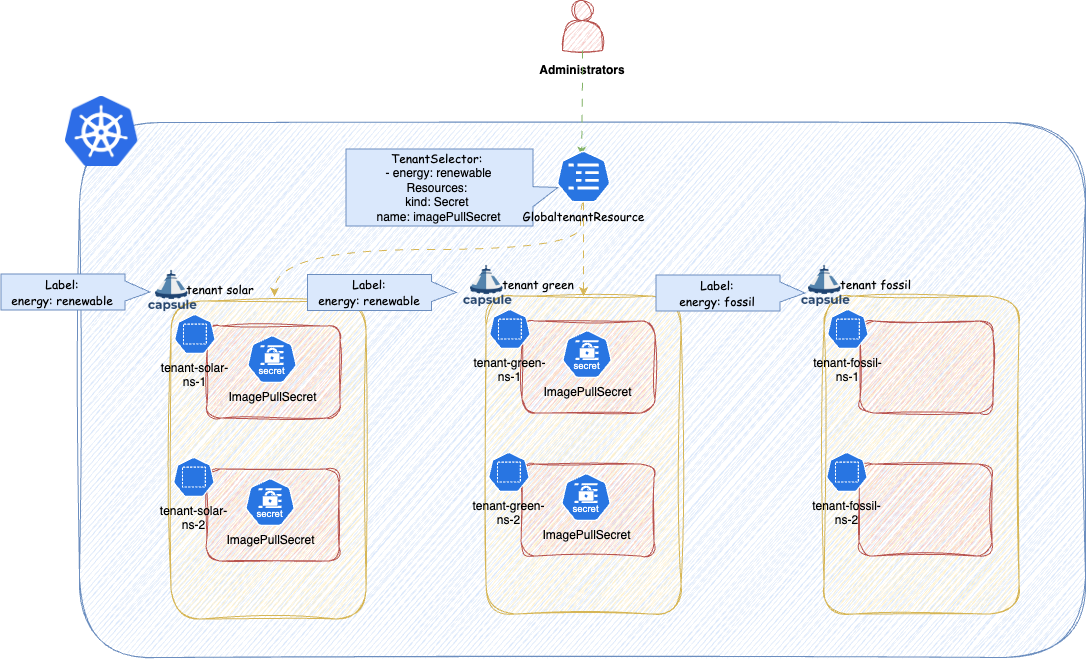
ConfigMaps or Secrets, you must exclude the OpenShift storage version migrator from the replication webhook. Without this, the migrator cannot rotate encryption keys. See the OpenShift installation guide for the required configuration.A common use case is distributing image pull secrets to all Tenants that must use a specific container registry. In the following example, Bill labels two Tenants and then creates a GlobalTenantResource to push the corresponding pull secret into each of their Namespaces automatically.
$ kubectl label tnt/solar energy=renewable
tenant solar labeled
$ kubectl label tnt/green energy=renewable
tenant green labeled
The pull secret already exists in the harbor-system namespace, labelled accordingly:
$ kubectl -n harbor-system get secret --show-labels
NAME TYPE DATA AGE LABELS
imagePullSecret Opaque 1 28s tenant=renewable
Without automation, these credentials would need to be distributed manually - against the self-service principle of Capsule. Bill solves this with a single GlobalTenantResource:
apiVersion: capsule.clastix.io/v1beta2
kind: GlobalTenantResource
metadata:
name: renewable-pull-secrets
spec:
tenantSelector:
matchLabels:
energy: renewable
resyncPeriod: 60s
resources:
- namespacedItems:
- apiVersion: v1
kind: Secret
namespace: harbor-system
selector:
matchLabels:
tenant: renewable
Capsule selects all Tenants matching tenantSelector, then replicates every item in namespacedItems into each Namespace belonging to those Tenants. The controller reconciles on the interval defined by resyncPeriod.
Objects managed by this controller can be either created (new objects) or adopted (existing objects). See Object Management in the Advanced section for full details.
A block that describes which Tenants the resource should be replicated to. matchLabels and matchExpressions can be used to select the desired Tenants. To select all tenants with the label energy: renewable, use:
tenantSelector:
matchLabels:
energy: renewable
TenantSelector is an optional field. If not set, the resources will be replicated to all tenants.
A resource block defines what to replicate. Multiple blocks can be stacked in the resources array, each using one or more of the strategies below.
The namespaceSelector field restricts replication to Namespaces matching a label selector. Capsule also protects selected resources from modification by Tenant users via its webhook.
Use additionalMetadata to attach extra labels and annotations to every generated object. Fast Template values are supported:
---
apiVersion: capsule.clastix.io/v1beta2
kind: GlobalTenantResource
metadata:
name: tenant-cluster-rbac
spec:
scope: Tenant
resources:
- additionalMetadata:
labels:
k8s.company.com/tenant: "{{tenant.name}}"
annotations:
k8s.company.com/cost-center: "inv-120"
generators:
- missingKey: error
template: |
---
apiVersion: rbac.authorization.k8s.io/v1
kind: ClusterRole
metadata:
name: tenant:{{$.tenant.metadata.name}}:priority
labels:
k8s.company.com/tenant: "test"
rules:
- apiGroups: ["scheduling.k8s.io"]
verbs: ["get"]
resources: ["priorityclasses"]
When the same label key appears in both additionalMetadata and the template, additionalMetadata takes priority.
The following labels are always stripped because they are reserved for the controller:
capsule.clastix.io/resourcesprojectcapsule.dev/created-bycapsule.clastix.io/managed-byprojectcapsule.dev/managed-byReference existing resources for replication across Tenant Namespaces. The controller validates that any resource kind listed here is namespace-scoped; cluster-scoped kinds are rejected with an error.
---
apiVersion: capsule.clastix.io/v1beta2
kind: GlobalTenantResource
metadata:
name: tenant-resource-replications
spec:
resyncPeriod: 60s
resources:
- namespacedItems:
# Replicate all Configmaps labeled with projectcapsule.dev/replicate: "true"
- apiVersion: v1
kind: ConfigMap
selector:
matchLabels:
projectcapsule.dev/replicate: "true"
# Replicate all Configmaps labeled with projectcapsule.dev/replicate: "true" and in namespace capsule-system
- apiVersion: v1
kind: ConfigMap
namespace: capsule-system
selector:
matchLabels:
projectcapsule.dev/replicate: "true"
# Replicate Configmap named "logging-config" in namespace capsule-system labeled with projectcapsule.dev/replicate: "true" and in namespace capsule-system
- apiVersion: v1
kind: ConfigMap
name: logging-config
namespace: capsule-system
Note: Resources with the label projectcapsule.dev/created-by: resources are ignored by namespacedItems to prevent reconciliation loops.
If you try to define a cluster-scoped resource under namespacedItems, the reconciliation will fail immediately:
---
apiVersion: capsule.clastix.io/v1beta2
kind: GlobalTenantResource
metadata:
name: tenant-resource-replications
spec:
resyncPeriod: 60s
- namespacedItems:
- apiVersion: addons.projectcapsule.dev/v1alpha1
kind: SopsProvider
name: infrastructure-provider
optional: true
status:
conditions:
- lastTransitionTime: "2026-01-15T21:04:15Z"
message: cluster-scoped kind addons.projectcapsule.dev/v1alpha1/SopsProvider is
not allowed
reason: Failed
status: "False"
type: Ready
Providing name triggers a GET request for that single resource rather than a LIST. You must also specify namespace when using name in a GlobalTenantResource:
---
apiVersion: capsule.clastix.io/v1beta2
kind: GlobalTenantResource
metadata:
name: tenant-resource-replications
spec:
resources:
- namespacedItems:
- apiVersion: v1
kind: ConfigMap
name: config-namespace
optional: true
status:
conditions:
- lastTransitionTime: "2026-01-15T21:10:17Z"
message: 'failed to get ConfigMap/config-namespace: an empty namespace may not
be set when a resource name is provided'
reason: Failed
status: "False"
type: Ready
Providing only namespace performs a LIST of all resources of that kind in that namespace:
---
apiVersion: capsule.clastix.io/v1beta2
kind: GlobalTenantResource
metadata:
name: tenant-resource-replications
spec:
resyncPeriod: 60s
resources:
- namespacedItems:
# Fetches all configmaps in the namespace tenants-system
- apiVersion: v1
kind: ConfigMap
namespace: "tenants-system"
# Fetches specific configmaps matching the selector in the namespaces tenants-system
- apiVersion: v1
kind: ConfigMap
namespace: "tenants-system"
selector:
matchLabels:
projectcapsule.dev/replicate: "true"
Fast Templates are supported for namespace:
---
apiVersion: capsule.clastix.io/v1beta2
kind: GlobalTenantResource
metadata:
name: tenant-resource-replications
spec:
resyncPeriod: 60s
resources:
- namespacedItems:
# Fetch ConfigMaps labeled with the tenant name and replicate them into each Tenant Namespace
- apiVersion: v1
kind: Secret
namespace: "{{tenant.name}}-system"
Note: When using TenantResource instead of GlobalTenantResource, the namespace field has no effect - resources can only be referenced from the Namespace where the TenantResource object was created.
When using selector, the selector labels are stripped from the replicated objects. This prevents the replicated copy from also matching the source selector, which would cause a circular reconciliation loop.
Source ConfigMap:
---
apiVersion: v1
kind: ConfigMap
metadata:
name: app-config
labels:
projectcapsule.dev/replicate: "true"
namespace: wind-test
data:
player_initial_lives: "3"
ui_properties_file_name: "user-interface.properties"
TenantResource:
---
apiVersion: capsule.clastix.io/v1beta2
kind: TenantResource
metadata:
name: app-config
spec:
resources:
- namespacedItems:
- apiVersion: v1
kind: ConfigMap
selector:
matchLabels:
projectcapsule.dev/replicate: "true"
Resulting object in wind-prod (notice the absence of projectcapsule.dev/replicate):
apiVersion: v1
data:
player_initial_lives: "3"
ui_properties_file_name: "user-interface.properties"
kind: ConfigMap
metadata:
labels:
projectcapsule.dev/created-by: resources
projectcapsule.dev/managed-by: resources
name: app-config
namespace: wind-prod
resourceVersion: "784529"
uid: 5f10a3f3-863e-4f45-9454-cff8f5bce86a
Fast Templates are supported for selector:
---
apiVersion: capsule.clastix.io/v1beta2
kind: GlobalTenantResource
metadata:
name: tenant-resource-replications
spec:
resyncPeriod: 60s
resources:
- namespacedItems:
# Fetch ConfigMaps labeled with the tenant name and replicate them into each Tenant Namespace
- apiVersion: v1
kind: ConfigMap
selector:
matchLabels:
company.com/replicate-for: "{{tenant.name}}"
Raw items let you define resources inline as standard Kubernetes manifests. Use this when the resource does not yet exist in the cluster, or when you want to define it directly in the spec. Fast Templates are supported.
---
apiVersion: capsule.clastix.io/v1beta2
kind: GlobalTenantResource
metadata:
name: tenant-resource-replications
spec:
resyncPeriod: 300s
resources:
- rawItems:
- apiVersion: v1
kind: LimitRange
metadata:
name: "{{tenant.name}}-{{namespace}}-resource-constraint"
spec:
limits:
- default: # this section defines default limits
cpu: 500m
defaultRequest: # this section defines default requests
cpu: 500m
max: # max and min define the limit range
cpu: "1"
min:
cpu: 100m
type: Container
The following example creates a SopsProvider for each Tenant:
---
apiVersion: capsule.clastix.io/v1beta2
kind: GlobalTenantResource
metadata:
name: tenant-sops-providers
spec:
resyncPeriod: 600s
scope: Tenant
resources:
- rawItems:
- apiVersion: addons.projectcapsule.dev/v1alpha1
kind: SopsProvider
metadata:
name: "{{tenant.name}}-secrets"
spec:
keys:
- namespaceSelector:
matchLabels:
capsule.clastix.io/tenant: "{{tenant.name}}"
sops:
- namespaceSelector:
matchLabels:
capsule.clastix.io/tenant: "{{tenant.name}}"
Because Server-Side Apply is used, you only need to specify the fields you want to manage - the full resource spec is not required.
For more advanced templating, consider Generators.
Generators render one or more Kubernetes objects from a Go template string. The template content must be valid YAML; multi-document output separated by --- is supported. The template engine is based on go-sprout - see available functions.
A simple example that creates a ClusterRole per Tenant:
---
apiVersion: capsule.clastix.io/v1beta2
kind: GlobalTenantResource
metadata:
name: tenant-cluster-rbac
spec:
scope: Tenant
resources:
- generators:
- missingKey: error
template: |
apiVersion: rbac.authorization.k8s.io/v1
kind: ClusterRole
metadata:
name: tenant:{{$.tenant.metadata.name}}:reader
rules:
- apiGroups: [""]
resources: ["secrets"]
verbs: ["get", "watch", "list"]
Templates can also produce multiple objects using flow control:
---
apiVersion: capsule.clastix.io/v1beta2
kind: GlobalTenantResource
metadata:
name: tenant-priority-rbac
spec:
scope: Tenant
resources:
- generators:
- missingKey: error
template: |
{{- range $.tenant.status.classes.priority }}
---
apiVersion: rbac.authorization.k8s.io/v1
kind: ClusterRole
metadata:
name: tenant:{{$.tenant.metadata.name}}:priority:{{.}}
rules:
- apiGroups: ["scheduling.k8s.io"]
resources: ["priorityclasses"]
resourceNames: ["{{.}}"]
verbs: ["get"]
{{- end }}
See Base Context for available template variables. To load additional resources into the template context, see Context in the Advanced section.
Some snippets that might be useful for certain cases.
Extract the Tenant name:
{{ $.tenant.metadata.name }}
Extract the Namespace name:
{{ $.namespace.metadata.name }}
Iterate over all owners of a Tenant:
{{- range $.tenant.status.owners }}
{{ .kind }}: {{ .name }}
{{- end }}
Controls template behaviour when a referenced context key is absent.
Continues execution silently. Missing keys render as the string "<no value>".
This definition with the missing context:
kind: GlobalTenantResource
metadata:
name: missing-key
spec:
resources:
- generators:
- missingKey: invalid
template: |
---
apiVersion: v1
kind: ConfigMap
metadata:
name: show-key
data:
value: {{ $.custom.account.name }}
Turns into after templating:
apiVersion: v1
kind: ConfigMap
metadata:
name: show-key
data:
value: "<no value>"
This is the default behavior. Missing keys resolve to the zero value of their type (usually an empty string).
This definition with the missing context:
kind: GlobalTenantResource
metadata:
name: missing-key
spec:
resources:
- generators:
- missingKey: zero
template: |
---
apiVersion: v1
kind: ConfigMap
metadata:
name: show-key
data:
value: {{ $.custom.account.name }}
Turns into after templating:
apiVersion: v1
kind: ConfigMap
metadata:
name: show-key
data:
value: ""
Stops execution immediately with an error when a required key is missing.
This definition with the missing context:
kind: GlobalTenantResource
metadata:
name: missing-key
spec:
resources:
- generators:
- missingKey: error
template: |
---
apiVersion: v1
kind: ConfigMap
metadata:
name: show-key
data:
value: {{ $.custom.account.name }}
Will error the GlobalTenantResources:
NAME ITEMS READY STATUS AGE
missing-key 6 False error running generator: template: tpl:8:7: executing "tpl" at <$.namespace.name>: map has no entry for key "name" 9m5s
GlobalTenantResources reconcile on the interval defined by resyncPeriod. The default is 60s. Capsule does not watch source resources for changes; it reconciles periodically. A very short interval on large clusters with many Tenants and Namespaces can cause performance issues - tune this value accordingly.
apiVersion: capsule.clastix.io/v1beta2
kind: GlobalTenantResource
metadata:
name: renewable-pull-secrets
spec:
resyncPeriod: 300s # 5 minutes
resources:
- namespacedItems:
- apiVersion: v1
kind: Secret
namespace: harbor-system
selector:
matchLabels:
tenant: renewable
To trigger an immediate reconciliation, add the reconcile.projectcapsule.dev/requestedAt annotation. The annotation is removed once reconciliation completes, making the process repeatable.
kubectl annotate globaltenantresource renewable-pull-secrets \
reconcile.projectcapsule.dev/requestedAt="$(date -Iseconds)"
By default, a GlobalTenantResource replicates resources into every Namespace of the selected Tenants. Setting scope: Tenant changes this to replicate once per Tenant instead.
Possible values:
None: Replicate based on items generated within generators. Essentially not reconciling based on items but running once.Tenant: Replicate once per Tenant.Namespace: Replicate into each Namespace of the selected Tenants. (Default)---
apiVersion: capsule.clastix.io/v1beta2
kind: GlobalTenantResource
metadata:
name: tenant-sops-providers
spec:
resyncPeriod: 60s
scope: Tenant
resources:
- rawItems:
- apiVersion: addons.projectcapsule.dev/v1alpha1
kind: SopsProvider
metadata:
name: {{tenant.name}}-secrets
spec:
keys:
- namespaceSelector:
matchLabels:
capsule.clastix.io/tenant: {{tenant.name}}
sops:
- namespaceSelector:
matchLabels:
capsule.clastix.io/tenant: {{tenant.name}}
Using the scope: Tenant is mainly useful when you want to deploy a cluster-scoped resource once per tenant, such as the SopsProvider above.
Note: When scope: Tenant is set, namespacedItems entries are not processed, since there is no target Namespace in that scope.
Enabling impersonation ensures that replication operations run under a specific ServiceAccount identity, providing a proper audit trail and limiting privilege exposure. You can check which ServiceAccount is currently in use via the object’s status:
kubectl get globaltenantresource custom-cm -o jsonpath='{.status.serviceAccount}' | jq
{
"name": "capsule",
"namespace": "capsule-system"
}
To use a different ServiceAccount, set the serviceAccount field on the object:
---
apiVersion: capsule.clastix.io/v1beta2
kind: GlobalTenantResource
metadata:
name: tenant-resource-replications
spec:
serviceAccount:
name: "default"
namespace: "kube-system"
resources:
- namespacedItems:
- apiVersion: v1
kind: ConfigMap
name: "config-namespace"
If the ServiceAccount lacks the required RBAC, replication will fail with a permission error:
- kind: ConfigMap
name: game-demo
namespace: wind-prod
status:
created: true
message: 'apply failed for item 0/raw-0: applying object failed: configmaps
"game-demo" is forbidden: User "system:serviceaccount:kube-system:default"
cannot patch resource "configmaps" in API group "" in the namespace "wind-prod"'
status: "False"
type: Ready
tenant: wind
version: v1
Grant the ServiceAccount the necessary permissions:
---
apiVersion: rbac.authorization.k8s.io/v1
kind: ClusterRole
metadata:
name: capsule-tenant-replications
rules:
- apiGroups: [""]
resources: ["configmaps"]
verbs: ["list", "get", "patch", "create", "delete"]
---
apiVersion: rbac.authorization.k8s.io/v1
kind: ClusterRoleBinding
metadata:
name: capsule-tenant-replications
subjects:
- kind: ServiceAccount
name: default
namespace: kube-system
roleRef:
kind: ClusterRole
name: capsule-tenant-replications
apiGroup: rbac.authorization.k8s.io
The following permissions are required for each resource type managed by the replication feature:
get (always required)create (always required)patch (always required)delete (always required)list (required for Namespaced Items and Context)Missing any of these will cause replication to fail.
To ensure all GlobalTenantResource objects use a controlled identity by default, configure a cluster-wide default ServiceAccount in the Capsule manager options. Per-object serviceAccount fields override this default.
Read more about Impersonation. You must provide both the name and namespace of the ServiceAccount:
manager:
options:
impersonation:
globalDefaultServiceAccount: "capsule-default-global"
globalDefaultServiceAccountNamespace: "capsule-system"
The default ServiceAccount must have sufficient RBAC. The following example allows it to manage Secrets and LimitRanges across all Tenants:
---
apiVersion: rbac.authorization.k8s.io/v1
kind: ClusterRole
metadata:
name: capsule-default-global
rules:
- apiGroups: [""]
resources: ["limitranges", "secrets"]
verbs: ["get", "patch", "create", "delete"]
---
apiVersion: rbac.authorization.k8s.io/v1
kind: ClusterRoleBinding
metadata:
name: capsule-default-global
subjects:
- kind: ServiceAccount
name: capsule-default-global
namespace: capsule-system
roleRef:
kind: ClusterRole
name: capsule-default-global
apiGroup: rbac.authorization.k8s.io
If a GlobalTenantResource attempts to manage a resource type not covered by the default ServiceAccount’s ClusterRole, replication will fail with a permissions error:
---
apiVersion: capsule.clastix.io/v1beta2
kind: GlobalTenantResource
metadata:
name: default-sa-replication
spec:
resyncPeriod: 60s
resources:
- rawItems:
- apiVersion: v1
kind: ConfigMap
metadata:
name: game-demo
data:
player_initial_lives: "3"
ui_properties_file_name: "user-interface.properties"
This section covers more advanced features of the Replication setup.
Capsule uses Server-Side Apply for all replication operations. Two management modes exist depending on whether the object already existed before reconciliation.
An object is Created when the GlobalTenantResource first encounters it - it did not exist prior to reconciliation. Created objects receive the following metadata:
metadata.labels.projectcapsule.dev/created-by: resourcesmetadata.labels.projectcapsule.dev/managed-by: resourcesmetadata.ownerReferences: Owner reference to the corresponding GlobalTenantResourcekind: ConfigMap
metadata:
labels:
projectcapsule.dev/created-by: resources
projectcapsule.dev/managed-by: resources
name: common-config
namespace: green-test
ownerReferences:
- apiVersion: capsule.clastix.io/v1beta2
kind: GlobalTenantResource
name: tenant-cm-providers
uid: 903395eb-9314-462d-ae19-7c87d71e890b
resourceVersion: "549517"
uid: 23abbb7a-2926-416a-bc72-9f793ebf6080
Since we are using Server-Side Apply we can also allow different items making changes to the same object, when it was created by a GlobalTenantResource, as long as there are no conflicts:
---
apiVersion: capsule.clastix.io/v1beta2
kind: GlobalTenantResource
metadata:
name: tenant-cm-registration
spec:
scope: Tenant
resources:
- generators:
- template: |
---
apiVersion: v1
kind: ConfigMap
metadata:
name: common-config
namespace: default
data:
{{ $.tenant.metadata.name }}.conf: |
{{ toYAML $.tenant.metadata | nindent 4 }}
Will result in the following object:
apiVersion: v1
data:
green.conf: "\ncreationTimestamp: \"2026-02-05T08:03:25Z\"\ngeneration: 2\nlabels:\n
\ customer: a\n kubernetes.io/metadata.name: green\nname: green\nresourceVersion:
\"549455\"\nuid: 7b756efd-cdad-484b-a41f-d1a00d401781 \n"
solar.conf: "\ncreationTimestamp: \"2026-02-05T08:03:25Z\"\ngeneration: 2\nlabels:\n
\ customer: a\n kubernetes.io/metadata.name: solar\nname: solar\nresourceVersion:
\"549521\"\nuid: c2b21703-2321-4789-af9f-65e541c883d5 \n"
wind.conf: "\ncreationTimestamp: \"2026-02-05T13:43:22Z\"\ngeneration: 1\nlabels:\n
\ kubernetes.io/metadata.name: wind\nname: wind\nresourceVersion: \"542629\"\nuid:
72388253-ff5c-4614-94a2-2fd8cd7cf813 \n"
kind: ConfigMap
metadata:
creationTimestamp: "2026-02-05T15:37:09Z"
labels:
projectcapsule.dev/created-by: resources
projectcapsule.dev/managed-by: resources
name: common-config
namespace: default
ownerReferences:
- apiVersion: capsule.clastix.io/v1beta2
kind: GlobalTenantResource
name: tenant-sops-providers
uid: 7cf01d19-0555-490f-bd01-a5beff0cbc64
resourceVersion: "561707"
uid: 33cfe1c6-1c9e-4417-9dd5-26ac0ba3bc85
This also works across different GlobalTenantResources:
apiVersion: v1
data:
common.conf: "\ncreationTimestamp: \"2026-02-05T08:03:25Z\"\ngeneration: 2\nlabels:\n
\ customer: a\n kubernetes.io/metadata.name: green\nname: green\nresourceVersion:
\"549455\"\nuid: 7b756efd-cdad-484b-a41f-d1a00d401781 \n"
green.conf: "\ncreationTimestamp: \"2026-02-05T08:03:25Z\"\ngeneration: 2\nlabels:\n
\ customer: a\n kubernetes.io/metadata.name: green\nname: green\nresourceVersion:
\"549455\"\nuid: 7b756efd-cdad-484b-a41f-d1a00d401781 \n"
solar.conf: "\ncreationTimestamp: \"2026-02-05T08:03:25Z\"\ngeneration: 2\nlabels:\n
\ customer: a\n kubernetes.io/metadata.name: solar\nname: solar\nresourceVersion:
\"549521\"\nuid: c2b21703-2321-4789-af9f-65e541c883d5 \n"
wind.conf: "\ncreationTimestamp: \"2026-02-05T13:43:22Z\"\ngeneration: 1\nlabels:\n
\ kubernetes.io/metadata.name: wind\nname: wind\nresourceVersion: \"542629\"\nuid:
72388253-ff5c-4614-94a2-2fd8cd7cf813 \n"
kind: ConfigMap
metadata:
creationTimestamp: "2026-02-05T15:37:09Z"
labels:
projectcapsule.dev/created-by: resources
projectcapsule.dev/managed-by: resources
name: common-config
namespace: default
ownerReferences:
- apiVersion: capsule.clastix.io/v1beta2
kind: GlobalTenantResource
name: tenant-sops-providers
uid: 7cf01d19-0555-490f-bd01-a5beff0cbc64
- apiVersion: capsule.clastix.io/v1beta2
kind: GlobalTenantResource
name: tenant-cm-registration
uid: b2d34727-b403-4e2a-9115-232ba61d3c69
resourceVersion: "562881"
uid: 33cfe1c6-1c9e-4417-9dd5-26ac0ba3bc85
However, when try to manage the same field, we will get an error:
---
apiVersion: capsule.clastix.io/v1beta2
kind: GlobalTenantResource
metadata:
name: tenant-cm-registration
spec:
scope: Tenant
resources:
generators:
- template: |
---
apiVersion: v1
kind: ConfigMap
metadata:
name: common-config
namespace: default
data:
common.conf: |
{{ toYAML $.tenant.metadata.name | nindent 4 }}
We can see a Conflict Error in the GlobalTenantResource status:
kubectl get globaltenantresource tenant-cm-registration -o yaml
...
status:
processedItems:
- kind: ConfigMap
name: common-config
namespace: default
status:
lastApply: "2026-02-05T15:52:26Z"
status: "True"
type: Ready
tenant: wind
version: v1
- kind: ConfigMap
name: common-config
namespace: default
status:
created: true
message: 'apply failed for item 0/generator-0-0: applying object failed: Apply
failed with 1 conflict: conflict with "projectcapsule.dev/resource/cluster/tenant-cm-registration//default/wind/":
.data.common.conf'
status: "False"
type: Ready
tenant: green
version: v1
- kind: ConfigMap
name: common-config
namespace: default
status:
created: true
message: 'apply failed for item 0/generator-0-0: applying object failed: Apply
failed with 1 conflict: conflict with "projectcapsule.dev/resource/cluster/tenant-cm-registration//default/wind/":
.data.common.conf'
status: "False"
type: Ready
tenant: solar
version: v1
You can check the created property on each item’s status to determine whether it was created or adopted. Field conflicts can be resolved with Force.
When pruning is enabled, Created objects are deleted when they fall out of scope. When pruning is disabled, the following metadata is removed instead:
metadata.labels.projectcapsule.dev/managed-by: resourcesmetadata.ownerReferences: owner reference to the GlobalTenantResourceThe label metadata.labels.projectcapsule.dev/created-by is preserved after pruning, allowing another GlobalTenantResource or TenantResource to take ownership without explicit adoption. To prevent re-adoption, remove or change this label manually.
By default, a GlobalTenantResource cannot modify objects it did not create. Adoption must be explicitly enabled. Adopted objects receive the following metadata:
metadata.labels.projectcapsule.dev/managed-by: resourcesFor example the following GlobalTenantResource tries to change the content of the existing argo-rbac ConfigMap:
apiVersion: capsule.clastix.io/v1beta2
kind: GlobalTenantResource
metadata:
name: argo-cd-permission
spec:
resources:
- generators:
- template: |
---
apiVersion: v1
kind: ConfigMap
metadata:
name: argocd-rbac-cm
data:
{{ $.tenant.metadata.name }}.csv: |
{{- range $.tenant.status.owners }}
p, {{ .name }}, applications, sync, my-{{ $.tenant.metadata.name }}/*, allow
{{- end }}
We can see, that we get an error for all items. Telling us, we can not overwrite an existing object:
kubectl get globaltenantresource argo-cd-permission -o yaml
...
processedItems:
- kind: ConfigMap
name: argocd-rbac-cm
namespace: argocd
status:
message: 'apply failed for item 0/generator-0-0: resource evaluation: resource
v1/ConfigMap argocd/argocd-rbac-cm exists and cannot be adopted'
status: "False"
type: Ready
tenant: green
version: v1
- kind: ConfigMap
name: argocd-rbac-cm
namespace: argocd
status:
message: 'apply failed for item 0/generator-0-0: resource evaluation: resource
v1/ConfigMap argocd/argocd-rbac-cm exists and cannot be adopted'
status: "False"
type: Ready
tenant: solar
version: v1
- kind: ConfigMap
name: argocd-rbac-cm
namespace: argocd
status:
message: 'apply failed for item 0/generator-0-0: resource evaluation: resource
v1/ConfigMap argocd/argocd-rbac-cm exists and cannot be adopted'
status: "False"
type: Ready
tenant: wind
version: v1
If we want to allow that, we can set the adopt property to true:
apiVersion: capsule.clastix.io/v1beta2
kind: GlobalTenantResource
metadata:
name: argo-cd-permission
spec:
settings:
adopt: true
resources:
- generators:
- template: |
---
apiVersion: v1
kind: ConfigMap
metadata:
name: argocd-rbac-cm
data:
{{ $.tenant.metadata.name }}.csv: |
{{- range $.tenant.status.owners }}
p, {{ .name }}, applications, sync, {{ $.tenant.metadata.name }}/*, allow
{{- end }}
When adoption is enabled, resources can be modified. Note that if multiple operators manage the same resource, all must use Server-Side Apply to avoid conflicts.
kubectl get cm -n argocd argocd-rbac-cm -o yaml
apiVersion: v1
data:
policy.csv: |
p, my-org:team-alpha, applications, sync, my-project/*, allow
g, my-org:team-beta, role:admin
g, user@example.org, role:admin
g, admin, role:admin
g, role:admin, role:readonly
policy.default: role:readonly
scopes: '[groups, email]'
green.csv: |2
p, oidc:org:devops, applications, sync, green/*, allow
p, bob, applications, sync, green/*, allow
solar.csv: |2
p, oidc:org:platform, applications, sync, solar/*, allow
p, alice, applications, sync, solar/*, allow
wind.csv: |2
p, oidc:org:devops, applications, sync, wind/*, allow
p, joe, applications, sync, wind/*, allow
kind: ConfigMap
When pruning is enabled, adoption is reverted - the patches introduced by the GlobalTenantResource are removed from the object. When pruning is disabled, only the metadata.labels.projectcapsule.dev/managed-by label is removed.
A GlobalTenantResource can declare dependencies on other GlobalTenantResource objects using dependsOn. The controller will not reconcile the resource until all declared dependencies are in Ready state.
---
apiVersion: capsule.clastix.io/v1beta2
kind: GlobalTenantResource
metadata:
name: gitops-owners
spec:
resyncPeriod: 60s
dependsOn:
- name: custom-cm
resources:
- additionalMetadata:
labels:
projectcapsule.dev/tenant: "{{tenant.name}}"
rawItems:
- apiVersion: capsule.clastix.io/v1beta2
kind: TenantOwner
metadata:
name: "{{tenant.name}}-{{namespace}}"
spec:
clusterRoles:
- capsule-namespace-deleter
- admin
kind: ServiceAccount
name: "system:serviceaccount:{{namespace}}:gitops-reconciler"
We can observe the status of the GlobalTenantResource reflecting, that it depends GlobalTenantResource is not yet ready.
kubectl get globaltenantresource
NAME ITEM COUNT READY STATUS AGE
custom-cm 6 False applying of 6 resources failed 12h
gitops-owners 6 False dependency custom-cm-2 not found 8h
If a dependency does not exist, we can observe a similar status message when describing the GlobalTenantResource object.
kubectl get globaltenantresource gitops-owners
NAME ITEM COUNT READY STATUS AGE
gitops-owners 6 False dependency custom-cm-2 not found 8h
Dependencies are evaluated in the order they are declared in the dependsOn array.
Setting settings.force: true instructs Capsule to force-apply changes on Server-Side Apply conflicts, claiming field ownership even if another manager already holds it.
This option should generally be avoided. Forcing ownership over a field managed by another operator will almost certainly cause a reconcile war. Only use it in scenarios where you intentionally want Capsule to win ownership disputes.
---
apiVersion: capsule.clastix.io/v1beta2
kind: GlobalTenantResource
metadata:
name: tenant-technical-accounts
spec:
settings:
force: true
resources:
- generators:
- template: |
---
apiVersion: v1
kind: ConfigMap
metadata:
name: shared-config
data:
common.conf: |
{{ toYAML $.tenant.metadata | nindent 4 }}
The context field lets you load additional Kubernetes resources into the template rendering context. This is useful when you need to iterate over existing objects as part of your template logic. To inspect the full context available to a template, you can create a ConfigMap that dumps it:
---
apiVersion: capsule.clastix.io/v1beta2
kind: GlobalTenantResource
metadata:
name: tenant-sops-providers
spec:
resyncPeriod: 600s
resources:
- context:
resources:
- index: secrets
apiVersion: v1
kind: Secret
namespace: "{{.namespace}}"
selector:
matchLabels:
pullsecret.company.com: "true"
- index: sa
apiVersion: v1
kind: ServiceAccount
namespace: "{{.namespace}}"
generators:
- template: |
---
apiVersion: v1
kind: ConfigMap
metadata:
name: show-context
data:
context.yaml: |
{{- toYAML $ | nindent 4 }}
A useful use case for this can be to add all imagePullSecrets to the default service account, so users don’t have to add these manually to their deployment spec. In the example below, all the secrets with the label energy: non-renewable are selected from the namespace system-imagepullsecrets. The names of these secrets are added to the default service account’s .imagePullSecrets for all matching tenants. Note also the dependsOn, which is a dependency to a different GlobalTenantResource which replicates the secret itself into each tenant namespace:
---
apiVersion: capsule.clastix.io/v1beta2
kind: GlobalTenantResource
metadata:
name: imagepullsecrets-default-sa-non-renewable
spec:
settings:
adopt: true
tenantSelector:
matchLabels:
energy: non-renewable
dependsOn:
- name: replicate-imagepullsecrets-non-renewable
resyncPeriod: 600s
resources:
- context:
resources:
- index: secrets
apiVersion: v1
kind: Secret
namespace: "system-imagepullsecrets"
selector:
matchLabels:
imagePullSecret: "true"
energy: non-renewable
generators:
- template: |
---
apiVersion: v1
kind: ServiceAccount
metadata:
name: default
{{- if $.secrets }}
imagePullSecrets:
{{- range $.secrets }}
- name: {{ .metadata.name }}
{{- end }}
{{- end }}
The following context is always available in generator templates. The tenant key is always present. The namespace key is only available when the scope is Namespace (the default); it is absent when scope: Tenant is set.
tenant:
apiVersion: capsule.clastix.io/v1beta2
kind: Tenant
metadata:
creationTimestamp: "2026-02-06T09:54:30Z"
generation: 1
labels:
kubernetes.io/metadata.name: wind
name: wind
resourceVersion: "4038"
uid: 93992a2b-cba4-4d33-9d09-da8fc0bfe93c
spec:
additionalRoleBindings:
- clusterRoleName: view
subjects:
- apiGroup: rbac.authorization.k8s.io
kind: Group
name: wind-users
owners:
- clusterRoles:
- admin
- capsule-namespace-deleter
kind: User
name: joe
permissions:
matchOwners:
- matchLabels:
team: devops
- matchLabels:
tenant: wind
status:
classes:
priority:
- system-cluster-critical
- system-node-critical
storage:
- standard
conditions:
- lastTransitionTime: "2026-02-06T09:54:30Z"
message: reconciled
reason: Succeeded
status: "True"
type: Ready
- lastTransitionTime: "2026-02-06T09:54:30Z"
message: not cordoned
reason: Active
status: "False"
type: Cordoned
namespaces:
- wind-prod
- wind-test
owners:
- clusterRoles:
- admin
- capsule-namespace-deleter
kind: Group
name: oidc:org:devops
- clusterRoles:
- admin
- capsule-namespace-deleter
kind: User
name: joe
size: 2
spaces:
- conditions:
- lastTransitionTime: "2026-02-06T09:54:30Z"
message: reconciled
reason: Succeeded
status: "True"
type: Ready
- lastTransitionTime: "2026-02-06T09:54:30Z"
message: not cordoned
reason: Active
status: "False"
type: Cordoned
metadata: {}
name: wind-test
uid: 24bb3c33-6e93-4191-8dc6-24b3df7cb1ed
- conditions:
- lastTransitionTime: "2026-02-06T09:54:30Z"
message: reconciled
reason: Succeeded
status: "True"
type: Ready
- lastTransitionTime: "2026-02-06T09:54:30Z"
message: not cordoned
reason: Active
status: "False"
type: Cordoned
metadata: {}
name: wind-prod
uid: b3f3201b-8527-47c4-928b-ad6ae610e707
state: Active
namespace:
apiVersion: v1
kind: Namespace
metadata:
creationTimestamp: "2026-02-06T09:54:30Z"
labels:
capsule.clastix.io/tenant: wind
kubernetes.io/metadata.name: wind-test
name: wind-test
ownerReferences:
- apiVersion: capsule.clastix.io/v1beta2
kind: Tenant
name: wind
uid: 93992a2b-cba4-4d33-9d09-da8fc0bfe93c
resourceVersion: "3977"
uid: 24bb3c33-6e93-4191-8dc6-24b3df7cb1ed
spec:
finalizers:
- kubernetes
status:
phase: Active
Currently mainly the conditions of GlobalTenantResources are exposed as metrics:
# HELP capsule_global_resource_condition The current condition status of a global tenant resource.
# TYPE capsule_global_resource_condition gauge
capsule_global_resource_condition{condition="Cordoned",name="templated-forbidden-namespace"} 0
capsule_global_resource_condition{condition="Ready",name="templated-forbidden-namespace"} 1
Different use cases for GlobalTenantResource objects.
---
apiVersion: capsule.clastix.io/v1beta2
kind: GlobalTenantResource
metadata:
name: gitops-reconciler
spec:
resyncPeriod: 60s
resources:
- rawItems:
- apiVersion: capsule.clastix.io/v1beta2
kind: TenantOwner
metadata:
name: "{{tenant.name}}-{{namespace}}"
spec:
clusterRoles:
- capsule-namespace-deleter
- admin
kind: ServiceAccount
name: "system:serviceaccount:{{namespace}}:gitops-reconciler"
apiVersion: capsule.clastix.io/v1beta2
kind: GlobalTenantResource
metadata:
name: capsule-proxy-settings
spec:
scope: Tenant
resyncPeriod: 30s
resources:
- generators:
- missingKey: zero
template: |
---
apiVersion: capsule.clastix.io/v1beta1
kind: GlobalProxySettings
metadata:
name: {{ $.tenant.metadata.name }}-proxy-settings
spec:
rules:
- subjects:
{{- range $.tenant.status.owners }}
- kind: {{ .kind }}
name: {{ .name }}
{{- end }}
clusterResources:
- apiGroups:
- "capsule.clastix.io"
resources:
- "globalcustomquotas"
operations:
- List
selector:
matchLabels:
company.com/tenant: {{ $.tenant.metadata.name }}
The following example solves a common problem with Gateway-API and Certificate management. Assume you have a managed gateway with a managed cluster-issuer. In this case we can load all the HTTPRoutes and template the corresponding tenant. The following example also allows to modify the EnvoyProxy instance with Tenant Data
---
apiVersion: capsule.clastix.io/v1beta2
kind: GlobalTenantResource
metadata:
name: managed-envoy-gateway
spec:
scope: Tenant
resyncPeriod: 30s
resources:
- context:
resources:
- apiVersion: gateway.networking.k8s.io/v1
kind: HTTPRoute
index: https
selector:
matchLabels:
projectcapsule.dev/tenant: "{{tenant.name}}"
generators:
- missingKey: zero
template: |
{{- $ingressBandwidth := dig "spec" "data" "networking" "ingress" "bandwidth" "" $.tenant }}
{{- $egressBandwidth := dig "spec" "data" "networking" "egress" "bandwidth" "" $.tenant }}
{{- $loadBalancerIP := dig "spec" "data" "networking" "ingress" "loadbalancer" "" $.tenant }}
---
apiVersion: gateway.envoyproxy.io/v1alpha1
kind: EnvoyProxy
metadata:
name: tenant-{{ $.tenant.metadata.name }}-gateway
namespace: tenant-{{ $.tenant.metadata.name }}-system
spec:
logging:
level:
default: info
provider:
type: Kubernetes
kubernetes:
envoyDeployment:
replicas: 2
pod:
priorityClassName: tenant-critical
{{- if or $ingressBandwidth $egressBandwidth }}
annotations:
{{- with $ingressBandwidth }}
kubernetes.io/ingress-bandwidth: {{ . }}
{{- end }}
{{- with $egressBandwidth }}
kubernetes.io/egress-bandwidth: {{ . }}
{{- end }}
{{- end }}
{{- with $loadBalancerIP }}
envoyService:
loadBalancerIP: {{ . }}
{{- end }}
- missingKey: zero
template: |
---
apiVersion: gateway.networking.k8s.io/v1
kind: Gateway
metadata:
name: tenant-{{ $.tenant.metadata.name }}-gateway
namespace: tenant-{{ $.tenant.metadata.name }}-system
annotations:
cert-manager.io/cluster-issuer: managed-cluster-issuer
cert-manager.io/private-key-size: "4096"
cert-manager.io/private-key-algorithm: RSA
spec:
gatewayClassName: tenants
infrastructure:
parametersRef:
group: gateway.envoyproxy.io
kind: EnvoyProxy
name: tenant-{{ $.tenant.metadata.name }}-gateway
listeners:
- name: http-challenge
port: 80
protocol: HTTP
allowedRoutes:
namespaces:
from: Selector
selector:
matchLabels:
capsule.clastix.io/tenant: "{{ $.tenant.metadata.name }}"
{{- range $_, $http := $.https }}
{{- range $i, $hostname := $http.spec.hostnames }}
- name: {{ $http.metadata.namespace }}-{{ $http.metadata.name }}-{{ $i }}
port: 443
protocol: HTTPS
hostname: {{ $hostname}}
tls:
mode: Terminate
certificateRefs:
- group: ''
kind: Secret
name: {{ $http.metadata.namespace }}-{{ $http.metadata.name }}-{{ $i }}-tls
allowedRoutes:
namespaces:
from: Selector
selector:
matchLabels:
kubernetes.io/metadata.name: "{{ $http.metadata.namespace }}"
{{- end }}
{{- end }}
This example shows the case when you need to populate content in a subkey, where Server-Side Apply is not sufficient, since it cannot manage specific fields of an object, but only the whole object itself. In this case, we can use a generator to generate the whole content of the subkey based on the Tenant’s data.
With Cortex/Mimir, you can use the overrides field to specify tenant-specific configuration (limits). This example generates a ConfigMap for each Tenant containing its overrides, based on the Tenant’s data, if provided. This is a case, where the scope is set to None, since we don’t want to replicate the generated ConfigMap into each Namespace, but just have it available in a single location for consumption by an external system:
apiVersion: capsule.clastix.io/v1beta2
kind: GlobalTenantResource
metadata:
name: mimir-overrides-cluster
spec:
scope: None
resyncPeriod: 30s
resources:
- context:
resources:
- apiVersion: capsule.clastix.io/v1beta2
kind: Tenant
index: tnts
generators:
- missingKey: zero
template: |
---
apiVersion: v1
kind: ConfigMap
metadata:
name: mimir-overrides
namespace: observability-system
data:
overrides.yaml: |
overrides:
{{- range $i, $tnt := $.tnts }}
{{ $tnt.metadata.name }}:
ingestion_rate: {{ $tnt | dig "spec" "data" "limits" "ingestionRate" 10000 }}
ingestion_burst_size: {{ $tnt | dig "spec" "data" "limits" "ingestionBurstSize" 20000 }}
{{- end }}
TenantResource is a namespace-scoped CRD that lets Tenant owners automatically replicate Kubernetes resources across all Namespaces in their Tenant - without manual distribution or custom automation. It is the tenant-level counterpart to GlobalTenantResource, which is reserved for cluster administrators.
The diagram below shows that an Administrator or a Tenant Owner can create a TenantResource inside a Tenant. In the TenantResource spec, a user specifies which resource they would like to replicate across the Tenant. When applied, this resource gets automatically distributed across all Namespaces that are part of the Tenant.
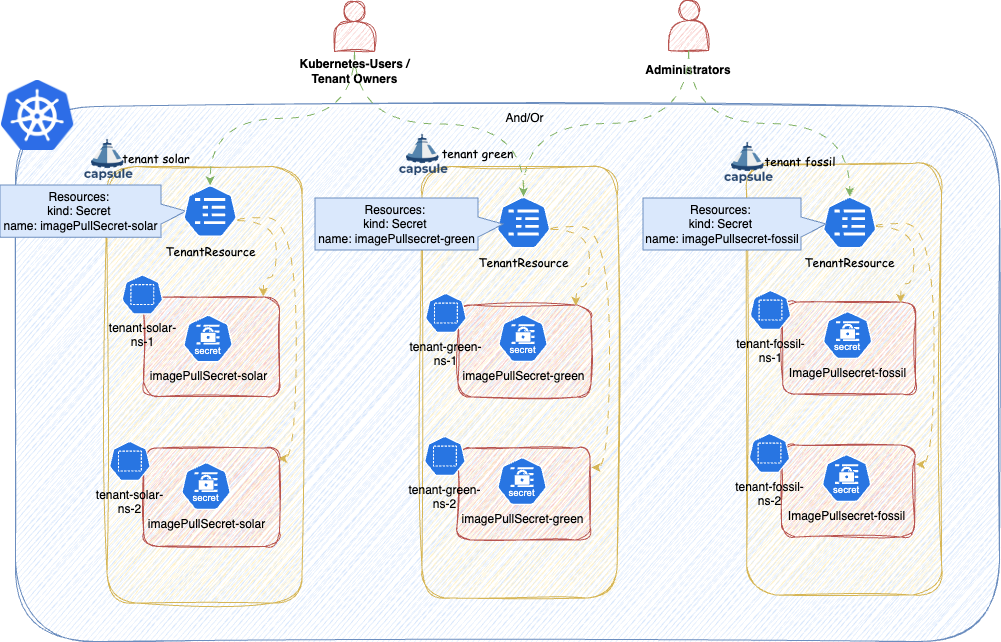
ConfigMaps or Secrets, you must exclude the OpenShift storage version migrator from the replication webhook. Without this, the migrator cannot rotate encryption keys. See the OpenShift installation guide for the required configuration.Tenant owners must have RBAC permission to create, update, and delete TenantResource objects. The following ClusterRole aggregates to the admin role, granting all holders permission to manage TenantResource instances:
apiVersion: rbac.authorization.k8s.io/v1
kind: ClusterRole
metadata:
name: allow-tenant-resources
labels:
rbac.authorization.k8s.io/aggregate-to-admin: "true"
rules:
- apiGroups: ["capsule.clastix.io"]
resources: ["tenantresources"]
verbs: ["get", "list", "watch", "create", "update", "patch", "delete"]
Alice, the project lead for the solar tenant, wants to provision a PostgreSQL database for each production Namespace automatically:
$ kubectl get namespaces -l capsule.clastix.io/tenant=solar --show-labels
NAME STATUS AGE LABELS
solar-1 Active 59s capsule.clastix.io/tenant=solar,environment=production,kubernetes.io/metadata.name=solar-1,name=solar-1
solar-2 Active 58s capsule.clastix.io/tenant=solar,environment=production,kubernetes.io/metadata.name=solar-2,name=solar-2
solar-system Active 62s capsule.clastix.io/tenant=solar,kubernetes.io/metadata.name=solar-system,name=solar-system
She creates a TenantResource in solar-system:
apiVersion: capsule.clastix.io/v1beta2
kind: TenantResource
metadata:
name: solar-db
namespace: solar-system
spec:
resyncPeriod: 60s
resources:
- additionalMetadata:
labels:
"replicated-by": "capsule"
namespaceSelector:
matchLabels:
environment: production
rawItems:
- apiVersion: postgresql.cnpg.io/v1
kind: Cluster
metadata:
name: "postgres-{{namespace}}"
spec:
description: PostgreSQL cluster for the {{tenant.name}} Project
instances: 3
postgresql:
pg_hba:
- hostssl app all all cert
primaryUpdateStrategy: unsupervised
storage:
size: 1Gi
Capsule replicates the Cluster resource into every Namespace matching the namespaceSelector. The Namespace where the TenantResource itself lives (solar-system) is automatically excluded, and Capsule injects labels to prevent the TenantResource from propagating into unowned Namespaces.
$ kubectl get clusters.postgresql.cnpg.io -A
NAMESPACE NAME AGE INSTANCES READY STATUS PRIMARY
solar-1 postgres-solar-1 80s 3 3 Cluster in healthy state postgresql-1
solar-2 postgres-solar-2 80s 3 3 Cluster in healthy state postgresql-1
Objects managed by this controller can be either created (new objects) or adopted (existing objects). See Object Management in the Advanced section for full details.
A resource block defines what to replicate. Multiple blocks can be stacked in the resources array, each using one or more of the strategies below.
The namespaceSelector field restricts replication to Namespaces matching a label selector. Capsule also protects selected resources from modification by Tenant users via its webhook.
Use additionalMetadata to attach extra labels and annotations to every generated object. Fast Template values are supported:
---
apiVersion: capsule.clastix.io/v1beta2
kind: TenantResource
metadata:
name: tenant-cluster-rbac
spec:
scope: Tenant
resources:
- additionalMetadata:
labels:
k8s.company.com/tenant: "{{tenant.name}}"
annotations:
k8s.company.com/cost-center: "inv-120"
generators:
- missingKey: error
template: |
---
apiVersion: rbac.authorization.k8s.io/v1
kind: ClusterRole
metadata:
name: tenant:{{$.tenant.metadata.name}}:priority
labels:
k8s.company.com/tenant: "test"
rules:
- apiGroups: ["scheduling.k8s.io"]
verbs: ["get"]
resources: ["priorityclasses"]
When the same label key appears in both additionalMetadata and the template, additionalMetadata takes priority.
The following labels are always stripped because they are reserved for the controller:
capsule.clastix.io/resourcesprojectcapsule.dev/created-bycapsule.clastix.io/managed-byprojectcapsule.dev/managed-byReference existing resources for replication across Tenant Namespaces. The controller validates that any resource kind listed here is namespace-scoped; cluster-scoped kinds are rejected with an error.
---
apiVersion: capsule.clastix.io/v1beta2
kind: TenantResource
metadata:
name: tenant-resource-replications
spec:
resyncPeriod: 60s
resources:
- namespacedItems:
# Replicate all Configmaps labeled with projectcapsule.dev/replicate: "true"
- apiVersion: v1
kind: ConfigMap
selector:
matchLabels:
projectcapsule.dev/replicate: "true"
# Replicate all Configmaps labeled with projectcapsule.dev/replicate: "true" and in namespace capsule-system
- apiVersion: v1
kind: ConfigMap
namespace: capsule-system
selector:
matchLabels:
projectcapsule.dev/replicate: "true"
# Replicate Configmap named "logging-config" in namespace capsule-system labeled with projectcapsule.dev/replicate: "true" and in namespace capsule-system
- apiVersion: v1
kind: ConfigMap
name: logging-config
namespace: capsule-system
Note: Resources with the label projectcapsule.dev/created-by: resources are ignored by namespacedItems to prevent reconciliation loops.
If you try to define a cluster-scoped resource under namespacedItems, the reconciliation will fail immediately:
---
apiVersion: capsule.clastix.io/v1beta2
kind: TenantResource
metadata:
name: tenant-resource-replications
spec:
resyncPeriod: 60s
resources:
- namespacedItems:
- apiVersion: addons.projectcapsule.dev/v1alpha1
kind: SopsProvider
name: infrastructure-provider
optional: true
status:
conditions:
- lastTransitionTime: "2026-01-15T21:04:15Z"
message: cluster-scoped kind addons.projectcapsule.dev/v1alpha1/SopsProvider is
not allowed
reason: Failed
status: "False"
type: Ready
Providing name triggers a GET request for that single resource rather than a LIST:
---
apiVersion: capsule.clastix.io/v1beta2
kind: TenantResource
metadata:
name: tenant-resource-replications
namespace: wind-test
spec:
resyncPeriod: 60s
resources:
- namespacedItems:
# Fetch ConfigMaps labeled with the tenant name and replicate them into each Tenant Namespace
- apiVersion: v1
kind: ConfigMap
name: "logging-config"
This distributes the ConfigMap named logging-config to all other Namespaces of the Tenant that wind-test belongs to.
Fast Templates are supported for name, namespace, and selector.
Providing only namespace performs a LIST of all resources of that kind in that namespace:
---
apiVersion: capsule.clastix.io/v1beta2
kind: TenantResource
metadata:
name: tenant-resource-replications
spec:
resources:
- namespacedItems:
- apiVersion: v1
kind: ConfigMap
name: config-namespace
optional: true
Fast Templates are supported for the namespace property:
---
apiVersion: capsule.clastix.io/v1beta2
kind: TenantResource
metadata:
name: tenant-resource-replications
spec:
resyncPeriod: 60s
resources:
- namespacedItems:
# Fetch ConfigMaps labeled with the tenant name and replicate them into each Tenant Namespace
- apiVersion: v1
kind: Secret
namespace: "{{tenant.name}}-system"
When using selector, the selector labels are stripped from the replicated objects. This prevents the replicated copy from also matching the source selector, which would cause a circular reconciliation loop.
Source ConfigMap:
---
apiVersion: v1
kind: ConfigMap
metadata:
name: app-config
labels:
projectcapsule.dev/replicate: "true"
namespace: wind-test
data:
player_initial_lives: "3"
ui_properties_file_name: "user-interface.properties"
TenantResource:
---
apiVersion: capsule.clastix.io/v1beta2
kind: TenantResource
metadata:
name: app-config
spec:
resources:
- namespacedItems:
- apiVersion: v1
kind: ConfigMap
selector:
matchLabels:
projectcapsule.dev/replicate: "true"
Resulting object in wind-prod (notice the absence of projectcapsule.dev/replicate):
apiVersion: v1
data:
player_initial_lives: "3"
ui_properties_file_name: "user-interface.properties"
kind: ConfigMap
metadata:
labels:
projectcapsule.dev/created-by: resources
projectcapsule.dev/managed-by: resources
name: app-config
namespace: wind-prod
resourceVersion: "784529"
uid: 5f10a3f3-863e-4f45-9454-cff8f5bce86a
Fast Templates are supported for selector:
---
apiVersion: capsule.clastix.io/v1beta2
kind: TenantResource
metadata:
name: tenant-resource-replications
spec:
resyncPeriod: 60s
resources:
- namespacedItems:
# Fetch ConfigMaps labeled with the tenant name and replicate them into each Tenant Namespace
- apiVersion: v1
kind: ConfigMap
selector:
matchLabels:
company.com/replicate-for: "{{tenant.name}}"
Raw items let you define resources inline as standard Kubernetes manifests. Use this when the resource does not yet exist in the cluster, or when you want to define it directly in the spec. Fast Templates are supported.
---
apiVersion: capsule.clastix.io/v1beta2
kind: TenantResource
metadata:
name: tenant-resource-replications
spec:
resyncPeriod: 300s
resources:
- rawItems:
- apiVersion: v1
kind: LimitRange
metadata:
name: "{{tenant.name}}-{{namespace}}-resource-constraint"
spec:
limits:
- default: # this section defines default limits
cpu: 500m
defaultRequest: # this section defines default requests
cpu: 500m
max: # max and min define the limit range
cpu: "1"
min:
cpu: 100m
type: Container
The following example creates a SopsProvider for each Tenant:
---
apiVersion: capsule.clastix.io/v1beta2
kind: TenantResource
metadata:
name: tenant-sops-providers
spec:
resyncPeriod: 600s
scope: Tenant
resources:
- rawItems:
- apiVersion: addons.projectcapsule.dev/v1alpha1
kind: SopsProvider
metadata:
name: "{{tenant.name}}-secrets"
spec:
keys:
- namespaceSelector:
matchLabels:
capsule.clastix.io/tenant: "{{tenant.name}}"
sops:
- namespaceSelector:
matchLabels:
capsule.clastix.io/tenant: "{{tenant.name}}"
Because Server-Side Apply is used, you only need to specify the fields you want to manage - the full resource spec is not required.
For more advanced templating, consider Generators.
Generators render one or more Kubernetes objects from a Go template string. The template content must be valid YAML; multi-document output separated by --- is supported. The template engine is based on go-sprout - see available functions.
A simple example that creates a ClusterRole per Tenant:
---
apiVersion: capsule.clastix.io/v1beta2
kind: TenantResource
metadata:
name: tenant-cluster-rbac
spec:
resources:
- generators:
- missingKey: error
template: |
apiVersion: rbac.authorization.k8s.io/v1
kind: ClusterRole
metadata:
name: tenant:{{$.tenant.metadata.name}}:reader
rules:
- apiGroups: [""]
resources: ["secrets"]
verbs: ["get", "watch", "list"]
Templates can also produce multiple objects using flow control:
---
apiVersion: capsule.clastix.io/v1beta2
kind: TenantResource
metadata:
name: tenant-priority-rbac
spec:
scope: Tenant
resources:
- generators:
- missingKey: error
template: |
{{- range $.tenant.status.classes.priority }}
---
apiVersion: rbac.authorization.k8s.io/v1
kind: ClusterRole
metadata:
name: tenant:{{$.tenant.metadata.name}}:priority:{{.}}
rules:
- apiGroups: ["scheduling.k8s.io"]
resources: ["priorityclasses"]
resourceNames: ["{{.}}"]
verbs: ["get"]
{{- end }}
See Base Context for available template variables. To load additional resources into the template context, see Context in the Advanced section.
Some snippets that might be useful for certain cases.
Extract the Tenant name:
{{ $.tenant.metadata.name }}
Extract the Namespace name:
{{ $.namespace.metadata.name }}
Iterate over all owners of a Tenant:
{{- range $.tenant.status.owners }}
{{ .kind }}: {{ .name }}
{{- end }}
Controls template behaviour when a referenced context key is absent.
Continues execution silently. Missing keys render as the string "<no value>".
This definition with the missing context:
apiVersion: capsule.clastix.io/v1beta2
kind: TenantResource
metadata:
name: missing-key
spec:
resources:
- generators:
- missingKey: invalid
template: |
---
apiVersion: v1
kind: ConfigMap
metadata:
name: show-key
data:
value: {{ $.custom.account.name }}
Turns into after templating:
apiVersion: v1
kind: ConfigMap
metadata:
name: show-key
data:
value: "<no value>"
This is the default behavior. Missing keys resolve to the zero value of their type (usually an empty string).
This definition with the missing context:
apiVersion: capsule.clastix.io/v1beta2
kind: TenantResource
metadata:
name: missing-key
spec:
resources:
- generators:
- missingKey: zero
template: |
---
apiVersion: v1
kind: ConfigMap
metadata:
name: show-key
data:
value: {{ $.custom.account.name }}
Turns into after templating:
apiVersion: v1
kind: ConfigMap
metadata:
name: show-key
data:
value: ""
Stops execution immediately with an error when a required key is missing.
This definition with the missing context:
apiVersion: capsule.clastix.io/v1beta2
kind: TenantResource
metadata:
name: missing-key
spec:
resources:
- generators:
- missingKey: error
template: |
---
apiVersion: v1
kind: ConfigMap
metadata:
name: show-key
data:
value: {{ $.custom.account.name }}
Will error the TenantResources:
NAME ITEMS READY STATUS AGE
missing-key 6 False error running generator: template: tpl:7:13: executing "tpl" at <$.custom.account.name>: map has no entry for key "custom" 9m5s
TenantResources reconcile on the interval defined by resyncPeriod. The default is 60s. Capsule does not watch source resources for changes; it reconciles periodically. A very short interval on large clusters with many Tenants and Namespaces can cause performance issues - tune this value accordingly.
apiVersion: capsule.clastix.io/v1beta2
kind: TenantResource
metadata:
name: renewable-pull-secrets
namespace: wind-test
spec:
resyncPeriod: 300s # 5 minutes
resources:
- namespacedItems:
- apiVersion: v1
kind: Secret
namespace: harbor-system
selector:
matchLabels:
tenant: renewable
To trigger an immediate reconciliation, add the reconcile.projectcapsule.dev/requestedAt annotation. The annotation is removed once reconciliation completes, making the process repeatable.
kubectl annotate tenantresource renewable-pull-secrets -n wind-test \
reconcile.projectcapsule.dev/requestedAt="$(date -Iseconds)"
Enabling impersonation ensures that replication operations run under a specific ServiceAccount identity, providing a proper audit trail and limiting privilege exposure. You can check which ServiceAccount is currently in use via the object’s status:
kubectl get tenantresource custom-cm -o jsonpath='{.status.serviceAccount}' | jq
{
"name": "capsule",
"namespace": "capsule-system"
}
To use a different ServiceAccount, set the serviceAccount field on the object. For TenantResource, only the name is required - the namespace is always inferred from the Namespace the TenantResource resides in:
---
apiVersion: capsule.clastix.io/v1beta2
kind: TenantResource
metadata:
name: tenant-resource-replications
namespace: wind-test
spec:
serviceAccount:
name: "default"
resources:
- namespacedItems:
- apiVersion: v1
kind: ConfigMap
name: "config-namespace"
If the ServiceAccount lacks the required RBAC, replication will fail with a permission error:
- kind: ConfigMap
name: game-demo
namespace: wind-test
status:
created: true
message: 'apply failed for item 0/raw-0: applying object failed: configmaps
"game-demo" is forbidden: User "system:serviceaccount:wind-test:default"
cannot patch resource "configmaps" in API group "" in the namespace "wind-test"'
status: "False"
type: Ready
tenant: wind
version: v1
Grant the ServiceAccount the necessary permissions:
---
apiVersion: rbac.authorization.k8s.io/v1
kind: ClusterRole
metadata:
name: capsule-tenant-replications
rules:
- apiGroups: [""]
resources: ["configmaps"]
verbs: ["list", "get", "patch", "create", "delete"]
---
apiVersion: capsule.clastix.io/v1beta2
kind: TenantResource
metadata:
name: default-sa-replication
spec:
resyncPeriod: 60s
resources:
- rawItems:
- apiVersion: rbac.authorization.k8s.io/v1
kind: RoleBinding
metadata:
name: wind-replication
subjects:
- kind: ServiceAccount
name: default
namespace: wind-test
roleRef:
kind: ClusterRole
name: capsule-tenant-replications
apiGroup: rbac.authorization.k8s.io
The following permissions are required for each resource type managed by the replication feature:
get (always required)create (always required)patch (always required)delete (always required)list (required for Namespaced Items and Context)Missing any of these will cause replication to fail.
To ensure all TenantResource objects use a controlled identity by default, configure a default ServiceAccount in the Capsule manager options. Per-object serviceAccount fields override this default. Only the name is required; the namespace is always the one the TenantResource resides in.
Read more about Impersonation.
manager:
options:
impersonation:
tenantDefaultServiceAccount: "default"
The default ServiceAccount must have sufficient RBAC. You can use a GlobalTenantResource to distribute the required RoleBinding across all Tenants:
---
apiVersion: rbac.authorization.k8s.io/v1
kind: ClusterRole
metadata:
name: capsule-default-namespace
rules:
- apiGroups: [""]
resources: ["limitranges", "secrets"]
verbs: ["get", "patch", "create", "delete", "list"]
---
apiVersion: capsule.clastix.io/v1beta2
kind: GlobalTenantResource
metadata:
name: default-sa-replication
spec:
resyncPeriod: 60s
resources:
- rawItems:
- apiVersion: rbac.authorization.k8s.io/v1
kind: RoleBinding
metadata:
name: default-replication
subjects:
- kind: ServiceAccount
name: default
namespace: wind-test
roleRef:
kind: ClusterRole
name: capsule-tenant-replications
apiGroup: rbac.authorization.k8s.io
This section covers more advanced features of the Replication setup.
Capsule uses Server-Side Apply for all replication operations. Two management modes exist depending on whether the object already existed before reconciliation.
An object is Created when the TenantResource first encounters it - it did not exist prior to reconciliation. Created objects receive the following metadata:
metadata.labels.projectcapsule.dev/created-by: resourcesmetadata.labels.projectcapsule.dev/managed-by: resourceskind: ConfigMap
metadata:
labels:
projectcapsule.dev/created-by: resources
projectcapsule.dev/managed-by: resources
name: common-config
namespace: wind-test
resourceVersion: "549517"
uid: 23abbb7a-2926-416a-bc72-9f793ebf6080
Because Server-Side Apply tracks field ownership, multiple TenantResource objects can contribute non-conflicting fields to the same object:
---
apiVersion: capsule.clastix.io/v1beta2
kind: TenantResource
metadata:
name: tenant-ns-cm-registration
namespace: wind-test
spec:
resources:
- generators:
- template: |
---
apiVersion: v1
kind: ConfigMap
metadata:
name: common-config
data:
{{ $.namespace.metadata.name }}.conf: |
{{ toYAML $.namespace .metadata | nindent 4 }}
- rawItems:
- apiVersion: v1
kind: ConfigMap
metadata:
name: common-config
data:
additional-data: "raw"
Result:
apiVersion: v1
data:
additional-data: raw
wind-test.conf: |2
creationTimestamp: "2026-02-10T10:58:33Z"
labels:
capsule.clastix.io/tenant: wind
kubernetes.io/metadata.name: wind-test
name: wind-test
ownerReferences:
- apiVersion: capsule.clastix.io/v1beta2
kind: Tenant
name: wind
uid: 42f72944-f6d9-44a2-9feb-cd2b52f4043d
resourceVersion: "526252"
uid: 3f280d61-98b7-4188-9853-9a6598ca10a9
kind: ConfigMap
metadata:
creationTimestamp: "2026-02-05T15:37:09Z"
labels:
projectcapsule.dev/created-by: resources
projectcapsule.dev/managed-by: resources
name: common-config
namespace: wind-test
resourceVersion: "561707"
uid: 33cfe1c6-1c9e-4417-9dd5-26ac0ba3bc85
You can check the created property on each item’s status to determine whether it was created or adopted. Field conflicts can be resolved with Force.
When pruning is enabled, Created objects are deleted when they fall out of scope. When pruning is disabled, the metadata.labels.projectcapsule.dev/managed-by label is removed instead.
The label metadata.labels.projectcapsule.dev/created-by is preserved after pruning, allowing another GlobalTenantResource or TenantResource to take ownership without explicit adoption. To prevent re-adoption, remove or change this label manually.
By default, a TenantResource cannot modify objects it did not create. Adoption must be explicitly enabled. Adopted objects receive the following metadata:
metadata.labels.projectcapsule.dev/managed-by: resourcesThe following example attempts to modify the existing app-demo ConfigMap in wind-test:
apiVersion: capsule.clastix.io/v1beta2
kind: TenantResource
metadata:
name: app-config
namespace: wind-test
spec:
resources:
- generators:
- template: |
---
apiVersion: v1
kind: ConfigMap
metadata:
name: app-demo
data:
{{ $.namespace.metadata.name }}.conf: |
{{ toYAML $.namespace .metadata | nindent 4 }}
Without adoption enabled, all items fail:
kubectl get tenantresource argo-cd-permission -o yaml
...
processedItems:
- kind: ConfigMap
name: app-demo
namespace: wind-prod
origin: 0/template-0-0
status:
created: true
lastApply: "2026-02-10T17:59:46Z"
status: "True"
type: Ready
tenant: wind
version: v1
- kind: ConfigMap
name: app-demo
namespace: wind-test
origin: 0/template-0-0
status:
message: 'apply failed for item 0/template-0-0: evaluating managed metadata:
object v1/ConfigMap wind-test/app-demo exists and cannot be adopted'
status: "False"
type: Ready
tenant: wind
version: v1
Enable adoption by setting settings.adopt: true:
apiVersion: capsule.clastix.io/v1beta2
kind: TenantResource
metadata:
name: app-config
namespace: wind-test
spec:
settings:
adopt: true
resources:
- generators:
- template: |
---
apiVersion: v1
kind: ConfigMap
metadata:
name: app-demo
data:
{{ $.namespace.metadata.name }}.conf: |
{{ toYAML $.namespace .metadata | nindent 4 }}
When adoption is enabled, resources can be modified. Note that if multiple operators manage the same resource, all must use Server-Side Apply to avoid conflicts.
processedItems:
- kind: ConfigMap
name: app-demo
namespace: wind-prod
origin: 0/generator-0-0
status:
created: true
lastApply: "2026-02-10T17:59:46Z"
status: "True"
type: Ready
tenant: wind
version: v1
- kind: ConfigMap
name: app-demo
namespace: wind-test
origin: 0/generator-0-0
status:
lastApply: "2026-02-10T18:01:31Z"
status: "True"
type: Ready
tenant: wind
version: v1
When pruning is enabled, adoption is reverted - the patches introduced by the TenantResource are removed from the object. When pruning is disabled, only the metadata.labels.projectcapsule.dev/managed-by label is removed.
A TenantResource can declare dependencies on other TenantResource objects in the same Namespace using dependsOn. The controller will not reconcile the resource until all declared dependencies are in Ready state.
---
apiVersion: capsule.clastix.io/v1beta2
kind: TenantResource
metadata:
name: gitops-secret
namespace: wind-test
spec:
resyncPeriod: 60s
dependsOn:
- name: custom-cm
resources:
- additionalMetadata:
labels:
projectcapsule.dev/tenant: "{{tenant.name}}"
rawItems:
- apiVersion: v1
kind: Secret
metadata:
name: myregistrykey
namespace: awesomeapps
data:
.dockerconfigjson: UmVhbGx5IHJlYWxseSByZWVlZWVlZWVlZWFhYWFhYWFhYWFhYWFhYWFhYWFhYWFhYWFhYWxsbGxsbGxsbGxsbGxsbGxsbGxsbGxsbGxsbGxsbGx5eXl5eXl5eXl5eXl5eXl5eXl5eSBsbGxsbGxsbGxsbGxsbG9vb29vb29vb29vb29vb29vb29vb29vb29vb25ubm5ubm5ubm5ubm5ubm5ubm5ubm5ubmdnZ2dnZ2dnZ2dnZ2dnZ2dnZ2cgYXV0aCBrZXlzCg==
type: kubernetes.io/dockerconfigjson
The status reflects whether a dependency is not yet ready:
kubectl get tenantresource -n wind-test
NAME ITEM COUNT READY STATUS AGE
custom-cm 6 False applying of 6 resources failed 12h
gitops-secret 6 False dependency custom-cm not ready 8h
If a dependency does not exist:
kubectl get tenantresource gitops-secret -n wind-test
NAME ITEM COUNT READY STATUS AGE
gitops-secret 6 False dependency custom-cm not found 8h
Dependencies are evaluated in the order they are declared in the dependsOn array.
Setting settings.force: true instructs Capsule to force-apply changes on Server-Side Apply conflicts, claiming field ownership even if another manager already holds it.
This option should generally be avoided. Forcing ownership over a field managed by another operator will almost certainly cause a reconcile war. Only use it in scenarios where you intentionally want Capsule to win ownership disputes.
---
apiVersion: capsule.clastix.io/v1beta2
kind: TenantResource
metadata:
name: tenant-technical-accounts
namespace: wind-test
spec:
settings:
force: true
resources:
- generators:
- template: |
---
apiVersion: v1
kind: ConfigMap
metadata:
name: shared-config
data:
common.conf: |
{{ toYAML $.tenant.metadata | nindent 4 }}
The context field lets you load additional Kubernetes resources into the template rendering context. This is useful when you need to iterate over existing objects as part of your template logic. To inspect the full context available to a template, you can create a ConfigMap that dumps it:
---
apiVersion: capsule.clastix.io/v1beta2
kind: TenantResource
metadata:
name: tenant-sops-providers
namespace: wind-test
spec:
resyncPeriod: 600s
resources:
- context:
resources:
- index: secrets
apiVersion: v1
kind: Secret
namespace: "{{.namespace}}"
selector:
matchLabels:
pullsecret.company.com: "true"
- index: sa
apiVersion: v1
kind: ServiceAccount
namespace: "{{.namespace}}"
generators:
- template: |
---
apiVersion: v1
kind: ConfigMap
metadata:
name: show-context
data:
context.yaml: |
{{- toYAML $ | nindent 4 }}
A useful use case for this can be to add all imagePullSecrets to the default service account, so users don’t have to add these manually to their deployment spec. In the example below, all the secrets with the label imagePullSecret: "true" are selected from the current Namespace. The names of these secrets are added to the default service account’s .imagePullSecrets for all Namespaces of the Tenant:
---
apiVersion: capsule.clastix.io/v1beta2
kind: TenantResource
metadata:
name: imagepullsecrets-default-sa-green
namespace: wind-test
spec:
settings:
adopt: true
resyncPeriod: 600s
resources:
- context:
resources:
- index: secrets
apiVersion: v1
kind: Secret
namespace: "{{.namespace}}"
selector:
matchLabels:
imagePullSecret: "true"
generators:
- template: |
---
apiVersion: v1
kind: ServiceAccount
metadata:
name: default
{{- if $.secrets }}
imagePullSecrets:
{{- range $.secrets }}
- name: {{ .metadata.name }}
{{- end }}
{{- end }}
The following context is always available in generator templates. The tenant key is always present.
tenant:
apiVersion: capsule.clastix.io/v1beta2
kind: Tenant
metadata:
creationTimestamp: "2026-02-06T09:54:30Z"
generation: 1
labels:
kubernetes.io/metadata.name: wind
name: wind
resourceVersion: "4038"
uid: 93992a2b-cba4-4d33-9d09-da8fc0bfe93c
spec:
additionalRoleBindings:
- clusterRoleName: view
subjects:
- apiGroup: rbac.authorization.k8s.io
kind: Group
name: wind-users
owners:
- clusterRoles:
- admin
- capsule-namespace-deleter
kind: User
name: joe
permissions:
matchOwners:
- matchLabels:
team: devops
- matchLabels:
tenant: wind
status:
classes:
priority:
- system-cluster-critical
- system-node-critical
storage:
- standard
conditions:
- lastTransitionTime: "2026-02-06T09:54:30Z"
message: reconciled
reason: Succeeded
status: "True"
type: Ready
- lastTransitionTime: "2026-02-06T09:54:30Z"
message: not cordoned
reason: Active
status: "False"
type: Cordoned
namespaces:
- wind-prod
- wind-test
owners:
- clusterRoles:
- admin
- capsule-namespace-deleter
kind: Group
name: oidc:org:devops
- clusterRoles:
- admin
- capsule-namespace-deleter
kind: User
name: joe
size: 2
spaces:
- conditions:
- lastTransitionTime: "2026-02-06T09:54:30Z"
message: reconciled
reason: Succeeded
status: "True"
type: Ready
- lastTransitionTime: "2026-02-06T09:54:30Z"
message: not cordoned
reason: Active
status: "False"
type: Cordoned
metadata: {}
name: wind-test
uid: 24bb3c33-6e93-4191-8dc6-24b3df7cb1ed
- conditions:
- lastTransitionTime: "2026-02-06T09:54:30Z"
message: reconciled
reason: Succeeded
status: "True"
type: Ready
- lastTransitionTime: "2026-02-06T09:54:30Z"
message: not cordoned
reason: Active
status: "False"
type: Cordoned
metadata: {}
name: wind-prod
uid: b3f3201b-8527-47c4-928b-ad6ae610e707
state: Active
namespace:
apiVersion: v1
kind: Namespace
metadata:
creationTimestamp: "2026-02-06T09:54:30Z"
labels:
capsule.clastix.io/tenant: wind
kubernetes.io/metadata.name: wind-test
name: wind-test
ownerReferences:
- apiVersion: capsule.clastix.io/v1beta2
kind: Tenant
name: wind
uid: 93992a2b-cba4-4d33-9d09-da8fc0bfe93c
resourceVersion: "3977"
uid: 24bb3c33-6e93-4191-8dc6-24b3df7cb1ed
spec:
finalizers:
- kubernetes
status:
phase: Active
Currently mainly the conditions of TenantResources are exposed as metrics:
# HELP capsule_resource_condition The current condition status of a tenant resource.
# TYPE capsule_resource_condition gauge
capsule_resource_condition{condition="Cordoned",name="templated-forbidden-namespace",target_namespace="e2e-tenantresource-ssa-system"} 0
capsule_resource_condition{condition="Ready",name="templated-forbidden-namespace",target_namespace="e2e-tenantresource-ssa-system"} 1
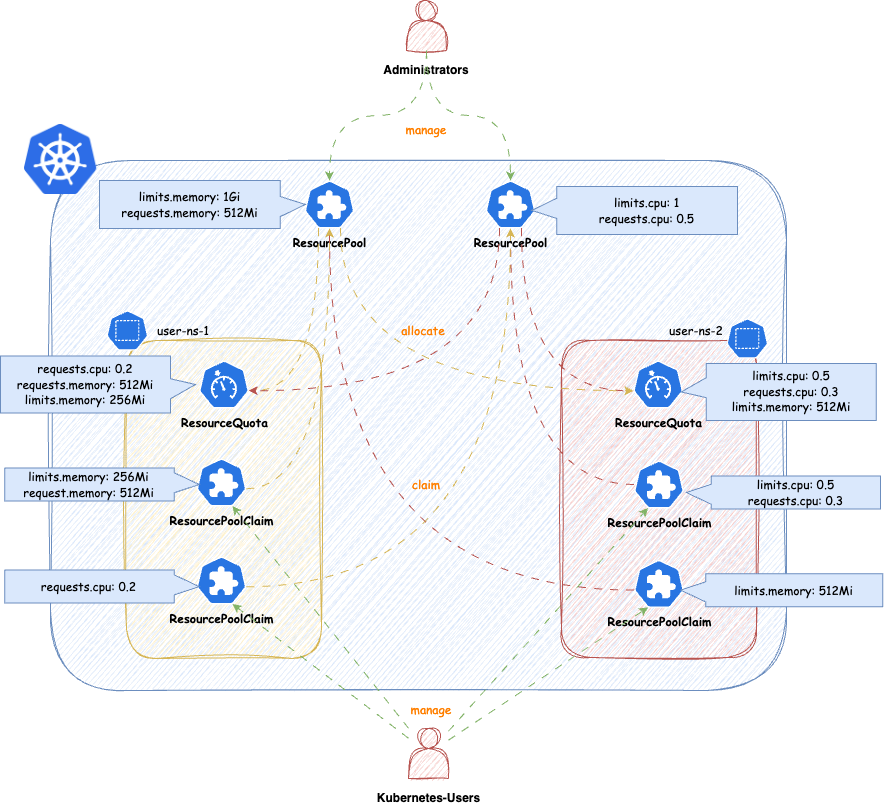
VClusters (VCluster/K3K) or CPs as pods (Kamaji). We think with this solution we have found a way to make capsule still beneficial and even open new use-cases for larger Kubernetes platforms.ResourceQuotas or our previous ResourceQuota-Implementation. Autobalancing is no longer given by default, however can be implemented according to your platform’s needs see future ideas.ResourcePools allow you to define a set of resources, similar to how ResourceQuotas work. ResourcePools are defined at the cluster scope and should be managed by cluster administrators. However, they provide an interface where cluster administrators can specify from which namespaces resources in a ResourcePool can be claimed. Claiming is done via a namespaced CRD called ResourcePoolClaim.
It is then up to the group of users within those namespaces to manage the resources they consume per namespace. Each ResourcePool provisions a ResourceQuota into all the selected namespaces. Essentially, when ResourcePoolClaims are assigned to a ResourcePool, they stack additional resources on top of that ResourceQuota, based on the namespace from which the ResourcePoolClaim was created.
You can create any number of ResourcePools for any kind of namespace; they do not need to be part of a Tenant. Note that the usual ResourceQuota mechanisms apply when, for example, the same resources are defined in multiple ResourcePools for the same namespaces (e.g., the lowest defined quota for a resource is always considered).
apiVersion: capsule.clastix.io/v1beta2
kind: ResourcePool
metadata:
name: example
spec:
quota:
hard:
limits.cpu: "2"
limits.memory: 2Gi
requests.cpu: "2"
requests.memory: 2Gi
requests.storage: "5Gi"
selectors:
- matchLabels:
capsule.clastix.io/tenant: example
The selection of namespaces is done via labels, you can define multiple independent LabelSelectors for a ResourcePool. This gives you a lot of flexibility if you want to span over different kind of namespaces (eg. all namespaces of multiple Tenants, System Namespaces, stages of Tenants etc.)
Here’s an example of a simple Selector:
---
apiVersion: capsule.clastix.io/v1beta2
kind: ResourcePool
metadata:
name: solar
spec:
quota:
hard:
limits.cpu: "2"
limits.memory: 2Gi
selectors:
- matchLabels:
capsule.clastix.io/tenant: solar
This will select all the namespaces, which are part of the Tenant solar. Each statement under selectors is treated independent, so for example this is how you can select multiple Tenant’s namespaces:
apiVersion: capsule.clastix.io/v1beta2
kind: ResourcePool
metadata:
name: green
spec:
quota:
hard:
limits.cpu: "2"
limits.memory: 2Gi
selectors:
- matchLabels:
capsule.clastix.io/tenant: solar
- matchLabels:
capsule.clastix.io/tenant: wind
Nothing special here, just all the fields you know from ResourceQuotas. The amount defined in quota.hard represents the total resources which can be claimed from the selected namespaces. Through claims the ResourceQuota is then increased or decreased. Note the following:
.spec.quota.hard if the current allocation from claims is greater than the new decreased number. You must first release claims, to free up that space.0)Other than that, you can use all the fields from ResourceQuotas
---
apiVersion: capsule.clastix.io/v1beta2
kind: ResourcePool
metadata:
name: best-effort-pool
spec:
selectors:
- matchExpressions:
- { key: capsule.clastix.io/tenant, operator: Exists }
quota:
hard:
cpu: "1000"
memory: "200Gi"
pods: "10"
scopeSelector:
matchExpressions:
- operator: In
scopeName: PriorityClass
values:
- "best-effort"
Each ResourcePool is representative for one ResourceQuota. In contrast to the old implementation, where multiple ResourceQuotas could have been defined in a slice. So if you eg. want to use different scopeSelectors or similar, you should create a new ResourcePool for each.
---
apiVersion: capsule.clastix.io/v1beta2
kind: ResourcePool
metadata:
name: gold-storage
spec:
selectors:
- matchExpressions:
- { key: company.com/env, operator: In, values: [prod, pre-prod] }
quota:
hard:
requests.storage: "10Gi"
persistentvolumeclaims: "10"
scopeSelector:
matchExpressions:
- operator: In
scopeName: VolumeAttributesClass
values: ["gold"]
Defaults can contain resources, which are not mentioned in the Quota of a ResourcePool. This is mainly to allow you, to block resources for example:
---
apiVersion: capsule.clastix.io/v1beta2
kind: ResourcePool
metadata:
name: example
spec:
defaults:
requests.storage: "0Gi"
quota:
hard:
limits.cpu: "2"
limits.memory: 2Gi
requests.cpu: "2"
requests.memory: 2Gi
requests.storage: "5Gi"
selectors:
- matchLabels:
capsule.clastix.io/tenant: example
This results in a ResourceQuota from this pool in all selected, which blocks the allocation of requests.storage:
NAME AGE REQUEST LIMIT
capsule-pool-example 3s requests.storage: 0/0
If no Defaults are defined, the ResourceQuota for the ResourcePool is still provisioned but it’s .spec.hard is empty.
---
apiVersion: capsule.clastix.io/v1beta2
kind: ResourcePool
metadata:
name: example
spec:
quota:
hard:
limits.cpu: "2"
limits.memory: 2Gi
requests.cpu: "2"
requests.memory: 2Gi
requests.storage: "5Gi"
selectors:
- matchLabels:
capsule.clastix.io/tenant: example
This allows users to essentially schedule anything in the namespace:
NAME AGE REQUEST LIMIT
capsule-pool-exmaple 2m47s
To prevent this, you might consider using the DefaultsZero option. This option can also be combined with setting other defaults, not part of the .spec.quota.hard. Here we are additionally restricting the creation of persistentvolumeclaims:
apiVersion: capsule.clastix.io/v1beta2
kind: ResourcePool
metadata:
name: example
spec:
defaults:
"count/persistentvolumeclaims": 3
config:
defaultsZero: true
quota:
hard:
limits.cpu: "2"
limits.memory: 2Gi
requests.cpu: "2"
requests.memory: 2Gi
requests.storage: "5Gi"
selectors:
- matchLabels:
capsule.clastix.io/tenant: example
Results in:
NAME AGE REQUEST LIMIT
capsule-pool-example 10h count/persistentvolumeclaims: 0/3, requests.cpu: 0/0, requests.memory: 0/0, requests.storage: 0/0 limits.cpu: 0/0, limits.memory: 0/0
Options that can be defined on a per-ResourcePool basis and influence the general behavior of the ResourcePool.
When ResourecePoolClaims are allocated to a pool, they are placed in a queue. The pool attempts to allocate claims in the order of their creation timestamps. However, even if a claim was created earlier, if it requests more resources than are currently available, it will remain in the queue. Meanwhile, a lower-priority claim that fits within the available resources may still be allocated, despite its lower priority.
Enabling this option enforces strict ordering: claims cannot be skipped, even if they block other claims from being fulfilled due to resource exhaustion. The CreationTimestamp is strictly respected, meaning that once a claim is queued, no subsequent claim can bypass it, even if it requires fewer resources.
Default: false
Sets the default values for the ResourceQuota created for the ResourcePool. When enabled, all resources in the quota are initialized to zero. This is useful in scenarios where users should not be able to consume any resources without explicitly creating claims. In such cases, it makes sense to initialize all available resources in the ResourcePool to 0.
Default: false
By default, when a ResourcePool is deleted, any ResourcePoolClaims bound to it are only disassociated, not deleted. Enabling this option ensures that all ResourcePoolClaims in a bound state are deleted when the corresponding ResourcePool is deleted.
Default: false
When defining ResourcePools you might want to consider distributing LimitRanges via Tenant Replications:
apiVersion: capsule.clastix.io/v1beta2
kind: TenantResource
metadata:
name: example
namespace: solar-system
spec:
resyncPeriod: 60s
resources:
- namespaceSelector:
matchLabels:
capsule.clastix.io/tenant: example
rawItems:
- apiVersion: v1
kind: LimitRange
metadata:
name: cpu-resource-constraint
spec:
limits:
- default: # this section defines default limits
cpu: 500m
defaultRequest: # this section defines default requests
cpu: 500m
max: # max and min define the limit range
cpu: "1"
min:
cpu: 100m
type: Container
ResourcePoolClaims declared claims of resources from a single ResourcePool. When a ResourcePoolClaim is successfully bound to a ResourcePool, it’s requested resources are stacked to the ResourceQuota from the ResourcePool in the corresponding namespaces, where the ResourcePoolClaim was declared. So the declaration of a ResourcePoolClaim is very simple:
apiVersion: capsule.clastix.io/v1beta2
kind: ResourcePoolClaim
metadata:
name: get-me-cpu
namespace: solar-test
spec:
pool: "sample"
claim:
requests.cpu: "2"
requests.memory: 2Gi
ResourcePoolClaims are decoupled from the lifecycle of ResourcePools. If a ResourcePool is deleted where a ResourcePoolClaim was bound to, the ResourcePoolClaim becomes unassigned, but is not deleted.
The Connection between ResourcePools and ResourcePoolClaims is done via the .spec.pool field. With that field you must be very specific, from which ResourcePool a ResourcePoolClaim claims resources. On the counter-part, the ResourcePool, the namespace from the ResourcePoolClaim must be allowed to claim resources from the ResourcePool.
If you are trying to allocate a Pool which does not exist or is not allowed to be claimed from, from the namespace the ResourcePoolClaim was made, you will get a failed Assigned status:
solar-test get-me-cpu Assigned Failed ResourcePool.capsule.clastix.io "sample" not found 12s
Similar errors may occur if you are trying to claim resources from a pool, where the given resources are not claimable.
If no .spec.pool was delivered a Webhook will try to evaluate a matching ResourcePool for the ResourcePoolClaim. In that process of evaluation the following criteria are considered:
ResourcePool has all the resources in their definition available the ResourcePoolClaim is trying to claim.If no Pool can be auto-assigned, the ResourcePoolClaim will enter an Unassigned state. Where it remains until ResourcePools considering the namespaces the ResourcePoolClaim is deployed in have more resources or a new ResourcePool is defined manually.
The Auto-Assignment Process is only executed, when .spec.pool is unset on Create or Update operations.
A ResourcePoolClaim is considered Bound, when the requested resources from the claim were successfully allocated from the ResourcePool. And the resources are actually used by any ResourceQuota in the namespace the claim was created in. If the resources are not used yet, the ResourcePoolClaims is considered Unused and can be deleted, change to a different ResourcePool or released without any further actions. However when it’s resources are used, the claim is Bound and can not be modified or deleted until the resources are released (not longer in use).
The selection of which ResourcePoolClaim is Bound is based on a greedy pattern. Meaning we sort the ResourcePoolClaims by their CreationTimestamp and try to allocate them one by one until no more resources are available from the ResourcePool.
Let’s see this in action. We can see that both claims are unused and can be released.
kubectl get resourcepoolclaim -n solar-test
NAME POOL READY MESSAGE BOUND REASON AGE
get-me-solar solar-pool True reconciled False claim is unused 9h
get-me-solar-2 solar-pool True reconciled False claim is unused 9h
kubectl get resourcequota -n solar-test
NAME REQUEST LIMIT AGE
capsule-pool-solar-pool requests.cpu: 4/4, requests.memory: 4Gi/4Gi 7m53s
We now create a pod to consume the amount of resources provided by the claim get-me-solar (cpu: 2 and memory: 2Gi). We can see that half of the claim is now used:
kubectl get resourcepoolclaim -n solar-test
NAME POOL READY MESSAGE BOUND REASON AGE
get-me-solar solar-pool True reconciled True claim is used 12m
get-me-solar-2 solar-pool True reconciled False claim is unused 12m
kubectl get resourcequota -n solar-test
NAME REQUEST LIMIT AGE
capsule-pool-solar-pool requests.cpu: 2/4, requests.memory: 2Gi/4Gi 11m
We can remove get-me-solar-2, as it’s still unused:
kubectl delete resourcepoolclaim -n solar-test get-me-solar-2
resourcepoolclaim.capsule.clastix.io "get-me-solar-2" deleted
However interactions with get-me-solar are now limited, as it’s Bound:
kubectl delete resourcepoolclaim -n solar-test get-me-solar
Error from server (Forbidden): admission webhook "resourcepoolclaims.projectcapsule.dev" denied the request: cannot delete the pool while claim is used in resourcepool solar-pool
If we remove the pod again, the ResourcePoolClaim becomes unused again and can be deleted or modified.
kubectl get resourcepoolclaim -n solar-test
NAME POOL READY MESSAGE BOUND REASON AGE
get-me-solar solar-pool True reconciled False claim is unused 16m
kubectl get resourcequota -n solar-test
NAME REQUEST LIMIT AGE
capsule-pool-solar-pool requests.cpu: 0/2, requests.memory: 0/2Gi 17m
If a ResourcePoolClaim is deleted, the resources are released back to the ResourcePool. This means that the resources are no longer reserved for the claim and can be used by other claims.
ResourcePoolClaim object (Recommended).ResourcePoolClaim with projectcapsule.dev/release: "true". This will release the ResourcePoolClaim from the ResourcePool without deleting the object itself and instantly requeue.Both these actions can only be performed if the ResourcePoolClaim is in a Bound state False (not used currently). Otherwise your first have to free the resources used by the claim in order to release it. You can verify the Bound state for all ResourcePoolClaims in a namespace with.
Once a ResourcePoolClaim has successfully claimed resources from a ResourcePool, the claim is immutable. This means that the claim cannot be modified or deleted until the resources have been released back to the ResourcePool. This means ResourcePoolClaim can not be expanded or shrunk, without releasing.
ResourcePoolClaims can always be created, even if the targeted ResourcePool does not have enough resources available at the time. In that case ResourcePoolClaims are put into a Queue-State, where they wait until they can claim the resources they are after. They following describes the different exhaustion indicators and what they mean, in case a ResourcePoolClaim gets scheduled.
When a ResourcePoolClaims is in Queued-State it is still mutable. So Resources and Pool-Assignment can still be changed.
There are different types of exhaustions which may occur when attempting to allocate a claim. They Status of each claim indicates
The requested resources are not available on the ResourcePool. Until other resources release resources or the pool size is increased the ResourcePoolClaim is queued. In this example the ResourcePoolClaim is trying to claim requests.memory=2Gi. However only requests.memory=1Gi are still available to be claimed from the ResourcePool
NAMESPACE NAME POOL STATUS REASON MESSAGE AGE
solar-test get-mem sampler Bound QueueExhausted requested: requests.memory=2Gi, queued: requests.memory=1Gi 9m19s
In this case you have the following options:
requests.memory=1GiResourcePool. When 1Gi of requests.memory gets released, the ResourcePoolClaim will be able to bind requests.memory=2Gi.ResourcePoolClaim which might free up requests.memoryHowever, claims which are requesting less than the ResourcePoolClaim solar-test, will be able to allocate their resources. Let’s say we have this second ResourcePoolClaim:
---
apiVersion: capsule.clastix.io/v1beta2
kind: ResourcePoolClaim
metadata:
name: skip-the-line
namespace: solar-test
spec:
pool: "sampler"
claim:
requests.memory: 512Mi
Applying this ResourcePoolClaim leads to it being able to bind these resources. This behavior can be controlled with orderedQueue.
NAMESPACE NAME POOL STATUS REASON MESSAGE AGE
solar-test get-me-cpu sampler Bound PoolExhausted requested: requests.memory=2Gi, available: requests.memory=512Mi 16m
solar-test skip-the-line sampler Bound Succeeded Claimed resources 2s
If orderedQueue is enabled, only the first item that exhausted a resource from the ResourcePool get the PoolExhausted state. Following claims fro the same resources get QueueExhausted.
A ResourcePoolClaim with higher priority is trying to allocate these resources, but is exhausting the ResourcePool. The ResourcePool has orderedQueue enabled, meaning that the ResourcePoolClaim with the highest priority must first schedule it’s resources, before any other ResourcePoolClaim can claim further resources. This queue is resource based (eg. requests.memory), ResourcePoolClaim with lower priority may still be Bound, if they are not trying to allocate resources which are being exhausted by another ResourcePoolClaim with highest priority.
NAMESPACE NAME POOL STATUS REASON MESSAGE AGE
solar-test get-mem sampler Bound QueueExhausted requested: requests.memory=2Gi, queued: requests.memory=1Gi 9m19s
The above means, that as ResourcePoolClaim with higher priority is trying to allocate requests.memory=1Gi but that already leads to an PoolExhausted for that ResourcePoolClaim.
The Priority of how the claims are processed, is deterministic defined based on the following order of attributes from each claim:
CreationTimestamp - Oldest firstName - TiebreakerNamespace - TiebreakerTiebreaker: If two claims have the same CreationTimestamp, they are then sorted alphabetically by their Name. If two claims have the same CreationTimestamp and Name, they are then sorted alphabetically by their Namespace. This means that if two claims are created at the same time, and have the same name, the claim with the lexicographically smaller Name will be processed first. If two claims have the same CreationTimestamp, Name, and Namespace, then the namespace is tiebreaking. This may be relevant in GitOps setups.
Dashboards can be deployed via helm-chart, enable the following values:
monitoring:
dashboards:
enabled: true
Dashboard which grants a detailed overview over the ResourcePools
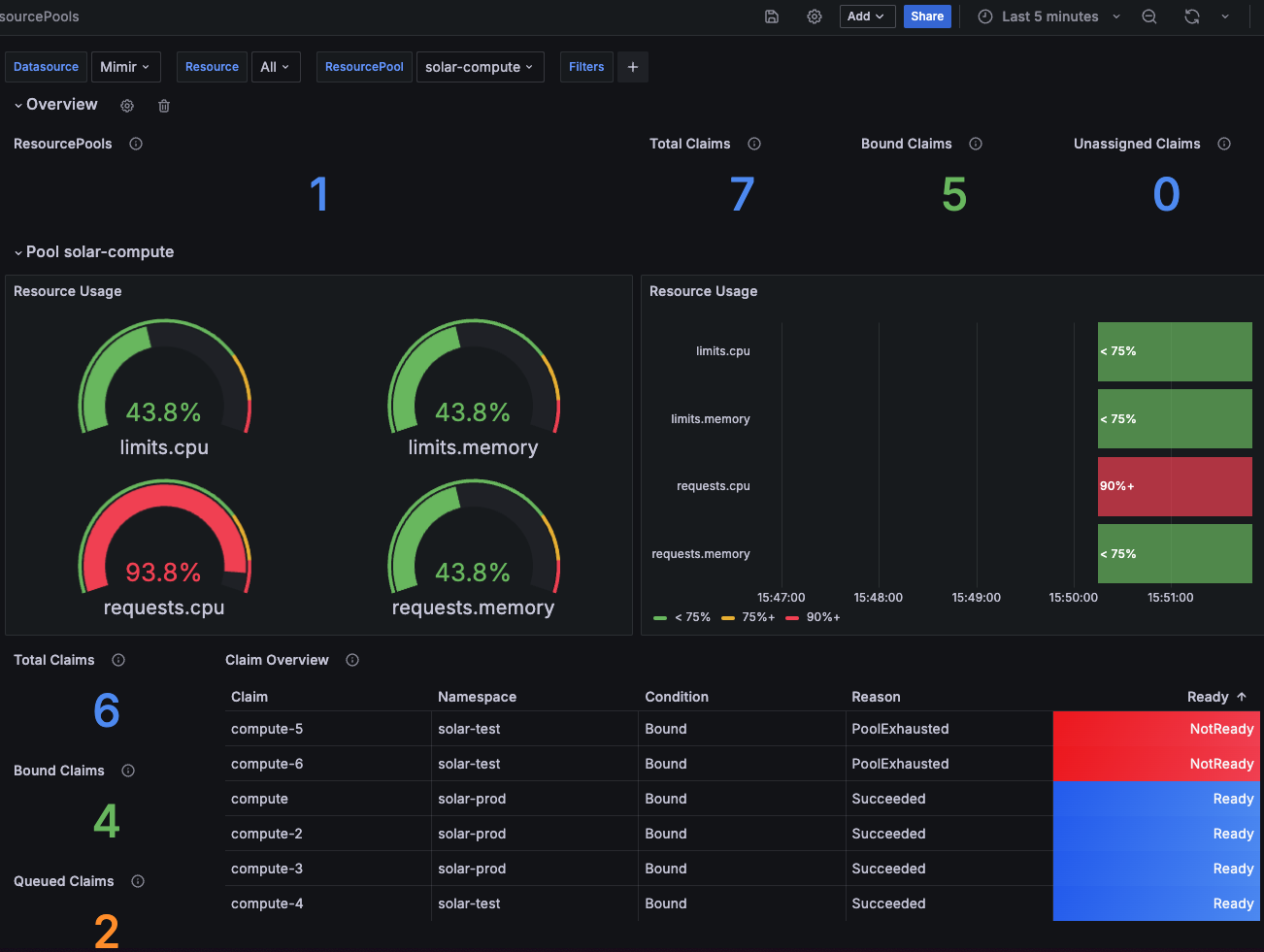
Example rules to give you some idea, what’s possible.
apiVersion: monitoring.coreos.com/v1
kind: PrometheusRule
metadata:
name: capsule-resourcepools-alerts
spec:
groups:
- name: capsule-resourcepools.rules
rules:
- alert: CapsuleResourcePoolHighUsageWarning
expr: |
capsule_pool_usage_percentage > 90
for: 10m
labels:
severity: warning
annotations:
summary: High resource usage in Resourcepool
description: |
Resource {{ $labels.resource }} in pool {{ $labels.pool }} is at {{ $value }}% usage for the last 10 minutes.
- alert: CapsuleResourcePoolHighUsageCritical
expr: |
capsule_pool_usage_percentage > 95
for: 10m
labels:
severity: critical
annotations:
summary: Critical resource usage in Resourcepool
description: |
Resource {{ $labels.resource }} in pool {{ $labels.pool }} has exceeded 95% usage for the last 10 minutes.
- alert: CapsuleResourcePoolExhausted
expr: |
capsule_pool_condition{condition="Exhausted"} == 1
for: 60m
labels:
severity: critical
annotations:
summary: Resource pool exhausted
description: |
Pool {{ $labels.pool }} has been Exhausted for more than 60 minutes.
- alert: CapsuleResourcePoolNotReady
expr: |
capsule_pool_condition{condition="Ready"} == 0
for: 10m
labels:
severity: warning
annotations:
summary: Resource pool not ready
description: |
Pool {{ $labels.pool }} has not been Ready for more than 10 minutes.
- name: capsule-resourcepoolclaims.rules
rules:
- alert: CapsuleResourcePoolClaimExhausted
expr: |
capsule_claim_condition{condition="Exhausted"} == 1
for: 24h
labels:
severity: critical
annotations:
summary: ResourcePoolClaim exhausted
description: |
ResourcePoolClaim {{ $labels.name }}/{{ $labels.target_namespace }} has been Exhausted for more than 24 hours.
- alert: CapsuleResourcePoolClaimNotReady
expr: |
capsule_claim_condition{condition="Ready"} == 0
for: 60m
labels:
severity: warning
annotations:
summary: ResourcePoolClaim not ready
description: |
ResourcePoolClaim {{ $labels.name }}/{{ $labels.target_namespace }} has not been Ready for more than 60 minutes.
The following Metrics are exposed and can be used for monitoring:
# HELP capsule_claim_condition The current condition status of a claim.
# TYPE capsule_claim_condition gauge
capsule_claim_condition{condition="Bound",name="get-me-customer",target_namespace="solar-test"} 1
capsule_claim_condition{condition="Bound",name="get-me-solar",target_namespace="solar-test"} 1
capsule_claim_condition{condition="Bound",name="get-me-solar-2",target_namespace="solar-test"} 0
capsule_claim_condition{condition="Exhausted",name="get-me-customer",target_namespace="solar-test"} 0
capsule_claim_condition{condition="Exhausted",name="get-me-solar",target_namespace="solar-test"} 0
capsule_claim_condition{condition="Exhausted",name="get-me-solar-2",target_namespace="solar-test"} 1
capsule_claim_condition{condition="Ready",name="get-me-customer",target_namespace="solar-test"} 1
capsule_claim_condition{condition="Ready",name="get-me-solar",target_namespace="solar-test"} 1
capsule_claim_condition{condition="Ready",name="get-me-solar-2",target_namespace="solar-test"} 1
# HELP capsule_claim_pool The current assigned pool of a claim.
# TYPE capsule_claim_pool gauge
capsule_claim_pool{name="get-me-solar",pool="solar-compute",target_namespace="solar-test"} 1
capsule_claim_pool{name="get-me-solar-2",pool="solar-compute",target_namespace="solar-test"} 1
# HELP capsule_claim_resource The given amount of resources from the claim
# TYPE capsule_claim_resource gauge
capsule_claim_resource{name="compute",resource="limits.cpu",target_namespace="solar-prod"} 0.375
capsule_claim_resource{name="compute",resource="limits.memory",target_namespace="solar-prod"} 4.02653184e+08
capsule_claim_resource{name="compute",resource="requests.cpu",target_namespace="solar-prod"} 0.375
capsule_claim_resource{name="compute",resource="requests.memory",target_namespace="solar-prod"} 4.02653184e+08
capsule_claim_resource{name="compute-10",resource="limits.memory",target_namespace="solar-prod"} 1.073741824e+10
capsule_claim_resource{name="compute-2",resource="limits.cpu",target_namespace="solar-prod"} 0.5
capsule_claim_resource{name="compute-2",resource="limits.memory",target_namespace="solar-prod"} 5.36870912e+08
capsule_claim_resource{name="compute-2",resource="requests.cpu",target_namespace="solar-prod"} 0.5
capsule_claim_resource{name="compute-2",resource="requests.memory",target_namespace="solar-prod"} 5.36870912e+08
capsule_claim_resource{name="compute-3",resource="requests.cpu",target_namespace="solar-prod"} 0.5
capsule_claim_resource{name="compute-4",resource="requests.cpu",target_namespace="solar-test"} 0.5
capsule_claim_resource{name="compute-5",resource="requests.cpu",target_namespace="solar-test"} 0.5
capsule_claim_resource{name="compute-6",resource="requests.cpu",target_namespace="solar-test"} 5
capsule_claim_resource{name="pods",resource="pods",target_namespace="solar-test"} 3
# HELP capsule_pool_available Current resource availability for a given resource in a resource pool
# TYPE capsule_pool_available gauge
capsule_pool_available{pool="solar-compute",resource="limits.cpu"} 1.125
capsule_pool_available{pool="solar-compute",resource="limits.memory"} 1.207959552e+09
capsule_pool_available{pool="solar-compute",resource="requests.cpu"} 0.125
capsule_pool_available{pool="solar-compute",resource="requests.memory"} 1.207959552e+09
capsule_pool_available{pool="solar-size",resource="pods"} 4
# HELP capsule_pool_condition Current conditions for a given resource in a resource pool
# TYPE capsule_pool_condition gauge
capsule_pool_condition{condition="Exhausted",pool="solar-size"} 0
capsule_pool_condition{condition="Exhausted",pool="solar-compute"} 1
capsule_pool_condition{condition="Ready",pool="solar-size"} 1
capsule_pool_condition{condition="Ready",pool="solar-compute"} 1
# HELP capsule_pool_exhaustion Resources become exhausted, when there's not enough available for all claims and the claims get queued
# TYPE capsule_pool_exhaustion gauge
capsule_pool_exhaustion{pool="solar-compute",resource="limits.memory"} 1.073741824e+10
capsule_pool_exhaustion{pool="solar-compute",resource="requests.cpu"} 5.5
# HELP capsule_pool_exhaustion_percentage Resources become exhausted, when there's not enough available for all claims and the claims get queued (Percentage)
# TYPE capsule_pool_exhaustion_percentage gauge
capsule_pool_exhaustion_percentage{pool="solar-compute",resource="limits.memory"} 788.8888888888889
capsule_pool_exhaustion_percentage{pool="solar-compute",resource="requests.cpu"} 4300
# HELP capsule_pool_limit Current resource limit for a given resource in a resource pool
# TYPE capsule_pool_limit gauge
capsule_pool_limit{pool="solar-compute",resource="limits.cpu"} 2
capsule_pool_limit{pool="solar-compute",resource="limits.memory"} 2.147483648e+09
capsule_pool_limit{pool="solar-compute",resource="requests.cpu"} 2
capsule_pool_limit{pool="solar-compute",resource="requests.memory"} 2.147483648e+09
capsule_pool_limit{pool="solar-size",resource="pods"} 7
# HELP capsule_pool_namespace_usage Current resources claimed on namespace basis for a given resource in a resource pool for a specific namespace
# TYPE capsule_pool_namespace_usage gauge
capsule_pool_namespace_usage{pool="solar-compute",resource="limits.cpu",target_namespace="solar-prod"} 0.875
capsule_pool_namespace_usage{pool="solar-compute",resource="limits.memory",target_namespace="solar-prod"} 9.39524096e+08
capsule_pool_namespace_usage{pool="solar-compute",resource="requests.cpu",target_namespace="solar-prod"} 1.375
capsule_pool_namespace_usage{pool="solar-compute",resource="requests.cpu",target_namespace="solar-test"} 0.5
capsule_pool_namespace_usage{pool="solar-compute",resource="requests.memory",target_namespace="solar-prod"} 9.39524096e+08
capsule_pool_namespace_usage{pool="solar-size",resource="pods",target_namespace="solar-test"} 3
# HELP capsule_pool_namespace_usage_percentage Current resources claimed on namespace basis for a given resource in a resource pool for a specific namespace (percentage)
# TYPE capsule_pool_namespace_usage_percentage gauge
capsule_pool_namespace_usage_percentage{pool="solar-compute",resource="limits.cpu",target_namespace="solar-prod"} 43.75
capsule_pool_namespace_usage_percentage{pool="solar-compute",resource="limits.memory",target_namespace="solar-prod"} 43.75
capsule_pool_namespace_usage_percentage{pool="solar-compute",resource="requests.cpu",target_namespace="solar-prod"} 68.75
capsule_pool_namespace_usage_percentage{pool="solar-compute",resource="requests.cpu",target_namespace="solar-test"} 25
capsule_pool_namespace_usage_percentage{pool="solar-compute",resource="requests.memory",target_namespace="solar-prod"} 43.75
capsule_pool_namespace_usage_percentage{pool="solar-size",resource="pods",target_namespace="solar-test"} 42.857142857142854
# HELP capsule_pool_resource Type of resource being used in a resource pool
# TYPE capsule_pool_resource gauge
capsule_pool_resource{pool="solar-compute",resource="limits.cpu"} 1
capsule_pool_resource{pool="solar-compute",resource="limits.memory"} 1
capsule_pool_resource{pool="solar-compute",resource="requests.cpu"} 1
capsule_pool_resource{pool="solar-compute",resource="requests.memory"} 1
capsule_pool_resource{pool="solar-size",resource="pods"} 1
# HELP capsule_pool_usage Current resource usage for a given resource in a resource pool
# TYPE capsule_pool_usage gauge
capsule_pool_usage{pool="solar-compute",resource="limits.cpu"} 0.875
capsule_pool_usage{pool="solar-compute",resource="limits.memory"} 9.39524096e+08
capsule_pool_usage{pool="solar-compute",resource="requests.cpu"} 1.875
capsule_pool_usage{pool="solar-compute",resource="requests.memory"} 9.39524096e+08
capsule_pool_usage{pool="solar-size",resource="pods"} 3
# HELP capsule_pool_usage_percentage Current resource usage for a given resource in a resource pool (percentage)
# TYPE capsule_pool_usage_percentage gauge
capsule_pool_usage_percentage{pool="solar-compute",resource="limits.cpu"} 43.75
capsule_pool_usage_percentage{pool="solar-compute",resource="limits.memory"} 43.75
capsule_pool_usage_percentage{pool="solar-compute",resource="requests.cpu"} 93.75
capsule_pool_usage_percentage{pool="solar-compute",resource="requests.memory"} 43.75
capsule_pool_usage_percentage{pool="solar-size",resource="pods"} 42.857142857142854
ResourcePools to be more granular or wider.To Migrate from the old ResourceQuota to ResourcePools, you can follow the steps below. This guide assumes you want to port the old ResourceQuota to the new ResourcePools in exactly the same capacity and scope.
The steps shown are an example to migrate a single Tenants ResourceQuota to a ResourcePool.
We are working with the following tenant. Asses the Situation of resourceQuotas. This guide is mainly relevant if the scope is Tenant:
apiVersion: capsule.clastix.io/v1beta2
kind: Tenant
metadata:
labels:
kubernetes.io/metadata.name: migration
name: migration
spec:
owners:
- clusterRoles:
- admin
- capsule-namespace-deleter
kind: User
name: bob
preventDeletion: false
resourceQuotas:
items:
- hard:
limits.cpu: "2"
limits.memory: 2Gi
requests.cpu: "2"
requests.memory: 2Gi
- hard:
pods: "7"
scope: Tenant
status:
namespaces:
- migration-dev
- migration-prod
- migration-test
size: 3
state: Active
We are now abstracting. For each item, we are creating a ResourcePool with the same values. The ResourcePool will be scoped to the Tenant and will be used for all namespaces in the tenant. Let’s first migrate the first item:
---
apiVersion: capsule.clastix.io/v1beta2
kind: ResourcePool
metadata:
name: migration-compute
spec:
config:
defaultsZero: true
selectors:
- matchLabels:
capsule.clastix.io/tenant: migration
quota:
hard:
limits.cpu: "2"
limits.memory: 2Gi
requests.cpu: "2"
requests.memory: 2Gi
The naming etc. is up to you. Important, we again select all namespaces from the migration tenant with the selector capsule.clastix.io/tenant: migration. The defined config is what we deem to be most compatible with the old ResourceQuota behavior. You may change these according to your requirements.
The same process can be repeated for the second item (or each of your items). The ResourcePool will be scoped to the Tenant and will be used for all namespaces in the tenant. Let’s migrate the second item:
---
apiVersion: capsule.clastix.io/v1beta2
kind: ResourcePool
metadata:
name: migration-size
spec:
config:
defaultsZero: true
selectors:
- matchLabels:
capsule.clastix.io/tenant: migration
quota:
hard:
pods: "7"
Now we need to create the ResourcePoolClaims for the ResourcePools. The ResourcePoolClaims are used to claim resources from the ResourcePools to the respective namespaces. Let’s start with the namespace migration-dev:
kubectl get resourcequota -n migration-dev
NAME AGE REQUEST LIMIT
capsule-migration-0 5m21s requests.cpu: 375m/1500m, requests.memory: 384Mi/1536Mi limits.cpu: 375m/1500m, limits.memory: 384Mi/1536Mi
capsule-migration-1 5m21s pods: 3/3
Our goal is now to port the current usage into ResourcePoolClaims. Here you must make sure, that you might need to allocate more resources to your claims, than currently is needed (eg. to allow RollingUpdates etc.).. For the example we are porting the current usage over 1:1 to ResourcePoolClaims
We created the ResourcePool named migration-compute, where we are going to claim the resources from (for capsule-migration-0). This results in the following ResourcePoolClaim:
---
apiVersion: capsule.clastix.io/v1beta2
kind: ResourcePoolClaim
metadata:
name: compute
namespace: migration-dev
spec:
pool: "migration-compute"
claim:
requests.cpu: 375m
requests.memory: 384Mi
limits.cpu: 375m
limits.memory: 384Mi
The same can be done for the capsule-migration-1 ResourceQuota.
---
apiVersion: capsule.clastix.io/v1beta2
kind: ResourcePoolClaim
metadata:
name: pods
namespace: migration-dev
spec:
pool: "migration-size"
claim:
pods: "3"
You can create the claims, they will remain in failed state until we apply the ResourcePools:
kubectl get resourcepoolclaims -n migration-dev
NAME POOL STATUS REASON MESSAGE AGE
compute Assigned Failed ResourcePool.capsule.clastix.io "migration-compute" not found 2s
pods Assigned Failed ResourcePool.capsule.clastix.io "migration-size" not found 2s
You may now apply the ResourcePools prepared in step 2:
kubectl apply -f pools.yaml
resourcepool.capsule.clastix.io/migration-compute created
resourcepool.capsule.clastix.io/migration-size created
After applying, you should instantly see, that the ResourcePoolClaims in the migration-dev namespace could be Bound to the corresponding ResourcePools:
kubectl get resourcepoolclaims -n migration-dev
NAME POOL STATUS REASON MESSAGE AGE
compute migration-compute Bound Succeeded Claimed resources 4m9s
pods migration-size Bound Succeeded Claimed resources 4m9s
Now you can verify the new ResourceQuotas in the migration-dev namespace:
kubectl get resourcequota -n migration-dev
NAME AGE REQUEST LIMIT
capsule-migration-0 23m requests.cpu: 375m/1500m, requests.memory: 384Mi/1536Mi limits.cpu: 375m/1500m, limits.memory: 384Mi/1536Mi
capsule-migration-1 23m pods: 3/3
capsule-pool-migration-compute 110s requests.cpu: 375m/375m, requests.memory: 384Mi/384Mi limits.cpu: 375m/375m, limits.memory: 384Mi/384Mi
capsule-pool-migration-size 110s pods: 3/3
That looks already super promising. Now You need to repeat these steps for migration-prod and migration-test. (Script Contributions are welcome).
Once we have migrated all resources over the ResourcePoolClaims, we can remove the ResourceQuota system. First of all, we are removing the .spec.resourceQuotas entirely. Currently it will again add the .spec.resourceQuotas.scope field, important is, that no more .spec.resourceQuotas.items exist:
apiVersion: capsule.clastix.io/v1beta2
kind: Tenant
metadata:
labels:
kubernetes.io/metadata.name: migration
name: migration
spec:
owners:
- clusterRoles:
- admin
- capsule-namespace-deleter
kind: User
name: bob
resourceQuotas: {}
This will remove all ResourceQuotas from namespace, verify like:
kubectl get resourcepoolclaims -n migration-dev
capsule-pool-migration-compute 130m requests.cpu: 375m/375m, requests.memory: 384Mi/384Mi limits.cpu: 375m/375m, limits.memory: 384Mi/384Mi
capsule-pool-migration-size 130m pods: 3/3
Success 🍀
This part should provide you with a little bit of back story, as to why this implementation was done the way it currently is. Let’s start.
Since the beginning of capsule we are struggling with a concurrency problem regarding ResourcesQuotas, this was already early detected in Issue 49. Let’s quickly recap what really the problem is with the current ResourceQuota centric approach.
With the current ResourceQuota with Scope: Tenant we encounter the problem, that resourcequotas spread across multiple namespaces referring to one tenant quota can be overprovisioned, if an operation is executed in parallel (eg. total is services/count: 3, in each namespace you could then create 3 services, leading to a possible overprovision of hard * amount-namespaces). The Problem in this approach is, that we are not doing anything with Webhooks, therefore we rely on the speed of the controller, where this entire construct becomes a matter of luck and racing conditions.
So, there needs to be change. But times have also changed and we have listened to our users, so the new approach to ResourceQuotas should:
Tenant. Often scenarios include granting resources to multiple Tenants eg.TenantsTenant ecosystem. Often the requirement to control resources for operators, which make up your distribution, must also be guardlined across n-namespaces.Our initial Idea for a redesign was simple: What if we just intercepted operations on the resourcequota/status subresource and calculate the offsets (or essentially what still can fit) on a Admission-Webhook. If another operation would have taken place the client operation would have thrown a conflict and rejected the admission, until it retries. Makes sense, right?
Here we have the problem, that even if we would block resourcequota status updates and wait until the actual quantity was added to the total, the resources have already been scheduled. The reason for that, is that the status for resourcequotas is eventually consistent, but what really matters at that moment is the hard spec (see this response from a maintainer kubernetes/kubernetes#123434 (comment)). So essentially no matter the status, you can always provision as much resources, as the .spec.hard of a ResourceQuota indicates. This makes perfect sense, if your ResourceQuota is acting in a single namespace. However in our scenario, we have the same ResourceQuota in n-namespaces. So the overprovisioning problem still persists.
Thinking of other ways: So the next idea was essentially increasing the ResourceQuota.spec.hard based on the workloads which are added to a namespaces (essentially a reversed approach). The workflow for this would look like something like this:
All resourcequotas get for their hard spec 0
New resource is requested (Evaluation what’s needed at Admission)
Controller gives the requested resources to the quota (by adding it to the total and updating the hard)
This way it’s only possible to scheduled “ordered”. In conclusion this would also downscale the resourcequota when the resources are no longer needed. This is how ResourceQuotas from the Kubernetes Core-API reject workload, when you try to allocate a Quantity in a namespaces, but the ResourceQuota does not have enough space.
But there are some problems with this approach as well:
count/0 there’s no admission call on the resourcequota, which would be the easiest. So we would need to find a way to know, there’s something new requesting resources. For example Rancher works around this problem with namespaced DefaultLimits. But this is not the agile approach we would like to offer.ResourceQuota Denied), regarding quotaoverprovision.If you eg update the resource quota that a pod now has space, it takes some time until that’s registered and actually scheduled (just tested it for pods). I guess the timing depends on the kube-controller-manager flag --concurrent-resource-quota-syncs and/or `–resource-quota-sync-period
So it’s really really difficult to increase quotas by the resources which are actually requested, especially the adding new resources process is where the performance would take a heavy hit.
Still thinking on this idea, the optimal solution would have been to calculate everything at admission and keep the usage vs available state on a global resources but not provisioning namespaced ResourceQuotas. This would have taken a bit pressure from the entire operation, as the resources would not have to be calculated twice (For our GlobalResourceQuota and the core ResourceQuota). In addition we should have added
So that’s when we discarded everything and came up with the concept of ResourcePools and ResourcePoolClaims.
We want to keep this API as lightweight as possible. But we have already identified use-cases with customers, which make heavy use of ResourcePools:
JIT-Claiming: Every Workload queues it’s own claim when being submitted to admission. The respective claims are bound to the lifecycle of the provisioned resource.
Node-Population: Populate the Quantity of a ResourcePool based on selected nodes.
If you just want to get common quotas up and running without reading the full model first, this section gives you copy-paste-ready GlobalCustomQuota examples for the most common dimensions: CPU, memory, Pod count, and storage. Skip ahead to Concept when you want to understand how sources, selectors, and JSONPath expressions work in depth.
Without the admission webhook enabled, quotas are observational only: usage is calculated and reported in status, but requests are never denied. Enable and configure it via Helm values:
webhooks:
hooks:
calculations:
enabled: true
namespaceSelector:
matchExpressions:
- key: capsule.clastix.io/tenant
operator: Exists
rules:
- apiGroups:
- ""
apiVersions:
- "v1"
operations:
- CREATE
- UPDATE
- DELETE
resources:
- "pods"
- "pods/status"
- "persistentvolumeclaims"
scope: Namespaced
matchConditions:
- name: ignore-subresources-except-pod-status-phase
expression: >-
!has(request.subResource) || request.subResource == "" ||
(request.subResource == "status" && request.resource.resource == "pods" && object.status.phase != oldObject.status.phase)
Including pods/status keeps quota usage accurate the moment a Pod’s phase changes to Succeeded or Failed, instead of waiting for another triggering event (e.g. a different Pod being created or deleted) to notice that a Pod no longer counts towards the quota. The ignore-subresources-except-pod-status-phase matchCondition combines two things into one expression:
ignore-subresources in the more advanced example shown later in Admission)pods status subresource, which is only let through when .status.phase actually changed, filtering out irrelevant status updates.Adjust .spec.limit and the .spec.namespaceSelectors matchLabels below to match your own tenant labeling, then apply. The CPU and memory examples cover both containers and initContainers, and exclude terminal Pods (Succeeded/Failed/Unknown) via fieldSelectors, matching the default behavior of native Kubernetes ResourceQuota (see Not-Equals for details):
---
apiVersion: capsule.clastix.io/v1beta2
kind: GlobalCustomQuota
metadata:
name: solar-cpu-requests
spec:
namespaceSelectors:
- matchLabels:
capsule.clastix.io/tenant: solar
sources:
- apiVersion: v1
kind: Pod
op: add
path: .spec.containers[*].resources.requests.cpu
selectors:
- fieldSelectors:
- '.status.phase!=Succeeded'
- '.status.phase!=Failed'
- '.status.phase!=Unknown'
- apiVersion: v1
kind: Pod
op: add
path: .spec.initContainers[*].resources.requests.cpu
selectors:
- fieldSelectors:
- '.spec.initContainers'
- '.status.phase!=Succeeded'
- '.status.phase!=Failed'
- '.status.phase!=Unknown'
limit: "2"
---
apiVersion: capsule.clastix.io/v1beta2
kind: GlobalCustomQuota
metadata:
name: solar-cpu-limits
spec:
namespaceSelectors:
- matchLabels:
capsule.clastix.io/tenant: solar
sources:
- apiVersion: v1
kind: Pod
op: add
path: .spec.containers[*].resources.limits.cpu
selectors:
- fieldSelectors:
- '.status.phase!=Succeeded'
- '.status.phase!=Failed'
- '.status.phase!=Unknown'
- apiVersion: v1
kind: Pod
op: add
path: .spec.initContainers[*].resources.limits.cpu
selectors:
- fieldSelectors:
- '.spec.initContainers'
- '.status.phase!=Succeeded'
- '.status.phase!=Failed'
- '.status.phase!=Unknown'
limit: "4"
---
apiVersion: capsule.clastix.io/v1beta2
kind: GlobalCustomQuota
metadata:
name: solar-memory-requests
spec:
namespaceSelectors:
- matchLabels:
capsule.clastix.io/tenant: solar
sources:
- apiVersion: v1
kind: Pod
op: add
path: .spec.containers[*].resources.requests.memory
selectors:
- fieldSelectors:
- '.status.phase!=Succeeded'
- '.status.phase!=Failed'
- '.status.phase!=Unknown'
- apiVersion: v1
kind: Pod
op: add
path: .spec.initContainers[*].resources.requests.memory
selectors:
- fieldSelectors:
- '.spec.initContainers'
- '.status.phase!=Succeeded'
- '.status.phase!=Failed'
- '.status.phase!=Unknown'
limit: "32Gi"
---
apiVersion: capsule.clastix.io/v1beta2
kind: GlobalCustomQuota
metadata:
name: solar-memory-limits
spec:
namespaceSelectors:
- matchLabels:
capsule.clastix.io/tenant: solar
sources:
- apiVersion: v1
kind: Pod
op: add
path: .spec.containers[*].resources.limits.memory
selectors:
- fieldSelectors:
- '.status.phase!=Succeeded'
- '.status.phase!=Failed'
- '.status.phase!=Unknown'
- apiVersion: v1
kind: Pod
op: add
path: .spec.initContainers[*].resources.limits.memory
selectors:
- fieldSelectors:
- '.spec.initContainers'
- '.status.phase!=Succeeded'
- '.status.phase!=Failed'
- '.status.phase!=Unknown'
limit: "32Gi"
---
apiVersion: capsule.clastix.io/v1beta2
kind: GlobalCustomQuota
metadata:
name: solar-pod-count
spec:
namespaceSelectors:
- matchLabels:
capsule.clastix.io/tenant: solar
sources:
- apiVersion: v1
kind: Pod
op: count
limit: 300
---
apiVersion: capsule.clastix.io/v1beta2
kind: GlobalCustomQuota
metadata:
name: solar-storage
spec:
namespaceSelectors:
- matchLabels:
capsule.clastix.io/tenant: solar
sources:
- apiVersion: v1
kind: PersistentVolumeClaim
op: add
path: .spec.resources.requests.storage
limit: "50Gi"
kubectl get globalcustomquota
kubectl get globalcustomquota solar-pod-count -o yaml
status:
conditions:
- reason: Succeeded
status: "True"
type: Ready
namespaces:
- solar-test
usage:
available: "297"
used: "3"
CustomQuotas complement Kubernetes ResourceQuota by enforcing limits on custom usage metrics extracted from objects themselves.
Capsule provides two quota resources:
CustomQuota: namespaced CRD that limits usage inside one namespace. It can only target namespaced resources.GlobalCustomQuota: cluster-scoped CRD that aggregates usage across a set of namespaces selected by label selectors.A quota is defined by:
limitsourcesEach matching object contributes a quantity to the quota. Capsule persists the current aggregate in status.usage.used and keeps the list of counted objects in status.claims.
GlobalCustomQuota and CustomQuota can operate in any namespace and do not have to be part of a Capsule tenant. This means that you can define a CustomQuota in any namespace, even if it’s not part of a tenant, and it will still be enforced for objects in that namespace. Similarly, you can define a GlobalCustomQuota that selects namespaces based on labels, regardless of whether those namespaces are part of a tenant or not.
CustomQuotas are calculated in two cooperating parts:
CREATE, UPDATE, and DELETEThe admission webhook intercepts operations for the configured resource kinds and evaluates whether the change would violate any matching quota.
For each matching quota it:
GVKQuantityLedgerpersistedUsed + inflightReserved + requested > limitThis makes quota enforcement safe even during bursts of concurrent requests.
Without the Admission Webhook enabled, CustomQuotas are observational only. The controllers still rebuild and report usage, but requests are not denied.
By default, no objects are sent to this webhook. You must explicitly enable it and configure matching rules.
Example: enable calculations for all Pod create/update/delete operations in tenant namespaces:
webhooks:
hooks:
calculations:
enabled: true
namespaceSelector:
matchExpressions:
- key: capsule.clastix.io/tenant
operator: Exists
rules:
- apiGroups:
- ""
apiVersions:
- ""
operations:
- CREATE
- UPDATE
- DELETE
resources:
- "pods"
scope: Namespaced
Make sure to configure this webhook carefully, as it can impact cluster performance and availability if it matches a large number of operations. Start with a narrow scope (e.g., specific GVKs and namespace labels) and monitor the impact before expanding it. Also make sure to exclude system critical components or namespaces to avoid accidental disruptions.
webhooks:
hooks:
calculations:
enabled: true
namespaceSelector:
matchExpressions:
- key: name
operator: NotIn
values: ["kube-system", "kube-public", "kube-node-lease"]
rules:
- apiGroups:
- ""
apiVersions:
- ""
operations:
- CREATE
- UPDATE
- DELETE
resources:
- "pods"
scope: Namespaced
matchConditions:
# Exclude Event and Subresource requests to avoid performance issues and disruptions in case of issues with the webhook (Example).
- name: ignore-subresources
expression: '!has(request.subResource) || request.subResource == ""'
- name: ignore-events
expression: 'request.resource.resource != "events"'
# Exclude Entities which never count towards quotas to avoid performance issues and disruptions in case of issues with the webhook (Example).
- name: 'exclude-kubelet-requests'
expression: '!("system:nodes" in request.userInfo.groups)'
- name: 'exclude-kube-system'
expression: '!("system:serviceaccounts:kube-system" in request.userInfo.groups)'
Without the Admission Webhook enabled, CustomQuotas are purely observational and do not enforce limits. You can use this mode to monitor usage and understand the impact before enabling enforcement.
The Custom Quota system relies on JSONPath expressions to extract numeric values from objects. The spec.sources[*].path field defines the JSONPath to the value that should be counted towards the quota. This allows you to define quotas based on any numeric field in any Kubernetes resource, including custom resources.
The following constraints apply to the JSONPath:
.) and use standard JSONPath syntax. (valid .spec.storage.usage).1024 characters.\n (newline)\r (carriage return)\t (tab).spec.containers[*].resources.limits.cpu would sum the CPU limits of all containers in a Pod.)path, it is denied by the admission controller (if enabled) and skipped by the reconciler with an error, setting the quota’s Ready condition to False. If you want to add a quota on a non-mandatory field (e.g. initContainers), add an existence check to fieldSelectors as well (see FieldSelectors), for example with .spec.initContainers as a truthy fieldSelector.This section describes how JSONPath expressions are evaluated and how their results are interpreted for conditional matching.
When a fieldSelectors entry does not contain a top-level = or ==, Capsule treats it as a JSONPath expression.
The selector matches when the JSONPath result is truthy.
Truthy evaluation rules:
false, case-insensitive: false0: falseExample:
spec:
sources:
- apiVersion: v1
kind: PersistentVolumeClaim
op: add
path: .spec.resources.requests.storage
selectors:
- fieldSelectors:
- '.spec.accessModes[?(@=="ReadWriteOnce")]'
- '.status.phase'
This selector matches only if:
.spec.accessModes[?(@=="ReadWriteOnce")] returns a non-empty result.status.phase returns a non-empty resultFor example, this matches a PVC with:
spec:
accessModes:
- ReadWriteOnce
status:
phase: Bound
When an entry contains a top-level = or == (not nested JP expressions), Capsule treats it as an equality comparison. The left side is evaluated as a JSONPath expression. The right side is compared as a string.
spec:
sources:
- apiVersion: v1
kind: Service
op: count
selectors:
- fieldSelectors:
- '.spec.type=ClusterIP'
The following forms are equivalent:
fieldSelectors:
- '.spec.type=ClusterIP'
- '.spec.type==ClusterIP'
- '.spec.type=="ClusterIP"'
- ".spec.type=='ClusterIP'"
A == inside a JSONPath filter is still treated as part of the JSONPath expression, not as Capsule equals matching.
For example:
fieldSelectors:
- '.spec.accessModes[?(@=="ReadWriteOnce")]'
This is interpreted as a truthy JSONPath selector, not as an equals selector.
Use JSONPath filters for arrays:
fieldSelectors:
- '.spec.accessModes[?(@=="ReadWriteOnce")]'
Use equals matching for scalar fields:
fieldSelectors:
- '.spec.type=ClusterIP'
When an entry contains a top-level !=, Capsule treats it as a not-equals comparison. The left side is evaluated as a JSONPath expression. The right side is compared as a string. The selector matches when the field value does not equal the specified string.
spec:
sources:
- apiVersion: v1
kind: Pod
op: add
path: .spec.containers[*].resources.limits.cpu
selectors:
- fieldSelectors:
- '.status.phase!=Succeeded'
- '.status.phase!=Failed'
- '.status.phase!=Unknown'
Recommended for CPU and memory resources
Kubernetes built-in
ResourceQuotaexcludes terminal Pods (those inSucceeded,Failed, orUnknownphase) from CPU and memory accounting by default, because those Pods no longer hold resources on the kubelet. When defining CustomQuotas or GlobalCustomQuotas for CPU or memory resources, it is strongly recommended to use!=field selectors to exclude terminal Pods and match this behavior.
As it’s the case with native ResourceQuotas, when a request is made, Capsule evaluates all existing CustomQuotas and GlobalCustomQuotas to determine which ones match the request. Always the smallest quantity of quotas is enforced, meaning that if multiple quotas match a request, the one with the least available capacity will be the one that determines whether the request is allowed or denied.
Let’s look at this example. We have a GlobalCustomQuota targeting all namespaces of the tenant solar with a limit of 6 Pods, and a CustomQuota in the namespace solar-test (part of tenant solar) with a limit of 3 Pods:
---
apiVersion: capsule.clastix.io/v1beta2
kind: GlobalCustomQuota
metadata:
name: pod-count-limit
spec:
limit: 6
namespaceSelectors:
- matchLabels:
capsule.clastix.io/tenant: solar
sources:
- apiVersion: v1
kind: Pod
op: count
---
apiVersion: capsule.clastix.io/v1beta2
kind: CustomQuota
metadata:
name: pod-count-limit
namespace: solar-test
spec:
limit: 3
sources:
- apiVersion: v1
kind: Pod
op: count
When we now try to create 6 Pods in the namespace solar-test, we can observe that the GlobalCustomQuota allows only 6 Pods in total across all namespaces of the tenant, while the CustomQuota allows only 3 Pods in the solar-test namespace:
kubectl get pod -n solar-test
NAME READY STATUS RESTARTS AGE
nginx-deployment-6ff89574f8-2jbvp 1/1 Running 0 4m20s
nginx-deployment-6ff89574f8-sdzvr 1/1 Running 0 4m20s
nginx-deployment-6ff89574f8-tvk74 1/1 Running 0 4m20s
We can see that requests are blocked because of the limits by the CustomQuota first, as it has the least available capacity (3 available vs 6 available in the GlobalCustomQuota):
115s Warning FailedCreate replicaset/nginx-deployment-6ff89574f8 Error creating: admission webhook "calculation.custom-quotas.projectcapsule.dev" denied the request: creating resource exceeds limit for CustomQuota "pod-count-limit" (requested=1, currentUsed=4, available=0, limit=3, inflightReserved=1)
GlobalCustomQuotas and CustomQuotas are only considered for enforcement once the target GVK has been posted to their status. If you quickly create workloads that match the GVK of a quota before the quota has been fully reconciled and posted to status, there is a possibility that those workloads are not counted towards the quota usage until the next reconciliation loop. This is because the admission webhook relies on the quota status to determine which quotas to enforce, and if the quota has not yet been reconciled and posted to status, it may not be considered during admission.
A quota may define one or many sources. Each source describes:
apiVersion, kind)path, if applicable)op)In practice, a source answers:
“For objects of this kind, what should count toward the quota?”
Sources are evaluated independently and then aggregated into one total.
Each source must identify a Kubernetes resource type by apiVersion / Kind. Example for a core Kubernetes Pod:
apiVersion: v1
kind: Pod
Example for CRDs:
apiVersion: objectbucket.io/v1alpha1
kind: ObjectBucketClaim
apiVersion: s3.aws.upbound.io/v1beta1
kind: Bucket
How matching works:
CustomQuota, the target resource must be namespacedGlobalCustomQuota, both namespaced Kubernetes resources and namespaced CRDs are supported across all selected namespacesA source does not automatically follow subresources, versions, or related objects. If you want to count two kinds, define two sources.
For example, to count both Pods and PVCs, use two sources:
spec:
sources:
- apiVersion: v1
kind: Pod
op: count
- apiVersion: v1
kind: PersistentVolumeClaim
op: count
path defines which value is extracted from a matching object.
Use path when the operation is add or sub and you want to sum up numeric fields from the objects, such as CPU requests or storage sizes. You can not use path with count.
The path expression leverages JSONPath syntax and must resolve to a numeric value or an array of numeric values. The resulting number is added to the quota usage according to the defined operation. Here some examples of paths:
Count requested PVC storage:
path: .spec.resources.requests.storage
Sum all container CPU requests in a Pod:
path: .spec.containers[*].resources.requests.cpu
Sum ephemeral volume claim sizes declared inside a Pod:
path: .spec.volumes[*].ephemeral.volumeClaimTemplate.spec.resources.requests.storage
Important notes:
initContainer), add it to the fieldSelectors as well (see JSONPath for more information).Each source has an op (operation) field that controls how each matching object contributes to the total usage:
add: used += extracted valuesub: used -= extracted valuecount: used += 1 per matching objectOn updates, usage is recalculated from the current object state and the authoritative quota status is rebuilt from scratch from all matching objects.
addAdds the extracted quantity to the quota usage. Typical use cases:
This is the default behavior.
Example:
spec:
sources:
- apiVersion: v1
kind: PersistentVolumeClaim
op: add
path: .spec.resources.requests.storage
subSubtracts the extracted quantity from the quota usage. This is useful when you want a source to offset or discount usage from another source.
countCounts matching objects as 1 each. Rules for count:
path must not be setExample:
spec:
sources:
- apiVersion: v1
kind: Pod
op: count
Each source can optionally include extra selectors to further restrict which objects contribute to usage. Capsule evaluates selectors after the object already matched the source GVK. Each entry will be aggregated with OR semantics, meaning that if an object matches any of the selector entries, it is counted. LabelSelectors and FieldSelectors can be combined within the same selector entry with AND semantics, meaning that an object must match both to be counted.
A source selector may contain Kubernetes-style matchLabels / matchExpressions against the object labels.
spec:
sources:
- apiVersion: v1
kind: PersistentVolumeClaim
op: add
path: .spec.resources.requests.storage
selectors:
- matchExpressions:
- key: "team"
operator: In
values: ["platform", "dev"]
- matchLabels:
- key: "team"
operator: In
values: ["platform", "dev"]
fieldSelectors are additional per-source filters. Each entry is a JSONPath expression evaluated against the candidate object.
View the available matching semantics for fieldSelectors.
spec:
sources:
- apiVersion: v1
kind: PersistentVolumeClaim
op: add
path: .spec.resources.requests.storage
selectors:
- fieldSelectors:
- '.spec.accessModes[?(@=="ReadWriteOnce")]'
- '.status.phase'
the selector matches only if:
.spec.accessModes[?(@=="ReadWriteOnce")] returns a non-empty result, and.status.phase returns a non-empty resultWithin one selectors entry:
fieldSelectorsAcross multiple selectors entries:
FieldSelectors are not Kubernetes API field selectors. They are evaluated by Capsule using JSONPath after the object has been listed.
Match PVCs that contain ReadWriteMany
selectors:
- fieldSelectors:
- '.spec.accessModes[?(@=="ReadWriteMany")]'
Match objects where a field exists
selectors:
- fieldSelectors:
- '.spec.storageClassName'
Match objects where a boolean field is true
selectors:
- fieldSelectors:
- '.spec.suspend'
If .spec.suspend resolves to true, it matches.
If it resolves to false or is missing, it does not match.
Match objects with a specific condition present in an array
selectors:
- fieldSelectors:
- '.status.conditions[?(@.type=="Ready")]'
This matches if at least one Ready condition exists.
Match objects where a field does not equal a value
selectors:
- fieldSelectors:
- '.status.phase!=Succeeded'
This excludes objects whose .status.phase equals Succeeded.
GlobalCustomQuota aggregates usage across multiple namespaces.
Sources can be distributed across many namespaces. Other than that, they follow the same Sources rules.
Selectors pre-filter which items are considered for the quota. Only items matching the selectors are counted towards usage. Selectors from Sources are applied after the source GVK is matched, so they can be used to further filter which objects are counted based on their labels or fields. However they can’t select items which are not selected by the selectors on GlobalCustomQuota level. This means that if you want to select items across multiple namespaces, you need to use namespaceSelectors and not selectors.
Definition of spec.namespaceSelectors determines which namespaces are in scope. Only objects from matching namespaces are considered. This enforces a 500Gi cap on ObjectBucketClaim storage in namespaces labeled with capsule.clastix.io/tenant=solar:
apiVersion: capsule.clastix.io/v1beta2
kind: GlobalCustomQuota
metadata:
name: object-bucket-claim-storage
spec:
limit: "500Gi"
namespaceSelectors:
- matchLabels:
capsule.clastix.io/tenant: solar
sources:
- apiVersion: objectbucket.io/v1alpha1
kind: ObjectBucketClaim
op: add
path: .spec.additionalConfig.maxSize
The collected namespaces are also reported in status.namespaces and can be used for informational purposes or by external systems to understand which namespaces are contributing to the quota usage.
kubectl get globalcustomquota object-bucket-claim-storage -o yaml
apiVersion: capsule.clastix.io/v1beta2
kind: GlobalCustomQuota
metadata:
name: object-bucket-claim-storage
spec:
limit: "500Gi"
namespaceSelectors:
- matchLabels:
capsule.clastix.io/tenant: solar
sources:
- apiVersion: objectbucket.io/v1alpha1
kind: ObjectBucketClaim
op: add
path: .spec.additionalConfig.maxSize
status:
conditions:
- lastTransitionTime: "2026-04-17T08:13:17Z"
message: reconciled
reason: Succeeded
status: "True"
type: Ready
namespaces:
- solar-prod
targets:
- version: v1alpha1
kind: ObjectBucketClaim
group: objectbucket.io
op: add
path: .spec.additionalConfig.maxSize
usage:
available: "500Gi"
used: "0"
Sources can be distributed across multiple namespaces. Other than that, they follow the same Sources rules. This enforces a 500Gi cap on ObjectBucketClaim storage in namespaces labeled with capsule.clastix.io/tenant=solar, counting only claims labeled with objectbucket.io/storage-class=gold:
apiVersion: capsule.clastix.io/v1beta2
kind: GlobalCustomQuota
metadata:
name: object-bucket-claim-storage
spec:
limit: "500Gi"
namespaceSelectors:
- matchLabels:
capsule.clastix.io/tenant: solar
scopeSelectors:
- matchLabels:
objectbucket.io/storage-class: gold
sources:
- apiVersion: objectbucket.io/v1alpha1
kind: ObjectBucketClaim
op: add
path: .spec.additionalConfig.maxSize
Additional options available for GlobalCustomQuota.
Additionally expose usage metrics for each claim contributing to the quota. This is disabled by default to avoid high cardinality in the metrics, but can be enabled for more granular monitoring and alerting. By default this option is disabled.
apiVersion: capsule.clastix.io/v1beta2
kind: GlobalCustomQuota
metadata:
name: object-bucket-claim-storage
spec:
options:
emitMetricPerClaimUsage: true
...
Example metrics:
# HELP capsule_global_custom_quota_resource_item_usage Claimed resources from given item
# TYPE capsule_global_custom_quota_resource_item_usage gauge
capsule_global_custom_quota_resource_item_usage{custom_quota="cpu-limits",group="",kind="Pod",name="nginx-deployment-6ff89574f8-299zf",target_namespace="solar-test"} 0.25
capsule_global_custom_quota_resource_item_usage{custom_quota="cpu-limits",group="",kind="Pod",name="nginx-deployment-6ff89574f8-5hzp9",target_namespace="solar-test"} 0.25
capsule_global_custom_quota_resource_item_usage{custom_quota="cpu-limits",group="",kind="Pod",name="nginx-deployment-6ff89574f8-9zzzw",target_namespace="solar-test"} 0.25
capsule_global_custom_quota_resource_item_usage{custom_quota="cpu-limits",group="",kind="Pod",name="nginx-deployment-6ff89574f8-gnf8f",target_namespace="solar-test"} 0.25
capsule_global_custom_quota_resource_item_usage{custom_quota="cpu-limits",group="",kind="Pod",name="nginx-deployment-6ff89574f8-l68c5",target_namespace="solar-test"} 0.25
capsule_global_custom_quota_resource_item_usage{custom_quota="cpu-limits",group="",kind="Pod",name="nginx-deployment-6ff89574f8-lrzvd",target_namespace="solar-test"} 0.25
Feel free to contribute examples if you have found interesting use cases!
This pattern mirrors the default behavior of Kubernetes ResourceQuota, which excludes terminal Pods from CPU and memory accounting.
apiVersion: capsule.clastix.io/v1beta2
kind: GlobalCustomQuota
metadata:
name: tenant-cpu-limits-quota
spec:
limit: "15"
namespaceSelectors:
- matchLabels:
capsule.clastix.io/tenant: solar
sources:
- apiVersion: v1
kind: Pod
op: add
path: .spec.containers[*].resources.limits.cpu
selectors:
- fieldSelectors:
- '.status.phase!=Succeeded'
- '.status.phase!=Failed'
- '.status.phase!=Unknown'
- apiVersion: v1
kind: Pod
op: add
path: .spec.initContainers[*].resources.limits.cpu
selectors:
- fieldSelectors:
- '.spec.initContainers'
- '.status.phase!=Succeeded'
- '.status.phase!=Failed'
- '.status.phase!=Unknown'
This enforces a 500Gi cap on max storage requested by ObjectBucketClaims in all namespaces labeled with capsule.clastix.io/tenant=solar, but only counting those claims with the storage class label objectbucket.io/storage-class=gold.
apiVersion: capsule.clastix.io/v1beta2
kind: GlobalCustomQuota
metadata:
name: object-bucket-claim-storage
spec:
limit: "500Gi"
namespaceSelectors:
- matchLabels:
capsule.clastix.io/tenant: solar
scopeSelectors:
- matchLabels:
objectbucket.io/storage-class: gold
sources:
- apiVersion: objectbucket.io/v1alpha1
kind: ObjectBucketClaim
op: add
path: .spec.additionalConfig.maxSize
This limits the total number of Services of type LoadBalancer across all namespaces of one tenant.
apiVersion: capsule.clastix.io/v1beta2
kind: GlobalCustomQuota
metadata:
name: customer-a-loadbalancers
spec:
limit: 3
namespaceSelectors:
- matchLabels:
customer: a
sources:
- apiVersion: v1
kind: Service
op: count
selectors:
- fieldSelectors:
- '.spec.type=="LoadBalancer"'
This policy combines:
---
apiVersion: capsule.clastix.io/v1beta2
kind: GlobalCustomQuota
metadata:
name: solar-storage-aggregate
spec:
limit: 5Gi
namespaceSelectors:
- matchLabels:
capsule.clastix.io/tenant: solar
sources:
- apiVersion: v1
kind: Pod
op: add
path: ".spec.volumes[*].ephemeral.volumeClaimTemplate.spec.resources.requests.storage"
- apiVersion: v1
kind: PersistentVolumeClaim
op: add
path: ".spec.resources.requests.storage"
selectors:
- fieldSelectors:
- '.spec.accessModes[?(@=="ReadWriteOnce")]'
This limits how many Crossplane S3 buckets may exist across a tenant.
apiVersion: capsule.clastix.io/v1beta2
kind: GlobalCustomQuota
metadata:
name: tenant-crossplane-buckets
spec:
limit: 5
namespaceSelectors:
- matchLabels:
capsule.clastix.io/tenant: solar
sources:
- apiVersion: s3.aws.upbound.io/v1beta1
kind: Bucket
op: count
See how you can monitor GlobalCustomQuota usage via Prometheus metrics. The example metrics are based on this GlobalCustomQuota definition:
apiVersion: capsule.clastix.io/v1beta2
kind: GlobalCustomQuota
metadata:
name: cpu-limits
spec:
limit: 5
namespaceSelectors:
- matchLabels:
capsule.clastix.io/tenant: solar
sources:
- apiVersion: v1
kind: Pod
op: add
path: .spec.containers[*].resources.limits.cpu
selectors:
- fieldSelectors:
- '.status.phase!=Succeeded'
- '.status.phase!=Failed'
- '.status.phase!=Unknown'
- apiVersion: v1
kind: Pod
op: add
path: .spec.initContainers[*].resources.limits.cpu
selectors:
- fieldSelectors:
- '.spec.initContainers'
- '.status.phase!=Succeeded'
- '.status.phase!=Failed'
- '.status.phase!=Unknown'
status:
claims:
- group: ""
kind: Pod
name: nginx-deployment-6ff89574f8-299zf
namespace: solar-test
uid: f7ff7d7c-7128-4f44-ad13-3c44882420f8
usage: 250m
version: v1
- group: ""
kind: Pod
name: nginx-deployment-6ff89574f8-9zzzw
namespace: solar-test
uid: 24c1bdea-000d-4e10-8af6-eb23c44ceaa3
usage: 250m
version: v1
- group: ""
kind: Pod
name: nginx-deployment-6ff89574f8-gnf8f
namespace: solar-test
uid: 25368dd6-b3e7-4cbd-9fc8-9082db50372e
usage: 250m
version: v1
- group: ""
kind: Pod
name: nginx-deployment-6ff89574f8-l68c5
namespace: solar-test
uid: bb697ba6-6512-4d63-acf8-6d058364c9d4
usage: 250m
version: v1
- group: ""
kind: Pod
name: nginx-deployment-6ff89574f8-lrzvd
namespace: solar-test
uid: 50556db5-0134-4f0a-a0b8-56235f2bdc59
usage: 250m
version: v1
- group: ""
kind: Pod
name: nginx-deployment-6ff89574f8-5hzp9
namespace: solar-test
uid: 7c6d1252-f649-4106-bfae-22c558c798df
usage: 250m
version: v1
conditions:
- lastTransitionTime: "2026-04-17T08:29:15Z"
message: reconciled
reason: Succeeded
status: "True"
type: Ready
namespaces:
- solar-prod
- solar-test
targets:
- group: ""
kind: Pod
op: add
path: .spec.containers[*].resources.limits.cpu
scope: namespace
version: v1
- group: ""
kind: Pod
op: add
path: .spec.initContainers[*].resources.limits.cpu
scope: namespace
version: v1
usage:
available: 3500m
used: 1500m
The following metrics are exposed for each GlobalCustomQuota:
# HELP capsule_global_custom_quota_condition Provides per global custom quota condition status
# TYPE capsule_global_custom_quota_condition gauge
capsule_global_custom_quota_condition{condition="Ready",custom_quota="cpu-limits"} 1
# TYPE capsule_global_custom_quota_resource_limit gauge
capsule_global_custom_quota_resource_limit{custom_quota="cpu-limits"} 5
# TYPE capsule_global_custom_quota_resource_available gauge
capsule_global_custom_quota_resource_available{custom_quota="cpu-limits"} 3.5
# TYPE capsule_global_custom_quota_resource_usage gauge
capsule_global_custom_quota_resource_usage{custom_quota="cpu-limits"} 1.5
## -- Requires .spec.options.emitMetricPerClaimUsage to be enabled
## May cause high cardinality if many claims are present, use with caution.
# HELP capsule_global_custom_quota_resource_item_usage Claimed resources from given item
# TYPE capsule_global_custom_quota_resource_item_usage gauge
capsule_global_custom_quota_resource_item_usage{custom_quota="cpu-limits",group="",kind="Pod",name="nginx-deployment-6ff89574f8-299zf",target_namespace="solar-test"} 0.25
capsule_global_custom_quota_resource_item_usage{custom_quota="cpu-limits",group="",kind="Pod",name="nginx-deployment-6ff89574f8-5hzp9",target_namespace="solar-test"} 0.25
capsule_global_custom_quota_resource_item_usage{custom_quota="cpu-limits",group="",kind="Pod",name="nginx-deployment-6ff89574f8-9zzzw",target_namespace="solar-test"} 0.25
capsule_global_custom_quota_resource_item_usage{custom_quota="cpu-limits",group="",kind="Pod",name="nginx-deployment-6ff89574f8-gnf8f",target_namespace="solar-test"} 0.25
capsule_global_custom_quota_resource_item_usage{custom_quota="cpu-limits",group="",kind="Pod",name="nginx-deployment-6ff89574f8-l68c5",target_namespace="solar-test"} 0.25
capsule_global_custom_quota_resource_item_usage{custom_quota="cpu-limits",group="",kind="Pod",name="nginx-deployment-6ff89574f8-lrzvd",target_namespace="solar-test"} 0.25
CustomQuota is namespaced and only counts resources in the same namespace as the quota.
Sources can originate in the same Namespace as the CustomQuota is deployed in. Other than that, they follow the same Sources rules.
Selectors pre-filter which items are considered for the quota. Only items matching the selectors are counted towards usage. Selectors from Sources are applied after the source GVK is matched, so they can be used to further filter which objects are counted based on their labels or fields. However they can’t select items which are not selected by the selectors on CustomQuota level.
Sources can be distributed across multiple namespaces. Other than that, they follow the same Sources rules. This enforces a 500Gi cap on ObjectBucketClaim storage counting only claims labeled with objectbucket.io/storage-class=gold:
apiVersion: capsule.clastix.io/v1beta2
kind: CustomQuota
metadata:
name: object-bucket-claim-storage
namespace: solar-test
spec:
limit: "500Gi"
scopeSelectors:
- matchLabels:
objectbucket.io/storage-class: gold
sources:
- apiVersion: objectbucket.io/v1alpha1
kind: ObjectBucketClaim
op: add
path: .spec.additionalConfig.maxSize
Additional options available for CustomQuota.
Additionally expose usage metrics for each claim contributing to the quota. This is disabled by default to avoid high cardinality in the metrics, but can be enabled for more granular monitoring and alerting. By default this option is disabled.
apiVersion: capsule.clastix.io/v1beta2
kind: CustomQuota
metadata:
name: pod-count-limit
namespace: wind-test
spec:
options:
emitMetricPerClaimUsage: true
...
Example metrics:
# HELP capsule_custom_quota_resource_item_usage Claimed resources from given item
# TYPE capsule_custom_quota_resource_item_usage gauge
capsule_custom_quota_resource_item_usage{custom_quota="pod-count-limit",group="",kind="Pod",name="nginx-deployment-77bc6bd484-4qm4h",target_namespace="wind-test"} 1
capsule_custom_quota_resource_item_usage{custom_quota="pod-count-limit",group="",kind="Pod",name="nginx-deployment-77bc6bd484-bsnfz",target_namespace="wind-test"} 1
capsule_custom_quota_resource_item_usage{custom_quota="pod-count-limit",group="",kind="Pod",name="nginx-deployment-77bc6bd484-f8qcv",target_namespace="wind-test"} 1
Feel free to contribute examples if you have found interesting use cases!
apiVersion: capsule.clastix.io/v1beta2
kind: CustomQuota
metadata:
name: pvc-storage-limit
namespace: team-a
spec:
limit: "200Gi"
scopeSelectors:
- matchLabels:
team: platform
sources:
- apiVersion: v1
kind: PersistentVolumeClaim
op: add
path: .spec.resources.requests.storage
apiVersion: capsule.clastix.io/v1beta2
kind: CustomQuota
metadata:
name: namespace-loadbalancers
namespace: team-a
spec:
limit: 2
sources:
- apiVersion: v1
kind: Service
op: count
selectors:
- fieldSelectors:
- '.spec.type=="LoadBalancer"'
apiVersion: capsule.clastix.io/v1beta2
kind: CustomQuota
metadata:
name: pod-memory-requests
namespace: team-a
spec:
limit: 16Gi
sources:
- apiVersion: v1
kind: Pod
op: add
path: .spec.containers[*].resources.requests.memory
- apiVersion: v1
kind: Pod
op: add
path: .spec.initContainers[*].resources.requests.memory
selectors:
- fieldSelectors:
- '.spec.initContainers'
apiVersion: capsule.clastix.io/v1beta2
kind: CustomQuota
metadata:
name: sql-instances
namespace: team-a
spec:
limit: 3
sources:
- apiVersion: database.gcp.upbound.io/v1beta1
kind: SQLDatabaseInstance
op: count
apiVersion: capsule.clastix.io/v1beta2
kind: CustomQuota
metadata:
name: suspended-cronjobs
namespace: team-a
spec:
limit: 5
sources:
- apiVersion: batch/v1
kind: CronJob
op: count
selectors:
- fieldSelectors:
- '.spec.suspend'
See how you can monitor CustomQuota usage via Prometheus metrics. The example metrics are based on this CustomQuota definition:
apiVersion: capsule.clastix.io/v1beta2
kind: CustomQuota
metadata:
name: pod-count-limit
namespace: wind-test
spec:
limit: 3
options:
emitMetricPerClaimUsage: false
sources:
- apiVersion: "v1"
kind: Pod
op: count
status:
claims:
- group: ""
kind: Pod
name: nginx-deployment-77bc6bd484-4qm4h
namespace: wind-test
uid: c6df70ce-f483-4b02-af65-c8c150d22ed2
usage: "1"
version: v1
- group: ""
kind: Pod
name: nginx-deployment-77bc6bd484-f8qcv
namespace: wind-test
uid: eeae006b-5ce8-442b-b6c3-f208387545a7
usage: "1"
version: v1
- group: ""
kind: Pod
name: nginx-deployment-77bc6bd484-bsnfz
namespace: wind-test
uid: 9e1135a7-b286-4768-becd-147b37c999f8
usage: "1"
version: v1
conditions:
- lastTransitionTime: "2026-04-23T09:21:29Z"
message: reconciled
reason: Succeeded
status: "True"
type: Ready
targets:
- group: ""
kind: Pod
op: count
scope: namespace
version: v1
usage:
available: "0"
used: "3"
The following metrics are exposed for each CustomQuota:
# HELP capsule_custom_quota_condition Provides per custom quota condition status
# TYPE capsule_custom_quota_condition gauge
capsule_custom_quota_condition{condition="Ready",custom_quota="pod-count-limit",target_namespace="wind-test"} 1
# HELP capsule_custom_quota_resource_available Available resources for given custom quota
# TYPE capsule_custom_quota_resource_available gauge
capsule_custom_quota_resource_available{custom_quota="pod-count-limit",target_namespace="wind-test"} 0
# HELP capsule_custom_quota_resource_limit Current resource limit for given custom quota
# TYPE capsule_custom_quota_resource_limit gauge
capsule_custom_quota_resource_limit{custom_quota="pod-count-limit",target_namespace="wind-test"} 3
# HELP capsule_custom_quota_resource_usage Current resource usage for given custom quota
# TYPE capsule_custom_quota_resource_usage gauge
capsule_custom_quota_resource_usage{custom_quota="pod-count-limit",target_namespace="wind-test"} 3
## -- Requires .spec.options.emitMetricPerClaimUsage to be enabled
## May cause high cardinality if many claims are present, use with caution.
# HELP capsule_custom_quota_resource_item_usage Claimed resources from given item
# TYPE capsule_custom_quota_resource_item_usage gauge
capsule_custom_quota_resource_item_usage{custom_quota="pod-count-limit",group="",kind="Pod",name="nginx-deployment-77bc6bd484-4qm4h",target_namespace="wind-test"} 1
capsule_custom_quota_resource_item_usage{custom_quota="pod-count-limit",group="",kind="Pod",name="nginx-deployment-77bc6bd484-bsnfz",target_namespace="wind-test"} 1
capsule_custom_quota_resource_item_usage{custom_quota="pod-count-limit",group="",kind="Pod",name="nginx-deployment-77bc6bd484-f8qcv",target_namespace="wind-test"} 1
Capsule Proxy is an add-on for Capsule Operator addressing some RBAC issues when enabling multi-tenancy in Kubernetes since users cannot list the owned cluster-scoped resources. One solution to this problem would be to grant all users LIST permissions for the relevant cluster-scoped resources (eg. Namespaces). However, this would allow users to list all cluster-scoped resources, which is not desirable in a multi-tenant environment and may lead to security issues. Kubernetes RBAC cannot list only the owned cluster-scoped resources since there are no ACL-filtered APIs. For example:
Error from server (Forbidden): namespaces is forbidden:
User "alice" cannot list resource "namespaces" in API group "" at the cluster scope
The reason, as the error message reported, is that the RBAC list action is available only at Cluster-Scope and it is not granted to users without appropriate permissions.
To overcome this problem, many Kubernetes distributions introduced mirrored custom resources supported by a custom set of ACL-filtered APIs. However, this leads to radically change the user’s experience of Kubernetes by introducing hard customizations that make it painful to move from one distribution to another.
With Capsule, we took a different approach. As one of the key goals, we want to keep the same user experience on all the distributions of Kubernetes. We want people to use the standard tools they already know and love and it should just work.
Capsule Proxy is a strong addition for Capsule and works well with other CNCF kubernetes based solutions. It allows any user facing solutions, which make impersonated requests as the users, to proxy the request and show the results Correctly.
Capsule Proxy is an optional add-on of the main Capsule Operator, so make sure you have a working instance of Capsule before attempting to install it. Use the capsule-proxy only if you want Tenant Owners to list their Cluster-Scope resources.
The capsule-proxy can be deployed in standalone mode, e.g. running as a pod bridging any Kubernetes client to the APIs server. Optionally, it can be deployed as a sidecar container in the backend of a dashboard.
We officially only support the installation of Capsule using the Helm chart. The chart itself handles the Installation/Upgrade of needed CustomResourceDefinitions. The following Artifacthub repository are official:
Perform the following steps to install the capsule Operator:
Add repository:
helm repo add projectcapsule https://projectcapsule.github.io/charts
Install Capsule-Proxy:
helm install capsule-proxy projectcapsule/capsule-proxy -n capsule-system --create-namespace
or (OCI)
helm install capsule-proxy oci://ghcr.io/projectcapsule/charts/capsule-proxy -n capsule-system --create-namespace
Show the status:
helm status capsule-proxy -n capsule-system
Upgrade the Chart
helm upgrade capsule-proxy projectcapsule/capsule-proxy -n capsule-system
or (OCI)
helm upgrade capsule-proxy oci://ghcr.io/projectcapsule/charts/capsule-proxy --version 0.13.0
Uninstall the Chart
helm uninstall capsule-proxy -n capsule-system
There are no specific requirements for using Capsule with GitOps tools like ArgoCD or FluxCD. You can manage Capsule resources as you would with any other Kubernetes resource.
Visit the ArgoCD Integration for more options to integrate Capsule with ArgoCD.
---
apiVersion: argoproj.io/v1alpha1
kind: Application
metadata:
name: capsule
namespace: argocd
finalizers:
- resources-finalizer.argocd.argoproj.io
spec:
project: system
source:
repoURL: ghcr.io/projectcapsule/charts
targetRevision: 0.13.10
chart: capsule
helm:
valuesObject:
...
proxy:
enabled: true
webhooks:
enabled: true
certManager:
generateCertificates: true
options:
generateCertificates: false
oidcUsernameClaim: "email"
extraArgs:
- "--feature-gates=ProxyClusterScoped=true"
serviceMonitor:
enabled: true
annotations:
argocd.argoproj.io/sync-options: SkipDryRunOnMissingResource=true
destination:
server: https://kubernetes.default.svc
namespace: capsule-system
syncPolicy:
automated:
prune: true
selfHeal: true
syncOptions:
- ServerSideApply=true
- CreateNamespace=true
- PrunePropagationPolicy=foreground
- PruneLast=true
- RespectIgnoreDifferences=true
retry:
limit: 5
backoff:
duration: 5s
factor: 2
maxDuration: 3m
---
apiVersion: v1
kind: Secret
metadata:
name: capsule-repo
namespace: argocd
labels:
argocd.argoproj.io/secret-type: repository
stringData:
url: ghcr.io/projectcapsule/charts
name: capsule
project: system
type: helm
enableOCI: "true"
apiVersion: helm.toolkit.fluxcd.io/v2
kind: HelmRelease
metadata:
name: capsule
namespace: flux-system
spec:
serviceAccountName: kustomize-controller
targetNamespace: "capsule-system"
interval: 10m
releaseName: "capsule"
chart:
spec:
chart: capsule
version: "0.13.10"
sourceRef:
kind: HelmRepository
name: capsule
interval: 24h
install:
createNamespace: true
upgrade:
remediation:
remediateLastFailure: true
driftDetection:
mode: enabled
values:
proxy:
enabled: true
webhooks:
enabled: true
certManager:
generateCertificates: true
options:
generateCertificates: false
oidcUsernameClaim: "email"
extraArgs:
- "--feature-gates=ProxyClusterScoped=true"
---
apiVersion: source.toolkit.fluxcd.io/v1
kind: HelmRepository
metadata:
name: capsule
namespace: flux-system
spec:
type: "oci"
interval: 12h0m0s
url: oci://ghcr.io/projectcapsule/charts
Considerations when deploying capsule-proxy
For large clusters you might need to consider adjusting values for the Capsule controller.
In order to handle a large number of tenants and resources, you may need to increase the QPS and Burst values for the Capsule-Proxy. This avoids the Proxy being throttled by the Kubernetes API server (Client Rate limited). You can set the following values in the Helm chart:
options:
# -- QPS to use for interacting with Kubernetes API Server.
clientConnectionQPS: 200
# -- Burst to use for interacting with kubernetes API Server.
clientConnectionBurst: 400
With APF enabled, the Capsule controller will be subject to the APF configuration of the cluster. If you are running a large cluster with many users/tenants, you may need to adjust the APF configuration to ensure that the Capsule controller has sufficient resources to operate effectively. For more information on APF, see Kubernetes API Priority and Fairness.
We provide a built-in APF configuration for the Capsule-Proxy, which provides API priority for all LIST operations and especially for subjectaccessreviews and tokenreviews. This configuration is applied automatically when you install Capsule-Proxy. To enable the built-in APF configuration, set the following value in the Helm chart:
apiPriorityAndFairness:
# -- Change to `true` if you want to insulate the API calls made by Capsule admission controller activities.
# This will help ensure Capsule stability in busy clusters.
# Ref: https://kubernetes.io/docs/concepts/cluster-administration/flow-control/
enabled: true
# -- Only the first matching FlowSchema for a given request matters. If multiple FlowSchemas match a single inbound request, it will be assigned based on the one with the highest matchingPrecedence.
# Ref: https://kubernetes.io/docs/concepts/cluster-administration/flow-control/#flowschema
matchingPrecedence: 900
# -- Priority level configuration.
# The block is directly forwarded into the priorityLevelConfiguration, so you can use whatever specification you want.
# ref: https://kubernetes.io/docs/concepts/cluster-administration/flow-control/#prioritylevelconfiguration
priorityLevelConfigurationSpec:
type: Limited
limited:
nominalConcurrencyShares: 100
limitResponse:
type: Queue
queuing:
queues: 64
handSize: 6
queueLengthLimit: 100
When tokens have a lot of groups, you can try to exclude groups which may never be used for authorization. This can be done by setting options.impersonationGroupRegexp and options.ignoredImpersonationGroups in the Helm chart:
options:
# -- Regular expression to match the groups which are considered for impersonation
impersonationGroupRegexp: "kubernetes:.*"
# -- Names of the groups which are not used for impersonation (considered after impersonation-group-regexp)
ignoredImpersonationGroups:
- "specific:ignored"
This results in less SSAR requests to the Kubernetes API server and less memory usage for the Capsule-Proxy. This is especially useful when using OIDC providers which provide a lot of groups, but only a few are used for authorization.
Depending on your environment, you can expose the capsule-proxy by:
Gateway API (Recommended)Ingress (Recommended)NodePort ServiceLoadBalance ServiceHostPortHostNetworkIf you are using a Gateway API compliant Ingress Controller, you must first make the decision, how TLS is terminiated or rather what’s possible in your environment. We have two potential options.
This is where the TLS termination is executed by the capsule-proxy, meaning that the Ingress Controller will just forward the encrypted traffic to the capsule-proxy, which will decrypt it and forward it to the Kubernetes API Server. In this way, the client certificate authentication will be preserved and reversed to the upstream.
apiVersion: gateway.networking.k8s.io/v1
kind: Gateway
metadata:
name: service-gateway
namespace: solar-system
spec:
gatewayClassName: default
listeners:
- allowedRoutes:
namespaces:
from: Selector
selector:
matchLabels:
kubernetes.io/metadata.name: capsule-system
hostname: api.cluster-name.company.com
name: https-capsule-proxy
port: 443
protocol: TLS
tls:
mode: Passthrough
TLSRoute resource to forward the encrypted traffic to the capsule-proxy:extraManifests:
- apiVersion: gateway.networking.k8s.io/v1
kind: TLSRoute
metadata:
name: capsule-proxy-tls-route
namespace: capsule-system
spec:
parentRefs:
- name: service-gateway
namespace: solar-system
sectionName: https-capsule-proxy
hostnames:
- api.cluster-name.company.com
rules:
- backendRefs:
- name: capsule-proxy
port: 9001
When the Gateway is terminating we must ensure, that users use the corresponding CA/Serving Certificate in their Kubeconfigs. You must ensure that the CA certificate of the Gateway is distributed to the users, so they can use it to verify the identity of the capsule-proxy. In this way, the client certificate authentication will be withdrawn and not reversed to the upstream.
apiVersion: gateway.networking.k8s.io/v1
kind: Gateway
metadata:
annotations:
cert-manager.io/cluster-issuer: cluster-service-issuer
cert-manager.io/private-key-algorithm: RSA
cert-manager.io/private-key-size: "4096"
name: service-gateway
namespace: solar-system
spec:
gatewayClassName: default
listeners:
- allowedRoutes:
namespaces:
from: Selector
selector:
matchLabels:
kubernetes.io/metadata.name: capsule-system
hostname: api.cluster-name.company.com
name: https-capsule-proxy
port: 443
protocol: HTTPS
tls:
certificateRefs:
- group: ""
kind: Secret
name: capsule-proxy-tls
mode: Terminate
When using an Ingress Controller, you can expose the capsule-proxy through an Ingress resource. The Ingress Controller will handle the TLS termination and forward the requests to the capsule-proxy. The capsule-proxy will then forward the requests to the Kubernetes API Server.
+-----------+ +-----------+ +-----------+
kubectl ------>|:443 |--------->|:9001 |-------->|:6443 |
+-----------+ +-----------+ +-----------+
ingress-controller capsule-proxy kube-apiserver
You can use the Ingress Values provided in the Helm chart to configure the Ingress resource for the capsule-proxy:
ingress:
enabled: true
className: "nginx" # or your ingress class name
hosts:
- host: capsule-proxy.company.com
paths:
- "/"
The capsule-proxy intercepts all the requests from the kubectl client directed to the APIs Server. Users using a TLS client-based authentication with a certificate and key can talk with the API Server since it can forward client certificates to the Kubernetes APIs server. You can configure the capsule-proxy to use multiple authentication methods, for example, you can prefer Bearer Token authentication over TLS client-based authentication or use Forwarded Client Certificate Authentication (XFCC) if supported by your Ingress Controller. The following sections describe the supported authentication methods.
options:
authPreferredTypes: "BearerToken,TLSCertificate,XForwardedClientCert"
Bearer Token authentication is supported by default, meaning that users providing tokens are always able to reach the APIs Server. You can configure the capsule-proxy to prefer Bearer Token authentication over TLS client-based authentication:
options:
authPreferredTypes: "BearerToken"
It is possible to protect the capsule-proxy using a certificate provided by Let’s Encrypt. Keep in mind that, in this way, the TLS termination will be executed by the Ingress Controller, meaning that the authentication based on the client certificate will be withdrawn and not reversed to the upstream. For such cases you may want to rely on the token-based authentication, for example, OIDC or Bearer tokens. Users providing tokens are always able to reach the APIs Server or consider using the Forwarded Client Certificate Authentication (XFCC) if supported by your Ingress Controller.
options:
authPreferredTypes: "TLSCertificate"
It is possible to protect the capsule-proxy using a certificate provided by Let’s Encrypt. Keep in mind that, in this way, the TLS termination will be executed by the Ingress Controller, meaning that the authentication based on the client certificate will be withdrawn and not reversed to the upstream.
If your prerequisite is exposing capsule-proxy using an Ingress, you must rely on the token-based authentication, for example, OIDC or Bearer tokens. Users providing tokens are always able to reach the APIs Server.
options:
authPreferredTypes: "XForwardedClientCert"
By default the HTTP-Header used for the client certificate is X-Forwarded-Client-Cert, but it can be customized using the --xfcc-header-name argument:
options:
authPreferredTypes: "XForwardedClientCert"
extraArgs:
- "--xfcc-header-name=X-My-Custom-Client-Cert"
CIDR ranges of trusted proxies allowed to send forwarded client certificate headers:
options:
trustedProxyCidrs:
- "10.0.0.0/8"
- "127.0.0.1/32"
By default, Capsule delegates its certificate management to cert-manager. This is the recommended way to manage the TLS certificates for Capsule.This relates to certifiacates for the proxy and the admissions server. However, you can also use a job to generate self-signed certificates and store them in a Kubernetes Secret:
options:
generateCertificates: true
certManager:
generateCertificates: false
The capsule-proxy requires the CA certificate to be distributed to the clients. The CA certificate is stored in a Secret named capsule-proxy in the capsule-system namespace, by default. In most cases the distribution of this secret is required for other clients within the cluster (e.g. the Tekton Dashboard). If you are using Ingress or any other endpoints for all the clients, this step is probably not required.
Here’s an example of how to distribute the CA certificate to the namespace tekton-pipelines by using kubectl and jq:
kubectl get secret capsule-proxy -n capsule-system -o json \
| jq 'del(.metadata["namespace","creationTimestamp","resourceVersion","selfLink","uid"])' \
| kubectl apply -n tekton-pipelines -f -
This can be used for development purposes, but it’s not recommended for production environments. Here are solutions to distribute the CA certificate, which might be useful for production environments:
How to distribute the CA certificate using External Secrets Operator (ESO). In the following example we have Headlamp running in a different namespace and we want to distribute the CA certificate to it.
First allow ServiceAccount headlamp to read the Secret capsule-proxy in the capsule-system namespace:
---
apiVersion: rbac.authorization.k8s.io/v1
kind: Role
metadata:
name: headlamp:capsule-proxy-ca-reader
namespace: capsule-system
rules:
- apiGroups: [""]
resources: ["secrets"]
resourceNames: ["capsule-proxy"]
verbs: ["get", "list", "watch"]
---
apiVersion: rbac.authorization.k8s.io/v1
kind: RoleBinding
metadata:
name: headlamp:capsule-proxy-ca-reader
namespace: capsule-system
roleRef:
apiGroup: rbac.authorization.k8s.io
kind: Role
name: headlamp:capsule-proxy-ca-reader
subjects:
- kind: ServiceAccount
name: headlamp
namespace: dashboard-system
Create ExternalSecret to sync the Secret capsule-proxy from the capsule-system namespace to the dashboard-system namespace:
---
apiVersion: external-secrets.io/v1
kind: SecretStore
metadata:
name: capsule-proxy-ca
namespace: dashboard-system
spec:
provider:
kubernetes:
remoteNamespace: capsule-system
server:
url: https://kubernetes.default.svc
caProvider:
type: ConfigMap
name: kube-root-ca.crt
key: ca.crt
auth:
serviceAccount:
name: headlamp
---
apiVersion: external-secrets.io/v1
kind: ExternalSecret
metadata:
name: capsule-proxy-ca
namespace: dashboard-system
spec:
refreshInterval: 1h
secretStoreRef:
kind: SecretStore
name: capsule-proxy-ca
target:
name: capsule-proxy-ca
creationPolicy: Owner
data:
- secretKey: ca.crt
remoteRef:
key: capsule-proxy
property: ca.crt
NOTE: kubectl will not work against a http server.
Capsule proxy supports https and http, although the latter is not recommended, we understand that it can be useful for some use cases (i.e. development, working behind a TLS-terminated reverse proxy and so on). As the default behaviour is to work with https, we need to use the flag –enable-ssl=false if we want to work under http.
After having the capsule-proxy working under http, requests must provide authentication using an allowed Bearer Token.
For example:
TOKEN=<type your TOKEN>
curl -H "Authorization: Bearer $TOKEN" http://localhost:9001/api/v1/namespaces
Starting from the v0.3.0 release, Capsule Proxy exposes Prometheus metrics available at http://0.0.0.0:8080/metrics.
The offered metrics are related to the internal controller-manager code base, such as work queue and REST client requests, and the Go runtime ones.
Along with these, metrics capsule_proxy_response_time_seconds and capsule_proxy_requests_total have been introduced and are specific to the Capsule Proxy code-base and functionalities.
capsule_proxy_response_time_seconds offers a bucket representation of the HTTP request duration. The available variables for these metrics are the following ones:
path: the HTTP path of every single request that Capsule Proxy passes to the upstream capsule_proxy_requests_total counts the global requests that Capsule Proxy is passing to the upstream with the following labels.
path: the HTTP path of every single request that Capsule Proxy passes to the upstream status: the HTTP status code of the request
You can customize the Capsule Proxy with the following configurations.
You can provide additional options via the helm chart:
options:
extraArgs:
- --disable-caching=true
Options are also available as dedicated configuration values:
# Controller Options
options:
# -- Set the listening port of the capsule-proxy
listeningPort: 9001
# -- Set leader election to true if you are running n-replicas
leaderElection: false
# -- Set the log verbosity of the capsule-proxy with a value from 1 to 10
logLevel: 4
# -- Name of the CapsuleConfiguration custom resource used by Capsule, required to identify the user groups
capsuleConfigurationName: default
# -- Define which groups must be ignored while proxying requests
ignoredUserGroups: []
# -- Names of the groups which are not used for impersonation (considered after impersonation-group-regexp)
ignoredImpersonationGroups: []
# -- Regular expression to match the groups which are considered for impersonation
impersonationGroupRegexp: ""
# -- Specify if capsule-proxy will use SSL
oidcUsernameClaim: preferred_username
# -- Specify if capsule-proxy will use SSL
enableSSL: true
# -- Set the directory, where SSL certificate and keyfile will be located
SSLDirectory: /opt/capsule-proxy
# -- Set the name of SSL certificate file
SSLCertFileName: tls.crt
# -- Set the name of SSL key file
SSLKeyFileName: tls.key
# -- Specify if capsule-proxy will generate self-signed SSL certificates
generateCertificates: false
# -- Specify additional subject alternative names for the self-signed SSL
additionalSANs: []
# -- Specify an override for the Secret containing the certificate for SSL. Default value is empty and referring to the generated certificate.
certificateVolumeName: ""
# -- Set the role bindings reflector resync period, a local cache to store mappings between users and their namespaces. [Use a lower value in case of flaky etcd server connections.](https://github.com/projectcapsule/capsule-proxy/issues/174)
rolebindingsResyncPeriod: 10h
# -- Disable the go-client caching to hit directly the Kubernetes API Server, it disables any local caching as the rolebinding reflector.
disableCaching: false
# -- Enable the rolebinding reflector, which allows to list the namespaces, where a rolebinding mentions a user.
roleBindingReflector: false
# -- Authentication types to be used for requests. Possible Auth Types: [BearerToken, TLSCertificate, XForwardedClientCert]
authPreferredTypes: "BearerToken,TLSCertificate"
# -- QPS to use for interacting with Kubernetes API Server.
clientConnectionQPS: 20
# -- Burst to use for interacting with kubernetes API Server.
clientConnectionBurst: 30
# -- Enable Pprof for profiling
pprof: false
# -- CIDR ranges of trusted proxies allowed to make requests to the proxy
trustedProxyCidrs: []
The following options are available for the Capsule Proxy Controller:
--allowed-paths strings URL paths which are not inspected by capsule-proxy (still require valid authentication) (default [/api,/apis,/version])
--auth-preferred-types string Authentication types to be used for requests. Possible Auth Types: [BearerToken, TLSCertificate, XForwardedClientCert]
First match is used and can be specified multiple times as comma separated values or by using the flag multiple times. (default "[TLSCertificate,BearerToken]")
--capsule-configuration-name string Name of the CapsuleConfiguration used to retrieve the Capsule user groups names (default "default")
--client-connection-burst int32 Burst to use for interacting with kubernetes apiserver. (default 30)
--client-connection-qps float32 QPS to use for interacting with kubernetes apiserver. (default 20)
--disable-caching Disable the go-client caching to hit directly the Kubernetes API Server, it disables any local caching as the rolebinding reflector (default: false)
--enable-leader-election Enable leader election for controller manager. Enabling this will ensure there is only one active controller manager.
--enable-pprof Enables Pprof endpoint for profiling (not recommend in production)
--enable-reflector Enable rolebinding reflector. The reflector allows to list the namespaces, where a rolebinding mentions a user
--enable-ssl Enable the bind on HTTPS for secure communication (default: true) (default true)
--feature-gates mapStringBool A set of key=value pairs that describe feature gates for alpha/experimental features. Options are:
AllAlpha=true|false (ALPHA - default=false)
AllBeta=true|false (BETA - default=false)
ProxyAllNamespaced=true|false (ALPHA - default=false)
ProxyClusterScoped=true|false (ALPHA - default=false)
SkipImpersonationReview=true|false (ALPHA - default=false)
--ignored-impersonation-group strings Names of the groups which are not used for impersonation (considered after impersonation-group-regexp)
--ignored-user-group strings Names of the groups which requests must be ignored and proxy-passed to the upstream server
--impersonation-group-regexp string Regular expression to match the groups which are considered for impersonation
--listening-port uint HTTP port the proxy listens to (default: 9001) (default 9001)
--metrics-addr string The address the metric endpoint binds to. (default ":8080")
--oidc-username-claim string The OIDC field name used to identify the user (default: preferred_username) (default "preferred_username")
--rolebindings-resync-period duration Resync period for rolebindings reflector (default 10h0m0s)
--ssl-cert-path string Path to the TLS certificate (default: /opt/capsule-proxy/tls.crt)
--ssl-key-path string Path to the TLS certificate key (default: /opt/capsule-proxy/tls.key)
--trusted-proxy-cidrs strings CIDR ranges of trusted proxies allowed to make requests to the proxy
--webhook-port int The port the webhook server binds to. (default 9443)
--xfcc-header-name string Name of the header inspected for forwarded client certificates (default "X-Forwarded-Client-Cert")
--zap-devel Development Mode defaults(encoder=consoleEncoder,logLevel=Debug,stackTraceLevel=Warn). Production Mode defaults(encoder=jsonEncoder,logLevel=Info,stackTraceLevel=Error)
--zap-encoder encoder Zap log encoding (one of 'json' or 'console')
--zap-log-level level Zap Level to configure the verbosity of logging. Can be one of 'debug', 'info', 'error', 'panic'or any integer value > 0 which corresponds to custom debug levels of increasing verbosity
--zap-stacktrace-level level Zap Level at and above which stacktraces are captured (one of 'info', 'error', 'panic').
--zap-time-encoding time-encoding Zap time encoding (one of 'epoch', 'millis', 'nano', 'iso8601', 'rfc3339' or 'rfc3339nano'). Defaults to 'epoch'.
Feature Gates are a set of key/value pairs that can be used to enable or disable certain features of the Capsule Proxy. The following feature gates are available:
| Feature Gate | Default Value | Description |
|---|---|---|
SkipImpersonationReview | false | SkipImpersonationReview allows to skip the impersonation review for all requests containing impersonation headers (user and groups). DANGER: Enabling this flag allows any user to impersonate as any user or group essentially bypassing any authorization. Only use this option in trusted environments where authorization/authentication is offloaded to external systems. |
ProxyClusterScoped | false | ProxyClusterScoped allows to proxy all clusterScoped objects for all tenant users. These can be defined via ProxySettings |
The configuration for the Proxy is also declarative via CRDs. This allows both Administrators and Tenant Owners to create flexible rules.
As an administrator, you might have the requirement to allow users to query cluster-scoped resources which are not directly linked to a tenant or anything like that. In that case you grant cluster-scoped LIST privileges to any subject, no matter what their tenant association is. For example:
apiVersion: capsule.clastix.io/v1beta1
kind: GlobalProxySettings
metadata:
name: global-proxy-settings
spec:
rules:
- subjects:
- kind: User
name: alice
clusterResources:
- apiGroups:
- "*"
resources:
- "*"
operations:
- List
selector:
matchLabels:
app.kubernetes.io/type: dev
With this rule the User alice can list any cluster-scoped resource which match the selector condition. The apiGroups and resources work the same as known from Kubernetes ClusterRoles. All of these are valid expressions:
apiVersion: capsule.clastix.io/v1beta1
kind: GlobalProxySettings
metadata:
name: global-proxy-settings
spec:
rules:
- subjects:
- kind: User
name: alice
clusterResources:
- apiGroups:
- "capsule.clastix.io"
resources:
- "globalcustomquotas"
operations:
- List
selector:
matchLabels:
capsule.clastix.io/tenant: green
- apiGroups:
- "kyverno.io"
resources:
- "*"
operations:
- List
selector:
matchLabels:
app.kubernetes.io/type: dev
A powerful tool to enhance the user-experience for all your users.
A ProxySetting is created in a namespace of a tenant, if it’s not in a namespace of a tenant it’s not regarded as valid. With the ProxySetting Tenant Owners can further improve the experience for their fellow tenant users.
apiVersion: capsule.clastix.io/v1beta1
kind: ProxySetting
metadata:
name: solar-proxy
namespace: solar-prod
spec:
subjects:
- kind: User
name: alice
proxySettings:
- kind: IngressClasses
operations:
- List
This will be refactored
Namespaces are treated specially. A users can list the namespaces they own, but they cannot list all the namespaces in the cluster. You can’t define additional selectors.
The proxy setting kind is an enum accepting the supported resources:
Each Resource kind can be granted with several verbs, such as:
ListUpdateDeleteWhen issuing a kubectl describe node, some other endpoints are put in place:
api/v1/pods?fieldSelector=spec.nodeName%3D{name}/apis/coordination.k8s.io/v1/namespaces/kube-node-lease/leases/{name}These are mandatory to retrieve the list of the running Pods on the required node and provide info about its lease status.
Namespace RoleBinding reflection allows users and groups to list every Namespace in which they are referenced by a RoleBinding. The user does not need to be a Tenant Owner.
Enable the reflector in the Helm values:
options:
roleBindingReflector: true
Alternatively, pass the corresponding command-line argument:
--enable-reflector=true
The functionality of allowing access to other Namespaces is achieved by enabling the RoleBinding Reflector, which allows the Capsule Proxy to list the namespaces where a rolebinding mentions a user. First to make use of this feature you must enable it for the proxy:
For example, the following Role and RoleBinding allow alice to list Pods in the green-test Namespace. Because alice is referenced by the RoleBinding, Namespace reflection also allows her to see green-test when listing Namespaces through Capsule Proxy:
---
apiVersion: rbac.authorization.k8s.io/v1
kind: Role
metadata:
name: pod-reader
namespace: green-test
rules:
- apiGroups:
- ""
resources:
- pods
verbs:
- list
---
apiVersion: rbac.authorization.k8s.io/v1
kind: RoleBinding
metadata:
name: alice-pod-reader
namespace: green-test
subjects:
- kind: User
name: alice
apiGroup: rbac.authorization.k8s.io
roleRef:
kind: Role
name: pod-reader
apiGroup: rbac.authorization.k8s.io
Namespace reflection supports the following subject kinds:
The RoleBinding does not require a special label for Namespace reflection. All RoleBindings mentioning the requesting subject are considered. The label reflection.proxy.projectcapsule.dev/enabled: “true” is only required when reflecting thereferenced Role or ClusterRole permissions to other namespaced resource LIST requests.
The same behavior can be achieved by using GlobalProxySettings to enable further listing of Namespace resources. Note that this must use the label "kubernetes.io/metadata.name". This provides the user alice the ability to list the Namespaces green-test and green-prod without being Tenant Owner or having any other permissions on the Tenant:
apiVersion: capsule.clastix.io/v1beta1
kind: GlobalProxySettings
metadata:
name: green-tenant-proxy-settings
spec:
rules:
- subjects:
- kind: User
name: alice
clusterResources:
- apiGroups:
- ""
resources:
- "namespaces"
selector:
matchExpressions:
- key: "kubernetes.io/metadata.name"
operator: In
values:
- green-test
- green-prod
For all namespaced items it’s possible to grant users LIST permissions within any Tenant namespace. They don’t have to be a Tenant Owner or anything. This is useful for example for operators, where they might also want to see all pods but are not directly owner on any Tenant. Reflection is resolved based on RoleBindings and the associated Roles and ClusterRoles (recommended).
The Role or ClusterRole must provide LIST permissions to the allowed resource(s). The RoleBindings considered for reflection must always use the label reflection.proxy.projectcapsule.dev/enabled: "true" to be considered for reflection. The following example shows how to grant a user LIST permissions on all pods within any Tenant namespace:
---
apiVersion: rbac.authorization.k8s.io/v1
kind: ClusterRole
metadata:
name: custom:pod-viewer
rules:
- apiGroups: [""]
resources: ["pods"]
verbs: ["list"]
---
apiVersion: rbac.authorization.k8s.io/v1
kind: RoleBinding
metadata:
labels:
reflection.proxy.projectcapsule.dev/enabled: "true"
name: custom-pod-viewer
namespace: green-test
roleRef:
apiGroup: rbac.authorization.k8s.io
kind: ClusterRole
name: custom:pod-viewer
subjects:
- apiGroup: rbac.authorization.k8s.io
kind: User
name: alice
This grants the user alice the ability to LIST all pods within any Tenant's namespace. The RoleBinding must be created in each namespace where you want to grant this permission, and it must reference a Role or ClusterRole that has the appropriate permissions.
With this ClusterRole you can grant LIST permission to all namespaced resources from the core API:
---
apiVersion: rbac.authorization.k8s.io/v1
kind: ClusterRole
metadata:
name: custom:proxy-viewer
rules:
- apiGroups: [""]
resources: ["*"]
verbs: ["list"]
---
apiVersion: rbac.authorization.k8s.io/v1
kind: RoleBinding
metadata:
labels:
reflection.proxy.projectcapsule.dev/enabled: "true"
name: custom-viewer
namespace: green-test
roleRef:
apiGroup: rbac.authorization.k8s.io
kind: ClusterRole
name: custom:proxy-viewer
subjects:
- apiGroup: rbac.authorization.k8s.io
kind: User
name: alice
Provisioning the RoleBindings via Tenant Rules is the best way to ensure that the RoleBindings are created in all namespaces of a Tenant and also in any new namespace created within the Tenant. The following example shows how to provision a RoleBinding for the user joe in all namespaces of the solar tenant:
---
apiVersion: capsule.clastix.io/v1beta2
kind: Tenant
metadata:
name: solar
spec:
rules:
- permissions:
bindings:
- clusterRoleName: 'custom:proxy-viewer'
subjects:
- apiGroup: rbac.authorization.k8s.io
kind: User
name: joe
labels:
reflection.proxy.projectcapsule.dev/enabled: "true"
By default, any user can add further RoleBindings with the reflection.proxy.projectcapsule.dev/enabled: "true" label to any RoleBinding. To prevent that, you can deny it with another Enforcement rule:
---
apiVersion: capsule.clastix.io/v1beta2
kind: Tenant
metadata:
name: solar
spec:
rules:
- permissions:
bindings:
- clusterRoleName: 'custom:proxy-viewer'
subjects:
- apiGroup: rbac.authorization.k8s.io
kind: User
name: joe
labels:
reflection.proxy.projectcapsule.dev/enabled: "true"
enforce:
action: deny
metadata:
- apiGroups:
- "rbac.authorization.k8s.io/v1"
kinds:
- "RoleBinding"
labels:
reflection.proxy.projectcapsule.dev/enabled:
values:
- exp: ".*"
Gangplank is a web application that allows users to authenticate with an OIDC provider and configure their kubectl configuration file with the OpenID Connect Tokens. Gangplank is based on Gangway, which is no longer maintained.
For Authentication you will need a Confidential OIDC client configured in your OIDC provider, such as Keycloak, Dex, or Google Cloud Identity. By default the Kubernetes API only validates tokens against a Public OIDC client, so you will need to configure your OIDC provider to allow the Gangplank client to issue tokens. You must make use of the Kubernetes Authentication Configuration, which allows to define multiple audiences (clients). This way we can issue tokens for a gangplank client, which is Confidential, and a kubernetes client, which is Public. The Kubernetes API will validate the tokens against both clients. The Config might look like this:
apiVersion: apiserver.config.k8s.io/v1beta1
kind: AuthenticationConfiguration
jwt:
- issuer:
url: https://keycloak/realms/realm-name
audiences:
- kubernetes
- gangplank
audienceMatchPolicy: MatchAny # This one is important
claimMappings:
username:
claim: 'email'
prefix: ""
groups:
claim: 'groups'
prefix: ""
We provide the option to install Gangplank alongside the Capsule Proxy. This allows users to authenticate with their OIDC provider and configure their kubectl configuration file with the OpenID Connect Tokens, which are valid for the Capsule Proxy Ingress. This way users can access the Kubernetes API through the Capsule Proxy without having to worry about the authentication and token management. To install gangplank, you must enable it:
gangplank:
enabled: true
Gangplank won’t just work out of the box. You will need to provide some configuration values, which are required for gangplank to work properly. These values are:
GANGPLANK_CONFIG_AUTHORIZE_URL: https://keycloak/realms/realm-name/protocol/openid-connect/authGANGPLANK_CONFIG_TOKEN_URL: https://keycloak/realms/realm-name/protocol/openid-connect/tokenGANGPLANK_CONFIG_REDIRECT_URL: https://gangplank.example.com/callbackGANGPLANK_CONFIG_CLIENT_ID: gangplankGANGPLANK_CONFIG_CLIENT_SECRET: <SECRET>GANGPLANK_CONFIG_USERNAME_CLAIM: The JWT claim to use as the username. (we use email in the authentication config above, so this should also be email)GANGPLANK_CONFIG_APISERVER_URL: The URL Capsule Proxy Ingress. Since the users probably want to access the Kubernetes API from outside the cluster, you should use the Capsule Proxy Ingress URL here.When using the Helm chart, you can set these values in the values.yaml file:
gangplank:
enabled: true
config:
clusterName: "tenant-cluster"
apiServerURL: "https://capsule-proxy.company.com:443"
scopes: ["openid", "profile", "email", "groups", "offline_access"]
redirectURL: "https://gangplank.company.com/callback"
usernameClaim: "email"
clientID: "gangplank"
authorizeURL: "https://keycloak/realms/realm-name/protocol/openid-connect/auth"
tokenURL: "https://keycloak/realms/realm-name/protocol/openid-connect/token"
# Mount The Client Secret as Environment Variables (GANGPLANK_CONFIG_CLIENT_SECRET)
envFrom:
- secretRef:
name: gangplank-secrets
Now the only thing left to do is to change the CA certificate which is provided. By default the CA certificate is set to the Kubernetes API server CA certificate, which is not valid for the Capsule Proxy Ingress. For this we can simply override the CA certificate in the Helm chart. You can do this by creating a Kubernetes Secret with the CA certificate and mounting it as a volume in the Gangplank deployment.
gangplank:
volumeMounts:
- mountPath: /var/run/secrets/kubernetes.io/serviceaccount
name: token-ca
volumes:
- name: token-ca
projected:
sources:
- serviceAccountToken:
path: token
- secret:
name: proxy-ingress-tls
items:
- key: tls.crt
path: ca.crt
Note: In this example we used the tls.crt key of the proxy-ingress-tls secret. This is a classic Cert-Manager TLS secret, which contains only the Certificate and Key for the Capsule Proxy Ingress. However the Certificate contains the CA certificate as well (Certificate Chain), so we can use it to verify the Capsule Proxy Ingress. If you use a different secret, make sure to adjust the key accordingly.
If you directly use the CA certificate generated by cert-manager, your values will look like this:
gangplank:
enabled: true
config:
clusterCAPath: "/capsule-proxy/ca.crt"
volumeMounts:
- mountPath: /capsule-proxy/
name: proxy-ca
volumes:
- name: proxy-ca
projected:
sources:
- secret:
name: capsule-proxy
items:
- key: ca.crt
path: ca.crt
Packages:
Resource Types:
GlobalProxySettings is the Schema for the globalproxysettings API.
| Name | Type | Description | Required |
|---|---|---|---|
| apiVersion | string | capsule.clastix.io/v1beta1 | true |
| kind | string | GlobalProxySettings | true |
| metadata | object | Refer to the Kubernetes API documentation for the fields of the metadata field. | true |
| spec | object | GlobalProxySettingsSpec defines the desired state of GlobalProxySettings. | false |
| status | object | GlobalProxySettingsStatus defines the observed state of GlobalProxySettings. | false |
GlobalProxySettingsSpec defines the desired state of GlobalProxySettings.
| Name | Type | Description | Required |
|---|---|---|---|
| rules | []object | Subjects that should receive additional permissions. The subjects are selected based on the oncoming requests. They don’t have to relate to an existing tenant. However they must be part of the capsule-user groups. | true |
| Name | Type | Description | Required |
|---|---|---|---|
| subjects | []object | Subjects that should receive additional permissions. The subjects are selected based on the oncoming requests. They don’t have to relate to an existing tenant. However they must be part of the capsule-user groups. | true |
| clusterResources | []object | Cluster Resources for tenant Owner. | false |
| Name | Type | Description | Required |
|---|---|---|---|
| kind | enum | Kind of tenant owner. Possible values are “User”, “Group”, and “ServiceAccount”. Enum: User, Group, ServiceAccount | true |
| name | string | Name of tenant owner. | true |
ClusterResource Specification
| Name | Type | Description | Required |
|---|---|---|---|
| apiGroups | []string | APIGroups is the name of the APIGroup that contains the resources. If multiple API groups are specified, any action requested against any resource listed will be allowed. ‘*’ represents all resources. Empty string represents v1 api resources. | true |
| resources | []string | Resources is a list of resources this rule applies to. ‘*’ represents all resources. | true |
| selector | object | Select all cluster scoped resources with the given label selector. Defining a selector which does not match any resources is considered not selectable (eg. using operation NotExists). | true |
| operations | []enum | Deprecated: For all registered Routes only LIST ang GET requests will intercepted Operations which can be executed on the selected resources. Other permissions must be implemented via kubernetes native RBAC Enum: List, Update, Delete | false |
Select all cluster scoped resources with the given label selector. Defining a selector which does not match any resources is considered not selectable (eg. using operation NotExists).
| Name | Type | Description | Required |
|---|---|---|---|
| matchExpressions | []object | matchExpressions is a list of label selector requirements. The requirements are ANDed. | false |
| matchLabels | map[string]string | matchLabels is a map of {key,value} pairs. A single {key,value} in the matchLabels map is equivalent to an element of matchExpressions, whose key field is “key”, the operator is “In”, and the values array contains only “value”. The requirements are ANDed. | false |
A label selector requirement is a selector that contains values, a key, and an operator that relates the key and values.
| Name | Type | Description | Required |
|---|---|---|---|
| key | string | key is the label key that the selector applies to. | true |
| operator | string | operator represents a key’s relationship to a set of values. Valid operators are In, NotIn, Exists and DoesNotExist. | true |
| values | []string | values is an array of string values. If the operator is In or NotIn, the values array must be non-empty. If the operator is Exists or DoesNotExist, the values array must be empty. This array is replaced during a strategic merge patch. | false |
GlobalProxySettingsStatus defines the observed state of GlobalProxySettings.
| Name | Type | Description | Required |
|---|---|---|---|
| conditions | []object | Conditions contains the reconciliation conditions for this GlobalProxySettings. | false |
| observedGeneration | integer | ObservedGeneration is the most recent generation observed by the controller. Format: int64 | false |
Condition contains details for one aspect of the current state of this API Resource.
| Name | Type | Description | Required |
|---|---|---|---|
| lastTransitionTime | string | lastTransitionTime is the last time the condition transitioned from one status to another. This should be when the underlying condition changed. If that is not known, then using the time when the API field changed is acceptable. Format: date-time | true |
| message | string | message is a human readable message indicating details about the transition. This may be an empty string. | true |
| reason | string | reason contains a programmatic identifier indicating the reason for the condition’s last transition. Producers of specific condition types may define expected values and meanings for this field, and whether the values are considered a guaranteed API. The value should be a CamelCase string. This field may not be empty. | true |
| status | enum | status of the condition, one of True, False, Unknown. Enum: True, False, Unknown | true |
| type | string | type of condition in CamelCase or in foo.example.com/CamelCase. | true |
| observedGeneration | integer | observedGeneration represents the .metadata.generation that the condition was set based upon. For instance, if .metadata.generation is currently 12, but the .status.conditions[x].observedGeneration is 9, the condition is out of date with respect to the current state of the instance. Format: int64 Minimum: 0 | false |
ProxySetting is the Schema for the proxysettings API.
| Name | Type | Description | Required |
|---|---|---|---|
| apiVersion | string | capsule.clastix.io/v1beta1 | true |
| kind | string | ProxySetting | true |
| metadata | object | Refer to the Kubernetes API documentation for the fields of the metadata field. | true |
| spec | object | ProxySettingSpec defines the additional Capsule Proxy settings for additional users of the Tenant. Resource is Namespace-scoped and applies the settings to the belonged Tenant. | false |
| status | object | ProxySettingStatus defines the observed state of ProxySetting. | false |
ProxySettingSpec defines the additional Capsule Proxy settings for additional users of the Tenant. Resource is Namespace-scoped and applies the settings to the belonged Tenant.
| Name | Type | Description | Required |
|---|---|---|---|
| subjects | []object | Subjects that should receive additional permissions. | true |
| Name | Type | Description | Required |
|---|---|---|---|
| kind | enum | Kind of tenant owner. Possible values are “User”, “Group”, and “ServiceAccount” Enum: User, Group, ServiceAccount | true |
| name | string | Name of tenant owner. | true |
| clusterResources | []object | Cluster Resources for tenant Owner. | false |
| proxySettings | []object | Deprecated: Use Global Proxy Settings instead (https://projectcapsule.dev/docs/proxy/proxysettings/#globalproxysettings) Proxy settings for tenant owner. | false |
ClusterResource Specification
| Name | Type | Description | Required |
|---|---|---|---|
| apiGroups | []string | APIGroups is the name of the APIGroup that contains the resources. If multiple API groups are specified, any action requested against any resource listed will be allowed. ‘*’ represents all resources. Empty string represents v1 api resources. | true |
| resources | []string | Resources is a list of resources this rule applies to. ‘*’ represents all resources. | true |
| selector | object | Select all cluster scoped resources with the given label selector. Defining a selector which does not match any resources is considered not selectable (eg. using operation NotExists). | true |
| operations | []enum | Deprecated: For all registered Routes only LIST ang GET requests will intercepted Operations which can be executed on the selected resources. Other permissions must be implemented via kubernetes native RBAC Enum: List, Update, Delete | false |
Select all cluster scoped resources with the given label selector. Defining a selector which does not match any resources is considered not selectable (eg. using operation NotExists).
| Name | Type | Description | Required |
|---|---|---|---|
| matchExpressions | []object | matchExpressions is a list of label selector requirements. The requirements are ANDed. | false |
| matchLabels | map[string]string | matchLabels is a map of {key,value} pairs. A single {key,value} in the matchLabels map is equivalent to an element of matchExpressions, whose key field is “key”, the operator is “In”, and the values array contains only “value”. The requirements are ANDed. | false |
A label selector requirement is a selector that contains values, a key, and an operator that relates the key and values.
| Name | Type | Description | Required |
|---|---|---|---|
| key | string | key is the label key that the selector applies to. | true |
| operator | string | operator represents a key’s relationship to a set of values. Valid operators are In, NotIn, Exists and DoesNotExist. | true |
| values | []string | values is an array of string values. If the operator is In or NotIn, the values array must be non-empty. If the operator is Exists or DoesNotExist, the values array must be empty. This array is replaced during a strategic merge patch. | false |
| Name | Type | Description | Required |
|---|---|---|---|
| kind | enum | Enum: Nodes, StorageClasses, IngressClasses, PriorityClasses, RuntimeClasses, PersistentVolumes | true |
| operations | []enum | Enum: List, Update, Delete | true |
ProxySettingStatus defines the observed state of ProxySetting.
| Name | Type | Description | Required |
|---|---|---|---|
| conditions | []object | Conditions contains the reconciliation conditions for this ProxySetting. | false |
| observedGeneration | integer | ObservedGeneration is the most recent generation observed by the controller. Format: int64 | false |
Condition contains details for one aspect of the current state of this API Resource.
| Name | Type | Description | Required |
|---|---|---|---|
| lastTransitionTime | string | lastTransitionTime is the last time the condition transitioned from one status to another. This should be when the underlying condition changed. If that is not known, then using the time when the API field changed is acceptable. Format: date-time | true |
| message | string | message is a human readable message indicating details about the transition. This may be an empty string. | true |
| reason | string | reason contains a programmatic identifier indicating the reason for the condition’s last transition. Producers of specific condition types may define expected values and meanings for this field, and whether the values are considered a guaranteed API. The value should be a CamelCase string. This field may not be empty. | true |
| status | enum | status of the condition, one of True, False, Unknown. Enum: True, False, Unknown | true |
| type | string | type of condition in CamelCase or in foo.example.com/CamelCase. | true |
| observedGeneration | integer | observedGeneration represents the .metadata.generation that the condition was set based upon. For instance, if .metadata.generation is currently 12, but the .status.conditions[x].observedGeneration is 9, the condition is out of date with respect to the current state of the instance. Format: int64 Minimum: 0 | false |
Packages:
Resource Types:
CapsuleConfiguration is the Schema for the Capsule configuration API.
| Name | Type | Description | Required |
|---|---|---|---|
| apiVersion | string | capsule.clastix.io/v1beta2 | true |
| kind | string | CapsuleConfiguration | true |
| metadata | object | Refer to the Kubernetes API documentation for the fields of the metadata field. | true |
| spec | object | CapsuleConfigurationSpec defines the Capsule configuration. | true |
| status | object | CapsuleConfigurationStatus defines the Capsule configuration status. | false |
CapsuleConfigurationSpec defines the Capsule configuration.
| Name | Type | Description | Required |
|---|---|---|---|
| cacheInvalidation | string | Define the period of time upon a cache invalidation is executed for all caches. Default: 24h | true |
| enableTLSReconciler | boolean | Toggles the TLS reconciler, the controller that is able to generate CA and certificates for the webhooks when not using an already provided CA and certificate, or when these are managed externally with Vault, or cert-manager. Default: false | true |
| rbac | object | Define Properties for managed ClusterRoles by Capsule Default: map[] | true |
| administrators | []object | Define entities which can act as Administrators in the capsule construct These entities are automatically owners for all existing tenants. Meaning they can add namespaces to any tenant. However they must be specific by using the capsule label for interacting with namespaces. Because if that label is not defined, it’s assumed that namespace interaction was not targeted towards a tenant and will therefore be ignored by capsule. | false |
| admission | object | Configuration for dynamic Validating and Mutating Admission webhooks managed by Capsule. | false |
| allowServiceAccountPromotion | boolean | ServiceAccounts within tenant namespaces can be promoted to owners of the given tenant this can be achieved by labeling the serviceaccount and then they are considered owners. This can only be done by other owners of the tenant. However ServiceAccounts which have been promoted to owner can not promote further serviceAccounts. Default: false | false |
| events | object | Event (Audit) Configuration Default: map[namespace:default] | false |
| forceTenantPrefix | boolean | Enforces the Tenant owner, during Namespace creation, to name it using the selected Tenant name as prefix, separated by a dash. This is useful to avoid Namespace name collision in a public CaaS environment. Default: false | false |
| ignoreUserWithGroups | []string | Define groups which when found in the request of a user will be ignored by the Capsule this might be useful if you have one group where all the users are in, but you want to separate administrators from normal users with additional groups. | false |
| impersonation | object | Service Account Client configuration for impersonation properties | false |
| nodeMetadata | object | Allows to set the forbidden metadata for the worker nodes that could be patched by a Tenant. This applies only if the Tenant has an active NodeSelector, and the Owner have right to patch their nodes. | false |
| overrides | object | Allows to set different name rather than the canonical one for the Capsule configuration objects, such as webhook secret or configurations. Default: map[TLSSecretName:capsule-tls mutatingWebhookConfigurationName:capsule-mutating-webhook-configuration validatingWebhookConfigurationName:capsule-validating-webhook-configuration] | false |
| protectedNamespaceRegex | string | Disallow creation of namespaces, whose name matches this regexp | false |
| userGroups | []string | Deprecated: use users property instead (https://projectcapsule.dev/docs/operating/setup/configuration/#users) Names of the groups considered as Capsule users. | false |
| userNames | []string | Deprecated: use users property instead (https://projectcapsule.dev/docs/operating/setup/configuration/#users) Names of the users considered as Capsule users. | false |
| users | []object | Define entities which are considered part of the Capsule construct Users not mentioned here will be ignored by Capsule | false |
Define Properties for managed ClusterRoles by Capsule
| Name | Type | Description | Required |
|---|---|---|---|
| administrationClusterRoles | []string | The ClusterRoles applied for Administrators Default: [capsule-namespace-deleter] | false |
| deleter | string | Name for the ClusterRole required to grant Namespace Deletion permissions. Default: capsule-namespace-deleter | false |
| promotionClusterRoles | []string | The ClusterRoles applied for ServiceAccounts which had owner Promotion Default: [capsule-namespace-provisioner capsule-namespace-deleter] | false |
| provisioner | string | Name for the ClusterRole required to grant Namespace Provision permissions. Default: capsule-namespace-provisioner | false |
| Name | Type | Description | Required |
|---|---|---|---|
| kind | enum | Kind of entity. Possible values are “User”, “Group”, and “ServiceAccount” Enum: User, Group, ServiceAccount | true |
| name | string | Name of the entity. | true |
Configuration for dynamic Validating and Mutating Admission webhooks managed by Capsule.
| Name | Type | Description | Required |
|---|---|---|---|
| mutating | object | Configure dynamic Mutating Admission for Capsule | false |
| serviceName | string | Service Name of the Admission Service Default: capsule-webhook-service | false |
| validating | object | Configure dynamic Validating Admission for Capsule | false |
Configure dynamic Mutating Admission for Capsule
| Name | Type | Description | Required |
|---|---|---|---|
| client | object | whats the problem | true |
| annotations | map[string]string | Annotations added to the Admission Webhook | false |
| labels | map[string]string | Labels added to the Admission Webhook | false |
| name | string | Name the Admission Webhook | false |
| webhooks | []object | Define Dynamic Admission Webhooks | false |
whats the problem
| Name | Type | Description | Required |
|---|---|---|---|
| caBundle | string | caBundle is a PEM encoded CA bundle which will be used to validate the webhook’s server certificate.If unspecified, system trust roots on the apiserver are used. Format: byte | false |
| service | object | service is a reference to the service for this webhook. Eitherservice or url must be specified.If the webhook is running within the cluster, then you should use service. | false |
| url | string | url gives the location of the webhook, in standard URL form( scheme://host:port/path). Exactly one of url or servicemust be specified. The host should not refer to a service running in the cluster; usethe service field instead. The host might be resolved via externalDNS in some apiservers (e.g., kube-apiserver cannot resolvein-cluster DNS as that would be a layering violation). host mayalso be an IP address. Please note that using localhost or 127.0.0.1 as a host isrisky unless you take great care to run this webhook on all hosts which run an apiserver which might need to make calls to this webhook. Such installs are likely to be non-portable, i.e., not easy to turn up in a new cluster. The scheme must be “https”; the URL must begin with “https://”. A path is optional, and if present may be any string permissible in a URL. You may use the path to pass an arbitrary string to the webhook, for example, a cluster identifier. Attempting to use a user or basic auth e.g. “user:password@” is not allowed. Fragments ("#…") and query parameters ("?…") are not allowed, either. | false |
service is a reference to the service for this webhook. Either
service or url must be specified.
If the webhook is running within the cluster, then you should use service.
| Name | Type | Description | Required |
|---|---|---|---|
| name | string | name is the name of the service.Required | true |
| namespace | string | namespace is the namespace of the service.Required | true |
| path | string | path is an optional URL path which will be sent in any request tothis service. | false |
| port | integer | If specified, the port on the service that hosting webhook. Default to 443 for backward compatibility. port should be a valid port number (1-65535, inclusive).Format: int32 | false |
| Name | Type | Description | Required |
|---|---|---|---|
| admissionReviewVersions | []string | AdmissionReviewVersions is an ordered list of preferred AdmissionReviewversions the Webhook expects. API server will try to use first version in the list which it supports. If none of the versions specified in this list supported by API server, validation will fail for this object. If a persisted webhook configuration specifies allowed versions and does not include any versions known to the API Server, calls to the webhook will fail and be subject to the failure policy. | true |
| name | string | The name of the admission webhook. Name should be fully qualified, e.g., imagepolicy.kubernetes.io, where “imagepolicy” is the name of the webhook, and kubernetes.io is the name of the organization. Required. | true |
| path | string | path is the URL path which will be sent in any request tothis service. | true |
| sideEffects | string | SideEffects states whether this webhook has side effects. Acceptable values are: None, NoneOnDryRun (webhooks created via v1beta1 may also specify Some or Unknown). Webhooks with side effects MUST implement a reconciliation system, since a request may be rejected by a future step in the admission chain and the side effects therefore need to be undone. Requests with the dryRun attribute will be auto-rejected if they match a webhook with sideEffects == Unknown or Some. | true |
| failurePolicy | string | FailurePolicy defines how unrecognized errors from the admission endpoint are handled - allowed values are Ignore or Fail. Defaults to Fail. | false |
| matchConditions | []object | MatchConditions is a list of conditions that must be met for a request to be sent to this webhook. Match conditions filter requests that have already been matched by the rules, namespaceSelector, and objectSelector. An empty list of matchConditions matches all requests. There are a maximum of 64 match conditions allowed. The exact matching logic is (in order): 1. If ANY matchCondition evaluates to FALSE, the webhook is skipped. 2. If ALL matchConditions evaluate to TRUE, the webhook is called. 3. If any matchCondition evaluates to an error (but none are FALSE): - If failurePolicy=Fail, reject the request - If failurePolicy=Ignore, the error is ignored and the webhook is skipped | false |
| matchPolicy | string | matchPolicy defines how the “rules” list is used to match incoming requests. Allowed values are “Exact” or “Equivalent”. - Exact: match a request only if it exactly matches a specified rule. For example, if deployments can be modified via apps/v1, apps/v1beta1, and extensions/v1beta1, but “rules” only included apiGroups:["apps"], apiVersions:["v1"], resources: ["deployments"],a request to apps/v1beta1 or extensions/v1beta1 would not be sent to the webhook. - Equivalent: match a request if modifies a resource listed in rules, even via another API group or version. For example, if deployments can be modified via apps/v1, apps/v1beta1, and extensions/v1beta1, and “rules” only included apiGroups:["apps"], apiVersions:["v1"], resources: ["deployments"],a request to apps/v1beta1 or extensions/v1beta1 would be converted to apps/v1 and sent to the webhook. Defaults to “Equivalent” | false |
| namespaceSelector | object | NamespaceSelector decides whether to run the webhook on an object based on whether the namespace for that object matches the selector. If the object itself is a namespace, the matching is performed on object.metadata.labels. If the object is another cluster scoped resource, it never skips the webhook. For example, to run the webhook on any objects whose namespace is not associated with “runlevel” of “0” or “1”; you will set the selector as follows: “namespaceSelector”: { “matchExpressions”: [ { “key”: “runlevel”, “operator”: “NotIn”, “values”: [ “0”, “1” ] } ] } If instead you want to only run the webhook on any objects whose namespace is associated with the “environment” of “prod” or “staging”; you will set the selector as follows: “namespaceSelector”: { “matchExpressions”: [ { “key”: “environment”, “operator”: “In”, “values”: [ “prod”, “staging” ] } ] } See https://kubernetes.io/docs/concepts/overview/working-with-objects/labels/ for more examples of label selectors. Default to the empty LabelSelector, which matches everything. | false |
| objectSelector | object | ObjectSelector decides whether to run the webhook based on if the object has matching labels. objectSelector is evaluated against both the oldObject and newObject that would be sent to the webhook, and is considered to match if either object matches the selector. A null object (oldObject in the case of create, or newObject in the case of delete) or an object that cannot have labels (like a DeploymentRollback or a PodProxyOptions object) is not considered to match. Use the object selector only if the webhook is opt-in, because end users may skip the admission webhook by setting the labels. Default to the empty LabelSelector, which matches everything. | false |
| opts | object | Capsule Custom Admission Options | false |
| reinvocationPolicy | string | reinvocationPolicy indicates whether this webhook should be called multiple times as part of a single admission evaluation. Allowed values are “Never” and “IfNeeded”. Never: the webhook will not be called more than once in a single admission evaluation. IfNeeded: the webhook will be called at least one additional time as part of the admission evaluation if the object being admitted is modified by other admission plugins after the initial webhook call. Webhooks that specify this option must be idempotent, able to process objects they previously admitted. Note: * the number of additional invocations is not guaranteed to be exactly one. * if additional invocations result in further modifications to the object, webhooks are not guaranteed to be invoked again. * webhooks that use this option may be reordered to minimize the number of additional invocations. * to validate an object after all mutations are guaranteed complete, use a validating admission webhook instead. Defaults to “Never”. | false |
| rules | []object | Rules describes what operations on what resources/subresources the webhook cares about. The webhook cares about an operation if it matches any Rule. However, in order to prevent ValidatingAdmissionWebhooks and MutatingAdmissionWebhooks from putting the cluster in a state which cannot be recovered from without completely disabling the plugin, ValidatingAdmissionWebhooks and MutatingAdmissionWebhooks are never called on admission requests for ValidatingWebhookConfiguration and MutatingWebhookConfiguration objects. | false |
| timeoutSeconds | integer | TimeoutSeconds specifies the timeout for this webhook. After the timeout passes, the webhook call will be ignored or the API call will fail based on the failure policy. The timeout value must be between 1 and 30 seconds. Default to 10 seconds. Format: int32 | false |
MatchCondition represents a condition which must by fulfilled for a request to be sent to a webhook.
| Name | Type | Description | Required |
|---|---|---|---|
| expression | string | Expression represents the expression which will be evaluated by CEL. Must evaluate to bool. CEL expressions have access to the contents of the AdmissionRequest and Authorizer, organized into CEL variables: ‘object’ - The object from the incoming request. The value is null for DELETE requests. ‘oldObject’ - The existing object. The value is null for CREATE requests. ‘request’ - Attributes of the admission request(/pkg/apis/admission/types.go#AdmissionRequest). ‘authorizer’ - A CEL Authorizer. May be used to perform authorization checks for the principal (user or service account) of the request. See https://pkg.go.dev/k8s.io/apiserver/pkg/cel/library#Authz ‘authorizer.requestResource’ - A CEL ResourceCheck constructed from the ‘authorizer’ and configured with the request resource. Documentation on CEL: https://kubernetes.io/docs/reference/using-api/cel/ Required. | true |
| name | string | Name is an identifier for this match condition, used for strategic merging of MatchConditions, as well as providing an identifier for logging purposes. A good name should be descriptive of the associated expression. Name must be a qualified name consisting of alphanumeric characters, ‘-’, ‘’ or ‘.’, and must start and end with an alphanumeric character (e.g. ‘MyName’, or ‘my.name’, or ‘123-abc’, regex used for validation is ‘([A-Za-z0-9][-A-Za-z0-9.]*)?[A-Za-z0-9]’) with an optional DNS subdomain prefix and ‘/’ (e.g. ’example.com/MyName’) Required. | true |
NamespaceSelector decides whether to run the webhook on an object based on whether the namespace for that object matches the selector. If the object itself is a namespace, the matching is performed on object.metadata.labels. If the object is another cluster scoped resource, it never skips the webhook.
For example, to run the webhook on any objects whose namespace is not associated with “runlevel” of “0” or “1”; you will set the selector as follows: “namespaceSelector”: { “matchExpressions”: [ { “key”: “runlevel”, “operator”: “NotIn”, “values”: [ “0”, “1” ] } ] }
If instead you want to only run the webhook on any objects whose namespace is associated with the “environment” of “prod” or “staging”; you will set the selector as follows: “namespaceSelector”: { “matchExpressions”: [ { “key”: “environment”, “operator”: “In”, “values”: [ “prod”, “staging” ] } ] }
See https://kubernetes.io/docs/concepts/overview/working-with-objects/labels/ for more examples of label selectors.
Default to the empty LabelSelector, which matches everything.
| Name | Type | Description | Required |
|---|---|---|---|
| matchExpressions | []object | matchExpressions is a list of label selector requirements. The requirements are ANDed. | false |
| matchLabels | map[string]string | matchLabels is a map of {key,value} pairs. A single {key,value} in the matchLabels map is equivalent to an element of matchExpressions, whose key field is “key”, the operator is “In”, and the values array contains only “value”. The requirements are ANDed. | false |
A label selector requirement is a selector that contains values, a key, and an operator that relates the key and values.
| Name | Type | Description | Required |
|---|---|---|---|
| key | string | key is the label key that the selector applies to. | true |
| operator | string | operator represents a key’s relationship to a set of values. Valid operators are In, NotIn, Exists and DoesNotExist. | true |
| values | []string | values is an array of string values. If the operator is In or NotIn, the values array must be non-empty. If the operator is Exists or DoesNotExist, the values array must be empty. This array is replaced during a strategic merge patch. | false |
ObjectSelector decides whether to run the webhook based on if the object has matching labels. objectSelector is evaluated against both the oldObject and newObject that would be sent to the webhook, and is considered to match if either object matches the selector. A null object (oldObject in the case of create, or newObject in the case of delete) or an object that cannot have labels (like a DeploymentRollback or a PodProxyOptions object) is not considered to match. Use the object selector only if the webhook is opt-in, because end users may skip the admission webhook by setting the labels. Default to the empty LabelSelector, which matches everything.
| Name | Type | Description | Required |
|---|---|---|---|
| matchExpressions | []object | matchExpressions is a list of label selector requirements. The requirements are ANDed. | false |
| matchLabels | map[string]string | matchLabels is a map of {key,value} pairs. A single {key,value} in the matchLabels map is equivalent to an element of matchExpressions, whose key field is “key”, the operator is “In”, and the values array contains only “value”. The requirements are ANDed. | false |
A label selector requirement is a selector that contains values, a key, and an operator that relates the key and values.
| Name | Type | Description | Required |
|---|---|---|---|
| key | string | key is the label key that the selector applies to. | true |
| operator | string | operator represents a key’s relationship to a set of values. Valid operators are In, NotIn, Exists and DoesNotExist. | true |
| values | []string | values is an array of string values. If the operator is In or NotIn, the values array must be non-empty. If the operator is Exists or DoesNotExist, the values array must be empty. This array is replaced during a strategic merge patch. | false |
Capsule Custom Admission Options
| Name | Type | Description | Required |
|---|---|---|---|
| administrators | boolean | If enabled, the request is only sent to admission if the user is mentioned As Part of the Capsule Administrators Default: false | true |
| capsuleUsers | boolean | If enabled, the request is only sent to admission if the user is mentioned As Part of the Capsule Users Default: false | true |
RuleWithOperations is a tuple of Operations and Resources. It is recommended to make sure that all the tuple expansions are valid.
| Name | Type | Description | Required |
|---|---|---|---|
| apiGroups | []string | APIGroups is the API groups the resources belong to. ‘’ is all groups. If ‘’ is present, the length of the slice must be one. Required. | false |
| apiVersions | []string | APIVersions is the API versions the resources belong to. ‘’ is all versions. If ‘’ is present, the length of the slice must be one. Required. | false |
| operations | []string | Operations is the operations the admission hook cares about - CREATE, UPDATE, DELETE, CONNECT or for all of those operations and any future admission operations that are added. If ‘’ is present, the length of the slice must be one. Required. | false |
| resources | []string | Resources is a list of resources this rule applies to. For example: ‘pods’ means pods. ‘pods/log’ means the log subresource of pods. ’’ means all resources, but not subresources. ‘pods/’ means all subresources of pods. ’/scale’ means all scale subresources. ’/*’ means all resources and their subresources. If wildcard is present, the validation rule will ensure resources do not overlap with each other. Depending on the enclosing object, subresources might not be allowed. Required. | false |
| scope | string | scope specifies the scope of this rule. Valid values are “Cluster”, “Namespaced”, and “" “Cluster” means that only cluster-scoped resources will match this rule. Namespace API objects are cluster-scoped. “Namespaced” means that only namespaced resources will match this rule. ”" means that there are no scope restrictions. Subresources match the scope of their parent resource. Default is “*”. | false |
Configure dynamic Validating Admission for Capsule
| Name | Type | Description | Required |
|---|---|---|---|
| client | object | whats the problem | true |
| annotations | map[string]string | Annotations added to the Admission Webhook | false |
| labels | map[string]string | Labels added to the Admission Webhook | false |
| name | string | Name the Admission Webhook | false |
| webhooks | []object | Define Dynamic Admission Webhooks | false |
whats the problem
| Name | Type | Description | Required |
|---|---|---|---|
| caBundle | string | caBundle is a PEM encoded CA bundle which will be used to validate the webhook’s server certificate.If unspecified, system trust roots on the apiserver are used. Format: byte | false |
| service | object | service is a reference to the service for this webhook. Eitherservice or url must be specified.If the webhook is running within the cluster, then you should use service. | false |
| url | string | url gives the location of the webhook, in standard URL form( scheme://host:port/path). Exactly one of url or servicemust be specified. The host should not refer to a service running in the cluster; usethe service field instead. The host might be resolved via externalDNS in some apiservers (e.g., kube-apiserver cannot resolvein-cluster DNS as that would be a layering violation). host mayalso be an IP address. Please note that using localhost or 127.0.0.1 as a host isrisky unless you take great care to run this webhook on all hosts which run an apiserver which might need to make calls to this webhook. Such installs are likely to be non-portable, i.e., not easy to turn up in a new cluster. The scheme must be “https”; the URL must begin with “https://”. A path is optional, and if present may be any string permissible in a URL. You may use the path to pass an arbitrary string to the webhook, for example, a cluster identifier. Attempting to use a user or basic auth e.g. “user:password@” is not allowed. Fragments ("#…") and query parameters ("?…") are not allowed, either. | false |
service is a reference to the service for this webhook. Either
service or url must be specified.
If the webhook is running within the cluster, then you should use service.
| Name | Type | Description | Required |
|---|---|---|---|
| name | string | name is the name of the service.Required | true |
| namespace | string | namespace is the namespace of the service.Required | true |
| path | string | path is an optional URL path which will be sent in any request tothis service. | false |
| port | integer | If specified, the port on the service that hosting webhook. Default to 443 for backward compatibility. port should be a valid port number (1-65535, inclusive).Format: int32 | false |
| Name | Type | Description | Required |
|---|---|---|---|
| admissionReviewVersions | []string | AdmissionReviewVersions is an ordered list of preferred AdmissionReviewversions the Webhook expects. API server will try to use first version in the list which it supports. If none of the versions specified in this list supported by API server, validation will fail for this object. If a persisted webhook configuration specifies allowed versions and does not include any versions known to the API Server, calls to the webhook will fail and be subject to the failure policy. | true |
| name | string | The name of the admission webhook. Name should be fully qualified, e.g., imagepolicy.kubernetes.io, where “imagepolicy” is the name of the webhook, and kubernetes.io is the name of the organization. Required. | true |
| path | string | path is the URL path which will be sent in any request tothis service. | true |
| sideEffects | string | SideEffects states whether this webhook has side effects. Acceptable values are: None, NoneOnDryRun (webhooks created via v1beta1 may also specify Some or Unknown). Webhooks with side effects MUST implement a reconciliation system, since a request may be rejected by a future step in the admission chain and the side effects therefore need to be undone. Requests with the dryRun attribute will be auto-rejected if they match a webhook with sideEffects == Unknown or Some. | true |
| failurePolicy | string | FailurePolicy defines how unrecognized errors from the admission endpoint are handled - allowed values are Ignore or Fail. Defaults to Fail. | false |
| matchConditions | []object | MatchConditions is a list of conditions that must be met for a request to be sent to this webhook. Match conditions filter requests that have already been matched by the rules, namespaceSelector, and objectSelector. An empty list of matchConditions matches all requests. There are a maximum of 64 match conditions allowed. The exact matching logic is (in order): 1. If ANY matchCondition evaluates to FALSE, the webhook is skipped. 2. If ALL matchConditions evaluate to TRUE, the webhook is called. 3. If any matchCondition evaluates to an error (but none are FALSE): - If failurePolicy=Fail, reject the request - If failurePolicy=Ignore, the error is ignored and the webhook is skipped | false |
| matchPolicy | string | matchPolicy defines how the “rules” list is used to match incoming requests. Allowed values are “Exact” or “Equivalent”. - Exact: match a request only if it exactly matches a specified rule. For example, if deployments can be modified via apps/v1, apps/v1beta1, and extensions/v1beta1, but “rules” only included apiGroups:["apps"], apiVersions:["v1"], resources: ["deployments"],a request to apps/v1beta1 or extensions/v1beta1 would not be sent to the webhook. - Equivalent: match a request if modifies a resource listed in rules, even via another API group or version. For example, if deployments can be modified via apps/v1, apps/v1beta1, and extensions/v1beta1, and “rules” only included apiGroups:["apps"], apiVersions:["v1"], resources: ["deployments"],a request to apps/v1beta1 or extensions/v1beta1 would be converted to apps/v1 and sent to the webhook. Defaults to “Equivalent” | false |
| namespaceSelector | object | NamespaceSelector decides whether to run the webhook on an object based on whether the namespace for that object matches the selector. If the object itself is a namespace, the matching is performed on object.metadata.labels. If the object is another cluster scoped resource, it never skips the webhook. For example, to run the webhook on any objects whose namespace is not associated with “runlevel” of “0” or “1”; you will set the selector as follows: “namespaceSelector”: { “matchExpressions”: [ { “key”: “runlevel”, “operator”: “NotIn”, “values”: [ “0”, “1” ] } ] } If instead you want to only run the webhook on any objects whose namespace is associated with the “environment” of “prod” or “staging”; you will set the selector as follows: “namespaceSelector”: { “matchExpressions”: [ { “key”: “environment”, “operator”: “In”, “values”: [ “prod”, “staging” ] } ] } See https://kubernetes.io/docs/concepts/overview/working-with-objects/labels for more examples of label selectors. Default to the empty LabelSelector, which matches everything. | false |
| objectSelector | object | ObjectSelector decides whether to run the webhook based on if the object has matching labels. objectSelector is evaluated against both the oldObject and newObject that would be sent to the webhook, and is considered to match if either object matches the selector. A null object (oldObject in the case of create, or newObject in the case of delete) or an object that cannot have labels (like a DeploymentRollback or a PodProxyOptions object) is not considered to match. Use the object selector only if the webhook is opt-in, because end users may skip the admission webhook by setting the labels. Default to the empty LabelSelector, which matches everything. | false |
| opts | object | Capsule Custom Admission Options | false |
| rules | []object | Rules describes what operations on what resources/subresources the webhook cares about. The webhook cares about an operation if it matches any Rule. However, in order to prevent ValidatingAdmissionWebhooks and MutatingAdmissionWebhooks from putting the cluster in a state which cannot be recovered from without completely disabling the plugin, ValidatingAdmissionWebhooks and MutatingAdmissionWebhooks are never called on admission requests for ValidatingWebhookConfiguration and MutatingWebhookConfiguration objects. | false |
| timeoutSeconds | integer | TimeoutSeconds specifies the timeout for this webhook. After the timeout passes, the webhook call will be ignored or the API call will fail based on the failure policy. The timeout value must be between 1 and 30 seconds. Default to 10 seconds. Format: int32 | false |
MatchCondition represents a condition which must by fulfilled for a request to be sent to a webhook.
| Name | Type | Description | Required |
|---|---|---|---|
| expression | string | Expression represents the expression which will be evaluated by CEL. Must evaluate to bool. CEL expressions have access to the contents of the AdmissionRequest and Authorizer, organized into CEL variables: ‘object’ - The object from the incoming request. The value is null for DELETE requests. ‘oldObject’ - The existing object. The value is null for CREATE requests. ‘request’ - Attributes of the admission request(/pkg/apis/admission/types.go#AdmissionRequest). ‘authorizer’ - A CEL Authorizer. May be used to perform authorization checks for the principal (user or service account) of the request. See https://pkg.go.dev/k8s.io/apiserver/pkg/cel/library#Authz ‘authorizer.requestResource’ - A CEL ResourceCheck constructed from the ‘authorizer’ and configured with the request resource. Documentation on CEL: https://kubernetes.io/docs/reference/using-api/cel/ Required. | true |
| name | string | Name is an identifier for this match condition, used for strategic merging of MatchConditions, as well as providing an identifier for logging purposes. A good name should be descriptive of the associated expression. Name must be a qualified name consisting of alphanumeric characters, ‘-’, ‘’ or ‘.’, and must start and end with an alphanumeric character (e.g. ‘MyName’, or ‘my.name’, or ‘123-abc’, regex used for validation is ‘([A-Za-z0-9][-A-Za-z0-9.]*)?[A-Za-z0-9]’) with an optional DNS subdomain prefix and ‘/’ (e.g. ’example.com/MyName’) Required. | true |
NamespaceSelector decides whether to run the webhook on an object based on whether the namespace for that object matches the selector. If the object itself is a namespace, the matching is performed on object.metadata.labels. If the object is another cluster scoped resource, it never skips the webhook.
For example, to run the webhook on any objects whose namespace is not associated with “runlevel” of “0” or “1”; you will set the selector as follows: “namespaceSelector”: { “matchExpressions”: [ { “key”: “runlevel”, “operator”: “NotIn”, “values”: [ “0”, “1” ] } ] }
If instead you want to only run the webhook on any objects whose namespace is associated with the “environment” of “prod” or “staging”; you will set the selector as follows: “namespaceSelector”: { “matchExpressions”: [ { “key”: “environment”, “operator”: “In”, “values”: [ “prod”, “staging” ] } ] }
See https://kubernetes.io/docs/concepts/overview/working-with-objects/labels for more examples of label selectors.
Default to the empty LabelSelector, which matches everything.
| Name | Type | Description | Required |
|---|---|---|---|
| matchExpressions | []object | matchExpressions is a list of label selector requirements. The requirements are ANDed. | false |
| matchLabels | map[string]string | matchLabels is a map of {key,value} pairs. A single {key,value} in the matchLabels map is equivalent to an element of matchExpressions, whose key field is “key”, the operator is “In”, and the values array contains only “value”. The requirements are ANDed. | false |
A label selector requirement is a selector that contains values, a key, and an operator that relates the key and values.
| Name | Type | Description | Required |
|---|---|---|---|
| key | string | key is the label key that the selector applies to. | true |
| operator | string | operator represents a key’s relationship to a set of values. Valid operators are In, NotIn, Exists and DoesNotExist. | true |
| values | []string | values is an array of string values. If the operator is In or NotIn, the values array must be non-empty. If the operator is Exists or DoesNotExist, the values array must be empty. This array is replaced during a strategic merge patch. | false |
ObjectSelector decides whether to run the webhook based on if the object has matching labels. objectSelector is evaluated against both the oldObject and newObject that would be sent to the webhook, and is considered to match if either object matches the selector. A null object (oldObject in the case of create, or newObject in the case of delete) or an object that cannot have labels (like a DeploymentRollback or a PodProxyOptions object) is not considered to match. Use the object selector only if the webhook is opt-in, because end users may skip the admission webhook by setting the labels. Default to the empty LabelSelector, which matches everything.
| Name | Type | Description | Required |
|---|---|---|---|
| matchExpressions | []object | matchExpressions is a list of label selector requirements. The requirements are ANDed. | false |
| matchLabels | map[string]string | matchLabels is a map of {key,value} pairs. A single {key,value} in the matchLabels map is equivalent to an element of matchExpressions, whose key field is “key”, the operator is “In”, and the values array contains only “value”. The requirements are ANDed. | false |
A label selector requirement is a selector that contains values, a key, and an operator that relates the key and values.
| Name | Type | Description | Required |
|---|---|---|---|
| key | string | key is the label key that the selector applies to. | true |
| operator | string | operator represents a key’s relationship to a set of values. Valid operators are In, NotIn, Exists and DoesNotExist. | true |
| values | []string | values is an array of string values. If the operator is In or NotIn, the values array must be non-empty. If the operator is Exists or DoesNotExist, the values array must be empty. This array is replaced during a strategic merge patch. | false |
Capsule Custom Admission Options
| Name | Type | Description | Required |
|---|---|---|---|
| administrators | boolean | If enabled, the request is only sent to admission if the user is mentioned As Part of the Capsule Administrators Default: false | true |
| capsuleUsers | boolean | If enabled, the request is only sent to admission if the user is mentioned As Part of the Capsule Users Default: false | true |
RuleWithOperations is a tuple of Operations and Resources. It is recommended to make sure that all the tuple expansions are valid.
| Name | Type | Description | Required |
|---|---|---|---|
| apiGroups | []string | APIGroups is the API groups the resources belong to. ‘’ is all groups. If ‘’ is present, the length of the slice must be one. Required. | false |
| apiVersions | []string | APIVersions is the API versions the resources belong to. ‘’ is all versions. If ‘’ is present, the length of the slice must be one. Required. | false |
| operations | []string | Operations is the operations the admission hook cares about - CREATE, UPDATE, DELETE, CONNECT or for all of those operations and any future admission operations that are added. If ‘’ is present, the length of the slice must be one. Required. | false |
| resources | []string | Resources is a list of resources this rule applies to. For example: ‘pods’ means pods. ‘pods/log’ means the log subresource of pods. ’’ means all resources, but not subresources. ‘pods/’ means all subresources of pods. ’/scale’ means all scale subresources. ’/*’ means all resources and their subresources. If wildcard is present, the validation rule will ensure resources do not overlap with each other. Depending on the enclosing object, subresources might not be allowed. Required. | false |
| scope | string | scope specifies the scope of this rule. Valid values are “Cluster”, “Namespaced”, and “" “Cluster” means that only cluster-scoped resources will match this rule. Namespace API objects are cluster-scoped. “Namespaced” means that only namespaced resources will match this rule. ”" means that there are no scope restrictions. Subresources match the scope of their parent resource. Default is “*”. | false |
Event (Audit) Configuration
| Name | Type | Description | Required |
|---|---|---|---|
| namespace | string | Namespace where the events are logged for cluster scoped resources or deny events (default namespace) Default: default | false |
Service Account Client configuration for impersonation properties
| Name | Type | Description | Required |
|---|---|---|---|
| caSecretKey | string | Key in the secret that holds the CA certificate (e.g., “ca.crt”) Default: ca.crt | false |
| caSecretName | string | Name of the secret containing the CA certificate | false |
| caSecretNamespace | string | Namespace where the CA certificate secret is located | false |
| endpoint | string | Kubernetes API Endpoint to use for impersonation | false |
| globalDefaultServiceAccount | string | Default ServiceAccount for global resources (GlobalTenantResource) When defined, users are required to use this ServiceAccount anywhere in the cluster unless they explicitly provide their own. | false |
| globalDefaultServiceAccountNamespace | string | Default ServiceAccount for global resources (GlobalTenantResource) When defined, users are required to use this ServiceAccount anywhere in the cluster unless they explicitly provide their own. | false |
| skipTlsVerify | boolean | If true, TLS certificate verification is skipped (not recommended for production) Default: false | false |
| tenantDefaultServiceAccount | string | Default ServiceAccount for namespaced resources (TenantResource) When defined, users are required to use this ServiceAccount within the namespace where they deploy the resource, unless they explicitly provide their own. | false |
Allows to set the forbidden metadata for the worker nodes that could be patched by a Tenant. This applies only if the Tenant has an active NodeSelector, and the Owner have right to patch their nodes.
| Name | Type | Description | Required |
|---|---|---|---|
| forbiddenAnnotations | object | Define the annotations that a Tenant Owner cannot set for their nodes. | false |
| forbiddenLabels | object | Define the labels that a Tenant Owner cannot set for their nodes. | false |
Define the annotations that a Tenant Owner cannot set for their nodes.
| Name | Type | Description | Required |
|---|---|---|---|
| denied | []string | false | |
| deniedRegex | string | false |
Define the labels that a Tenant Owner cannot set for their nodes.
| Name | Type | Description | Required |
|---|---|---|---|
| denied | []string | false | |
| deniedRegex | string | false |
Allows to set different name rather than the canonical one for the Capsule configuration objects, such as webhook secret or configurations.
| Name | Type | Description | Required |
|---|---|---|---|
| TLSSecretName | string | Defines the Secret name used for the webhook server. Must be in the same Namespace where the Capsule Deployment is deployed. Default: capsule-tls | true |
| mutatingWebhookConfigurationName | string | Deprecated: use dynamic admission instead Name of the MutatingWebhookConfiguration which contains the dynamic admission controller paths and resources. Default: capsule-mutating-webhook-configuration | true |
| validatingWebhookConfigurationName | string | Deprecated: use dynamic admission instead Name of the ValidatingWebhookConfiguration which contains the dynamic admission controller paths and resources. Default: capsule-validating-webhook-configuration | true |
| Name | Type | Description | Required |
|---|---|---|---|
| kind | enum | Kind of entity. Possible values are “User”, “Group”, and “ServiceAccount” Enum: User, Group, ServiceAccount | true |
| name | string | Name of the entity. | true |
CapsuleConfigurationStatus defines the Capsule configuration status.
| Name | Type | Description | Required |
|---|---|---|---|
| conditions | []object | Conditions holds the reconciliation conditions for this CapsuleConfiguration. Includes a Ready condition indicating whether the configuration was successfully validated and applied. | false |
| observedGeneration | integer | ObservedGeneration is the most recent generation the controller has observed. Format: int64 | false |
| tenants | []string | Tenants is the sorted list of Tenant names currently present in the cluster. The total count is available via len(Tenants). | false |
| users | []object | Users which are considered Capsule Users and are bound to the Capsule Tenant construct. | false |
Condition contains details for one aspect of the current state of this API Resource.
| Name | Type | Description | Required |
|---|---|---|---|
| lastTransitionTime | string | lastTransitionTime is the last time the condition transitioned from one status to another. This should be when the underlying condition changed. If that is not known, then using the time when the API field changed is acceptable. Format: date-time | true |
| message | string | message is a human readable message indicating details about the transition. This may be an empty string. | true |
| reason | string | reason contains a programmatic identifier indicating the reason for the condition’s last transition. Producers of specific condition types may define expected values and meanings for this field, and whether the values are considered a guaranteed API. The value should be a CamelCase string. This field may not be empty. | true |
| status | enum | status of the condition, one of True, False, Unknown. Enum: True, False, Unknown | true |
| type | string | type of condition in CamelCase or in foo.example.com/CamelCase. | true |
| observedGeneration | integer | observedGeneration represents the .metadata.generation that the condition was set based upon. For instance, if .metadata.generation is currently 12, but the .status.conditions[x].observedGeneration is 9, the condition is out of date with respect to the current state of the instance. Format: int64 Minimum: 0 | false |
| Name | Type | Description | Required |
|---|---|---|---|
| kind | enum | Kind of entity. Possible values are “User”, “Group”, and “ServiceAccount” Enum: User, Group, ServiceAccount | true |
| name | string | Name of the entity. | true |
| Name | Type | Description | Required |
|---|---|---|---|
| apiVersion | string | capsule.clastix.io/v1beta2 | true |
| kind | string | CustomQuota | true |
| metadata | object | Refer to the Kubernetes API documentation for the fields of the metadata field. | true |
| spec | object | CustomQuotaSpec. | true |
| status | object | CustomQuotaStatus defines the observed state of GlobalResourceQuota. | false |
CustomQuotaSpec.
| Name | Type | Description | Required |
|---|---|---|---|
| limit | int or string | Resource Quantity as limit | true |
| options | object | Additional Options for the CustomQuotaSpecification Default: map[emitMetricPerClaimUsage:false] | true |
| sources | []object | Target resource | true |
| scopeSelectors | []object | Select items governed by this quota | false |
Additional Options for the CustomQuotaSpecification
| Name | Type | Description | Required |
|---|---|---|---|
| emitMetricPerClaimUsage | boolean | Additionally expose usage metrics for each claim contributing to the quota. This is disabled by default to avoid high cardinality in the metrics, but can be enabled for more granular monitoring and alerting. Default: false | false |
| Name | Type | Description | Required |
|---|---|---|---|
| kind | string | Kind of the referent. Use “*” to match all kinds. | true |
| apiVersion | string | API version, API group, or API group/version selector of the referent. Empty APIVersion means the core Kubernetes API version “v1”. Use “” to explicitly match all API groups and versions. Examples: - "" means core “v1”. - “v1” means core “v1”. - “apps” means any version in the “apps” API group. - “apps/v1” means the “apps/v1” API group/version. - “apps/” means any version in the “apps” API group. | false |
| op | enum | Operation used to evaluate usage. Enum: add, sub, count Default: add | false |
| path | string | Path on GVK where usage is evaluated. Must be empty when op is “count”. Required and non-empty for all other operations. | false |
| selectors | []object | Provide more granular selectors for these sources The ScopeSelector and NamespaceSelector are always applied Allowing these selectors to make further selecting on the resulting subset. | false |
| Name | Type | Description | Required |
|---|---|---|---|
| fieldSelectors | []string | Additional boolean JSONPath expressions. All must evaluate to true for this selector to match. | false |
| matchExpressions | []object | matchExpressions is a list of label selector requirements. The requirements are ANDed. | false |
| matchLabels | map[string]string | matchLabels is a map of {key,value} pairs. A single {key,value} in the matchLabels map is equivalent to an element of matchExpressions, whose key field is “key”, the operator is “In”, and the values array contains only “value”. The requirements are ANDed. | false |
A label selector requirement is a selector that contains values, a key, and an operator that relates the key and values.
| Name | Type | Description | Required |
|---|---|---|---|
| key | string | key is the label key that the selector applies to. | true |
| operator | string | operator represents a key’s relationship to a set of values. Valid operators are In, NotIn, Exists and DoesNotExist. | true |
| values | []string | values is an array of string values. If the operator is In or NotIn, the values array must be non-empty. If the operator is Exists or DoesNotExist, the values array must be empty. This array is replaced during a strategic merge patch. | false |
A label selector is a label query over a set of resources. The result of matchLabels and matchExpressions are ANDed. An empty label selector matches all objects. A null label selector matches no objects.
| Name | Type | Description | Required |
|---|---|---|---|
| matchExpressions | []object | matchExpressions is a list of label selector requirements. The requirements are ANDed. | false |
| matchLabels | map[string]string | matchLabels is a map of {key,value} pairs. A single {key,value} in the matchLabels map is equivalent to an element of matchExpressions, whose key field is “key”, the operator is “In”, and the values array contains only “value”. The requirements are ANDed. | false |
A label selector requirement is a selector that contains values, a key, and an operator that relates the key and values.
| Name | Type | Description | Required |
|---|---|---|---|
| key | string | key is the label key that the selector applies to. | true |
| operator | string | operator represents a key’s relationship to a set of values. Valid operators are In, NotIn, Exists and DoesNotExist. | true |
| values | []string | values is an array of string values. If the operator is In or NotIn, the values array must be non-empty. If the operator is Exists or DoesNotExist, the values array must be empty. This array is replaced during a strategic merge patch. | false |
CustomQuotaStatus defines the observed state of GlobalResourceQuota.
| Name | Type | Description | Required |
|---|---|---|---|
| conditions | []object | Conditions | true |
| targets | []object | Targeting GVK | true |
| claims | []object | Objects regarding this policy | false |
| observedGeneration | integer | ObservedGeneration is the most recent generation the controller has observed. Format: int64 | false |
| usage | object | Usage measurements | false |
Condition contains details for one aspect of the current state of this API Resource.
| Name | Type | Description | Required |
|---|---|---|---|
| lastTransitionTime | string | lastTransitionTime is the last time the condition transitioned from one status to another. This should be when the underlying condition changed. If that is not known, then using the time when the API field changed is acceptable. Format: date-time | true |
| message | string | message is a human readable message indicating details about the transition. This may be an empty string. | true |
| reason | string | reason contains a programmatic identifier indicating the reason for the condition’s last transition. Producers of specific condition types may define expected values and meanings for this field, and whether the values are considered a guaranteed API. The value should be a CamelCase string. This field may not be empty. | true |
| status | enum | status of the condition, one of True, False, Unknown. Enum: True, False, Unknown | true |
| type | string | type of condition in CamelCase or in foo.example.com/CamelCase. | true |
| observedGeneration | integer | observedGeneration represents the .metadata.generation that the condition was set based upon. For instance, if .metadata.generation is currently 12, but the .status.conditions[x].observedGeneration is 9, the condition is out of date with respect to the current state of the instance. Format: int64 Minimum: 0 | false |
| Name | Type | Description | Required |
|---|---|---|---|
| group | string | true | |
| kind | string | true | |
| version | string | true | |
| op | enum | Operation used to evaluate usage. Enum: add, sub, count Default: add | false |
| path | string | Path on GVK where usage is evaluated. Must be empty when op is “count”. Required and non-empty for all other operations. | false |
| scope | string | Path on GVK where usage is evaluated | false |
| selectors | []object | Provide more granular selectors for these sources The ScopeSelector and NamespaceSelector are always applied Allowing these selectors to make further selecting on the resulting subset. | false |
| Name | Type | Description | Required |
|---|---|---|---|
| fieldSelectors | []string | Additional boolean JSONPath expressions. All must evaluate to true for this selector to match. | false |
| matchExpressions | []object | matchExpressions is a list of label selector requirements. The requirements are ANDed. | false |
| matchLabels | map[string]string | matchLabels is a map of {key,value} pairs. A single {key,value} in the matchLabels map is equivalent to an element of matchExpressions, whose key field is “key”, the operator is “In”, and the values array contains only “value”. The requirements are ANDed. | false |
A label selector requirement is a selector that contains values, a key, and an operator that relates the key and values.
| Name | Type | Description | Required |
|---|---|---|---|
| key | string | key is the label key that the selector applies to. | true |
| operator | string | operator represents a key’s relationship to a set of values. Valid operators are In, NotIn, Exists and DoesNotExist. | true |
| values | []string | values is an array of string values. If the operator is In or NotIn, the values array must be non-empty. If the operator is Exists or DoesNotExist, the values array must be empty. This array is replaced during a strategic merge patch. | false |
| Name | Type | Description | Required |
|---|---|---|---|
| group | string | true | |
| kind | string | true | |
| name | string | Name of the referent. | true |
| uid | string | UID of the tracked Tenant to pin point tracking | true |
| usage | int or string | Resource Quantity for given item | true |
| version | string | true | |
| namespace | string | Namespace of the referent, when not specified it acts as LocalObjectReference. | false |
Usage measurements
| Name | Type | Description | Required |
|---|---|---|---|
| available | int or string | Used is the current observed total available of the resource (limit - used). | false |
| used | int or string | Used is the current observed total usage of the resource. | false |
| Name | Type | Description | Required |
|---|---|---|---|
| apiVersion | string | capsule.clastix.io/v1beta2 | true |
| kind | string | GlobalCustomQuota | true |
| metadata | object | Refer to the Kubernetes API documentation for the fields of the metadata field. | true |
| spec | object | ClusterCustomQuotaSpec. | true |
| status | object | CustomQuotaStatus defines the observed state of GlobalResourceQuota. | false |
ClusterCustomQuotaSpec.
| Name | Type | Description | Required |
|---|---|---|---|
| limit | int or string | Resource Quantity as limit | true |
| options | object | Additional Options for the CustomQuotaSpecification Default: map[emitMetricPerClaimUsage:false] | true |
| sources | []object | Target resource | true |
| namespaceSelectors | []object | Select specifc namespaces where this Quota selects items. | false |
| scopeSelectors | []object | Select items governed by this quota | false |
Additional Options for the CustomQuotaSpecification
| Name | Type | Description | Required |
|---|---|---|---|
| emitMetricPerClaimUsage | boolean | Additionally expose usage metrics for each claim contributing to the quota. This is disabled by default to avoid high cardinality in the metrics, but can be enabled for more granular monitoring and alerting. Default: false | false |
| Name | Type | Description | Required |
|---|---|---|---|
| kind | string | Kind of the referent. Use “*” to match all kinds. | true |
| apiVersion | string | API version, API group, or API group/version selector of the referent. Empty APIVersion means the core Kubernetes API version “v1”. Use “” to explicitly match all API groups and versions. Examples: - "" means core “v1”. - “v1” means core “v1”. - “apps” means any version in the “apps” API group. - “apps/v1” means the “apps/v1” API group/version. - “apps/” means any version in the “apps” API group. | false |
| op | enum | Operation used to evaluate usage. Enum: add, sub, count Default: add | false |
| path | string | Path on GVK where usage is evaluated. Must be empty when op is “count”. Required and non-empty for all other operations. | false |
| selectors | []object | Provide more granular selectors for these sources The ScopeSelector and NamespaceSelector are always applied Allowing these selectors to make further selecting on the resulting subset. | false |
| Name | Type | Description | Required |
|---|---|---|---|
| fieldSelectors | []string | Additional boolean JSONPath expressions. All must evaluate to true for this selector to match. | false |
| matchExpressions | []object | matchExpressions is a list of label selector requirements. The requirements are ANDed. | false |
| matchLabels | map[string]string | matchLabels is a map of {key,value} pairs. A single {key,value} in the matchLabels map is equivalent to an element of matchExpressions, whose key field is “key”, the operator is “In”, and the values array contains only “value”. The requirements are ANDed. | false |
A label selector requirement is a selector that contains values, a key, and an operator that relates the key and values.
| Name | Type | Description | Required |
|---|---|---|---|
| key | string | key is the label key that the selector applies to. | true |
| operator | string | operator represents a key’s relationship to a set of values. Valid operators are In, NotIn, Exists and DoesNotExist. | true |
| values | []string | values is an array of string values. If the operator is In or NotIn, the values array must be non-empty. If the operator is Exists or DoesNotExist, the values array must be empty. This array is replaced during a strategic merge patch. | false |
Selector for resources and their labels or selecting origin namespaces
| Name | Type | Description | Required |
|---|---|---|---|
| matchExpressions | []object | matchExpressions is a list of label selector requirements. The requirements are ANDed. | false |
| matchLabels | map[string]string | matchLabels is a map of {key,value} pairs. A single {key,value} in the matchLabels map is equivalent to an element of matchExpressions, whose key field is “key”, the operator is “In”, and the values array contains only “value”. The requirements are ANDed. | false |
A label selector requirement is a selector that contains values, a key, and an operator that relates the key and values.
| Name | Type | Description | Required |
|---|---|---|---|
| key | string | key is the label key that the selector applies to. | true |
| operator | string | operator represents a key’s relationship to a set of values. Valid operators are In, NotIn, Exists and DoesNotExist. | true |
| values | []string | values is an array of string values. If the operator is In or NotIn, the values array must be non-empty. If the operator is Exists or DoesNotExist, the values array must be empty. This array is replaced during a strategic merge patch. | false |
A label selector is a label query over a set of resources. The result of matchLabels and matchExpressions are ANDed. An empty label selector matches all objects. A null label selector matches no objects.
| Name | Type | Description | Required |
|---|---|---|---|
| matchExpressions | []object | matchExpressions is a list of label selector requirements. The requirements are ANDed. | false |
| matchLabels | map[string]string | matchLabels is a map of {key,value} pairs. A single {key,value} in the matchLabels map is equivalent to an element of matchExpressions, whose key field is “key”, the operator is “In”, and the values array contains only “value”. The requirements are ANDed. | false |
A label selector requirement is a selector that contains values, a key, and an operator that relates the key and values.
| Name | Type | Description | Required |
|---|---|---|---|
| key | string | key is the label key that the selector applies to. | true |
| operator | string | operator represents a key’s relationship to a set of values. Valid operators are In, NotIn, Exists and DoesNotExist. | true |
| values | []string | values is an array of string values. If the operator is In or NotIn, the values array must be non-empty. If the operator is Exists or DoesNotExist, the values array must be empty. This array is replaced during a strategic merge patch. | false |
CustomQuotaStatus defines the observed state of GlobalResourceQuota.
| Name | Type | Description | Required |
|---|---|---|---|
| conditions | []object | Conditions | true |
| targets | []object | Targeting GVK | true |
| claims | []object | Objects regarding this policy | false |
| namespaces | []string | Observed Namespaces | false |
| observedGeneration | integer | ObservedGeneration is the most recent generation the controller has observed. Format: int64 | false |
| usage | object | Usage measurements | false |
Condition contains details for one aspect of the current state of this API Resource.
| Name | Type | Description | Required |
|---|---|---|---|
| lastTransitionTime | string | lastTransitionTime is the last time the condition transitioned from one status to another. This should be when the underlying condition changed. If that is not known, then using the time when the API field changed is acceptable. Format: date-time | true |
| message | string | message is a human readable message indicating details about the transition. This may be an empty string. | true |
| reason | string | reason contains a programmatic identifier indicating the reason for the condition’s last transition. Producers of specific condition types may define expected values and meanings for this field, and whether the values are considered a guaranteed API. The value should be a CamelCase string. This field may not be empty. | true |
| status | enum | status of the condition, one of True, False, Unknown. Enum: True, False, Unknown | true |
| type | string | type of condition in CamelCase or in foo.example.com/CamelCase. | true |
| observedGeneration | integer | observedGeneration represents the .metadata.generation that the condition was set based upon. For instance, if .metadata.generation is currently 12, but the .status.conditions[x].observedGeneration is 9, the condition is out of date with respect to the current state of the instance. Format: int64 Minimum: 0 | false |
| Name | Type | Description | Required |
|---|---|---|---|
| group | string | true | |
| kind | string | true | |
| version | string | true | |
| op | enum | Operation used to evaluate usage. Enum: add, sub, count Default: add | false |
| path | string | Path on GVK where usage is evaluated. Must be empty when op is “count”. Required and non-empty for all other operations. | false |
| scope | string | Path on GVK where usage is evaluated | false |
| selectors | []object | Provide more granular selectors for these sources The ScopeSelector and NamespaceSelector are always applied Allowing these selectors to make further selecting on the resulting subset. | false |
| Name | Type | Description | Required |
|---|---|---|---|
| fieldSelectors | []string | Additional boolean JSONPath expressions. All must evaluate to true for this selector to match. | false |
| matchExpressions | []object | matchExpressions is a list of label selector requirements. The requirements are ANDed. | false |
| matchLabels | map[string]string | matchLabels is a map of {key,value} pairs. A single {key,value} in the matchLabels map is equivalent to an element of matchExpressions, whose key field is “key”, the operator is “In”, and the values array contains only “value”. The requirements are ANDed. | false |
A label selector requirement is a selector that contains values, a key, and an operator that relates the key and values.
| Name | Type | Description | Required |
|---|---|---|---|
| key | string | key is the label key that the selector applies to. | true |
| operator | string | operator represents a key’s relationship to a set of values. Valid operators are In, NotIn, Exists and DoesNotExist. | true |
| values | []string | values is an array of string values. If the operator is In or NotIn, the values array must be non-empty. If the operator is Exists or DoesNotExist, the values array must be empty. This array is replaced during a strategic merge patch. | false |
| Name | Type | Description | Required |
|---|---|---|---|
| group | string | true | |
| kind | string | true | |
| name | string | Name of the referent. | true |
| uid | string | UID of the tracked Tenant to pin point tracking | true |
| usage | int or string | Resource Quantity for given item | true |
| version | string | true | |
| namespace | string | Namespace of the referent, when not specified it acts as LocalObjectReference. | false |
Usage measurements
| Name | Type | Description | Required |
|---|---|---|---|
| available | int or string | Used is the current observed total available of the resource (limit - used). | false |
| used | int or string | Used is the current observed total usage of the resource. | false |
GlobalTenantResource allows to propagate resource replications to a specific subset of Tenant resources.
| Name | Type | Description | Required |
|---|---|---|---|
| apiVersion | string | capsule.clastix.io/v1beta2 | true |
| kind | string | GlobalTenantResource | true |
| metadata | object | Refer to the Kubernetes API documentation for the fields of the metadata field. | true |
| spec | object | GlobalTenantResourceSpec defines the desired state of GlobalTenantResource. | true |
| status | object | GlobalTenantResourceStatus defines the observed state of GlobalTenantResource. | false |
GlobalTenantResourceSpec defines the desired state of GlobalTenantResource.
| Name | Type | Description | Required |
|---|---|---|---|
| resources | []object | Defines the rules to select targeting Namespace, along with the objects that must be replicated. | true |
| resyncPeriod | string | Define the period of time upon a second reconciliation must be invoked. Keep in mind that any change to the manifests will trigger a new reconciliation. Default: 60s | true |
| settings | object | Provide additional settings Default: map[] | true |
| cordoned | boolean | When cordoning a replication it will no longer execute any applies or deletions (paused). This is useful for maintenances Default: false | false |
| dependsOn | []object | DependsOn may contain a meta.NamespacedObjectReference slice with references to TenantResource resources that must be ready before this TenantResource can be reconciled. | false |
| pruningOnDelete | boolean | When the replicated resource manifest is deleted, all the objects replicated so far will be automatically deleted. Disable this to keep replicated resources although the deletion of the replication manifest. Default: true | false |
| scope | enum | Resource Scope, Can either be - Tenant: Create Resources for each tenant in selected Tenants - Namespace: Create Resources for each namespace in selected Tenants Enum: Namespace, Tenant, None Default: Namespace | false |
| serviceAccount | object | Local ServiceAccount which will perform all the actions defined in the TenantResource You must provide permissions accordingly to that ServiceAccount | false |
| tenantSelector | object | Defines the Tenant selector used target the tenants on which resources must be propagated. | false |
| Name | Type | Description | Required |
|---|---|---|---|
| additionalMetadata | object | Besides the Capsule metadata required by TenantResource controller, defines additional metadata that must be added to the replicated resources. | false |
| context | object | Provide additional template context, which can be used throughout all the declared items for the replication | false |
| generators | []object | Templates for advanced use cases | false |
| namespaceSelector | object | Defines the Namespace selector to select the Tenant Namespaces on which the resources must be propagated. In case of nil value, all the Tenant Namespaces are targeted. | false |
| namespacedItems | []object | List of the resources already existing in other Namespaces that must be replicated. | false |
| rawItems | []object | List of raw resources that must be replicated. | false |
Besides the Capsule metadata required by TenantResource controller, defines additional metadata that must be added to the replicated resources.
| Name | Type | Description | Required |
|---|---|---|---|
| annotations | map[string]string | false | |
| labels | map[string]string | false |
Provide additional template context, which can be used throughout all the declared items for the replication
| Name | Type | Description | Required |
|---|---|---|---|
| resources | []object | false |
| Name | Type | Description | Required |
|---|---|---|---|
| kind | string | Kind of the referent. Use “*” to match all kinds. | true |
| apiVersion | string | API version, API group, or API group/version selector of the referent. Empty APIVersion means the core Kubernetes API version “v1”. Use “” to explicitly match all API groups and versions. Examples: - "" means core “v1”. - “v1” means core “v1”. - “apps” means any version in the “apps” API group. - “apps/v1” means the “apps/v1” API group/version. - “apps/” means any version in the “apps” API group. | false |
| index | string | Index to mount the resource in the template context | false |
| name | string | Name of the values referent. This is useful when you traying to get a specific resource | false |
| namespace | string | Namespace of the values referent. | false |
| optional | boolean | Only relevant if name is set. If an item is not optional, there will be an error thrown when it does not exist Default: true | false |
| selector | object | Selector which allows to get any amount of these resources based on labels | false |
Selector which allows to get any amount of these resources based on labels
| Name | Type | Description | Required |
|---|---|---|---|
| matchExpressions | []object | matchExpressions is a list of label selector requirements. The requirements are ANDed. | false |
| matchLabels | map[string]string | matchLabels is a map of {key,value} pairs. A single {key,value} in the matchLabels map is equivalent to an element of matchExpressions, whose key field is “key”, the operator is “In”, and the values array contains only “value”. The requirements are ANDed. | false |
A label selector requirement is a selector that contains values, a key, and an operator that relates the key and values.
| Name | Type | Description | Required |
|---|---|---|---|
| key | string | key is the label key that the selector applies to. | true |
| operator | string | operator represents a key’s relationship to a set of values. Valid operators are In, NotIn, Exists and DoesNotExist. | true |
| values | []string | values is an array of string values. If the operator is In or NotIn, the values array must be non-empty. If the operator is Exists or DoesNotExist, the values array must be empty. This array is replaced during a strategic merge patch. | false |
| Name | Type | Description | Required |
|---|---|---|---|
| missingKey | enum | Missing Key Option for templating Enum: invalid, zero, error Default: zero | false |
| template | string | Template contains any amount of yaml which is applied to Kubernetes. This can be a single resource or multiple resources | false |
Defines the Namespace selector to select the Tenant Namespaces on which the resources must be propagated. In case of nil value, all the Tenant Namespaces are targeted.
| Name | Type | Description | Required |
|---|---|---|---|
| matchExpressions | []object | matchExpressions is a list of label selector requirements. The requirements are ANDed. | false |
| matchLabels | map[string]string | matchLabels is a map of {key,value} pairs. A single {key,value} in the matchLabels map is equivalent to an element of matchExpressions, whose key field is “key”, the operator is “In”, and the values array contains only “value”. The requirements are ANDed. | false |
A label selector requirement is a selector that contains values, a key, and an operator that relates the key and values.
| Name | Type | Description | Required |
|---|---|---|---|
| key | string | key is the label key that the selector applies to. | true |
| operator | string | operator represents a key’s relationship to a set of values. Valid operators are In, NotIn, Exists and DoesNotExist. | true |
| values | []string | values is an array of string values. If the operator is In or NotIn, the values array must be non-empty. If the operator is Exists or DoesNotExist, the values array must be empty. This array is replaced during a strategic merge patch. | false |
Reference
| Name | Type | Description | Required |
|---|---|---|---|
| kind | string | Kind of the referent. Use “*” to match all kinds. | true |
| apiVersion | string | API version, API group, or API group/version selector of the referent. Empty APIVersion means the core Kubernetes API version “v1”. Use “” to explicitly match all API groups and versions. Examples: - "" means core “v1”. - “v1” means core “v1”. - “apps” means any version in the “apps” API group. - “apps/v1” means the “apps/v1” API group/version. - “apps/” means any version in the “apps” API group. | false |
| name | string | Name of the values referent. This is useful when you traying to get a specific resource | false |
| namespace | string | Namespace of the values referent. | false |
| optional | boolean | Only relevant if name is set. If an item is not optional, there will be an error thrown when it does not exist Default: true | false |
| selector | object | Selector which allows to get any amount of these resources based on labels | false |
Selector which allows to get any amount of these resources based on labels
| Name | Type | Description | Required |
|---|---|---|---|
| matchExpressions | []object | matchExpressions is a list of label selector requirements. The requirements are ANDed. | false |
| matchLabels | map[string]string | matchLabels is a map of {key,value} pairs. A single {key,value} in the matchLabels map is equivalent to an element of matchExpressions, whose key field is “key”, the operator is “In”, and the values array contains only “value”. The requirements are ANDed. | false |
A label selector requirement is a selector that contains values, a key, and an operator that relates the key and values.
| Name | Type | Description | Required |
|---|---|---|---|
| key | string | key is the label key that the selector applies to. | true |
| operator | string | operator represents a key’s relationship to a set of values. Valid operators are In, NotIn, Exists and DoesNotExist. | true |
| values | []string | values is an array of string values. If the operator is In or NotIn, the values array must be non-empty. If the operator is Exists or DoesNotExist, the values array must be empty. This array is replaced during a strategic merge patch. | false |
Provide additional settings
| Name | Type | Description | Required |
|---|---|---|---|
| adopt | boolean | Enabling this allows TenanResources to interact with objects which were not created by a TenantResource. In this case on prune no deletion of the entire object is made. Default: false | false |
| force | boolean | Force indicates that in case of conflicts with server-side apply, the client should acquire ownership of the conflicting field. You may create collisions with this. Default: false | false |
LocalObjectReference contains enough information to locate the referenced Kubernetes resource object.
| Name | Type | Description | Required |
|---|---|---|---|
| name | string | Name of the referent. | true |
Local ServiceAccount which will perform all the actions defined in the TenantResource You must provide permissions accordingly to that ServiceAccount
| Name | Type | Description | Required |
|---|---|---|---|
| name | string | Name of the referent. | true |
| namespace | string | Namespace of the referent. | true |
Defines the Tenant selector used target the tenants on which resources must be propagated.
| Name | Type | Description | Required |
|---|---|---|---|
| matchExpressions | []object | matchExpressions is a list of label selector requirements. The requirements are ANDed. | false |
| matchLabels | map[string]string | matchLabels is a map of {key,value} pairs. A single {key,value} in the matchLabels map is equivalent to an element of matchExpressions, whose key field is “key”, the operator is “In”, and the values array contains only “value”. The requirements are ANDed. | false |
A label selector requirement is a selector that contains values, a key, and an operator that relates the key and values.
| Name | Type | Description | Required |
|---|---|---|---|
| key | string | key is the label key that the selector applies to. | true |
| operator | string | operator represents a key’s relationship to a set of values. Valid operators are In, NotIn, Exists and DoesNotExist. | true |
| values | []string | values is an array of string values. If the operator is In or NotIn, the values array must be non-empty. If the operator is Exists or DoesNotExist, the values array must be empty. This array is replaced during a strategic merge patch. | false |
GlobalTenantResourceStatus defines the observed state of GlobalTenantResource.
| Name | Type | Description | Required |
|---|---|---|---|
| size | integer | How many items are being replicated by the TenantResource. | true |
| conditions | []object | Condition of the GlobalTenantResource. | false |
| observedGeneration | integer | ObservedGeneration is the most recent generation the controller has observed. Format: int64 | false |
| processedItems | []object | List of the replicated resources for the given TenantResource. | false |
| selectedTenants | []string | List of Tenants addressed by the GlobalTenantResource. | false |
| serviceAccount | object | Serviceaccount used for impersonation | false |
Condition contains details for one aspect of the current state of this API Resource.
| Name | Type | Description | Required |
|---|---|---|---|
| lastTransitionTime | string | lastTransitionTime is the last time the condition transitioned from one status to another. This should be when the underlying condition changed. If that is not known, then using the time when the API field changed is acceptable. Format: date-time | true |
| message | string | message is a human readable message indicating details about the transition. This may be an empty string. | true |
| reason | string | reason contains a programmatic identifier indicating the reason for the condition’s last transition. Producers of specific condition types may define expected values and meanings for this field, and whether the values are considered a guaranteed API. The value should be a CamelCase string. This field may not be empty. | true |
| status | enum | status of the condition, one of True, False, Unknown. Enum: True, False, Unknown | true |
| type | string | type of condition in CamelCase or in foo.example.com/CamelCase. | true |
| observedGeneration | integer | observedGeneration represents the .metadata.generation that the condition was set based upon. For instance, if .metadata.generation is currently 12, but the .status.conditions[x].observedGeneration is 9, the condition is out of date with respect to the current state of the instance. Format: int64 Minimum: 0 | false |
Advanced Status Item for pin pointing items in tenants/namespaces.
| Name | Type | Description | Required |
|---|---|---|---|
| group | string | false | |
| kind | string | false | |
| name | string | false | |
| namespace | string | false | |
| origin | string | false | |
| status | object | false | |
| tenant | string | false | |
| version | string | false |
| Name | Type | Description | Required |
|---|---|---|---|
| status | enum | status of the condition, one of True, False, Unknown. Enum: True, False, Unknown | true |
| type | string | type of condition in CamelCase or in foo.example.com/CamelCase. | true |
| clusterScoped | boolean | Indicates whether the referenced resource is cluster-scoped. | false |
| created | boolean | Indicates wether the resource was created or adopted | false |
| lastApply | string | An opaque value that represents the internal version of this object that can be used by clients to determine when objects have changed. May be used for optimistic concurrency, change detection, and the watch operation on a resource or set of resources. Clients must treat these values as opaque and passed unmodified back to the server. They may only be valid for a particular resource or set of resources. Populated by the system. Read-only. Value must be treated as opaque by clients and . More info: https://git.k8s.io/community/contributors/devel/sig-architecture/api-conventions.md#concurrency-control-and-consistency Format: date-time | false |
| message | string | message is a human readable message indicating details about the transition. This may be an empty string. | false |
Serviceaccount used for impersonation
| Name | Type | Description | Required |
|---|---|---|---|
| name | string | Name of the referent. | true |
| namespace | string | Namespace of the referent. | true |
| Name | Type | Description | Required |
|---|---|---|---|
| apiVersion | string | capsule.clastix.io/v1beta2 | true |
| kind | string | QuantityLedger | true |
| metadata | object | Refer to the Kubernetes API documentation for the fields of the metadata field. | true |
| spec | object | QuotaLedgerSpec contains the immutable target reference. | false |
| status | object | QuantityLedgerStatus contains the mutable coordination state used by admission and quota controllers. | false |
QuotaLedgerSpec contains the immutable target reference.
| Name | Type | Description | Required |
|---|---|---|---|
| targetRef | object | TargetRef points to the quota object that this ledger belongs to. | true |
TargetRef points to the quota object that this ledger belongs to.
| Name | Type | Description | Required |
|---|---|---|---|
| kind | string | Kind of the target quota resource, for example “CustomQuota” or “GlobalCustomQuota”. | true |
| name | string | Name of the target quota resource. | true |
| apiGroup | string | APIGroup of the target quota resource, for example “capsule.clastix.io”. | false |
| namespace | string | Namespace of the target quota resource. Must be empty for cluster-scoped targets. | false |
| uid | string | UID of the target quota resource. Optional, but useful for stale reference detection. | false |
QuantityLedgerStatus contains the mutable coordination state used by admission and quota controllers.
| Name | Type | Description | Required |
|---|---|---|---|
| allocated | int or string | Allocated is the admission-owned total that has been accepted by the webhook. It must be updated only through optimistic concurrency on QuantityLedger. | false |
| conditions | []object | Conditions for the resource claim | false |
| pendingDeletes | []object | Pending delete hints carried over from admission delete handling. | false |
| reservations | []object | Active inflight reservations for this quota. | false |
| reserved | int or string | Reserved is the aggregate sum of all active reservations. Controllers/webhooks should treat this as derived data from Reservations. | false |
Condition contains details for one aspect of the current state of this API Resource.
| Name | Type | Description | Required |
|---|---|---|---|
| lastTransitionTime | string | lastTransitionTime is the last time the condition transitioned from one status to another. This should be when the underlying condition changed. If that is not known, then using the time when the API field changed is acceptable. Format: date-time | true |
| message | string | message is a human readable message indicating details about the transition. This may be an empty string. | true |
| reason | string | reason contains a programmatic identifier indicating the reason for the condition’s last transition. Producers of specific condition types may define expected values and meanings for this field, and whether the values are considered a guaranteed API. The value should be a CamelCase string. This field may not be empty. | true |
| status | enum | status of the condition, one of True, False, Unknown. Enum: True, False, Unknown | true |
| type | string | type of condition in CamelCase or in foo.example.com/CamelCase. | true |
| observedGeneration | integer | observedGeneration represents the .metadata.generation that the condition was set based upon. For instance, if .metadata.generation is currently 12, but the .status.conditions[x].observedGeneration is 9, the condition is out of date with respect to the current state of the instance. Format: int64 Minimum: 0 | false |
QuantityLedgerPendingDelete tracks objects that are expected to disappear from claims soon, but may still temporarily appear during rebuild due to propagation delay.
| Name | Type | Description | Required |
|---|---|---|---|
| createdAt | string | Format: date-time | true |
| objectRef | object | QuotaLedgerObjectRef identifies the object for which a reservation exists. UID may be empty for CREATE admission before the object is persisted. | true |
QuotaLedgerObjectRef identifies the object for which a reservation exists. UID may be empty for CREATE admission before the object is persisted.
| Name | Type | Description | Required |
|---|---|---|---|
| apiVersion | string | APIVersion of the tracked object, for example “v1”. | true |
| kind | string | Kind of the tracked object, for example “Pod”. | true |
| apiGroup | string | APIGroup of the tracked object. | false |
| name | string | Name of the tracked object. | false |
| namespace | string | Namespace of the tracked object. | false |
| uid | string | UID of the tracked object. | false |
QuantityLedgerReservation represents one active inflight reservation. ID should be stable for retries of the same admission request. In practice, admission.Request.UID is a good default.
| Name | Type | Description | Required |
|---|---|---|---|
| createdAt | string | Time the reservation was first created. Format: date-time | true |
| id | string | Unique reservation identifier. | true |
| objectRef | object | Object that this reservation is intended to create/update. | true |
| updatedAt | string | Time the reservation was last refreshed or updated. Format: date-time | true |
| usage | int or string | Amount reserved for this request. | true |
| expiresAt | string | Time after which the reservation may be considered stale. Format: date-time | false |
Object that this reservation is intended to create/update.
| Name | Type | Description | Required |
|---|---|---|---|
| apiVersion | string | APIVersion of the tracked object, for example “v1”. | true |
| kind | string | Kind of the tracked object, for example “Pod”. | true |
| apiGroup | string | APIGroup of the tracked object. | false |
| name | string | Name of the tracked object. | false |
| namespace | string | Namespace of the tracked object. | false |
| uid | string | UID of the tracked object. | false |
ResourcePoolClaim is the Schema for the resourcepoolclaims API.
| Name | Type | Description | Required |
|---|---|---|---|
| apiVersion | string | capsule.clastix.io/v1beta2 | true |
| kind | string | ResourcePoolClaim | true |
| metadata | object | Refer to the Kubernetes API documentation for the fields of the metadata field. | true |
| spec | object | true | |
| status | object | ResourceQuotaClaimStatus defines the observed state of ResourceQuotaClaim. | false |
| Name | Type | Description | Required |
|---|---|---|---|
| claim | map[string]int or string | Amount which should be claimed for the resourcequota | true |
| pool | string | If there’s the possability to claim from multiple global Quotas You must be specific about which one you want to claim resources from Once bound to a ResourcePool, this field is immutable | true |
ResourceQuotaClaimStatus defines the observed state of ResourceQuotaClaim.
| Name | Type | Description | Required |
|---|---|---|---|
| conditions | []object | Conditions for the resource claim | true |
| allocation | object | Tracks the Usage from Claimed from this claim and available resources | false |
| condition | object | Deprecated: Use Conditions | false |
| observedGeneration | integer | ObservedGeneration is the most recent generation the controller has observed. Format: int64 | false |
| pool | object | Reference to the GlobalQuota being claimed from | false |
Condition contains details for one aspect of the current state of this API Resource.
| Name | Type | Description | Required |
|---|---|---|---|
| lastTransitionTime | string | lastTransitionTime is the last time the condition transitioned from one status to another. This should be when the underlying condition changed. If that is not known, then using the time when the API field changed is acceptable. Format: date-time | true |
| message | string | message is a human readable message indicating details about the transition. This may be an empty string. | true |
| reason | string | reason contains a programmatic identifier indicating the reason for the condition’s last transition. Producers of specific condition types may define expected values and meanings for this field, and whether the values are considered a guaranteed API. The value should be a CamelCase string. This field may not be empty. | true |
| status | enum | status of the condition, one of True, False, Unknown. Enum: True, False, Unknown | true |
| type | string | type of condition in CamelCase or in foo.example.com/CamelCase. | true |
| observedGeneration | integer | observedGeneration represents the .metadata.generation that the condition was set based upon. For instance, if .metadata.generation is currently 12, but the .status.conditions[x].observedGeneration is 9, the condition is out of date with respect to the current state of the instance. Format: int64 Minimum: 0 | false |
Tracks the Usage from Claimed from this claim and available resources
| Name | Type | Description | Required |
|---|---|---|---|
| available | map[string]int or string | Used to track the usage of the resource in the pool (diff hard - claimed). May be used for further automation | false |
| hard | map[string]int or string | Hard is the set of enforced hard limits for each named resource. More info: https://kubernetes.io/docs/concepts/policy/resource-quotas/ | false |
| used | map[string]int or string | Used is the current observed total usage of the resource in the namespace. | false |
Deprecated: Use Conditions
| Name | Type | Description | Required |
|---|---|---|---|
| lastTransitionTime | string | lastTransitionTime is the last time the condition transitioned from one status to another. This should be when the underlying condition changed. If that is not known, then using the time when the API field changed is acceptable. Format: date-time | true |
| message | string | message is a human readable message indicating details about the transition. This may be an empty string. | true |
| reason | string | reason contains a programmatic identifier indicating the reason for the condition’s last transition. Producers of specific condition types may define expected values and meanings for this field, and whether the values are considered a guaranteed API. The value should be a CamelCase string. This field may not be empty. | true |
| status | enum | status of the condition, one of True, False, Unknown. Enum: True, False, Unknown | true |
| type | string | type of condition in CamelCase or in foo.example.com/CamelCase. | true |
| observedGeneration | integer | observedGeneration represents the .metadata.generation that the condition was set based upon. For instance, if .metadata.generation is currently 12, but the .status.conditions[x].observedGeneration is 9, the condition is out of date with respect to the current state of the instance. Format: int64 Minimum: 0 | false |
Reference to the GlobalQuota being claimed from
| Name | Type | Description | Required |
|---|---|---|---|
| name | string | Name of the referent. | true |
| uid | string | UID of the tracked Tenant to pin point tracking | true |
Resourcepools allows you to define a set of resources as known from ResoureQuotas. The Resourcepools are defined at cluster-scope an should be administrated by cluster-administrators. However they create an interface, where cluster-administrators can define from which namespaces resources from a Resourcepool can be claimed. The claiming is done via a namespaced CRD called ResourcePoolClaim. Then it’s up the group of users within these namespaces, to manage the resources they consume per namespace. Each Resourcepool provisions a ResourceQuotainto all the selected namespaces. Then essentially the ResourcePoolClaims, when they can be assigned to the ResourcePool stack resources on top of that ResourceQuota based on the namspace, where the ResourcePoolClaim was made from.
| Name | Type | Description | Required |
|---|---|---|---|
| apiVersion | string | capsule.clastix.io/v1beta2 | true |
| kind | string | ResourcePool | true |
| metadata | object | Refer to the Kubernetes API documentation for the fields of the metadata field. | true |
| spec | object | ResourcePoolSpec. | true |
| status | object | GlobalResourceQuotaStatus defines the observed state of GlobalResourceQuota. | false |
ResourcePoolSpec.
| Name | Type | Description | Required |
|---|---|---|---|
| quota | object | Define the resourcequota served by this resourcepool. | true |
| config | object | Additional Configuration Default: map[] | false |
| defaults | map[string]int or string | The Defaults given for each namespace, the default is not counted towards the total allocation When you use claims it’s recommended to provision Defaults as the prevent the scheduling of any resources | false |
| selectors | []object | Selector to match the namespaces that should be managed by the GlobalResourceQuota | false |
Define the resourcequota served by this resourcepool.
| Name | Type | Description | Required |
|---|---|---|---|
| hard | map[string]int or string | hard is the set of desired hard limits for each named resource. More info: https://kubernetes.io/docs/concepts/policy/resource-quotas/ | false |
| scopeSelector | object | scopeSelector is also a collection of filters like scopes that must match each object tracked by a quota but expressed using ScopeSelectorOperator in combination with possible values. For a resource to match, both scopes AND scopeSelector (if specified in spec), must be matched. | false |
| scopes | []string | A collection of filters that must match each object tracked by a quota. If not specified, the quota matches all objects. | false |
scopeSelector is also a collection of filters like scopes that must match each object tracked by a quota but expressed using ScopeSelectorOperator in combination with possible values. For a resource to match, both scopes AND scopeSelector (if specified in spec), must be matched.
| Name | Type | Description | Required |
|---|---|---|---|
| matchExpressions | []object | A list of scope selector requirements by scope of the resources. | false |
A scoped-resource selector requirement is a selector that contains values, a scope name, and an operator that relates the scope name and values.
| Name | Type | Description | Required |
|---|---|---|---|
| operator | string | Represents a scope’s relationship to a set of values. Valid operators are In, NotIn, Exists, DoesNotExist. | true |
| scopeName | string | The name of the scope that the selector applies to. | true |
| values | []string | An array of string values. If the operator is In or NotIn, the values array must be non-empty. If the operator is Exists or DoesNotExist, the values array must be empty. This array is replaced during a strategic merge patch. | false |
Additional Configuration
| Name | Type | Description | Required |
|---|---|---|---|
| defaultsZero | boolean | With this option all resources which can be allocated are set to 0 for the resourcequota defaults. (Default false) Default: false | false |
| deleteBoundResources | boolean | When a resourcepool is deleted, the resourceclaims bound to it are disassociated from the resourcepool but not deleted. By Enabling this option, the resourceclaims will be deleted when the resourcepool is deleted, if they are in bound state. (Default false) Default: false | false |
| orderedQueue | boolean | Claims are queued whenever they are allocated to a pool. A pool tries to allocate claims in order based on their creation date. But no matter their creation time, if a claim is requesting too much resources it’s put into the queue but if a lower priority claim still has enough space in the available resources, it will be able to claim them. Eventough it’s priority was lower Enabling this option respects to Order. Meaning the Creationtimestamp matters and if a resource is put into the queue, no other claim can claim the same resources with lower priority. (Default false) Default: false | false |
Selector for resources and their labels or selecting origin namespaces
| Name | Type | Description | Required |
|---|---|---|---|
| matchExpressions | []object | matchExpressions is a list of label selector requirements. The requirements are ANDed. | false |
| matchLabels | map[string]string | matchLabels is a map of {key,value} pairs. A single {key,value} in the matchLabels map is equivalent to an element of matchExpressions, whose key field is “key”, the operator is “In”, and the values array contains only “value”. The requirements are ANDed. | false |
A label selector requirement is a selector that contains values, a key, and an operator that relates the key and values.
| Name | Type | Description | Required |
|---|---|---|---|
| key | string | key is the label key that the selector applies to. | true |
| operator | string | operator represents a key’s relationship to a set of values. Valid operators are In, NotIn, Exists and DoesNotExist. | true |
| values | []string | values is an array of string values. If the operator is In or NotIn, the values array must be non-empty. If the operator is Exists or DoesNotExist, the values array must be empty. This array is replaced during a strategic merge patch. | false |
GlobalResourceQuotaStatus defines the observed state of GlobalResourceQuota.
| Name | Type | Description | Required |
|---|---|---|---|
| conditions | []object | Conditions for the resource claim | true |
| allocation | object | Tracks the Usage from Claimed against what has been granted from the pool | false |
| claimCount | integer | Amount of claims Default: 0 | false |
| claims | map[string][]object | Tracks the quotas for the Resource. | false |
| exhaustions | map[string]object | Exhaustions from claims associated with the pool | false |
| namespaceCount | integer | How many namespaces are considered Default: 0 | false |
| namespaces | []string | Namespaces which are considered for claims | false |
| observedGeneration | integer | ObservedGeneration is the most recent generation the controller has observed. Format: int64 | false |
Condition contains details for one aspect of the current state of this API Resource.
| Name | Type | Description | Required |
|---|---|---|---|
| lastTransitionTime | string | lastTransitionTime is the last time the condition transitioned from one status to another. This should be when the underlying condition changed. If that is not known, then using the time when the API field changed is acceptable. Format: date-time | true |
| message | string | message is a human readable message indicating details about the transition. This may be an empty string. | true |
| reason | string | reason contains a programmatic identifier indicating the reason for the condition’s last transition. Producers of specific condition types may define expected values and meanings for this field, and whether the values are considered a guaranteed API. The value should be a CamelCase string. This field may not be empty. | true |
| status | enum | status of the condition, one of True, False, Unknown. Enum: True, False, Unknown | true |
| type | string | type of condition in CamelCase or in foo.example.com/CamelCase. | true |
| observedGeneration | integer | observedGeneration represents the .metadata.generation that the condition was set based upon. For instance, if .metadata.generation is currently 12, but the .status.conditions[x].observedGeneration is 9, the condition is out of date with respect to the current state of the instance. Format: int64 Minimum: 0 | false |
Tracks the Usage from Claimed against what has been granted from the pool
| Name | Type | Description | Required |
|---|---|---|---|
| available | map[string]int or string | Used to track the usage of the resource in the pool (diff hard - claimed). May be used for further automation | false |
| hard | map[string]int or string | Hard is the set of enforced hard limits for each named resource. More info: https://kubernetes.io/docs/concepts/policy/resource-quotas/ | false |
| used | map[string]int or string | Used is the current observed total usage of the resource in the namespace. | false |
ResourceQuotaClaimStatus defines the observed state of ResourceQuotaClaim.
| Name | Type | Description | Required |
|---|---|---|---|
| name | string | Name of the referent. | true |
| namespace | string | Namespace of the referent. | true |
| uid | string | UID of the tracked Tenant to pin point tracking | true |
| claims | map[string]int or string | Claimed resources | false |
| Name | Type | Description | Required |
|---|---|---|---|
| available | int or string | Available Resources to be claimed | false |
| requesting | int or string | Requesting Resources | false |
| Name | Type | Description | Required |
|---|---|---|---|
| apiVersion | string | capsule.clastix.io/v1beta2 | true |
| kind | string | RuleStatus | true |
| metadata | object | Refer to the Kubernetes API documentation for the fields of the metadata field. | true |
| spec | []object | false | |
| status | object | RuleStatus contains the accumulated rules applying to namespace it’s deployed in. | false |
For future implementation where users might manage RuleStatus CRs themselves
| Name | Type | Description | Required |
|---|---|---|---|
| audience | []object | Audience limits this rule to matching request subjects. An empty audience matches every request. | false |
| enforce | object | Enforcement for given rule | false |
| Name | Type | Description | Required |
|---|---|---|---|
| kind | enum | Enum: User, Group, ServiceAccount, Custom | true |
| name | string | true |
Enforcement for given rule
| Name | Type | Description | Required |
|---|---|---|---|
| action | enum | Declare the action being performed on the enforcement rule: deny: On match, deny admission request allow: On match, allowed admission request audit: On match, audit (post event) of admission request Enum: allow, deny, audit Default: deny | false |
| ingress | object | Enforcement for Ingress and Gateway API resource hostnames. | false |
| metadata | []object | Enforcement for object metadata on namespaced resources. | false |
| services | object | Enforcement for Services. | false |
| workloads | object | Enforcement for Workloads (Pods) | false |
Enforcement for Ingress and Gateway API resource hostnames.
| Name | Type | Description | Required |
|---|---|---|---|
| hostnames | []object | Hostnames defines allowed, denied, or audited hostname expressions. A resource targeted by an allow or deny rule must declare non-empty values in all hostname fields. Audit-only rules record missing hostnames without denying them. | false |
| types | []enum | Types defines the resource kinds to which hostname enforcement applies. Enum: Ingress, Route, ListenerSet, HTTPRoute, Gateway, TLSRoute, GRPCRoute | false |
At least one of Exact or Exp must be set. Both may be set together.
| Name | Type | Description | Required |
|---|---|---|---|
| exact | []string | Exact matches one of the provided values exactly. | false |
| exp | string | Exp matches regular expression. | false |
| negate | boolean | Negate regular Expression Default: false | false |
MetadataRule defines metadata constraints for namespaced resources.
| Name | Type | Description | Required |
|---|---|---|---|
| kinds | []string | Kinds of the referents. Use “*” to match all kinds. | true |
| annotations | map[string]object | Annotations defines metadata policies by annotation key. | false |
| apiGroups | []string | API groups or API group/version selectors of the referents. Empty or omitted APIGroups means the core Kubernetes API version “v1”. Use “” to match all API groups and versions. Examples: - [] or [""] means core “v1”. - [“v1”] means core “v1”. - [“apps”] means any version in the “apps” API group. - [“apps/v1”] means only “apps/v1”. - [“apps”, “batch/v1”] means any “apps” version and “batch/v1”. - [""] means all API groups and versions. | false |
| labels | map[string]object | Labels defines metadata policies by label key. | false |
| Name | Type | Description | Required |
|---|---|---|---|
| default | string | Default is applied by admission mutation when the concrete metadata key is absent. It is not reconciled after admission. | false |
| managed | string | Managed is enforced by admission mutation and reconciled by the RuleStatus controller using server-side apply when the rule configuration changes. | false |
| required | boolean | Required enforces that the metadata key must be present. This is mainly meaningful with action=allow. Deny and audit rules remain value matchers and do not require missing metadata to exist. Default: false | false |
| values | []object | Values defines allowed, denied, or audited values for the metadata key. If Required=true and Values is empty, only presence is enforced. | false |
At least one of Exact or Exp must be set. Both may be set together.
| Name | Type | Description | Required |
|---|---|---|---|
| exact | []string | Exact matches one of the provided values exactly. | false |
| exp | string | Exp matches regular expression. | false |
| negate | boolean | Negate regular Expression Default: false | false |
| Name | Type | Description | Required |
|---|---|---|---|
| default | string | Default is applied by admission mutation when the concrete metadata key is absent. It is not reconciled after admission. | false |
| managed | string | Managed is enforced by admission mutation and reconciled by the RuleStatus controller using server-side apply when the rule configuration changes. | false |
| required | boolean | Required enforces that the metadata key must be present. This is mainly meaningful with action=allow. Deny and audit rules remain value matchers and do not require missing metadata to exist. Default: false | false |
| values | []object | Values defines allowed, denied, or audited values for the metadata key. If Required=true and Values is empty, only presence is enforced. | false |
At least one of Exact or Exp must be set. Both may be set together.
| Name | Type | Description | Required |
|---|---|---|---|
| exact | []string | Exact matches one of the provided values exactly. | false |
| exp | string | Exp matches regular expression. | false |
| negate | boolean | Negate regular Expression Default: false | false |
Enforcement for Services.
| Name | Type | Description | Required |
|---|---|---|---|
| externalNames | object | ExternalNames defines additional constraints for Services of type ExternalName. | false |
| loadBalancers | object | LoadBalancers defines additional constraints for Services of type LoadBalancer. | false |
| nodePorts | object | NodePorts defines additional constraints for nodePort values. | false |
| types | []enum | Types defines the Service types matched by this rule. Supported values: - ClusterIP - NodePort - LoadBalancer - ExternalName Enum: ClusterIP, NodePort, LoadBalancer, ExternalName | false |
ExternalNames defines additional constraints for Services of type ExternalName.
| Name | Type | Description | Required |
|---|---|---|---|
| hostnames | []object | Hostnames restricts spec.externalName. Empty means no additional hostname restriction once ExternalName is allowed by types. | false |
At least one of Exact or Exp must be set. Both may be set together.
| Name | Type | Description | Required |
|---|---|---|---|
| exact | []string | Exact matches one of the provided values exactly. | false |
| exp | string | Exp matches regular expression. | false |
| negate | boolean | Negate regular Expression Default: false | false |
LoadBalancers defines additional constraints for Services of type LoadBalancer.
| Name | Type | Description | Required |
|---|---|---|---|
| cidrs | []string | CIDRs restricts spec.loadBalancerIP and spec.loadBalancerSourceRanges. Empty means no additional CIDR restriction once LoadBalancer is allowed by types. | false |
NodePorts defines additional constraints for nodePort values.
| Name | Type | Description | Required |
|---|---|---|---|
| ports | []object | Ports restricts explicitly requested nodePort values. Empty means no additional port restriction once NodePort is allowed by types. | false |
| Name | Type | Description | Required |
|---|---|---|---|
| from | integer | Format: int32 Minimum: 1 Maximum: 65535 | true |
| to | integer | Format: int32 Minimum: 1 Maximum: 65535 | true |
Enforcement for Workloads (Pods)
| Name | Type | Description | Required |
|---|---|---|---|
| qosClasses | []string | Define Pod QoS classes matched by this enforcement rule. Supported values are Guaranteed, Burstable and BestEffort. | false |
| registries | []object | Define registries which are allowed to be used within this tenant The rules are aggregated, since you can use Regular Expressions the match registry endpoints | false |
| schedulers | []object | Schedulers defines schedulerName matchers for Pod admission. The rule is evaluated against pod.spec.schedulerName. Empty schedulerName is ignored and is not normalized to default-scheduler. | false |
| targets | []enum | Define the enforcement targets this rule applies to. If empty, each webhook applies its own backwards-compatible default. Enum: pod/initcontainers, pod/ephemeralcontainers, pod/containers, pod/volumes | false |
| Name | Type | Description | Required |
|---|---|---|---|
| exact | []string | Exact matches one of the provided values exactly. | false |
| exp | string | Exp matches regular expression. | false |
| negate | boolean | Negate regular Expression Default: false | false |
| policy | []string | Allowed PullPolicy for the given registry. Supplying no value allows all policies. | false |
At least one of Exact or Exp must be set. Both may be set together.
| Name | Type | Description | Required |
|---|---|---|---|
| exact | []string | Exact matches one of the provided values exactly. | false |
| exp | string | Exp matches regular expression. | false |
| negate | boolean | Negate regular Expression Default: false | false |
RuleStatus contains the accumulated rules applying to namespace it’s deployed in.
| Name | Type | Description | Required |
|---|---|---|---|
| conditions | []object | Conditions | true |
| observedGeneration | integer | ObservedGeneration is the most recent generation the controller has observed. Format: int64 | false |
| rule | object | Deprecated: use Rules. Rule contains a legacy flattened view and cannot fully represent action-aware rules. | false |
| rules | []object | Rules contains the effective namespace rules after tenant rule selection. Order is preserved from the originating Tenant rules. | false |
Condition contains details for one aspect of the current state of this API Resource.
| Name | Type | Description | Required |
|---|---|---|---|
| lastTransitionTime | string | lastTransitionTime is the last time the condition transitioned from one status to another. This should be when the underlying condition changed. If that is not known, then using the time when the API field changed is acceptable. Format: date-time | true |
| message | string | message is a human readable message indicating details about the transition. This may be an empty string. | true |
| reason | string | reason contains a programmatic identifier indicating the reason for the condition’s last transition. Producers of specific condition types may define expected values and meanings for this field, and whether the values are considered a guaranteed API. The value should be a CamelCase string. This field may not be empty. | true |
| status | enum | status of the condition, one of True, False, Unknown. Enum: True, False, Unknown | true |
| type | string | type of condition in CamelCase or in foo.example.com/CamelCase. | true |
| observedGeneration | integer | observedGeneration represents the .metadata.generation that the condition was set based upon. For instance, if .metadata.generation is currently 12, but the .status.conditions[x].observedGeneration is 9, the condition is out of date with respect to the current state of the instance. Format: int64 Minimum: 0 | false |
Deprecated: use Rules. Rule contains a legacy flattened view and cannot fully represent action-aware rules.
| Name | Type | Description | Required |
|---|---|---|---|
| audience | []object | Audience limits this rule to matching request subjects. An empty audience matches every request. | false |
| enforce | object | Enforcement for given rule | false |
| Name | Type | Description | Required |
|---|---|---|---|
| kind | enum | Enum: User, Group, ServiceAccount, Custom | true |
| name | string | true |
Enforcement for given rule
| Name | Type | Description | Required |
|---|---|---|---|
| action | enum | Declare the action being performed on the enforcement rule: deny: On match, deny admission request allow: On match, allowed admission request audit: On match, audit (post event) of admission request Enum: allow, deny, audit Default: deny | false |
| ingress | object | Enforcement for Ingress and Gateway API resource hostnames. | false |
| metadata | []object | Enforcement for object metadata on namespaced resources. | false |
| services | object | Enforcement for Services. | false |
| workloads | object | Enforcement for Workloads (Pods) | false |
Enforcement for Ingress and Gateway API resource hostnames.
| Name | Type | Description | Required |
|---|---|---|---|
| hostnames | []object | Hostnames defines allowed, denied, or audited hostname expressions. A resource targeted by an allow or deny rule must declare non-empty values in all hostname fields. Audit-only rules record missing hostnames without denying them. | false |
| types | []enum | Types defines the resource kinds to which hostname enforcement applies. Enum: Ingress, Route, ListenerSet, HTTPRoute, Gateway, TLSRoute, GRPCRoute | false |
At least one of Exact or Exp must be set. Both may be set together.
| Name | Type | Description | Required |
|---|---|---|---|
| exact | []string | Exact matches one of the provided values exactly. | false |
| exp | string | Exp matches regular expression. | false |
| negate | boolean | Negate regular Expression Default: false | false |
MetadataRule defines metadata constraints for namespaced resources.
| Name | Type | Description | Required |
|---|---|---|---|
| kinds | []string | Kinds of the referents. Use “*” to match all kinds. | true |
| annotations | map[string]object | Annotations defines metadata policies by annotation key. | false |
| apiGroups | []string | API groups or API group/version selectors of the referents. Empty or omitted APIGroups means the core Kubernetes API version “v1”. Use “” to match all API groups and versions. Examples: - [] or [""] means core “v1”. - [“v1”] means core “v1”. - [“apps”] means any version in the “apps” API group. - [“apps/v1”] means only “apps/v1”. - [“apps”, “batch/v1”] means any “apps” version and “batch/v1”. - [""] means all API groups and versions. | false |
| labels | map[string]object | Labels defines metadata policies by label key. | false |
| Name | Type | Description | Required |
|---|---|---|---|
| default | string | Default is applied by admission mutation when the concrete metadata key is absent. It is not reconciled after admission. | false |
| managed | string | Managed is enforced by admission mutation and reconciled by the RuleStatus controller using server-side apply when the rule configuration changes. | false |
| required | boolean | Required enforces that the metadata key must be present. This is mainly meaningful with action=allow. Deny and audit rules remain value matchers and do not require missing metadata to exist. Default: false | false |
| values | []object | Values defines allowed, denied, or audited values for the metadata key. If Required=true and Values is empty, only presence is enforced. | false |
At least one of Exact or Exp must be set. Both may be set together.
| Name | Type | Description | Required |
|---|---|---|---|
| exact | []string | Exact matches one of the provided values exactly. | false |
| exp | string | Exp matches regular expression. | false |
| negate | boolean | Negate regular Expression Default: false | false |
| Name | Type | Description | Required |
|---|---|---|---|
| default | string | Default is applied by admission mutation when the concrete metadata key is absent. It is not reconciled after admission. | false |
| managed | string | Managed is enforced by admission mutation and reconciled by the RuleStatus controller using server-side apply when the rule configuration changes. | false |
| required | boolean | Required enforces that the metadata key must be present. This is mainly meaningful with action=allow. Deny and audit rules remain value matchers and do not require missing metadata to exist. Default: false | false |
| values | []object | Values defines allowed, denied, or audited values for the metadata key. If Required=true and Values is empty, only presence is enforced. | false |
At least one of Exact or Exp must be set. Both may be set together.
| Name | Type | Description | Required |
|---|---|---|---|
| exact | []string | Exact matches one of the provided values exactly. | false |
| exp | string | Exp matches regular expression. | false |
| negate | boolean | Negate regular Expression Default: false | false |
Enforcement for Services.
| Name | Type | Description | Required |
|---|---|---|---|
| externalNames | object | ExternalNames defines additional constraints for Services of type ExternalName. | false |
| loadBalancers | object | LoadBalancers defines additional constraints for Services of type LoadBalancer. | false |
| nodePorts | object | NodePorts defines additional constraints for nodePort values. | false |
| types | []enum | Types defines the Service types matched by this rule. Supported values: - ClusterIP - NodePort - LoadBalancer - ExternalName Enum: ClusterIP, NodePort, LoadBalancer, ExternalName | false |
ExternalNames defines additional constraints for Services of type ExternalName.
| Name | Type | Description | Required |
|---|---|---|---|
| hostnames | []object | Hostnames restricts spec.externalName. Empty means no additional hostname restriction once ExternalName is allowed by types. | false |
At least one of Exact or Exp must be set. Both may be set together.
| Name | Type | Description | Required |
|---|---|---|---|
| exact | []string | Exact matches one of the provided values exactly. | false |
| exp | string | Exp matches regular expression. | false |
| negate | boolean | Negate regular Expression Default: false | false |
LoadBalancers defines additional constraints for Services of type LoadBalancer.
| Name | Type | Description | Required |
|---|---|---|---|
| cidrs | []string | CIDRs restricts spec.loadBalancerIP and spec.loadBalancerSourceRanges. Empty means no additional CIDR restriction once LoadBalancer is allowed by types. | false |
NodePorts defines additional constraints for nodePort values.
| Name | Type | Description | Required |
|---|---|---|---|
| ports | []object | Ports restricts explicitly requested nodePort values. Empty means no additional port restriction once NodePort is allowed by types. | false |
| Name | Type | Description | Required |
|---|---|---|---|
| from | integer | Format: int32 Minimum: 1 Maximum: 65535 | true |
| to | integer | Format: int32 Minimum: 1 Maximum: 65535 | true |
Enforcement for Workloads (Pods)
| Name | Type | Description | Required |
|---|---|---|---|
| qosClasses | []string | Define Pod QoS classes matched by this enforcement rule. Supported values are Guaranteed, Burstable and BestEffort. | false |
| registries | []object | Define registries which are allowed to be used within this tenant The rules are aggregated, since you can use Regular Expressions the match registry endpoints | false |
| schedulers | []object | Schedulers defines schedulerName matchers for Pod admission. The rule is evaluated against pod.spec.schedulerName. Empty schedulerName is ignored and is not normalized to default-scheduler. | false |
| targets | []enum | Define the enforcement targets this rule applies to. If empty, each webhook applies its own backwards-compatible default. Enum: pod/initcontainers, pod/ephemeralcontainers, pod/containers, pod/volumes | false |
| Name | Type | Description | Required |
|---|---|---|---|
| exact | []string | Exact matches one of the provided values exactly. | false |
| exp | string | Exp matches regular expression. | false |
| negate | boolean | Negate regular Expression Default: false | false |
| policy | []string | Allowed PullPolicy for the given registry. Supplying no value allows all policies. | false |
At least one of Exact or Exp must be set. Both may be set together.
| Name | Type | Description | Required |
|---|---|---|---|
| exact | []string | Exact matches one of the provided values exactly. | false |
| exp | string | Exp matches regular expression. | false |
| negate | boolean | Negate regular Expression Default: false | false |
For future implementation where users might manage RuleStatus CRs themselves
| Name | Type | Description | Required |
|---|---|---|---|
| audience | []object | Audience limits this rule to matching request subjects. An empty audience matches every request. | false |
| enforce | object | Enforcement for given rule | false |
| Name | Type | Description | Required |
|---|---|---|---|
| kind | enum | Enum: User, Group, ServiceAccount, Custom | true |
| name | string | true |
Enforcement for given rule
| Name | Type | Description | Required |
|---|---|---|---|
| action | enum | Declare the action being performed on the enforcement rule: deny: On match, deny admission request allow: On match, allowed admission request audit: On match, audit (post event) of admission request Enum: allow, deny, audit Default: deny | false |
| ingress | object | Enforcement for Ingress and Gateway API resource hostnames. | false |
| metadata | []object | Enforcement for object metadata on namespaced resources. | false |
| services | object | Enforcement for Services. | false |
| workloads | object | Enforcement for Workloads (Pods) | false |
Enforcement for Ingress and Gateway API resource hostnames.
| Name | Type | Description | Required |
|---|---|---|---|
| hostnames | []object | Hostnames defines allowed, denied, or audited hostname expressions. A resource targeted by an allow or deny rule must declare non-empty values in all hostname fields. Audit-only rules record missing hostnames without denying them. | false |
| types | []enum | Types defines the resource kinds to which hostname enforcement applies. Enum: Ingress, Route, ListenerSet, HTTPRoute, Gateway, TLSRoute, GRPCRoute | false |
At least one of Exact or Exp must be set. Both may be set together.
| Name | Type | Description | Required |
|---|---|---|---|
| exact | []string | Exact matches one of the provided values exactly. | false |
| exp | string | Exp matches regular expression. | false |
| negate | boolean | Negate regular Expression Default: false | false |
MetadataRule defines metadata constraints for namespaced resources.
| Name | Type | Description | Required |
|---|---|---|---|
| kinds | []string | Kinds of the referents. Use “*” to match all kinds. | true |
| annotations | map[string]object | Annotations defines metadata policies by annotation key. | false |
| apiGroups | []string | API groups or API group/version selectors of the referents. Empty or omitted APIGroups means the core Kubernetes API version “v1”. Use “” to match all API groups and versions. Examples: - [] or [""] means core “v1”. - [“v1”] means core “v1”. - [“apps”] means any version in the “apps” API group. - [“apps/v1”] means only “apps/v1”. - [“apps”, “batch/v1”] means any “apps” version and “batch/v1”. - [""] means all API groups and versions. | false |
| labels | map[string]object | Labels defines metadata policies by label key. | false |
| Name | Type | Description | Required |
|---|---|---|---|
| default | string | Default is applied by admission mutation when the concrete metadata key is absent. It is not reconciled after admission. | false |
| managed | string | Managed is enforced by admission mutation and reconciled by the RuleStatus controller using server-side apply when the rule configuration changes. | false |
| required | boolean | Required enforces that the metadata key must be present. This is mainly meaningful with action=allow. Deny and audit rules remain value matchers and do not require missing metadata to exist. Default: false | false |
| values | []object | Values defines allowed, denied, or audited values for the metadata key. If Required=true and Values is empty, only presence is enforced. | false |
At least one of Exact or Exp must be set. Both may be set together.
| Name | Type | Description | Required |
|---|---|---|---|
| exact | []string | Exact matches one of the provided values exactly. | false |
| exp | string | Exp matches regular expression. | false |
| negate | boolean | Negate regular Expression Default: false | false |
| Name | Type | Description | Required |
|---|---|---|---|
| default | string | Default is applied by admission mutation when the concrete metadata key is absent. It is not reconciled after admission. | false |
| managed | string | Managed is enforced by admission mutation and reconciled by the RuleStatus controller using server-side apply when the rule configuration changes. | false |
| required | boolean | Required enforces that the metadata key must be present. This is mainly meaningful with action=allow. Deny and audit rules remain value matchers and do not require missing metadata to exist. Default: false | false |
| values | []object | Values defines allowed, denied, or audited values for the metadata key. If Required=true and Values is empty, only presence is enforced. | false |
At least one of Exact or Exp must be set. Both may be set together.
| Name | Type | Description | Required |
|---|---|---|---|
| exact | []string | Exact matches one of the provided values exactly. | false |
| exp | string | Exp matches regular expression. | false |
| negate | boolean | Negate regular Expression Default: false | false |
Enforcement for Services.
| Name | Type | Description | Required |
|---|---|---|---|
| externalNames | object | ExternalNames defines additional constraints for Services of type ExternalName. | false |
| loadBalancers | object | LoadBalancers defines additional constraints for Services of type LoadBalancer. | false |
| nodePorts | object | NodePorts defines additional constraints for nodePort values. | false |
| types | []enum | Types defines the Service types matched by this rule. Supported values: - ClusterIP - NodePort - LoadBalancer - ExternalName Enum: ClusterIP, NodePort, LoadBalancer, ExternalName | false |
ExternalNames defines additional constraints for Services of type ExternalName.
| Name | Type | Description | Required |
|---|---|---|---|
| hostnames | []object | Hostnames restricts spec.externalName. Empty means no additional hostname restriction once ExternalName is allowed by types. | false |
At least one of Exact or Exp must be set. Both may be set together.
| Name | Type | Description | Required |
|---|---|---|---|
| exact | []string | Exact matches one of the provided values exactly. | false |
| exp | string | Exp matches regular expression. | false |
| negate | boolean | Negate regular Expression Default: false | false |
LoadBalancers defines additional constraints for Services of type LoadBalancer.
| Name | Type | Description | Required |
|---|---|---|---|
| cidrs | []string | CIDRs restricts spec.loadBalancerIP and spec.loadBalancerSourceRanges. Empty means no additional CIDR restriction once LoadBalancer is allowed by types. | false |
NodePorts defines additional constraints for nodePort values.
| Name | Type | Description | Required |
|---|---|---|---|
| ports | []object | Ports restricts explicitly requested nodePort values. Empty means no additional port restriction once NodePort is allowed by types. | false |
| Name | Type | Description | Required |
|---|---|---|---|
| from | integer | Format: int32 Minimum: 1 Maximum: 65535 | true |
| to | integer | Format: int32 Minimum: 1 Maximum: 65535 | true |
Enforcement for Workloads (Pods)
| Name | Type | Description | Required |
|---|---|---|---|
| qosClasses | []string | Define Pod QoS classes matched by this enforcement rule. Supported values are Guaranteed, Burstable and BestEffort. | false |
| registries | []object | Define registries which are allowed to be used within this tenant The rules are aggregated, since you can use Regular Expressions the match registry endpoints | false |
| schedulers | []object | Schedulers defines schedulerName matchers for Pod admission. The rule is evaluated against pod.spec.schedulerName. Empty schedulerName is ignored and is not normalized to default-scheduler. | false |
| targets | []enum | Define the enforcement targets this rule applies to. If empty, each webhook applies its own backwards-compatible default. Enum: pod/initcontainers, pod/ephemeralcontainers, pod/containers, pod/volumes | false |
| Name | Type | Description | Required |
|---|---|---|---|
| exact | []string | Exact matches one of the provided values exactly. | false |
| exp | string | Exp matches regular expression. | false |
| negate | boolean | Negate regular Expression Default: false | false |
| policy | []string | Allowed PullPolicy for the given registry. Supplying no value allows all policies. | false |
At least one of Exact or Exp must be set. Both may be set together.
| Name | Type | Description | Required |
|---|---|---|---|
| exact | []string | Exact matches one of the provided values exactly. | false |
| exp | string | Exp matches regular expression. | false |
| negate | boolean | Negate regular Expression Default: false | false |
TenantOwner is the Schema for the tenantowners API.
| Name | Type | Description | Required |
|---|---|---|---|
| apiVersion | string | capsule.clastix.io/v1beta2 | true |
| kind | string | TenantOwner | true |
| metadata | object | Refer to the Kubernetes API documentation for the fields of the metadata field. | true |
| spec | object | spec defines the desired state of TenantOwner. | true |
| status | object | status defines the observed state of TenantOwner. | false |
spec defines the desired state of TenantOwner.
| Name | Type | Description | Required |
|---|---|---|---|
| kind | enum | Kind of entity. Possible values are “User”, “Group”, and “ServiceAccount” Enum: User, Group, ServiceAccount | true |
| name | string | Name of the entity. | true |
| aggregate | boolean | Adds the given subject as capsule user. When enabled this subject does not have to be mentioned in the CapsuleConfiguration as Capsule User. In almost all scenarios Tenant Owners must be Capsule Users. Default: true | false |
| clusterRoles | []string | Defines additional cluster-roles for the specific Owner. Default: [admin capsule-namespace-deleter] | false |
status defines the observed state of TenantOwner.
| Name | Type | Description | Required |
|---|---|---|---|
| conditions | []object | Conditions contains the reconciliation conditions for this TenantOwner. | false |
| observedGeneration | integer | ObservedGeneration is the most recent generation the controller has observed. Format: int64 | false |
| tenants | []string | Tenants lists the names of all Tenants that this TenantOwner is currently matched to via the Tenant’s spec.permissions.matchOwners selectors. | false |
Condition contains details for one aspect of the current state of this API Resource.
| Name | Type | Description | Required |
|---|---|---|---|
| lastTransitionTime | string | lastTransitionTime is the last time the condition transitioned from one status to another. This should be when the underlying condition changed. If that is not known, then using the time when the API field changed is acceptable. Format: date-time | true |
| message | string | message is a human readable message indicating details about the transition. This may be an empty string. | true |
| reason | string | reason contains a programmatic identifier indicating the reason for the condition’s last transition. Producers of specific condition types may define expected values and meanings for this field, and whether the values are considered a guaranteed API. The value should be a CamelCase string. This field may not be empty. | true |
| status | enum | status of the condition, one of True, False, Unknown. Enum: True, False, Unknown | true |
| type | string | type of condition in CamelCase or in foo.example.com/CamelCase. | true |
| observedGeneration | integer | observedGeneration represents the .metadata.generation that the condition was set based upon. For instance, if .metadata.generation is currently 12, but the .status.conditions[x].observedGeneration is 9, the condition is out of date with respect to the current state of the instance. Format: int64 Minimum: 0 | false |
TenantResource allows a Tenant Owner, if enabled with proper RBAC, to propagate resources in its Namespace. The object must be deployed in a Tenant Namespace, and cannot reference object living in non-Tenant namespaces. For such cases, the GlobalTenantResource must be used.
| Name | Type | Description | Required |
|---|---|---|---|
| apiVersion | string | capsule.clastix.io/v1beta2 | true |
| kind | string | TenantResource | true |
| metadata | object | Refer to the Kubernetes API documentation for the fields of the metadata field. | true |
| spec | object | TenantResourceSpec defines the desired state of TenantResource. | true |
| status | object | TenantResourceStatus defines the observed state of TenantResource. | false |
TenantResourceSpec defines the desired state of TenantResource.
| Name | Type | Description | Required |
|---|---|---|---|
| resources | []object | Defines the rules to select targeting Namespace, along with the objects that must be replicated. | true |
| resyncPeriod | string | Define the period of time upon a second reconciliation must be invoked. Keep in mind that any change to the manifests will trigger a new reconciliation. Default: 60s | true |
| settings | object | Provide additional settings Default: map[] | true |
| cordoned | boolean | When cordoning a replication it will no longer execute any applies or deletions (paused). This is useful for maintenances Default: false | false |
| dependsOn | []object | DependsOn may contain a meta.NamespacedObjectReference slice with references to TenantResource resources that must be ready before this TenantResource can be reconciled. | false |
| pruningOnDelete | boolean | When the replicated resource manifest is deleted, all the objects replicated so far will be automatically deleted. Disable this to keep replicated resources although the deletion of the replication manifest. Default: true | false |
| serviceAccount | object | Local ServiceAccount which will perform all the actions defined in the TenantResource You must provide permissions accordingly to that ServiceAccount | false |
| Name | Type | Description | Required |
|---|---|---|---|
| additionalMetadata | object | Besides the Capsule metadata required by TenantResource controller, defines additional metadata that must be added to the replicated resources. | false |
| context | object | Provide additional template context, which can be used throughout all the declared items for the replication | false |
| generators | []object | Templates for advanced use cases | false |
| namespaceSelector | object | Defines the Namespace selector to select the Tenant Namespaces on which the resources must be propagated. In case of nil value, all the Tenant Namespaces are targeted. | false |
| namespacedItems | []object | List of the resources already existing in other Namespaces that must be replicated. | false |
| rawItems | []object | List of raw resources that must be replicated. | false |
Besides the Capsule metadata required by TenantResource controller, defines additional metadata that must be added to the replicated resources.
| Name | Type | Description | Required |
|---|---|---|---|
| annotations | map[string]string | false | |
| labels | map[string]string | false |
Provide additional template context, which can be used throughout all the declared items for the replication
| Name | Type | Description | Required |
|---|---|---|---|
| resources | []object | false |
| Name | Type | Description | Required |
|---|---|---|---|
| kind | string | Kind of the referent. Use “*” to match all kinds. | true |
| apiVersion | string | API version, API group, or API group/version selector of the referent. Empty APIVersion means the core Kubernetes API version “v1”. Use “” to explicitly match all API groups and versions. Examples: - "" means core “v1”. - “v1” means core “v1”. - “apps” means any version in the “apps” API group. - “apps/v1” means the “apps/v1” API group/version. - “apps/” means any version in the “apps” API group. | false |
| index | string | Index to mount the resource in the template context | false |
| name | string | Name of the values referent. This is useful when you traying to get a specific resource | false |
| namespace | string | Namespace of the values referent. | false |
| optional | boolean | Only relevant if name is set. If an item is not optional, there will be an error thrown when it does not exist Default: true | false |
| selector | object | Selector which allows to get any amount of these resources based on labels | false |
Selector which allows to get any amount of these resources based on labels
| Name | Type | Description | Required |
|---|---|---|---|
| matchExpressions | []object | matchExpressions is a list of label selector requirements. The requirements are ANDed. | false |
| matchLabels | map[string]string | matchLabels is a map of {key,value} pairs. A single {key,value} in the matchLabels map is equivalent to an element of matchExpressions, whose key field is “key”, the operator is “In”, and the values array contains only “value”. The requirements are ANDed. | false |
A label selector requirement is a selector that contains values, a key, and an operator that relates the key and values.
| Name | Type | Description | Required |
|---|---|---|---|
| key | string | key is the label key that the selector applies to. | true |
| operator | string | operator represents a key’s relationship to a set of values. Valid operators are In, NotIn, Exists and DoesNotExist. | true |
| values | []string | values is an array of string values. If the operator is In or NotIn, the values array must be non-empty. If the operator is Exists or DoesNotExist, the values array must be empty. This array is replaced during a strategic merge patch. | false |
| Name | Type | Description | Required |
|---|---|---|---|
| missingKey | enum | Missing Key Option for templating Enum: invalid, zero, error Default: zero | false |
| template | string | Template contains any amount of yaml which is applied to Kubernetes. This can be a single resource or multiple resources | false |
Defines the Namespace selector to select the Tenant Namespaces on which the resources must be propagated. In case of nil value, all the Tenant Namespaces are targeted.
| Name | Type | Description | Required |
|---|---|---|---|
| matchExpressions | []object | matchExpressions is a list of label selector requirements. The requirements are ANDed. | false |
| matchLabels | map[string]string | matchLabels is a map of {key,value} pairs. A single {key,value} in the matchLabels map is equivalent to an element of matchExpressions, whose key field is “key”, the operator is “In”, and the values array contains only “value”. The requirements are ANDed. | false |
A label selector requirement is a selector that contains values, a key, and an operator that relates the key and values.
| Name | Type | Description | Required |
|---|---|---|---|
| key | string | key is the label key that the selector applies to. | true |
| operator | string | operator represents a key’s relationship to a set of values. Valid operators are In, NotIn, Exists and DoesNotExist. | true |
| values | []string | values is an array of string values. If the operator is In or NotIn, the values array must be non-empty. If the operator is Exists or DoesNotExist, the values array must be empty. This array is replaced during a strategic merge patch. | false |
Reference
| Name | Type | Description | Required |
|---|---|---|---|
| kind | string | Kind of the referent. Use “*” to match all kinds. | true |
| apiVersion | string | API version, API group, or API group/version selector of the referent. Empty APIVersion means the core Kubernetes API version “v1”. Use “” to explicitly match all API groups and versions. Examples: - "" means core “v1”. - “v1” means core “v1”. - “apps” means any version in the “apps” API group. - “apps/v1” means the “apps/v1” API group/version. - “apps/” means any version in the “apps” API group. | false |
| name | string | Name of the values referent. This is useful when you traying to get a specific resource | false |
| namespace | string | Namespace of the values referent. | false |
| optional | boolean | Only relevant if name is set. If an item is not optional, there will be an error thrown when it does not exist Default: true | false |
| selector | object | Selector which allows to get any amount of these resources based on labels | false |
Selector which allows to get any amount of these resources based on labels
| Name | Type | Description | Required |
|---|---|---|---|
| matchExpressions | []object | matchExpressions is a list of label selector requirements. The requirements are ANDed. | false |
| matchLabels | map[string]string | matchLabels is a map of {key,value} pairs. A single {key,value} in the matchLabels map is equivalent to an element of matchExpressions, whose key field is “key”, the operator is “In”, and the values array contains only “value”. The requirements are ANDed. | false |
A label selector requirement is a selector that contains values, a key, and an operator that relates the key and values.
| Name | Type | Description | Required |
|---|---|---|---|
| key | string | key is the label key that the selector applies to. | true |
| operator | string | operator represents a key’s relationship to a set of values. Valid operators are In, NotIn, Exists and DoesNotExist. | true |
| values | []string | values is an array of string values. If the operator is In or NotIn, the values array must be non-empty. If the operator is Exists or DoesNotExist, the values array must be empty. This array is replaced during a strategic merge patch. | false |
Provide additional settings
| Name | Type | Description | Required |
|---|---|---|---|
| adopt | boolean | Enabling this allows TenanResources to interact with objects which were not created by a TenantResource. In this case on prune no deletion of the entire object is made. Default: false | false |
| force | boolean | Force indicates that in case of conflicts with server-side apply, the client should acquire ownership of the conflicting field. You may create collisions with this. Default: false | false |
LocalObjectReference contains enough information to locate the referenced Kubernetes resource object.
| Name | Type | Description | Required |
|---|---|---|---|
| name | string | Name of the referent. | true |
Local ServiceAccount which will perform all the actions defined in the TenantResource You must provide permissions accordingly to that ServiceAccount
| Name | Type | Description | Required |
|---|---|---|---|
| name | string | Name of the referent. | true |
TenantResourceStatus defines the observed state of TenantResource.
| Name | Type | Description | Required |
|---|---|---|---|
| size | integer | How many items are being replicated by the TenantResource. | true |
| conditions | []object | Condition of the GlobalTenantResource. | false |
| observedGeneration | integer | ObservedGeneration is the most recent generation the controller has observed. Format: int64 | false |
| processedItems | []object | List of the replicated resources for the given TenantResource. | false |
| serviceAccount | object | Serviceaccount used for impersonation | false |
Condition contains details for one aspect of the current state of this API Resource.
| Name | Type | Description | Required |
|---|---|---|---|
| lastTransitionTime | string | lastTransitionTime is the last time the condition transitioned from one status to another. This should be when the underlying condition changed. If that is not known, then using the time when the API field changed is acceptable. Format: date-time | true |
| message | string | message is a human readable message indicating details about the transition. This may be an empty string. | true |
| reason | string | reason contains a programmatic identifier indicating the reason for the condition’s last transition. Producers of specific condition types may define expected values and meanings for this field, and whether the values are considered a guaranteed API. The value should be a CamelCase string. This field may not be empty. | true |
| status | enum | status of the condition, one of True, False, Unknown. Enum: True, False, Unknown | true |
| type | string | type of condition in CamelCase or in foo.example.com/CamelCase. | true |
| observedGeneration | integer | observedGeneration represents the .metadata.generation that the condition was set based upon. For instance, if .metadata.generation is currently 12, but the .status.conditions[x].observedGeneration is 9, the condition is out of date with respect to the current state of the instance. Format: int64 Minimum: 0 | false |
Advanced Status Item for pin pointing items in tenants/namespaces.
| Name | Type | Description | Required |
|---|---|---|---|
| group | string | false | |
| kind | string | false | |
| name | string | false | |
| namespace | string | false | |
| origin | string | false | |
| status | object | false | |
| tenant | string | false | |
| version | string | false |
| Name | Type | Description | Required |
|---|---|---|---|
| status | enum | status of the condition, one of True, False, Unknown. Enum: True, False, Unknown | true |
| type | string | type of condition in CamelCase or in foo.example.com/CamelCase. | true |
| clusterScoped | boolean | Indicates whether the referenced resource is cluster-scoped. | false |
| created | boolean | Indicates wether the resource was created or adopted | false |
| lastApply | string | An opaque value that represents the internal version of this object that can be used by clients to determine when objects have changed. May be used for optimistic concurrency, change detection, and the watch operation on a resource or set of resources. Clients must treat these values as opaque and passed unmodified back to the server. They may only be valid for a particular resource or set of resources. Populated by the system. Read-only. Value must be treated as opaque by clients and . More info: https://git.k8s.io/community/contributors/devel/sig-architecture/api-conventions.md#concurrency-control-and-consistency Format: date-time | false |
| message | string | message is a human readable message indicating details about the transition. This may be an empty string. | false |
Serviceaccount used for impersonation
| Name | Type | Description | Required |
|---|---|---|---|
| name | string | Name of the referent. | true |
| namespace | string | Namespace of the referent. | true |
Tenant is the Schema for the tenants API.
| Name | Type | Description | Required |
|---|---|---|---|
| apiVersion | string | capsule.clastix.io/v1beta2 | true |
| kind | string | Tenant | true |
| metadata | object | Refer to the Kubernetes API documentation for the fields of the metadata field. | true |
| spec | object | TenantSpec defines the desired state of Tenant. | false |
| status | object | Returns the observed state of the Tenant. | false |
TenantSpec defines the desired state of Tenant.
| Name | Type | Description | Required |
|---|---|---|---|
| additionalRoleBindings | []object | Specifies additional RoleBindings assigned to the Tenant. Capsule will ensure that all namespaces in the Tenant always contain the RoleBinding for the given ClusterRole. Optional. | false |
| containerRegistries | object | Deprecated: Use Enforcement.Registries instead Specifies the trusted Image Registries assigned to the Tenant. Capsule assures that all Pods resources created in the Tenant can use only one of the allowed trusted registries. Optional. | false |
| cordoned | boolean | Toggling the Tenant resources cordoning, when enable resources cannot be deleted. Default: false | false |
| data | JSON | Specify additional data relating to the tenant. Mainly useable in templating and more accessible than labels/annotations. | false |
| deviceClasses | object | Specifies options for the DeviceClass resources. | false |
| forceTenantPrefix | boolean | Use this if you want to disable/enable the Tenant name prefix to specific Tenants, overriding global forceTenantPrefix in CapsuleConfiguration. When set to ’true’, it enforces Namespaces created for this Tenant to be named with the Tenant name prefix, separated by a dash (i.e. for Tenant ‘foo’, namespace names must be prefixed with ‘foo-’), this is useful to avoid Namespace name collision. When set to ‘false’, it allows Namespaces created for this Tenant to be named anything. Overrides CapsuleConfiguration global forceTenantPrefix for the Tenant only. If unset, Tenant uses CapsuleConfiguration’s forceTenantPrefix Optional | false |
| gatewayOptions | object | Specifies options for the GatewayClass resources. | false |
| imagePullPolicies | []enum | Deprecated: Use Enforcement.Registries instead Specify the allowed values for the imagePullPolicies option in Pod resources. Capsule assures that all Pod resources created in the Tenant can use only one of the allowed policy. Optional. Enum: Always, Never, IfNotPresent | false |
| ingressOptions | object | Specifies options for the Ingress resources, such as allowed hostnames and IngressClass. Optional. | false |
| limitRanges | object | Deprecated: Use Tenant Replications instead (https://projectcapsule.dev/docs/replications/) Specifies the resource min/max usage restrictions to the Tenant. The assigned values are inherited by any namespace created in the Tenant. Optional. | false |
| namespaceOptions | object | Specifies options for the Namespaces, such as additional metadata or maximum number of namespaces allowed for that Tenant. Once the namespace quota assigned to the Tenant has been reached, the Tenant owner cannot create further namespaces. Optional. | false |
| networkPolicies | object | Deprecated: Use Tenant Replications instead (https://projectcapsule.dev/docs/replications/) Specifies the NetworkPolicies assigned to the Tenant. The assigned NetworkPolicies are inherited by any namespace created in the Tenant. Optional. | false |
| nodeSelector | map[string]string | Specifies the label to control the placement of pods on a given pool of worker nodes. All namespaces created within the Tenant will have the node selector annotation. This annotation tells the Kubernetes scheduler to place pods on the nodes having the selector label. Optional. | false |
| owners | []object | Specifies the owners of the Tenant. Optional | false |
| permissions | object | Specify Permissions for the Tenant. | false |
| podOptions | object | Specifies options for the Pods deployed in the Tenant namespaces, such as additional metadata. | false |
| preventDeletion | boolean | Prevent accidental deletion of the Tenant. When enabled, the deletion request will be declined. Default: false | false |
| priorityClasses | object | Specifies the allowed priorityClasses assigned to the Tenant. Capsule assures that all Pods resources created in the Tenant can use only one of the allowed PriorityClasses. A default value can be specified, and all the Pod resources created will inherit the declared class. Optional. | false |
| resourceQuotas | object | Specifies a list of ResourceQuota resources assigned to the Tenant. The assigned values are inherited by any namespace created in the Tenant. The Capsule operator aggregates ResourceQuota at Tenant level, so that the hard quota is never crossed for the given Tenant. This permits the Tenant owner to consume resources in the Tenant regardless of the namespace. Optional. | false |
| rules | []object | Specify enforcement specifications for the scope of the Tenant. We are moving all configuration enforcement. per namespace into a rule construct. It’s currently not final. Read More: https://projectcapsule.dev/docs/tenants/rules/ | false |
| runtimeClasses | object | Specifies the allowed RuntimeClasses assigned to the Tenant. Capsule assures that all Pods resources created in the Tenant can use only one of the allowed RuntimeClasses. Optional. | false |
| serviceOptions | object | Specifies options for the Service, such as additional metadata or block of certain type of Services. Optional. | false |
| storageClasses | object | Specifies the allowed StorageClasses assigned to the Tenant. Capsule assures that all PersistentVolumeClaim resources created in the Tenant can use only one of the allowed StorageClasses. A default value can be specified, and all the PersistentVolumeClaim resources created will inherit the declared class. Optional. | false |
| Name | Type | Description | Required |
|---|---|---|---|
| clusterRoleName | string | true | |
| subjects | []object | true | |
| annotations | map[string]string | Additional Annotations for the synchronized rolebindings | false |
| labels | map[string]string | Additional Labels for the synchronized rolebindings | false |
Subject contains a reference to the object or user identities a role binding applies to. This can either hold a direct API object reference, or a value for non-objects such as user and group names.
| Name | Type | Description | Required |
|---|---|---|---|
| kind | string | Kind of object being referenced. Values defined by this API group are “User”, “Group”, and “ServiceAccount”. If the Authorizer does not recognized the kind value, the Authorizer should report an error. | true |
| name | string | Name of the object being referenced. | true |
| apiGroup | string | APIGroup holds the API group of the referenced subject. Defaults to "" for ServiceAccount subjects. Defaults to “rbac.authorization.k8s.io” for User and Group subjects. | false |
| namespace | string | Namespace of the referenced object. If the object kind is non-namespace, such as “User” or “Group”, and this value is not empty the Authorizer should report an error. | false |
Deprecated: Use Enforcement.Registries instead
Specifies the trusted Image Registries assigned to the Tenant. Capsule assures that all Pods resources created in the Tenant can use only one of the allowed trusted registries. Optional.
| Name | Type | Description | Required |
|---|---|---|---|
| allowed | []string | Match exact elements which are allowed as class names within this tenant | false |
| allowedRegex | string | Deprecated: will be removed in a future release Match elements by regex. | false |
Specifies options for the DeviceClass resources.
| Name | Type | Description | Required |
|---|---|---|---|
| allowed | []string | Match exact elements which are allowed as class names within this tenant | false |
| allowedRegex | string | Deprecated: will be removed in a future release Match elements by regex. | false |
| matchExpressions | []object | matchExpressions is a list of label selector requirements. The requirements are ANDed. | false |
| matchLabels | map[string]string | matchLabels is a map of {key,value} pairs. A single {key,value} in the matchLabels map is equivalent to an element of matchExpressions, whose key field is “key”, the operator is “In”, and the values array contains only “value”. The requirements are ANDed. | false |
A label selector requirement is a selector that contains values, a key, and an operator that relates the key and values.
| Name | Type | Description | Required |
|---|---|---|---|
| key | string | key is the label key that the selector applies to. | true |
| operator | string | operator represents a key’s relationship to a set of values. Valid operators are In, NotIn, Exists and DoesNotExist. | true |
| values | []string | values is an array of string values. If the operator is In or NotIn, the values array must be non-empty. If the operator is Exists or DoesNotExist, the values array must be empty. This array is replaced during a strategic merge patch. | false |
Specifies options for the GatewayClass resources.
| Name | Type | Description | Required |
|---|---|---|---|
| allowedClasses | object | false |
| Name | Type | Description | Required |
|---|---|---|---|
| allowed | []string | Match exact elements which are allowed as class names within this tenant | false |
| allowedRegex | string | Deprecated: will be removed in a future release Match elements by regex. | false |
| default | string | false | |
| matchExpressions | []object | matchExpressions is a list of label selector requirements. The requirements are ANDed. | false |
| matchLabels | map[string]string | matchLabels is a map of {key,value} pairs. A single {key,value} in the matchLabels map is equivalent to an element of matchExpressions, whose key field is “key”, the operator is “In”, and the values array contains only “value”. The requirements are ANDed. | false |
A label selector requirement is a selector that contains values, a key, and an operator that relates the key and values.
| Name | Type | Description | Required |
|---|---|---|---|
| key | string | key is the label key that the selector applies to. | true |
| operator | string | operator represents a key’s relationship to a set of values. Valid operators are In, NotIn, Exists and DoesNotExist. | true |
| values | []string | values is an array of string values. If the operator is In or NotIn, the values array must be non-empty. If the operator is Exists or DoesNotExist, the values array must be empty. This array is replaced during a strategic merge patch. | false |
Specifies options for the Ingress resources, such as allowed hostnames and IngressClass. Optional.
| Name | Type | Description | Required |
|---|---|---|---|
| allowWildcardHostnames | boolean | Toggles the ability for Ingress resources created in a Tenant to have a hostname wildcard. | false |
| allowedClasses | object | Specifies the allowed IngressClasses assigned to the Tenant. Capsule assures that all Ingress resources created in the Tenant can use only one of the allowed IngressClasses. A default value can be specified, and all the Ingress resources created will inherit the declared class. Optional. | false |
| allowedHostnames | object | Specifies the allowed hostnames in Ingresses for the given Tenant. Capsule assures that all Ingress resources created in the Tenant can use only one of the allowed hostnames. Optional. | false |
| hostnameCollisionScope | enum | Defines the scope of hostname collision check performed when Tenant Owners create Ingress with allowed hostnames. - Cluster: disallow the creation of an Ingress if the pair hostname and path is already used across the Namespaces managed by Capsule. - Tenant: disallow the creation of an Ingress if the pair hostname and path is already used across the Namespaces of the Tenant. - Namespace: disallow the creation of an Ingress if the pair hostname and path is already used in the Ingress Namespace. Optional. Enum: Cluster, Tenant, Namespace, Disabled Default: Disabled | false |
Specifies the allowed IngressClasses assigned to the Tenant. Capsule assures that all Ingress resources created in the Tenant can use only one of the allowed IngressClasses. A default value can be specified, and all the Ingress resources created will inherit the declared class. Optional.
| Name | Type | Description | Required |
|---|---|---|---|
| allowed | []string | Match exact elements which are allowed as class names within this tenant | false |
| allowedRegex | string | Deprecated: will be removed in a future release Match elements by regex. | false |
| default | string | false | |
| matchExpressions | []object | matchExpressions is a list of label selector requirements. The requirements are ANDed. | false |
| matchLabels | map[string]string | matchLabels is a map of {key,value} pairs. A single {key,value} in the matchLabels map is equivalent to an element of matchExpressions, whose key field is “key”, the operator is “In”, and the values array contains only “value”. The requirements are ANDed. | false |
A label selector requirement is a selector that contains values, a key, and an operator that relates the key and values.
| Name | Type | Description | Required |
|---|---|---|---|
| key | string | key is the label key that the selector applies to. | true |
| operator | string | operator represents a key’s relationship to a set of values. Valid operators are In, NotIn, Exists and DoesNotExist. | true |
| values | []string | values is an array of string values. If the operator is In or NotIn, the values array must be non-empty. If the operator is Exists or DoesNotExist, the values array must be empty. This array is replaced during a strategic merge patch. | false |
Specifies the allowed hostnames in Ingresses for the given Tenant. Capsule assures that all Ingress resources created in the Tenant can use only one of the allowed hostnames. Optional.
| Name | Type | Description | Required |
|---|---|---|---|
| allowed | []string | Match exact elements which are allowed as class names within this tenant | false |
| allowedRegex | string | Deprecated: will be removed in a future release Match elements by regex. | false |
Deprecated: Use Tenant Replications instead (https://projectcapsule.dev/docs/replications/)
Specifies the resource min/max usage restrictions to the Tenant. The assigned values are inherited by any namespace created in the Tenant. Optional.
| Name | Type | Description | Required |
|---|---|---|---|
| items | []object | false |
LimitRangeSpec defines a min/max usage limit for resources that match on kind.
| Name | Type | Description | Required |
|---|---|---|---|
| limits | []object | Limits is the list of LimitRangeItem objects that are enforced. | true |
LimitRangeItem defines a min/max usage limit for any resource that matches on kind.
| Name | Type | Description | Required |
|---|---|---|---|
| type | string | Type of resource that this limit applies to. | true |
| default | map[string]int or string | Default resource requirement limit value by resource name if resource limit is omitted. | false |
| defaultRequest | map[string]int or string | DefaultRequest is the default resource requirement request value by resource name if resource request is omitted. | false |
| max | map[string]int or string | Max usage constraints on this kind by resource name. | false |
| maxLimitRequestRatio | map[string]int or string | MaxLimitRequestRatio if specified, the named resource must have a request and limit that are both non-zero where limit divided by request is less than or equal to the enumerated value; this represents the max burst for the named resource. | false |
| min | map[string]int or string | Min usage constraints on this kind by resource name. | false |
Specifies options for the Namespaces, such as additional metadata or maximum number of namespaces allowed for that Tenant. Once the namespace quota assigned to the Tenant has been reached, the Tenant owner cannot create further namespaces. Optional.
| Name | Type | Description | Required |
|---|---|---|---|
| additionalMetadata | object | Deprecated: Use additionalMetadataList instead (https://projectcapsule.dev/docs/tenants/metadata/#additionalmetadatalist) Specifies additional labels and annotations the Capsule operator places on any Namespace resource in the Tenant. Optional. | false |
| additionalMetadataList | []object | Specifies additional labels and annotations the Capsule operator places on any Namespace resource in the Tenant via a list. Optional. | false |
| forbiddenAnnotations | object | Define the annotations that a Tenant Owner cannot set for their Namespace resources. | false |
| forbiddenLabels | object | Define the labels that a Tenant Owner cannot set for their Namespace resources. | false |
| managedMetadataOnly | boolean | If enabled only metadata from additionalMetadata is reconciled to the namespaces. Default: false | false |
| quota | integer | Specifies the maximum number of namespaces allowed for that Tenant. Once the namespace quota assigned to the Tenant has been reached, the Tenant owner cannot create further namespaces. Optional. Format: int32 Minimum: 1 | false |
| requiredMetadata | object | Required Metadata for namespace within this tenant | false |
Deprecated: Use additionalMetadataList instead (https://projectcapsule.dev/docs/tenants/metadata/#additionalmetadatalist)
Specifies additional labels and annotations the Capsule operator places on any Namespace resource in the Tenant. Optional.
| Name | Type | Description | Required |
|---|---|---|---|
| annotations | map[string]string | false | |
| labels | map[string]string | false |
| Name | Type | Description | Required |
|---|---|---|---|
| annotations | map[string]string | false | |
| labels | map[string]string | false | |
| namespaceSelector | object | A label selector is a label query over a set of resources. The result of matchLabels and matchExpressions are ANDed. An empty label selector matches all objects. A null label selector matches no objects. | false |
A label selector is a label query over a set of resources. The result of matchLabels and matchExpressions are ANDed. An empty label selector matches all objects. A null label selector matches no objects.
| Name | Type | Description | Required |
|---|---|---|---|
| matchExpressions | []object | matchExpressions is a list of label selector requirements. The requirements are ANDed. | false |
| matchLabels | map[string]string | matchLabels is a map of {key,value} pairs. A single {key,value} in the matchLabels map is equivalent to an element of matchExpressions, whose key field is “key”, the operator is “In”, and the values array contains only “value”. The requirements are ANDed. | false |
A label selector requirement is a selector that contains values, a key, and an operator that relates the key and values.
| Name | Type | Description | Required |
|---|---|---|---|
| key | string | key is the label key that the selector applies to. | true |
| operator | string | operator represents a key’s relationship to a set of values. Valid operators are In, NotIn, Exists and DoesNotExist. | true |
| values | []string | values is an array of string values. If the operator is In or NotIn, the values array must be non-empty. If the operator is Exists or DoesNotExist, the values array must be empty. This array is replaced during a strategic merge patch. | false |
Define the annotations that a Tenant Owner cannot set for their Namespace resources.
| Name | Type | Description | Required |
|---|---|---|---|
| denied | []string | false | |
| deniedRegex | string | false |
Define the labels that a Tenant Owner cannot set for their Namespace resources.
| Name | Type | Description | Required |
|---|---|---|---|
| denied | []string | false | |
| deniedRegex | string | false |
Required Metadata for namespace within this tenant
| Name | Type | Description | Required |
|---|---|---|---|
| annotations | map[string]string | Annotations that must be defined for each namespace | false |
| labels | map[string]string | Labels that must be defined for each namespace | false |
Deprecated: Use Tenant Replications instead (https://projectcapsule.dev/docs/replications/)
Specifies the NetworkPolicies assigned to the Tenant. The assigned NetworkPolicies are inherited by any namespace created in the Tenant. Optional.
| Name | Type | Description | Required |
|---|---|---|---|
| items | []object | false |
NetworkPolicySpec provides the specification of a NetworkPolicy
| Name | Type | Description | Required |
|---|---|---|---|
| egress | []object | egress is a list of egress rules to be applied to the selected pods. Outgoing traffic is allowed if there are no NetworkPolicies selecting the pod (and cluster policy otherwise allows the traffic), OR if the traffic matches at least one egress rule across all of the NetworkPolicy objects whose podSelector matches the pod. If this field is empty then this NetworkPolicy limits all outgoing traffic (and serves solely to ensure that the pods it selects are isolated by default). This field is beta-level in 1.8 | false |
| ingress | []object | ingress is a list of ingress rules to be applied to the selected pods. Traffic is allowed to a pod if there are no NetworkPolicies selecting the pod (and cluster policy otherwise allows the traffic), OR if the traffic source is the pod’s local node, OR if the traffic matches at least one ingress rule across all of the NetworkPolicy objects whose podSelector matches the pod. If this field is empty then this NetworkPolicy does not allow any traffic (and serves solely to ensure that the pods it selects are isolated by default) | false |
| podSelector | object | podSelector selects the pods to which this NetworkPolicy object applies. The array of rules is applied to any pods selected by this field. An empty selector matches all pods in the policy’s namespace. Multiple network policies can select the same set of pods. In this case, the ingress rules for each are combined additively. This field is optional. If it is not specified, it defaults to an empty selector. | false |
| policyTypes | []string | policyTypes is a list of rule types that the NetworkPolicy relates to. Valid options are [“Ingress”], [“Egress”], or [“Ingress”, “Egress”]. If this field is not specified, it will default based on the existence of ingress or egress rules; policies that contain an egress section are assumed to affect egress, and all policies (whether or not they contain an ingress section) are assumed to affect ingress. If you want to write an egress-only policy, you must explicitly specify policyTypes [ “Egress” ]. Likewise, if you want to write a policy that specifies that no egress is allowed, you must specify a policyTypes value that include “Egress” (since such a policy would not include an egress section and would otherwise default to just [ “Ingress” ]). This field is beta-level in 1.8 | false |
NetworkPolicyEgressRule describes a particular set of traffic that is allowed out of pods matched by a NetworkPolicySpec’s podSelector. The traffic must match both ports and to. This type is beta-level in 1.8
| Name | Type | Description | Required |
|---|---|---|---|
| ports | []object | ports is a list of destination ports for outgoing traffic. Each item in this list is combined using a logical OR. If this field is empty or missing, this rule matches all ports (traffic not restricted by port). If this field is present and contains at least one item, then this rule allows traffic only if the traffic matches at least one port in the list. | false |
| to | []object | to is a list of destinations for outgoing traffic of pods selected for this rule. Items in this list are combined using a logical OR operation. If this field is empty or missing, this rule matches all destinations (traffic not restricted by destination). If this field is present and contains at least one item, this rule allows traffic only if the traffic matches at least one item in the to list. | false |
NetworkPolicyPort describes a port to allow traffic on
| Name | Type | Description | Required |
|---|---|---|---|
| endPort | integer | endPort indicates that the range of ports from port to endPort if set, inclusive, should be allowed by the policy. This field cannot be defined if the port field is not defined or if the port field is defined as a named (string) port. The endPort must be equal or greater than port. Format: int32 | false |
| port | int or string | port represents the port on the given protocol. This can either be a numerical or named port on a pod. If this field is not provided, this matches all port names and numbers. If present, only traffic on the specified protocol AND port will be matched. | false |
| protocol | string | protocol represents the protocol (TCP, UDP, or SCTP) which traffic must match. If not specified, this field defaults to TCP. | false |
NetworkPolicyPeer describes a peer to allow traffic to/from. Only certain combinations of fields are allowed
| Name | Type | Description | Required |
|---|---|---|---|
| ipBlock | object | ipBlock defines policy on a particular IPBlock. If this field is set then neither of the other fields can be. | false |
| namespaceSelector | object | namespaceSelector selects namespaces using cluster-scoped labels. This field follows standard label selector semantics; if present but empty, it selects all namespaces. If podSelector is also set, then the NetworkPolicyPeer as a whole selects the pods matching podSelector in the namespaces selected by namespaceSelector. Otherwise it selects all pods in the namespaces selected by namespaceSelector. | false |
| podSelector | object | podSelector is a label selector which selects pods. This field follows standard label selector semantics; if present but empty, it selects all pods. If namespaceSelector is also set, then the NetworkPolicyPeer as a whole selects the pods matching podSelector in the Namespaces selected by NamespaceSelector. Otherwise it selects the pods matching podSelector in the policy’s own namespace. | false |
ipBlock defines policy on a particular IPBlock. If this field is set then neither of the other fields can be.
| Name | Type | Description | Required |
|---|---|---|---|
| cidr | string | cidr is a string representing the IPBlock Valid examples are “192.168.1.0/24” or “2001:db8::/64” | true |
| except | []string | except is a slice of CIDRs that should not be included within an IPBlock Valid examples are “192.168.1.0/24” or “2001:db8::/64” Except values will be rejected if they are outside the cidr range | false |
namespaceSelector selects namespaces using cluster-scoped labels. This field follows standard label selector semantics; if present but empty, it selects all namespaces.
If podSelector is also set, then the NetworkPolicyPeer as a whole selects the pods matching podSelector in the namespaces selected by namespaceSelector. Otherwise it selects all pods in the namespaces selected by namespaceSelector.
| Name | Type | Description | Required |
|---|---|---|---|
| matchExpressions | []object | matchExpressions is a list of label selector requirements. The requirements are ANDed. | false |
| matchLabels | map[string]string | matchLabels is a map of {key,value} pairs. A single {key,value} in the matchLabels map is equivalent to an element of matchExpressions, whose key field is “key”, the operator is “In”, and the values array contains only “value”. The requirements are ANDed. | false |
A label selector requirement is a selector that contains values, a key, and an operator that relates the key and values.
| Name | Type | Description | Required |
|---|---|---|---|
| key | string | key is the label key that the selector applies to. | true |
| operator | string | operator represents a key’s relationship to a set of values. Valid operators are In, NotIn, Exists and DoesNotExist. | true |
| values | []string | values is an array of string values. If the operator is In or NotIn, the values array must be non-empty. If the operator is Exists or DoesNotExist, the values array must be empty. This array is replaced during a strategic merge patch. | false |
podSelector is a label selector which selects pods. This field follows standard label selector semantics; if present but empty, it selects all pods.
If namespaceSelector is also set, then the NetworkPolicyPeer as a whole selects the pods matching podSelector in the Namespaces selected by NamespaceSelector. Otherwise it selects the pods matching podSelector in the policy’s own namespace.
| Name | Type | Description | Required |
|---|---|---|---|
| matchExpressions | []object | matchExpressions is a list of label selector requirements. The requirements are ANDed. | false |
| matchLabels | map[string]string | matchLabels is a map of {key,value} pairs. A single {key,value} in the matchLabels map is equivalent to an element of matchExpressions, whose key field is “key”, the operator is “In”, and the values array contains only “value”. The requirements are ANDed. | false |
A label selector requirement is a selector that contains values, a key, and an operator that relates the key and values.
| Name | Type | Description | Required |
|---|---|---|---|
| key | string | key is the label key that the selector applies to. | true |
| operator | string | operator represents a key’s relationship to a set of values. Valid operators are In, NotIn, Exists and DoesNotExist. | true |
| values | []string | values is an array of string values. If the operator is In or NotIn, the values array must be non-empty. If the operator is Exists or DoesNotExist, the values array must be empty. This array is replaced during a strategic merge patch. | false |
NetworkPolicyIngressRule describes a particular set of traffic that is allowed to the pods matched by a NetworkPolicySpec’s podSelector. The traffic must match both ports and from.
| Name | Type | Description | Required |
|---|---|---|---|
| from | []object | from is a list of sources which should be able to access the pods selected for this rule. Items in this list are combined using a logical OR operation. If this field is empty or missing, this rule matches all sources (traffic not restricted by source). If this field is present and contains at least one item, this rule allows traffic only if the traffic matches at least one item in the from list. | false |
| ports | []object | ports is a list of ports which should be made accessible on the pods selected for this rule. Each item in this list is combined using a logical OR. If this field is empty or missing, this rule matches all ports (traffic not restricted by port). If this field is present and contains at least one item, then this rule allows traffic only if the traffic matches at least one port in the list. | false |
NetworkPolicyPeer describes a peer to allow traffic to/from. Only certain combinations of fields are allowed
| Name | Type | Description | Required |
|---|---|---|---|
| ipBlock | object | ipBlock defines policy on a particular IPBlock. If this field is set then neither of the other fields can be. | false |
| namespaceSelector | object | namespaceSelector selects namespaces using cluster-scoped labels. This field follows standard label selector semantics; if present but empty, it selects all namespaces. If podSelector is also set, then the NetworkPolicyPeer as a whole selects the pods matching podSelector in the namespaces selected by namespaceSelector. Otherwise it selects all pods in the namespaces selected by namespaceSelector. | false |
| podSelector | object | podSelector is a label selector which selects pods. This field follows standard label selector semantics; if present but empty, it selects all pods. If namespaceSelector is also set, then the NetworkPolicyPeer as a whole selects the pods matching podSelector in the Namespaces selected by NamespaceSelector. Otherwise it selects the pods matching podSelector in the policy’s own namespace. | false |
ipBlock defines policy on a particular IPBlock. If this field is set then neither of the other fields can be.
| Name | Type | Description | Required |
|---|---|---|---|
| cidr | string | cidr is a string representing the IPBlock Valid examples are “192.168.1.0/24” or “2001:db8::/64” | true |
| except | []string | except is a slice of CIDRs that should not be included within an IPBlock Valid examples are “192.168.1.0/24” or “2001:db8::/64” Except values will be rejected if they are outside the cidr range | false |
namespaceSelector selects namespaces using cluster-scoped labels. This field follows standard label selector semantics; if present but empty, it selects all namespaces.
If podSelector is also set, then the NetworkPolicyPeer as a whole selects the pods matching podSelector in the namespaces selected by namespaceSelector. Otherwise it selects all pods in the namespaces selected by namespaceSelector.
| Name | Type | Description | Required |
|---|---|---|---|
| matchExpressions | []object | matchExpressions is a list of label selector requirements. The requirements are ANDed. | false |
| matchLabels | map[string]string | matchLabels is a map of {key,value} pairs. A single {key,value} in the matchLabels map is equivalent to an element of matchExpressions, whose key field is “key”, the operator is “In”, and the values array contains only “value”. The requirements are ANDed. | false |
A label selector requirement is a selector that contains values, a key, and an operator that relates the key and values.
| Name | Type | Description | Required |
|---|---|---|---|
| key | string | key is the label key that the selector applies to. | true |
| operator | string | operator represents a key’s relationship to a set of values. Valid operators are In, NotIn, Exists and DoesNotExist. | true |
| values | []string | values is an array of string values. If the operator is In or NotIn, the values array must be non-empty. If the operator is Exists or DoesNotExist, the values array must be empty. This array is replaced during a strategic merge patch. | false |
podSelector is a label selector which selects pods. This field follows standard label selector semantics; if present but empty, it selects all pods.
If namespaceSelector is also set, then the NetworkPolicyPeer as a whole selects the pods matching podSelector in the Namespaces selected by NamespaceSelector. Otherwise it selects the pods matching podSelector in the policy’s own namespace.
| Name | Type | Description | Required |
|---|---|---|---|
| matchExpressions | []object | matchExpressions is a list of label selector requirements. The requirements are ANDed. | false |
| matchLabels | map[string]string | matchLabels is a map of {key,value} pairs. A single {key,value} in the matchLabels map is equivalent to an element of matchExpressions, whose key field is “key”, the operator is “In”, and the values array contains only “value”. The requirements are ANDed. | false |
A label selector requirement is a selector that contains values, a key, and an operator that relates the key and values.
| Name | Type | Description | Required |
|---|---|---|---|
| key | string | key is the label key that the selector applies to. | true |
| operator | string | operator represents a key’s relationship to a set of values. Valid operators are In, NotIn, Exists and DoesNotExist. | true |
| values | []string | values is an array of string values. If the operator is In or NotIn, the values array must be non-empty. If the operator is Exists or DoesNotExist, the values array must be empty. This array is replaced during a strategic merge patch. | false |
NetworkPolicyPort describes a port to allow traffic on
| Name | Type | Description | Required |
|---|---|---|---|
| endPort | integer | endPort indicates that the range of ports from port to endPort if set, inclusive, should be allowed by the policy. This field cannot be defined if the port field is not defined or if the port field is defined as a named (string) port. The endPort must be equal or greater than port. Format: int32 | false |
| port | int or string | port represents the port on the given protocol. This can either be a numerical or named port on a pod. If this field is not provided, this matches all port names and numbers. If present, only traffic on the specified protocol AND port will be matched. | false |
| protocol | string | protocol represents the protocol (TCP, UDP, or SCTP) which traffic must match. If not specified, this field defaults to TCP. | false |
podSelector selects the pods to which this NetworkPolicy object applies. The array of rules is applied to any pods selected by this field. An empty selector matches all pods in the policy’s namespace. Multiple network policies can select the same set of pods. In this case, the ingress rules for each are combined additively. This field is optional. If it is not specified, it defaults to an empty selector.
| Name | Type | Description | Required |
|---|---|---|---|
| matchExpressions | []object | matchExpressions is a list of label selector requirements. The requirements are ANDed. | false |
| matchLabels | map[string]string | matchLabels is a map of {key,value} pairs. A single {key,value} in the matchLabels map is equivalent to an element of matchExpressions, whose key field is “key”, the operator is “In”, and the values array contains only “value”. The requirements are ANDed. | false |
A label selector requirement is a selector that contains values, a key, and an operator that relates the key and values.
| Name | Type | Description | Required |
|---|---|---|---|
| key | string | key is the label key that the selector applies to. | true |
| operator | string | operator represents a key’s relationship to a set of values. Valid operators are In, NotIn, Exists and DoesNotExist. | true |
| values | []string | values is an array of string values. If the operator is In or NotIn, the values array must be non-empty. If the operator is Exists or DoesNotExist, the values array must be empty. This array is replaced during a strategic merge patch. | false |
| Name | Type | Description | Required |
|---|---|---|---|
| kind | enum | Kind of entity. Possible values are “User”, “Group”, and “ServiceAccount” Enum: User, Group, ServiceAccount | true |
| name | string | Name of the entity. | true |
| annotations | map[string]string | Additional Annotations for the synchronized rolebindings | false |
| clusterRoles | []string | Defines additional cluster-roles for the specific Owner. Default: [admin capsule-namespace-deleter] | false |
| labels | map[string]string | Additional Labels for the synchronized rolebindings | false |
| proxySettings | []object | Proxy settings for tenant owner. | false |
| Name | Type | Description | Required |
|---|---|---|---|
| kind | enum | Enum: Nodes, StorageClasses, IngressClasses, PriorityClasses, RuntimeClasses, PersistentVolumes | true |
| operations | []enum | Enum: List, Update, Delete | true |
Specify Permissions for the Tenant.
| Name | Type | Description | Required |
|---|---|---|---|
| allowOwnerPromotion | boolean | ClusterRoles granted to the promoted ServiceAccounts across the Tenant Default: true | false |
| matchOwners | []object | Matches TenantOwner objects which are promoted to owners of this tenant The elements are OR operations and independent. You can see the resulting Tenant Owners in the Status.Owners specification of the Tenant. | false |
A label selector is a label query over a set of resources. The result of matchLabels and matchExpressions are ANDed. An empty label selector matches all objects. A null label selector matches no objects.
| Name | Type | Description | Required |
|---|---|---|---|
| matchExpressions | []object | matchExpressions is a list of label selector requirements. The requirements are ANDed. | false |
| matchLabels | map[string]string | matchLabels is a map of {key,value} pairs. A single {key,value} in the matchLabels map is equivalent to an element of matchExpressions, whose key field is “key”, the operator is “In”, and the values array contains only “value”. The requirements are ANDed. | false |
A label selector requirement is a selector that contains values, a key, and an operator that relates the key and values.
| Name | Type | Description | Required |
|---|---|---|---|
| key | string | key is the label key that the selector applies to. | true |
| operator | string | operator represents a key’s relationship to a set of values. Valid operators are In, NotIn, Exists and DoesNotExist. | true |
| values | []string | values is an array of string values. If the operator is In or NotIn, the values array must be non-empty. If the operator is Exists or DoesNotExist, the values array must be empty. This array is replaced during a strategic merge patch. | false |
Specifies options for the Pods deployed in the Tenant namespaces, such as additional metadata.
| Name | Type | Description | Required |
|---|---|---|---|
| additionalMetadata | object | Specifies additional labels and annotations the Capsule operator places on any Pod resource in the Tenant. Optional. | false |
Specifies additional labels and annotations the Capsule operator places on any Pod resource in the Tenant. Optional.
| Name | Type | Description | Required |
|---|---|---|---|
| annotations | map[string]string | false | |
| labels | map[string]string | false |
Specifies the allowed priorityClasses assigned to the Tenant. Capsule assures that all Pods resources created in the Tenant can use only one of the allowed PriorityClasses. A default value can be specified, and all the Pod resources created will inherit the declared class. Optional.
| Name | Type | Description | Required |
|---|---|---|---|
| allowed | []string | Match exact elements which are allowed as class names within this tenant | false |
| allowedRegex | string | Deprecated: will be removed in a future release Match elements by regex. | false |
| default | string | false | |
| matchExpressions | []object | matchExpressions is a list of label selector requirements. The requirements are ANDed. | false |
| matchLabels | map[string]string | matchLabels is a map of {key,value} pairs. A single {key,value} in the matchLabels map is equivalent to an element of matchExpressions, whose key field is “key”, the operator is “In”, and the values array contains only “value”. The requirements are ANDed. | false |
A label selector requirement is a selector that contains values, a key, and an operator that relates the key and values.
| Name | Type | Description | Required |
|---|---|---|---|
| key | string | key is the label key that the selector applies to. | true |
| operator | string | operator represents a key’s relationship to a set of values. Valid operators are In, NotIn, Exists and DoesNotExist. | true |
| values | []string | values is an array of string values. If the operator is In or NotIn, the values array must be non-empty. If the operator is Exists or DoesNotExist, the values array must be empty. This array is replaced during a strategic merge patch. | false |
Specifies a list of ResourceQuota resources assigned to the Tenant. The assigned values are inherited by any namespace created in the Tenant. The Capsule operator aggregates ResourceQuota at Tenant level, so that the hard quota is never crossed for the given Tenant. This permits the Tenant owner to consume resources in the Tenant regardless of the namespace. Optional.
| Name | Type | Description | Required |
|---|---|---|---|
| items | []object | false | |
| scope | enum | Define if the Resource Budget should compute resource across all Namespaces in the Tenant or individually per cluster. Default is Tenant Enum: Tenant, Namespace Default: Tenant | false |
ResourceQuotaSpec defines the desired hard limits to enforce for Quota.
| Name | Type | Description | Required |
|---|---|---|---|
| hard | map[string]int or string | hard is the set of desired hard limits for each named resource. More info: https://kubernetes.io/docs/concepts/policy/resource-quotas/ | false |
| scopeSelector | object | scopeSelector is also a collection of filters like scopes that must match each object tracked by a quota but expressed using ScopeSelectorOperator in combination with possible values. For a resource to match, both scopes AND scopeSelector (if specified in spec), must be matched. | false |
| scopes | []string | A collection of filters that must match each object tracked by a quota. If not specified, the quota matches all objects. | false |
scopeSelector is also a collection of filters like scopes that must match each object tracked by a quota but expressed using ScopeSelectorOperator in combination with possible values. For a resource to match, both scopes AND scopeSelector (if specified in spec), must be matched.
| Name | Type | Description | Required |
|---|---|---|---|
| matchExpressions | []object | A list of scope selector requirements by scope of the resources. | false |
A scoped-resource selector requirement is a selector that contains values, a scope name, and an operator that relates the scope name and values.
| Name | Type | Description | Required |
|---|---|---|---|
| operator | string | Represents a scope’s relationship to a set of values. Valid operators are In, NotIn, Exists, DoesNotExist. | true |
| scopeName | string | The name of the scope that the selector applies to. | true |
| values | []string | An array of string values. If the operator is In or NotIn, the values array must be non-empty. If the operator is Exists or DoesNotExist, the values array must be empty. This array is replaced during a strategic merge patch. | false |
Rules Distributed via Tenants
| Name | Type | Description | Required |
|---|---|---|---|
| audience | []object | Audience limits this rule to matching request subjects. An empty audience matches every request. | false |
| enforce | object | Enforcement for given rule | false |
| namespaceSelector | object | Select namespaces which are going to be targeted with this rule | false |
| permissions | object | Permissions for given rule | false |
| Name | Type | Description | Required |
|---|---|---|---|
| kind | enum | Enum: User, Group, ServiceAccount, Custom | true |
| name | string | true |
Enforcement for given rule
| Name | Type | Description | Required |
|---|---|---|---|
| action | enum | Declare the action being performed on the enforcement rule: deny: On match, deny admission request allow: On match, allowed admission request audit: On match, audit (post event) of admission request Enum: allow, deny, audit Default: deny | false |
| ingress | object | Enforcement for Ingress and Gateway API resource hostnames. | false |
| metadata | []object | Enforcement for object metadata on namespaced resources. | false |
| services | object | Enforcement for Services. | false |
| workloads | object | Enforcement for Workloads (Pods) | false |
Enforcement for Ingress and Gateway API resource hostnames.
| Name | Type | Description | Required |
|---|---|---|---|
| hostnames | []object | Hostnames defines allowed, denied, or audited hostname expressions. A resource targeted by an allow or deny rule must declare non-empty values in all hostname fields. Audit-only rules record missing hostnames without denying them. | false |
| types | []enum | Types defines the resource kinds to which hostname enforcement applies. Enum: Ingress, Route, ListenerSet, HTTPRoute, Gateway, TLSRoute, GRPCRoute | false |
At least one of Exact or Exp must be set. Both may be set together.
| Name | Type | Description | Required |
|---|---|---|---|
| exact | []string | Exact matches one of the provided values exactly. | false |
| exp | string | Exp matches regular expression. | false |
| negate | boolean | Negate regular Expression Default: false | false |
MetadataRule defines metadata constraints for namespaced resources.
| Name | Type | Description | Required |
|---|---|---|---|
| kinds | []string | Kinds of the referents. Use “*” to match all kinds. | true |
| annotations | map[string]object | Annotations defines metadata policies by annotation key. | false |
| apiGroups | []string | API groups or API group/version selectors of the referents. Empty or omitted APIGroups means the core Kubernetes API version “v1”. Use “” to match all API groups and versions. Examples: - [] or [""] means core “v1”. - [“v1”] means core “v1”. - [“apps”] means any version in the “apps” API group. - [“apps/v1”] means only “apps/v1”. - [“apps”, “batch/v1”] means any “apps” version and “batch/v1”. - [""] means all API groups and versions. | false |
| labels | map[string]object | Labels defines metadata policies by label key. | false |
| Name | Type | Description | Required |
|---|---|---|---|
| default | string | Default is applied by admission mutation when the concrete metadata key is absent. It is not reconciled after admission. | false |
| managed | string | Managed is enforced by admission mutation and reconciled by the RuleStatus controller using server-side apply when the rule configuration changes. | false |
| required | boolean | Required enforces that the metadata key must be present. This is mainly meaningful with action=allow. Deny and audit rules remain value matchers and do not require missing metadata to exist. Default: false | false |
| values | []object | Values defines allowed, denied, or audited values for the metadata key. If Required=true and Values is empty, only presence is enforced. | false |
At least one of Exact or Exp must be set. Both may be set together.
| Name | Type | Description | Required |
|---|---|---|---|
| exact | []string | Exact matches one of the provided values exactly. | false |
| exp | string | Exp matches regular expression. | false |
| negate | boolean | Negate regular Expression Default: false | false |
| Name | Type | Description | Required |
|---|---|---|---|
| default | string | Default is applied by admission mutation when the concrete metadata key is absent. It is not reconciled after admission. | false |
| managed | string | Managed is enforced by admission mutation and reconciled by the RuleStatus controller using server-side apply when the rule configuration changes. | false |
| required | boolean | Required enforces that the metadata key must be present. This is mainly meaningful with action=allow. Deny and audit rules remain value matchers and do not require missing metadata to exist. Default: false | false |
| values | []object | Values defines allowed, denied, or audited values for the metadata key. If Required=true and Values is empty, only presence is enforced. | false |
At least one of Exact or Exp must be set. Both may be set together.
| Name | Type | Description | Required |
|---|---|---|---|
| exact | []string | Exact matches one of the provided values exactly. | false |
| exp | string | Exp matches regular expression. | false |
| negate | boolean | Negate regular Expression Default: false | false |
Enforcement for Services.
| Name | Type | Description | Required |
|---|---|---|---|
| externalNames | object | ExternalNames defines additional constraints for Services of type ExternalName. | false |
| loadBalancers | object | LoadBalancers defines additional constraints for Services of type LoadBalancer. | false |
| nodePorts | object | NodePorts defines additional constraints for nodePort values. | false |
| types | []enum | Types defines the Service types matched by this rule. Supported values: - ClusterIP - NodePort - LoadBalancer - ExternalName Enum: ClusterIP, NodePort, LoadBalancer, ExternalName | false |
ExternalNames defines additional constraints for Services of type ExternalName.
| Name | Type | Description | Required |
|---|---|---|---|
| hostnames | []object | Hostnames restricts spec.externalName. Empty means no additional hostname restriction once ExternalName is allowed by types. | false |
At least one of Exact or Exp must be set. Both may be set together.
| Name | Type | Description | Required |
|---|---|---|---|
| exact | []string | Exact matches one of the provided values exactly. | false |
| exp | string | Exp matches regular expression. | false |
| negate | boolean | Negate regular Expression Default: false | false |
LoadBalancers defines additional constraints for Services of type LoadBalancer.
| Name | Type | Description | Required |
|---|---|---|---|
| cidrs | []string | CIDRs restricts spec.loadBalancerIP and spec.loadBalancerSourceRanges. Empty means no additional CIDR restriction once LoadBalancer is allowed by types. | false |
NodePorts defines additional constraints for nodePort values.
| Name | Type | Description | Required |
|---|---|---|---|
| ports | []object | Ports restricts explicitly requested nodePort values. Empty means no additional port restriction once NodePort is allowed by types. | false |
| Name | Type | Description | Required |
|---|---|---|---|
| from | integer | Format: int32 Minimum: 1 Maximum: 65535 | true |
| to | integer | Format: int32 Minimum: 1 Maximum: 65535 | true |
Enforcement for Workloads (Pods)
| Name | Type | Description | Required |
|---|---|---|---|
| qosClasses | []string | Define Pod QoS classes matched by this enforcement rule. Supported values are Guaranteed, Burstable and BestEffort. | false |
| registries | []object | Define registries which are allowed to be used within this tenant The rules are aggregated, since you can use Regular Expressions the match registry endpoints | false |
| schedulers | []object | Schedulers defines schedulerName matchers for Pod admission. The rule is evaluated against pod.spec.schedulerName. Empty schedulerName is ignored and is not normalized to default-scheduler. | false |
| targets | []enum | Define the enforcement targets this rule applies to. If empty, each webhook applies its own backwards-compatible default. Enum: pod/initcontainers, pod/ephemeralcontainers, pod/containers, pod/volumes | false |
| Name | Type | Description | Required |
|---|---|---|---|
| exact | []string | Exact matches one of the provided values exactly. | false |
| exp | string | Exp matches regular expression. | false |
| negate | boolean | Negate regular Expression Default: false | false |
| policy | []string | Allowed PullPolicy for the given registry. Supplying no value allows all policies. | false |
At least one of Exact or Exp must be set. Both may be set together.
| Name | Type | Description | Required |
|---|---|---|---|
| exact | []string | Exact matches one of the provided values exactly. | false |
| exp | string | Exp matches regular expression. | false |
| negate | boolean | Negate regular Expression Default: false | false |
Select namespaces which are going to be targeted with this rule
| Name | Type | Description | Required |
|---|---|---|---|
| matchExpressions | []object | matchExpressions is a list of label selector requirements. The requirements are ANDed. | false |
| matchLabels | map[string]string | matchLabels is a map of {key,value} pairs. A single {key,value} in the matchLabels map is equivalent to an element of matchExpressions, whose key field is “key”, the operator is “In”, and the values array contains only “value”. The requirements are ANDed. | false |
A label selector requirement is a selector that contains values, a key, and an operator that relates the key and values.
| Name | Type | Description | Required |
|---|---|---|---|
| key | string | key is the label key that the selector applies to. | true |
| operator | string | operator represents a key’s relationship to a set of values. Valid operators are In, NotIn, Exists and DoesNotExist. | true |
| values | []string | values is an array of string values. If the operator is In or NotIn, the values array must be non-empty. If the operator is Exists or DoesNotExist, the values array must be empty. This array is replaced during a strategic merge patch. | false |
Permissions for given rule
| Name | Type | Description | Required |
|---|---|---|---|
| bindings | []object | Bindings defines additional RoleBindings for namespaces selected by this rule. | false |
| promotions | []object | Define Promotion Rules which distributed additional ClusterRoles across the Tenant for promoted ServiceAccounts. | false |
| Name | Type | Description | Required |
|---|---|---|---|
| clusterRoleName | string | true | |
| subjects | []object | true | |
| annotations | map[string]string | Additional Annotations for the synchronized rolebindings | false |
| labels | map[string]string | Additional Labels for the synchronized rolebindings | false |
Subject contains a reference to the object or user identities a role binding applies to. This can either hold a direct API object reference, or a value for non-objects such as user and group names.
| Name | Type | Description | Required |
|---|---|---|---|
| kind | string | Kind of object being referenced. Values defined by this API group are “User”, “Group”, and “ServiceAccount”. If the Authorizer does not recognized the kind value, the Authorizer should report an error. | true |
| name | string | Name of the object being referenced. | true |
| apiGroup | string | APIGroup holds the API group of the referenced subject. Defaults to "" for ServiceAccount subjects. Defaults to “rbac.authorization.k8s.io” for User and Group subjects. | false |
| namespace | string | Namespace of the referenced object. If the object kind is non-namespace, such as “User” or “Group”, and this value is not empty the Authorizer should report an error. | false |
| Name | Type | Description | Required |
|---|---|---|---|
| clusterRoles | []string | ClusterRoles granted to the promoted ServiceAccounts across the Tenant kubebuilder:validation:Minimum=1 | false |
| selector | object | Match ServiceAccounts which are promoted which are granted these additional ClusterRoles across the Tenant | false |
Match ServiceAccounts which are promoted which are granted these additional ClusterRoles across the Tenant
| Name | Type | Description | Required |
|---|---|---|---|
| matchExpressions | []object | matchExpressions is a list of label selector requirements. The requirements are ANDed. | false |
| matchLabels | map[string]string | matchLabels is a map of {key,value} pairs. A single {key,value} in the matchLabels map is equivalent to an element of matchExpressions, whose key field is “key”, the operator is “In”, and the values array contains only “value”. The requirements are ANDed. | false |
A label selector requirement is a selector that contains values, a key, and an operator that relates the key and values.
| Name | Type | Description | Required |
|---|---|---|---|
| key | string | key is the label key that the selector applies to. | true |
| operator | string | operator represents a key’s relationship to a set of values. Valid operators are In, NotIn, Exists and DoesNotExist. | true |
| values | []string | values is an array of string values. If the operator is In or NotIn, the values array must be non-empty. If the operator is Exists or DoesNotExist, the values array must be empty. This array is replaced during a strategic merge patch. | false |
Specifies the allowed RuntimeClasses assigned to the Tenant. Capsule assures that all Pods resources created in the Tenant can use only one of the allowed RuntimeClasses. Optional.
| Name | Type | Description | Required |
|---|---|---|---|
| allowed | []string | Match exact elements which are allowed as class names within this tenant | false |
| allowedRegex | string | Deprecated: will be removed in a future release Match elements by regex. | false |
| default | string | false | |
| matchExpressions | []object | matchExpressions is a list of label selector requirements. The requirements are ANDed. | false |
| matchLabels | map[string]string | matchLabels is a map of {key,value} pairs. A single {key,value} in the matchLabels map is equivalent to an element of matchExpressions, whose key field is “key”, the operator is “In”, and the values array contains only “value”. The requirements are ANDed. | false |
A label selector requirement is a selector that contains values, a key, and an operator that relates the key and values.
| Name | Type | Description | Required |
|---|---|---|---|
| key | string | key is the label key that the selector applies to. | true |
| operator | string | operator represents a key’s relationship to a set of values. Valid operators are In, NotIn, Exists and DoesNotExist. | true |
| values | []string | values is an array of string values. If the operator is In or NotIn, the values array must be non-empty. If the operator is Exists or DoesNotExist, the values array must be empty. This array is replaced during a strategic merge patch. | false |
Specifies options for the Service, such as additional metadata or block of certain type of Services. Optional.
| Name | Type | Description | Required |
|---|---|---|---|
| additionalMetadata | object | Specifies additional labels and annotations the Capsule operator places on any Service resource in the Tenant. Optional. | false |
| allowedServices | object | Block or deny certain type of Services. Optional. | false |
| externalIPs | object | Specifies the external IPs that can be used in Services with type ClusterIP. An empty list means no IPs are allowed. Optional. | false |
| forbiddenAnnotations | object | Define the annotations that a Tenant Owner cannot set for their Service resources. | false |
| forbiddenLabels | object | Define the labels that a Tenant Owner cannot set for their Service resources. | false |
Specifies additional labels and annotations the Capsule operator places on any Service resource in the Tenant. Optional.
| Name | Type | Description | Required |
|---|---|---|---|
| annotations | map[string]string | false | |
| labels | map[string]string | false |
Block or deny certain type of Services. Optional.
| Name | Type | Description | Required |
|---|---|---|---|
| externalName | boolean | Specifies if ExternalName service type resources are allowed for the Tenant. Default is true. Optional. Default: true | false |
| loadBalancer | boolean | Specifies if LoadBalancer service type resources are allowed for the Tenant. Default is true. Optional. Default: true | false |
| nodePort | boolean | Specifies if NodePort service type resources are allowed for the Tenant. Default is true. Optional. Default: true | false |
Specifies the external IPs that can be used in Services with type ClusterIP. An empty list means no IPs are allowed. Optional.
| Name | Type | Description | Required |
|---|---|---|---|
| allowed | []string | true |
Define the annotations that a Tenant Owner cannot set for their Service resources.
| Name | Type | Description | Required |
|---|---|---|---|
| denied | []string | false | |
| deniedRegex | string | false |
Define the labels that a Tenant Owner cannot set for their Service resources.
| Name | Type | Description | Required |
|---|---|---|---|
| denied | []string | false | |
| deniedRegex | string | false |
Specifies the allowed StorageClasses assigned to the Tenant. Capsule assures that all PersistentVolumeClaim resources created in the Tenant can use only one of the allowed StorageClasses. A default value can be specified, and all the PersistentVolumeClaim resources created will inherit the declared class. Optional.
| Name | Type | Description | Required |
|---|---|---|---|
| allowed | []string | Match exact elements which are allowed as class names within this tenant | false |
| allowedRegex | string | Deprecated: will be removed in a future release Match elements by regex. | false |
| default | string | false | |
| matchExpressions | []object | matchExpressions is a list of label selector requirements. The requirements are ANDed. | false |
| matchLabels | map[string]string | matchLabels is a map of {key,value} pairs. A single {key,value} in the matchLabels map is equivalent to an element of matchExpressions, whose key field is “key”, the operator is “In”, and the values array contains only “value”. The requirements are ANDed. | false |
A label selector requirement is a selector that contains values, a key, and an operator that relates the key and values.
| Name | Type | Description | Required |
|---|---|---|---|
| key | string | key is the label key that the selector applies to. | true |
| operator | string | operator represents a key’s relationship to a set of values. Valid operators are In, NotIn, Exists and DoesNotExist. | true |
| values | []string | values is an array of string values. If the operator is In or NotIn, the values array must be non-empty. If the operator is Exists or DoesNotExist, the values array must be empty. This array is replaced during a strategic merge patch. | false |
Returns the observed state of the Tenant.
| Name | Type | Description | Required |
|---|---|---|---|
| conditions | []object | Tenant Condition | true |
| size | integer | How many namespaces are assigned to the Tenant. | true |
| state | enum | The operational state of the Tenant. Possible values are “Active”, “Cordoned” or “Terminating”. Enum: Cordoned, Active, Terminating Default: Active | true |
| classes | object | Available Class Types within Tenant | false |
| namespaces | []string | List of namespaces assigned to the Tenant. (Deprecated) | false |
| observedGeneration | integer | ObservedGeneration is the most recent generation the controller has observed. Format: int64 | false |
| owners | []object | Collected owners for this tenant | false |
| promotions | []object | Promoted ServiceAccounts across the Tenant | false |
| spaces | []object | Tracks state for the namespaces associated with this tenant | false |
Condition contains details for one aspect of the current state of this API Resource.
| Name | Type | Description | Required |
|---|---|---|---|
| lastTransitionTime | string | lastTransitionTime is the last time the condition transitioned from one status to another. This should be when the underlying condition changed. If that is not known, then using the time when the API field changed is acceptable. Format: date-time | true |
| message | string | message is a human readable message indicating details about the transition. This may be an empty string. | true |
| reason | string | reason contains a programmatic identifier indicating the reason for the condition’s last transition. Producers of specific condition types may define expected values and meanings for this field, and whether the values are considered a guaranteed API. The value should be a CamelCase string. This field may not be empty. | true |
| status | enum | status of the condition, one of True, False, Unknown. Enum: True, False, Unknown | true |
| type | string | type of condition in CamelCase or in foo.example.com/CamelCase. | true |
| observedGeneration | integer | observedGeneration represents the .metadata.generation that the condition was set based upon. For instance, if .metadata.generation is currently 12, but the .status.conditions[x].observedGeneration is 9, the condition is out of date with respect to the current state of the instance. Format: int64 Minimum: 0 | false |
Available Class Types within Tenant
| Name | Type | Description | Required |
|---|---|---|---|
| device | []string | Available DeviceClasses | false |
| gateway | []string | Available GatewayClasses | false |
| priority | []string | Available PriorityClasses | false |
| runtime | []string | Available StorageClasses | false |
| storage | []string | Available Storageclasses (Only collected if any matching condition is specified) | false |
| Name | Type | Description | Required |
|---|---|---|---|
| kind | enum | Kind of entity. Possible values are “User”, “Group”, and “ServiceAccount” Enum: User, Group, ServiceAccount | true |
| name | string | Name of the entity. | true |
| clusterRoles | []string | Defines additional cluster-roles for the specific Owner. Default: [admin capsule-namespace-deleter] | false |
| Name | Type | Description | Required |
|---|---|---|---|
| kind | enum | Kind of entity. Possible values are “User”, “Group”, and “ServiceAccount” Enum: User, Group, ServiceAccount | true |
| name | string | Name of the entity. | true |
| clusterRoles | []string | Defines additional cluster-roles for the specific Owner. Default: [admin capsule-namespace-deleter] | false |
| targets | []string | Defines additional cluster-roles for the specific Owner. | false |
| Name | Type | Description | Required |
|---|---|---|---|
| conditions | []object | Conditions | true |
| name | string | Namespace Name | true |
| enforce | object | Managed Metadata | false |
| metadata | object | Managed Metadata | false |
| uid | string | Namespace UID | false |
Condition contains details for one aspect of the current state of this API Resource.
| Name | Type | Description | Required |
|---|---|---|---|
| lastTransitionTime | string | lastTransitionTime is the last time the condition transitioned from one status to another. This should be when the underlying condition changed. If that is not known, then using the time when the API field changed is acceptable. Format: date-time | true |
| message | string | message is a human readable message indicating details about the transition. This may be an empty string. | true |
| reason | string | reason contains a programmatic identifier indicating the reason for the condition’s last transition. Producers of specific condition types may define expected values and meanings for this field, and whether the values are considered a guaranteed API. The value should be a CamelCase string. This field may not be empty. | true |
| status | enum | status of the condition, one of True, False, Unknown. Enum: True, False, Unknown | true |
| type | string | type of condition in CamelCase or in foo.example.com/CamelCase. | true |
| observedGeneration | integer | observedGeneration represents the .metadata.generation that the condition was set based upon. For instance, if .metadata.generation is currently 12, but the .status.conditions[x].observedGeneration is 9, the condition is out of date with respect to the current state of the instance. Format: int64 Minimum: 0 | false |
Managed Metadata
| Name | Type | Description | Required |
|---|---|---|---|
| registry | []object | Registries which are allowed within this namespace | false |
| Name | Type | Description | Required |
|---|---|---|---|
| exact | []string | Exact matches one of the provided values exactly. | false |
| exp | string | Exp matches regular expression. | false |
| negate | boolean | Negate regular Expression Default: false | false |
| policy | []string | Allowed PullPolicy for the given registry. Supplying no value allows all policies. | false |
Managed Metadata
| Name | Type | Description | Required |
|---|---|---|---|
| annotations | map[string]string | Managed Annotations | false |
| labels | map[string]string | Managed Labels | false |
Resource Types:
Tenant is the Schema for the tenants API.
| Name | Type | Description | Required |
|---|---|---|---|
| apiVersion | string | capsule.clastix.io/v1beta1 | true |
| kind | string | Tenant | true |
| metadata | object | Refer to the Kubernetes API documentation for the fields of the metadata field. | true |
| spec | object | TenantSpec defines the desired state of Tenant. | true |
| status | object | Returns the observed state of the Tenant. | false |
TenantSpec defines the desired state of Tenant.
| Name | Type | Description | Required |
|---|---|---|---|
| owners | []object | Specifies the owners of the Tenant. Mandatory. | true |
| additionalRoleBindings | []object | Specifies additional RoleBindings assigned to the Tenant. Capsule will ensure that all namespaces in the Tenant always contain the RoleBinding for the given ClusterRole. Optional. | false |
| containerRegistries | object | Specifies the trusted Image Registries assigned to the Tenant. Capsule assures that all Pods resources created in the Tenant can use only one of the allowed trusted registries. Optional. | false |
| imagePullPolicies | []enum | Specify the allowed values for the imagePullPolicies option in Pod resources. Capsule assures that all Pod resources created in the Tenant can use only one of the allowed policy. Optional. Enum: Always, Never, IfNotPresent | false |
| ingressOptions | object | Specifies options for the Ingress resources, such as allowed hostnames and IngressClass. Optional. | false |
| limitRanges | object | Specifies the resource min/max usage restrictions to the Tenant. The assigned values are inherited by any namespace created in the Tenant. Optional. | false |
| namespaceOptions | object | Specifies options for the Namespaces, such as additional metadata or maximum number of namespaces allowed for that Tenant. Once the namespace quota assigned to the Tenant has been reached, the Tenant owner cannot create further namespaces. Optional. | false |
| networkPolicies | object | Specifies the NetworkPolicies assigned to the Tenant. The assigned NetworkPolicies are inherited by any namespace created in the Tenant. Optional. | false |
| nodeSelector | map[string]string | Specifies the label to control the placement of pods on a given pool of worker nodes. All namespaces created within the Tenant will have the node selector annotation. This annotation tells the Kubernetes scheduler to place pods on the nodes having the selector label. Optional. | false |
| priorityClasses | object | Specifies the allowed priorityClasses assigned to the Tenant. Capsule assures that all Pods resources created in the Tenant can use only one of the allowed PriorityClasses. Optional. | false |
| resourceQuotas | object | Specifies a list of ResourceQuota resources assigned to the Tenant. The assigned values are inherited by any namespace created in the Tenant. The Capsule operator aggregates ResourceQuota at Tenant level, so that the hard quota is never crossed for the given Tenant. This permits the Tenant owner to consume resources in the Tenant regardless of the namespace. Optional. | false |
| serviceOptions | object | Specifies options for the Service, such as additional metadata or block of certain type of Services. Optional. | false |
| storageClasses | object | Specifies the allowed StorageClasses assigned to the Tenant. Capsule assures that all PersistentVolumeClaim resources created in the Tenant can use only one of the allowed StorageClasses. Optional. | false |
| Name | Type | Description | Required |
|---|---|---|---|
| kind | enum | Kind of tenant owner. Possible values are “User”, “Group”, and “ServiceAccount” Enum: User, Group, ServiceAccount | true |
| name | string | Name of tenant owner. | true |
| proxySettings | []object | Proxy settings for tenant owner. | false |
| Name | Type | Description | Required |
|---|---|---|---|
| kind | enum | Enum: Nodes, StorageClasses, IngressClasses, PriorityClasses | true |
| operations | []enum | Enum: List, Update, Delete | true |
| Name | Type | Description | Required |
|---|---|---|---|
| clusterRoleName | string | true | |
| subjects | []object | true | |
| annotations | map[string]string | Additional Annotations for the synchronized rolebindings | false |
| labels | map[string]string | Additional Labels for the synchronized rolebindings | false |
Subject contains a reference to the object or user identities a role binding applies to. This can either hold a direct API object reference, or a value for non-objects such as user and group names.
| Name | Type | Description | Required |
|---|---|---|---|
| kind | string | Kind of object being referenced. Values defined by this API group are “User”, “Group”, and “ServiceAccount”. If the Authorizer does not recognized the kind value, the Authorizer should report an error. | true |
| name | string | Name of the object being referenced. | true |
| apiGroup | string | APIGroup holds the API group of the referenced subject. Defaults to "" for ServiceAccount subjects. Defaults to “rbac.authorization.k8s.io” for User and Group subjects. | false |
| namespace | string | Namespace of the referenced object. If the object kind is non-namespace, such as “User” or “Group”, and this value is not empty the Authorizer should report an error. | false |
Specifies the trusted Image Registries assigned to the Tenant. Capsule assures that all Pods resources created in the Tenant can use only one of the allowed trusted registries. Optional.
| Name | Type | Description | Required |
|---|---|---|---|
| allowed | []string | Match exact elements which are allowed as class names within this tenant | false |
| allowedRegex | string | Deprecated: will be removed in a future release Match elements by regex. | false |
Specifies options for the Ingress resources, such as allowed hostnames and IngressClass. Optional.
| Name | Type | Description | Required |
|---|---|---|---|
| allowedClasses | object | Specifies the allowed IngressClasses assigned to the Tenant. Capsule assures that all Ingress resources created in the Tenant can use only one of the allowed IngressClasses. Optional. | false |
| allowedHostnames | object | Specifies the allowed hostnames in Ingresses for the given Tenant. Capsule assures that all Ingress resources created in the Tenant can use only one of the allowed hostnames. Optional. | false |
| hostnameCollisionScope | enum | Defines the scope of hostname collision check performed when Tenant Owners create Ingress with allowed hostnames. - Cluster: disallow the creation of an Ingress if the pair hostname and path is already used across the Namespaces managed by Capsule. - Tenant: disallow the creation of an Ingress if the pair hostname and path is already used across the Namespaces of the Tenant. - Namespace: disallow the creation of an Ingress if the pair hostname and path is already used in the Ingress Namespace. Optional. Enum: Cluster, Tenant, Namespace, Disabled Default: Disabled | false |
Specifies the allowed IngressClasses assigned to the Tenant. Capsule assures that all Ingress resources created in the Tenant can use only one of the allowed IngressClasses. Optional.
| Name | Type | Description | Required |
|---|---|---|---|
| allowed | []string | Match exact elements which are allowed as class names within this tenant | false |
| allowedRegex | string | Deprecated: will be removed in a future release Match elements by regex. | false |
Specifies the allowed hostnames in Ingresses for the given Tenant. Capsule assures that all Ingress resources created in the Tenant can use only one of the allowed hostnames. Optional.
| Name | Type | Description | Required |
|---|---|---|---|
| allowed | []string | Match exact elements which are allowed as class names within this tenant | false |
| allowedRegex | string | Deprecated: will be removed in a future release Match elements by regex. | false |
Specifies the resource min/max usage restrictions to the Tenant. The assigned values are inherited by any namespace created in the Tenant. Optional.
| Name | Type | Description | Required |
|---|---|---|---|
| items | []object | false |
LimitRangeSpec defines a min/max usage limit for resources that match on kind.
| Name | Type | Description | Required |
|---|---|---|---|
| limits | []object | Limits is the list of LimitRangeItem objects that are enforced. | true |
LimitRangeItem defines a min/max usage limit for any resource that matches on kind.
| Name | Type | Description | Required |
|---|---|---|---|
| type | string | Type of resource that this limit applies to. | true |
| default | map[string]int or string | Default resource requirement limit value by resource name if resource limit is omitted. | false |
| defaultRequest | map[string]int or string | DefaultRequest is the default resource requirement request value by resource name if resource request is omitted. | false |
| max | map[string]int or string | Max usage constraints on this kind by resource name. | false |
| maxLimitRequestRatio | map[string]int or string | MaxLimitRequestRatio if specified, the named resource must have a request and limit that are both non-zero where limit divided by request is less than or equal to the enumerated value; this represents the max burst for the named resource. | false |
| min | map[string]int or string | Min usage constraints on this kind by resource name. | false |
Specifies options for the Namespaces, such as additional metadata or maximum number of namespaces allowed for that Tenant. Once the namespace quota assigned to the Tenant has been reached, the Tenant owner cannot create further namespaces. Optional.
| Name | Type | Description | Required |
|---|---|---|---|
| additionalMetadata | object | Specifies additional labels and annotations the Capsule operator places on any Namespace resource in the Tenant. Optional. | false |
| quota | integer | Specifies the maximum number of namespaces allowed for that Tenant. Once the namespace quota assigned to the Tenant has been reached, the Tenant owner cannot create further namespaces. Optional. Format: int32 Minimum: 1 | false |
Specifies additional labels and annotations the Capsule operator places on any Namespace resource in the Tenant. Optional.
| Name | Type | Description | Required |
|---|---|---|---|
| annotations | map[string]string | false | |
| labels | map[string]string | false |
Specifies the NetworkPolicies assigned to the Tenant. The assigned NetworkPolicies are inherited by any namespace created in the Tenant. Optional.
| Name | Type | Description | Required |
|---|---|---|---|
| items | []object | false |
NetworkPolicySpec provides the specification of a NetworkPolicy
| Name | Type | Description | Required |
|---|---|---|---|
| egress | []object | egress is a list of egress rules to be applied to the selected pods. Outgoing traffic is allowed if there are no NetworkPolicies selecting the pod (and cluster policy otherwise allows the traffic), OR if the traffic matches at least one egress rule across all of the NetworkPolicy objects whose podSelector matches the pod. If this field is empty then this NetworkPolicy limits all outgoing traffic (and serves solely to ensure that the pods it selects are isolated by default). This field is beta-level in 1.8 | false |
| ingress | []object | ingress is a list of ingress rules to be applied to the selected pods. Traffic is allowed to a pod if there are no NetworkPolicies selecting the pod (and cluster policy otherwise allows the traffic), OR if the traffic source is the pod’s local node, OR if the traffic matches at least one ingress rule across all of the NetworkPolicy objects whose podSelector matches the pod. If this field is empty then this NetworkPolicy does not allow any traffic (and serves solely to ensure that the pods it selects are isolated by default) | false |
| podSelector | object | podSelector selects the pods to which this NetworkPolicy object applies. The array of rules is applied to any pods selected by this field. An empty selector matches all pods in the policy’s namespace. Multiple network policies can select the same set of pods. In this case, the ingress rules for each are combined additively. This field is optional. If it is not specified, it defaults to an empty selector. | false |
| policyTypes | []string | policyTypes is a list of rule types that the NetworkPolicy relates to. Valid options are [“Ingress”], [“Egress”], or [“Ingress”, “Egress”]. If this field is not specified, it will default based on the existence of ingress or egress rules; policies that contain an egress section are assumed to affect egress, and all policies (whether or not they contain an ingress section) are assumed to affect ingress. If you want to write an egress-only policy, you must explicitly specify policyTypes [ “Egress” ]. Likewise, if you want to write a policy that specifies that no egress is allowed, you must specify a policyTypes value that include “Egress” (since such a policy would not include an egress section and would otherwise default to just [ “Ingress” ]). This field is beta-level in 1.8 | false |
NetworkPolicyEgressRule describes a particular set of traffic that is allowed out of pods matched by a NetworkPolicySpec’s podSelector. The traffic must match both ports and to. This type is beta-level in 1.8
| Name | Type | Description | Required |
|---|---|---|---|
| ports | []object | ports is a list of destination ports for outgoing traffic. Each item in this list is combined using a logical OR. If this field is empty or missing, this rule matches all ports (traffic not restricted by port). If this field is present and contains at least one item, then this rule allows traffic only if the traffic matches at least one port in the list. | false |
| to | []object | to is a list of destinations for outgoing traffic of pods selected for this rule. Items in this list are combined using a logical OR operation. If this field is empty or missing, this rule matches all destinations (traffic not restricted by destination). If this field is present and contains at least one item, this rule allows traffic only if the traffic matches at least one item in the to list. | false |
NetworkPolicyPort describes a port to allow traffic on
| Name | Type | Description | Required |
|---|---|---|---|
| endPort | integer | endPort indicates that the range of ports from port to endPort if set, inclusive, should be allowed by the policy. This field cannot be defined if the port field is not defined or if the port field is defined as a named (string) port. The endPort must be equal or greater than port. Format: int32 | false |
| port | int or string | port represents the port on the given protocol. This can either be a numerical or named port on a pod. If this field is not provided, this matches all port names and numbers. If present, only traffic on the specified protocol AND port will be matched. | false |
| protocol | string | protocol represents the protocol (TCP, UDP, or SCTP) which traffic must match. If not specified, this field defaults to TCP. | false |
NetworkPolicyPeer describes a peer to allow traffic to/from. Only certain combinations of fields are allowed
| Name | Type | Description | Required |
|---|---|---|---|
| ipBlock | object | ipBlock defines policy on a particular IPBlock. If this field is set then neither of the other fields can be. | false |
| namespaceSelector | object | namespaceSelector selects namespaces using cluster-scoped labels. This field follows standard label selector semantics; if present but empty, it selects all namespaces. If podSelector is also set, then the NetworkPolicyPeer as a whole selects the pods matching podSelector in the namespaces selected by namespaceSelector. Otherwise it selects all pods in the namespaces selected by namespaceSelector. | false |
| podSelector | object | podSelector is a label selector which selects pods. This field follows standard label selector semantics; if present but empty, it selects all pods. If namespaceSelector is also set, then the NetworkPolicyPeer as a whole selects the pods matching podSelector in the Namespaces selected by NamespaceSelector. Otherwise it selects the pods matching podSelector in the policy’s own namespace. | false |
ipBlock defines policy on a particular IPBlock. If this field is set then neither of the other fields can be.
| Name | Type | Description | Required |
|---|---|---|---|
| cidr | string | cidr is a string representing the IPBlock Valid examples are “192.168.1.0/24” or “2001:db8::/64” | true |
| except | []string | except is a slice of CIDRs that should not be included within an IPBlock Valid examples are “192.168.1.0/24” or “2001:db8::/64” Except values will be rejected if they are outside the cidr range | false |
namespaceSelector selects namespaces using cluster-scoped labels. This field follows standard label selector semantics; if present but empty, it selects all namespaces.
If podSelector is also set, then the NetworkPolicyPeer as a whole selects the pods matching podSelector in the namespaces selected by namespaceSelector. Otherwise it selects all pods in the namespaces selected by namespaceSelector.
| Name | Type | Description | Required |
|---|---|---|---|
| matchExpressions | []object | matchExpressions is a list of label selector requirements. The requirements are ANDed. | false |
| matchLabels | map[string]string | matchLabels is a map of {key,value} pairs. A single {key,value} in the matchLabels map is equivalent to an element of matchExpressions, whose key field is “key”, the operator is “In”, and the values array contains only “value”. The requirements are ANDed. | false |
A label selector requirement is a selector that contains values, a key, and an operator that relates the key and values.
| Name | Type | Description | Required |
|---|---|---|---|
| key | string | key is the label key that the selector applies to. | true |
| operator | string | operator represents a key’s relationship to a set of values. Valid operators are In, NotIn, Exists and DoesNotExist. | true |
| values | []string | values is an array of string values. If the operator is In or NotIn, the values array must be non-empty. If the operator is Exists or DoesNotExist, the values array must be empty. This array is replaced during a strategic merge patch. | false |
podSelector is a label selector which selects pods. This field follows standard label selector semantics; if present but empty, it selects all pods.
If namespaceSelector is also set, then the NetworkPolicyPeer as a whole selects the pods matching podSelector in the Namespaces selected by NamespaceSelector. Otherwise it selects the pods matching podSelector in the policy’s own namespace.
| Name | Type | Description | Required |
|---|---|---|---|
| matchExpressions | []object | matchExpressions is a list of label selector requirements. The requirements are ANDed. | false |
| matchLabels | map[string]string | matchLabels is a map of {key,value} pairs. A single {key,value} in the matchLabels map is equivalent to an element of matchExpressions, whose key field is “key”, the operator is “In”, and the values array contains only “value”. The requirements are ANDed. | false |
A label selector requirement is a selector that contains values, a key, and an operator that relates the key and values.
| Name | Type | Description | Required |
|---|---|---|---|
| key | string | key is the label key that the selector applies to. | true |
| operator | string | operator represents a key’s relationship to a set of values. Valid operators are In, NotIn, Exists and DoesNotExist. | true |
| values | []string | values is an array of string values. If the operator is In or NotIn, the values array must be non-empty. If the operator is Exists or DoesNotExist, the values array must be empty. This array is replaced during a strategic merge patch. | false |
NetworkPolicyIngressRule describes a particular set of traffic that is allowed to the pods matched by a NetworkPolicySpec’s podSelector. The traffic must match both ports and from.
| Name | Type | Description | Required |
|---|---|---|---|
| from | []object | from is a list of sources which should be able to access the pods selected for this rule. Items in this list are combined using a logical OR operation. If this field is empty or missing, this rule matches all sources (traffic not restricted by source). If this field is present and contains at least one item, this rule allows traffic only if the traffic matches at least one item in the from list. | false |
| ports | []object | ports is a list of ports which should be made accessible on the pods selected for this rule. Each item in this list is combined using a logical OR. If this field is empty or missing, this rule matches all ports (traffic not restricted by port). If this field is present and contains at least one item, then this rule allows traffic only if the traffic matches at least one port in the list. | false |
NetworkPolicyPeer describes a peer to allow traffic to/from. Only certain combinations of fields are allowed
| Name | Type | Description | Required |
|---|---|---|---|
| ipBlock | object | ipBlock defines policy on a particular IPBlock. If this field is set then neither of the other fields can be. | false |
| namespaceSelector | object | namespaceSelector selects namespaces using cluster-scoped labels. This field follows standard label selector semantics; if present but empty, it selects all namespaces. If podSelector is also set, then the NetworkPolicyPeer as a whole selects the pods matching podSelector in the namespaces selected by namespaceSelector. Otherwise it selects all pods in the namespaces selected by namespaceSelector. | false |
| podSelector | object | podSelector is a label selector which selects pods. This field follows standard label selector semantics; if present but empty, it selects all pods. If namespaceSelector is also set, then the NetworkPolicyPeer as a whole selects the pods matching podSelector in the Namespaces selected by NamespaceSelector. Otherwise it selects the pods matching podSelector in the policy’s own namespace. | false |
ipBlock defines policy on a particular IPBlock. If this field is set then neither of the other fields can be.
| Name | Type | Description | Required |
|---|---|---|---|
| cidr | string | cidr is a string representing the IPBlock Valid examples are “192.168.1.0/24” or “2001:db8::/64” | true |
| except | []string | except is a slice of CIDRs that should not be included within an IPBlock Valid examples are “192.168.1.0/24” or “2001:db8::/64” Except values will be rejected if they are outside the cidr range | false |
namespaceSelector selects namespaces using cluster-scoped labels. This field follows standard label selector semantics; if present but empty, it selects all namespaces.
If podSelector is also set, then the NetworkPolicyPeer as a whole selects the pods matching podSelector in the namespaces selected by namespaceSelector. Otherwise it selects all pods in the namespaces selected by namespaceSelector.
| Name | Type | Description | Required |
|---|---|---|---|
| matchExpressions | []object | matchExpressions is a list of label selector requirements. The requirements are ANDed. | false |
| matchLabels | map[string]string | matchLabels is a map of {key,value} pairs. A single {key,value} in the matchLabels map is equivalent to an element of matchExpressions, whose key field is “key”, the operator is “In”, and the values array contains only “value”. The requirements are ANDed. | false |
A label selector requirement is a selector that contains values, a key, and an operator that relates the key and values.
| Name | Type | Description | Required |
|---|---|---|---|
| key | string | key is the label key that the selector applies to. | true |
| operator | string | operator represents a key’s relationship to a set of values. Valid operators are In, NotIn, Exists and DoesNotExist. | true |
| values | []string | values is an array of string values. If the operator is In or NotIn, the values array must be non-empty. If the operator is Exists or DoesNotExist, the values array must be empty. This array is replaced during a strategic merge patch. | false |
podSelector is a label selector which selects pods. This field follows standard label selector semantics; if present but empty, it selects all pods.
If namespaceSelector is also set, then the NetworkPolicyPeer as a whole selects the pods matching podSelector in the Namespaces selected by NamespaceSelector. Otherwise it selects the pods matching podSelector in the policy’s own namespace.
| Name | Type | Description | Required |
|---|---|---|---|
| matchExpressions | []object | matchExpressions is a list of label selector requirements. The requirements are ANDed. | false |
| matchLabels | map[string]string | matchLabels is a map of {key,value} pairs. A single {key,value} in the matchLabels map is equivalent to an element of matchExpressions, whose key field is “key”, the operator is “In”, and the values array contains only “value”. The requirements are ANDed. | false |
A label selector requirement is a selector that contains values, a key, and an operator that relates the key and values.
| Name | Type | Description | Required |
|---|---|---|---|
| key | string | key is the label key that the selector applies to. | true |
| operator | string | operator represents a key’s relationship to a set of values. Valid operators are In, NotIn, Exists and DoesNotExist. | true |
| values | []string | values is an array of string values. If the operator is In or NotIn, the values array must be non-empty. If the operator is Exists or DoesNotExist, the values array must be empty. This array is replaced during a strategic merge patch. | false |
NetworkPolicyPort describes a port to allow traffic on
| Name | Type | Description | Required |
|---|---|---|---|
| endPort | integer | endPort indicates that the range of ports from port to endPort if set, inclusive, should be allowed by the policy. This field cannot be defined if the port field is not defined or if the port field is defined as a named (string) port. The endPort must be equal or greater than port. Format: int32 | false |
| port | int or string | port represents the port on the given protocol. This can either be a numerical or named port on a pod. If this field is not provided, this matches all port names and numbers. If present, only traffic on the specified protocol AND port will be matched. | false |
| protocol | string | protocol represents the protocol (TCP, UDP, or SCTP) which traffic must match. If not specified, this field defaults to TCP. | false |
podSelector selects the pods to which this NetworkPolicy object applies. The array of rules is applied to any pods selected by this field. An empty selector matches all pods in the policy’s namespace. Multiple network policies can select the same set of pods. In this case, the ingress rules for each are combined additively. This field is optional. If it is not specified, it defaults to an empty selector.
| Name | Type | Description | Required |
|---|---|---|---|
| matchExpressions | []object | matchExpressions is a list of label selector requirements. The requirements are ANDed. | false |
| matchLabels | map[string]string | matchLabels is a map of {key,value} pairs. A single {key,value} in the matchLabels map is equivalent to an element of matchExpressions, whose key field is “key”, the operator is “In”, and the values array contains only “value”. The requirements are ANDed. | false |
A label selector requirement is a selector that contains values, a key, and an operator that relates the key and values.
| Name | Type | Description | Required |
|---|---|---|---|
| key | string | key is the label key that the selector applies to. | true |
| operator | string | operator represents a key’s relationship to a set of values. Valid operators are In, NotIn, Exists and DoesNotExist. | true |
| values | []string | values is an array of string values. If the operator is In or NotIn, the values array must be non-empty. If the operator is Exists or DoesNotExist, the values array must be empty. This array is replaced during a strategic merge patch. | false |
Specifies the allowed priorityClasses assigned to the Tenant. Capsule assures that all Pods resources created in the Tenant can use only one of the allowed PriorityClasses. Optional.
| Name | Type | Description | Required |
|---|---|---|---|
| allowed | []string | Match exact elements which are allowed as class names within this tenant | false |
| allowedRegex | string | Deprecated: will be removed in a future release Match elements by regex. | false |
Specifies a list of ResourceQuota resources assigned to the Tenant. The assigned values are inherited by any namespace created in the Tenant. The Capsule operator aggregates ResourceQuota at Tenant level, so that the hard quota is never crossed for the given Tenant. This permits the Tenant owner to consume resources in the Tenant regardless of the namespace. Optional.
| Name | Type | Description | Required |
|---|---|---|---|
| items | []object | false | |
| scope | enum | Define if the Resource Budget should compute resource across all Namespaces in the Tenant or individually per cluster. Default is Tenant Enum: Tenant, Namespace Default: Tenant | false |
ResourceQuotaSpec defines the desired hard limits to enforce for Quota.
| Name | Type | Description | Required |
|---|---|---|---|
| hard | map[string]int or string | hard is the set of desired hard limits for each named resource. More info: https://kubernetes.io/docs/concepts/policy/resource-quotas/ | false |
| scopeSelector | object | scopeSelector is also a collection of filters like scopes that must match each object tracked by a quota but expressed using ScopeSelectorOperator in combination with possible values. For a resource to match, both scopes AND scopeSelector (if specified in spec), must be matched. | false |
| scopes | []string | A collection of filters that must match each object tracked by a quota. If not specified, the quota matches all objects. | false |
scopeSelector is also a collection of filters like scopes that must match each object tracked by a quota but expressed using ScopeSelectorOperator in combination with possible values. For a resource to match, both scopes AND scopeSelector (if specified in spec), must be matched.
| Name | Type | Description | Required |
|---|---|---|---|
| matchExpressions | []object | A list of scope selector requirements by scope of the resources. | false |
A scoped-resource selector requirement is a selector that contains values, a scope name, and an operator that relates the scope name and values.
| Name | Type | Description | Required |
|---|---|---|---|
| operator | string | Represents a scope’s relationship to a set of values. Valid operators are In, NotIn, Exists, DoesNotExist. | true |
| scopeName | string | The name of the scope that the selector applies to. | true |
| values | []string | An array of string values. If the operator is In or NotIn, the values array must be non-empty. If the operator is Exists or DoesNotExist, the values array must be empty. This array is replaced during a strategic merge patch. | false |
Specifies options for the Service, such as additional metadata or block of certain type of Services. Optional.
| Name | Type | Description | Required |
|---|---|---|---|
| additionalMetadata | object | Specifies additional labels and annotations the Capsule operator places on any Service resource in the Tenant. Optional. | false |
| allowedServices | object | Block or deny certain type of Services. Optional. | false |
| externalIPs | object | Specifies the external IPs that can be used in Services with type ClusterIP. An empty list means no IPs are allowed. Optional. | false |
| forbiddenAnnotations | object | Define the annotations that a Tenant Owner cannot set for their Service resources. | false |
| forbiddenLabels | object | Define the labels that a Tenant Owner cannot set for their Service resources. | false |
Specifies additional labels and annotations the Capsule operator places on any Service resource in the Tenant. Optional.
| Name | Type | Description | Required |
|---|---|---|---|
| annotations | map[string]string | false | |
| labels | map[string]string | false |
Block or deny certain type of Services. Optional.
| Name | Type | Description | Required |
|---|---|---|---|
| externalName | boolean | Specifies if ExternalName service type resources are allowed for the Tenant. Default is true. Optional. Default: true | false |
| loadBalancer | boolean | Specifies if LoadBalancer service type resources are allowed for the Tenant. Default is true. Optional. Default: true | false |
| nodePort | boolean | Specifies if NodePort service type resources are allowed for the Tenant. Default is true. Optional. Default: true | false |
Specifies the external IPs that can be used in Services with type ClusterIP. An empty list means no IPs are allowed. Optional.
| Name | Type | Description | Required |
|---|---|---|---|
| allowed | []string | true |
Define the annotations that a Tenant Owner cannot set for their Service resources.
| Name | Type | Description | Required |
|---|---|---|---|
| denied | []string | false | |
| deniedRegex | string | false |
Define the labels that a Tenant Owner cannot set for their Service resources.
| Name | Type | Description | Required |
|---|---|---|---|
| denied | []string | false | |
| deniedRegex | string | false |
Specifies the allowed StorageClasses assigned to the Tenant. Capsule assures that all PersistentVolumeClaim resources created in the Tenant can use only one of the allowed StorageClasses. Optional.
| Name | Type | Description | Required |
|---|---|---|---|
| allowed | []string | Match exact elements which are allowed as class names within this tenant | false |
| allowedRegex | string | Deprecated: will be removed in a future release Match elements by regex. | false |
Returns the observed state of the Tenant.
| Name | Type | Description | Required |
|---|---|---|---|
| size | integer | How many namespaces are assigned to the Tenant. | true |
| state | enum | The operational state of the Tenant. Possible values are “Active”, “Cordoned”. Enum: Cordoned, Active Default: Active | true |
| namespaces | []string | List of namespaces assigned to the Tenant. | false |